

Aksesuar özelliklerinde görünüm eksikliği (Cevher özelliklerini tam göstermeme sorunu)
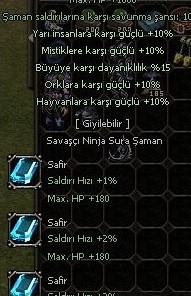
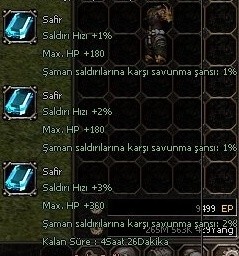
Kısaca sorunu anlatayım ; Biliyorsunuz ki metin2 de cevherler bulunuyor ve bu cevherleri iç itemlere ekleyip yeni özellikler kazanabiliyoruz. Fakat 90 level üstü Safir bilezik , turmalin bilezik gibi iç itemlere cevherlerini ekledikten sonra karaktere karşı savunmaları gözükmüyordu. Bu sorunun çözümü aşağıda;
Kanıt ;
arat;uitooltip.py
Fonksiyonu komple değiştir ;
arat ;
Fonksiyonu komple değiştir ;
Aksesuar Özelliklerinde Görünüm Eksikliği
Metin2 özel sunucularında aksesuarlar, karakterin estetik ve fonksiyonel yönlerini güçlendiren önemli ögelerdir. Ancak bazı durumlarda aksesuarların özelliklerinde görünüm eksiklikleri yaşanabilmektedir. Bu eksiklikler hem oyuncu deneyimini olumsuz yönde etkileyebilir hem de sunucunun teknik altyapısıyla doğrudan ilişkilidir. Bu yazıda, Metin2 özel sunucularda aksesuar görünümüyle ilgili karşılaşılan sorunları ve bunların çözüm önerilerini detaylıca ele alacağız.
Görünüm Eksikliğinin Nedenleri
Aksesuarlarda görünüm eksikliği genellikle sunucu tarafında tanımlanan veri yapılarında meydana gelen uyuşmazlıklardan kaynaklanmaktadır. Örneğin bir aksesuarın model dosyası doğru tanımlanmamışsa ya da sunucu tarafında veritabanında eksik bir kayıt varsa, aksesuar oyun içine düzgün yüklenemeyebilir. Özellikle Martysama veya başka bir C++ kaynak kod tabanlı sistemlerde geliştirilmiş özel sunucularda, bu tür hatalar sıklıkla görülür.
Sunucu Tarafı Kodlama Sorunları
Birçok Metin2 özel sunucu geliştiricisi, game server programming sırasında aksesuar verilerini doğrudan db core veya game core içinde tanımlar. Eğer bu tanımlamalarda bir hata varsa, aksesuarın görünümü eksik kalabilir. Bu durumda öncelikle source edit işlemleri yapılarak veritabanındaki aksesuar tablosu incelenmelidir. Ayrıca, aksesuarların client src tarafında doğru tanımlandığından emin olunmalıdır.
Olası Hatalar ve Belirtiler
Aksesuar görünüm eksikliği şu şekillerde ortaya çıkabilir:
- Aksesuar giyildiğinde görünmez.
- Aksesuar sadece bazı oyuncularda görünmez.
- Aksesuarın modeli eksik veya bozuk gözükür.
- Aksesuar giyildiğinde karakterin görünümü bozulur.
Teknik Çözüm Yaklaşımları[/BR]
Bu tür hataların çözümü için genellikle aşağıdaki adımlar izlenmelidir:
1. Game server üzerindeki aksesuar verileri kontrol edilmeli. Özellikle db tarafında item_proto tablosunda eksik veya hatalı veri olup olmadığı incelenmeli.
2. Auth server ve game server arasındaki veri aktarımı test edilmeli. Aksesuar verileri doğru şekilde aktarılmıyorsa, bu durumda görünüm eksikliği meydana gelebilir.
3. Client tarafında aksesuar model dosyalarının doğru yerleştirildiğinden emin olunmalı. Bazı özel sunucular, standart Metin2 dosya yapısından farklılık gösterebilir ve bu nedenle model yolları yanlış tanımlanmış olabilir.
PVP Sistemleriyle Bağlantı[/BR]
Metin2 PVP sistemlerinde aksesuarlar, sıklıkla savaş performansını artırmak için kullanılır. Ancak görünüm eksikliği, oyuncuların hangi aksesuarı kullandığını belirlemesini zorlaştırabilir. Bu da hem estetik hem de stratejik açıdan dezavantaj oluşturur. Bu nedenle PVP sunucularında aksesuar görünüm eksikliklerinin hızla çözülmesi önemlidir.
Sonuç
Metin2 özel sunucularda aksesuar görünüm eksikliği, hem sunucu yöneticileri hem de oyuncular için ciddi bir sorun teşkil edebilir. Bu tür sorunların çözümü için detaylı source edit, compile ve test süreçleri gerekebilir. Ancak doğru yaklaşımla bu sorunlar kolayca aşılabilir ve oyuncuların daha keyifli bir deneyim yaşaması sağlanabilir.
Visual Deficiency in Accessory Features
Accessories are important elements that enhance both the aesthetic and functional aspects of characters in Metin2 private servers. However, sometimes visual deficiencies may occur in accessory properties. These deficiencies can negatively affect player experience and are directly related to the technical infrastructure of the server. In this article, we will examine in detail the issues related to accessory visuals in Metin2 private servers and provide potential solutions.
Reasons for Visual Deficiencies
Visual deficiencies in accessories usually arise from mismatches in data structures defined on the server-side. For example, if an accessory's model file is not properly defined, or there is a missing record in the database, the accessory may fail to load correctly into the game. Such errors are frequently observed in custom servers developed using Martysama or other C++ source code bases.
Server-Side Coding Issues
Many Metin2 private server developers define accessory data directly within db core or game core during game server programming. If there are mistakes in these definitions, the accessory appearance may be incomplete. In such cases, source edit procedures should be performed to review the accessory table in the database. Additionally, ensure that accessories are properly defined on the client src side.
Possible Errors and Symptoms
Visual deficiencies in accessories can manifest in the following ways:
- The accessory does not appear when equipped.
- The accessory appears only for some players.
- The accessory model appears incomplete or corrupted.
- The character's appearance becomes distorted when the accessory is equipped.
Technical Solution Approaches
The following steps should generally be taken to resolve such issues:
1. Check accessory data on the game server. Specifically, verify whether there are missing or incorrect entries in the item_proto table on the db side.
2. Test data transfer between auth server and game server. If accessory data is not transferred correctly, visual deficiencies may occur.
3. Ensure that accessory model files are placed correctly on the client side. Some private servers may differ from the standard Metin2 file structure, causing model paths to be incorrectly defined.
Connection with PVP Systems
In Metin2 PVP systems, accessories are often used to enhance combat performance. However, visual deficiencies can make it difficult for players to identify which accessory is being used. This creates disadvantages both aesthetically and strategically. Therefore, resolving accessory visual issues quickly is crucial for PVP servers.
Conclusion
Visual deficiencies in accessories on Metin2 private servers can pose serious problems for both server administrators and players. Resolving such issues may require detailed source edit, compile, and testing processes. However, with the right approach, these issues can be easily overcome, allowing players to enjoy a better gaming experience.
Kısaca sorunu anlatayım ; Biliyorsunuz ki metin2 de cevherler bulunuyor ve bu cevherleri iç itemlere ekleyip yeni özellikler kazanabiliyoruz. Fakat 90 level üstü Safir bilezik , turmalin bilezik gibi iç itemlere cevherlerini ekledikten sonra karaktere karşı savunmaları gözükmüyordu. Bu sorunun çözümü aşağıda;
Kanıt ;
arat;uitooltip.py
Kod:
def __AppendAccessoryMetinSlotInfo(self, metinSlot, mtrlVnum)Fonksiyonu komple değiştir ;
Kod:
def __AppendAccessoryMetinSlotInfo(self, metinSlot, mtrlVnum): ACCESSORY_SOCKET_MAX_SIZE = 4 cur=min(metinSlot[0], ACCESSORY_SOCKET_MAX_SIZE) end=min(metinSlot[1], ACCESSORY_SOCKET_MAX_SIZE) affectType1, affectValue1 = item.GetAffect(0) affectList1=[0, max(1, affectValue1*10/100), max(2, affectValue1*20/100), max(3, affectValue1*40/100), max(4, affectValue1*60/100)] affectType2, affectValue2 = item.GetAffect(1) affectList2=[0, max(1, affectValue2*10/100), max(2, affectValue2*20/100), max(3, affectValue2*40/100), max(4, affectValue1*60/100)] affectType3, affectValue3 = item.GetAffect(2) affectList3=[0, max(1, affectValue3*10/100), max(2, affectValue3*20/100), max(3, affectValue3*40/100), max(4, affectValue1*60/100)] mtrlPos=0 mtrlList=[mtrlVnum]*cur+[player.METIN_SOCKET_TYPE_SILVER]*(end-cur) for mtrl in mtrlList: affectString1 = self.__GetAffectString(affectType1, affectList1[mtrlPos+1]-affectList1[mtrlPos]) affectString2 = self.__GetAffectString(affectType2, affectList2[mtrlPos+1]-affectList2[mtrlPos]) affectString3 = self.__GetAffectString(affectType3, affectList3[mtrlPos+1]-affectList3[mtrlPos]) leftTime = 0 if cur == mtrlPos+1: leftTime=metinSlot[2] self.__AppendMetinSlotInfo_AppendMetinSocketData(mtrlPos, mtrl, affectString1, affectString2 ,affectString3, leftTime) mtrlPos+=1arat ;
Kod:
def __AppendMetinSlotInfo_AppendMetinSocketDataFonksiyonu komple değiştir ;
Kod:
def __AppendMetinSlotInfo_AppendMetinSocketData(self, index, metinSlotData, custumAffectString="", custumAffectString2="", custumAffectString3="",leftTime=0): slotType = self.GetMetinSocketType(metinSlotData) itemIndex = self.GetMetinItemIndex(metinSlotData) if 0 == slotType: return self.AppendSpace(5) slotImage = ui.ImageBox() slotImage.SetParent(self) slotImage.Show() ## Name nameTextLine = ui.TextLine() nameTextLine.SetParent(self) nameTextLine.SetFontName(self.defFontName) nameTextLine.SetPackedFontColor(self.NORMAL_COLOR) nameTextLine.SetOutline() nameTextLine.SetFeather() nameTextLine.Show() self.childrenList.append(nameTextLine) if player.METIN_SOCKET_TYPE_SILVER == slotType: slotImage.LoadImage("d:/ymir work/ui/game/windows/metin_slot_silver.sub") elif player.METIN_SOCKET_TYPE_GOLD == slotType: slotImage.LoadImage("d:/ymir work/ui/game/windows/metin_slot_gold.sub") self.childrenList.append(slotImage) if localeInfo.IsARABIC(): slotImage.SetPosition(self.toolTipWidth - slotImage.GetWidth() - 9, self.toolTipHeight-1) nameTextLine.SetPosition(self.toolTipWidth - 50, self.toolTipHeight + 2) else: slotImage.SetPosition(9, self.toolTipHeight-1) nameTextLine.SetPosition(50, self.toolTipHeight + 2) metinImage = ui.ImageBox() metinImage.SetParent(self) metinImage.Show() self.childrenList.append(metinImage) if itemIndex: item.SelectItem(itemIndex) ## Image try: metinImage.LoadImage(item.GetIconImageFileName()) except: dbg.TraceError("ItemToolTip.__AppendMetinSocketData() - Failed to find image file %d:%s" % (itemIndex, item.GetIconImageFileName()) ) nameTextLine.SetText(item.GetItemName()) ## Affect affectTextLine = ui.TextLine() affectTextLine.SetParent(self) affectTextLine.SetFontName(self.defFontName) affectTextLine.SetPackedFontColor(self.POSITIVE_COLOR) affectTextLine.SetOutline() affectTextLine.SetFeather() affectTextLine.Show() if localeInfo.IsARABIC(): metinImage.SetPosition(self.toolTipWidth - metinImage.GetWidth() - 10, self.toolTipHeight) affectTextLine.SetPosition(self.toolTipWidth - 50, self.toolTipHeight + 16 + 2) else: metinImage.SetPosition(10, self.toolTipHeight) affectTextLine.SetPosition(50, self.toolTipHeight + 16 + 2) if custumAffectString: affectTextLine.SetText(custumAffectString) elif itemIndex!=constInfo.ERROR_METIN_STONE: affectType, affectValue = item.GetAffect(0) affectString = self.__GetAffectString(affectType, affectValue) if affectString: affectTextLine.SetText(affectString) else: affectTextLine.SetText(localeInfo.TOOLTIP_APPLY_NOAFFECT) self.childrenList.append(affectTextLine) if custumAffectString2: affectTextLine = ui.TextLine() affectTextLine.SetParent(self) affectTextLine.SetFontName(self.defFontName) affectTextLine.SetPackedFontColor(self.POSITIVE_COLOR) affectTextLine.SetPosition(50, self.toolTipHeight + 16 + 2 + 16 + 2) affectTextLine.SetOutline() affectTextLine.SetFeather() affectTextLine.Show() affectTextLine.SetText(custumAffectString2) self.childrenList.append(affectTextLine) self.toolTipHeight += 16 + 2 if custumAffectString3: affectTextLine = ui.TextLine() affectTextLine.SetParent(self) affectTextLine.SetFontName(self.defFontName) affectTextLine.SetPackedFontColor(self.POSITIVE_COLOR) affectTextLine.SetPosition(50, self.toolTipHeight + 16 + 2 + 16 + 2) affectTextLine.SetOutline() affectTextLine.SetFeather() affectTextLine.Show() affectTextLine.SetText(custumAffectString3) self.childrenList.append(affectTextLine) self.toolTipHeight += 16 + 2 if 0 != leftTime: timeText = (localeInfo.LEFT_TIME + " : " + localeInfo.SecondToDHM(leftTime)) timeTextLine = ui.TextLine() timeTextLine.SetParent(self) timeTextLine.SetFontName(self.defFontName) timeTextLine.SetPackedFontColor(self.POSITIVE_COLOR) timeTextLine.SetPosition(50, self.toolTipHeight + 16 + 2 + 16 + 2) timeTextLine.SetOutline() timeTextLine.SetFeather() timeTextLine.Show() timeTextLine.SetText(timeText) self.childrenList.append(timeTextLine) self.toolTipHeight += 16 + 2 else: nameTextLine.SetText(localeInfo.TOOLTIP_SOCKET_EMPTY) self.toolTipHeight += 45 self.ResizeToolTip() def __AppendFishInfo(self, size): if size > 0: self.AppendSpace(5) self.AppendTextLine(localeInfo.TOOLTIP_FISH_LEN % (float(size) / 100.0), self.NORMAL_COLOR)Aksesuar Özelliklerinde Görünüm Eksikliği
Metin2 özel sunucularında aksesuarlar, karakterin estetik ve fonksiyonel yönlerini güçlendiren önemli ögelerdir. Ancak bazı durumlarda aksesuarların özelliklerinde görünüm eksiklikleri yaşanabilmektedir. Bu eksiklikler hem oyuncu deneyimini olumsuz yönde etkileyebilir hem de sunucunun teknik altyapısıyla doğrudan ilişkilidir. Bu yazıda, Metin2 özel sunucularda aksesuar görünümüyle ilgili karşılaşılan sorunları ve bunların çözüm önerilerini detaylıca ele alacağız.
Görünüm Eksikliğinin Nedenleri
Aksesuarlarda görünüm eksikliği genellikle sunucu tarafında tanımlanan veri yapılarında meydana gelen uyuşmazlıklardan kaynaklanmaktadır. Örneğin bir aksesuarın model dosyası doğru tanımlanmamışsa ya da sunucu tarafında veritabanında eksik bir kayıt varsa, aksesuar oyun içine düzgün yüklenemeyebilir. Özellikle Martysama veya başka bir C++ kaynak kod tabanlı sistemlerde geliştirilmiş özel sunucularda, bu tür hatalar sıklıkla görülür.
Sunucu Tarafı Kodlama Sorunları
Birçok Metin2 özel sunucu geliştiricisi, game server programming sırasında aksesuar verilerini doğrudan db core veya game core içinde tanımlar. Eğer bu tanımlamalarda bir hata varsa, aksesuarın görünümü eksik kalabilir. Bu durumda öncelikle source edit işlemleri yapılarak veritabanındaki aksesuar tablosu incelenmelidir. Ayrıca, aksesuarların client src tarafında doğru tanımlandığından emin olunmalıdır.
Olası Hatalar ve Belirtiler
Aksesuar görünüm eksikliği şu şekillerde ortaya çıkabilir:
- Aksesuar giyildiğinde görünmez.
- Aksesuar sadece bazı oyuncularda görünmez.
- Aksesuarın modeli eksik veya bozuk gözükür.
- Aksesuar giyildiğinde karakterin görünümü bozulur.
Teknik Çözüm Yaklaşımları[/BR]
Bu tür hataların çözümü için genellikle aşağıdaki adımlar izlenmelidir:
1. Game server üzerindeki aksesuar verileri kontrol edilmeli. Özellikle db tarafında item_proto tablosunda eksik veya hatalı veri olup olmadığı incelenmeli.
2. Auth server ve game server arasındaki veri aktarımı test edilmeli. Aksesuar verileri doğru şekilde aktarılmıyorsa, bu durumda görünüm eksikliği meydana gelebilir.
3. Client tarafında aksesuar model dosyalarının doğru yerleştirildiğinden emin olunmalı. Bazı özel sunucular, standart Metin2 dosya yapısından farklılık gösterebilir ve bu nedenle model yolları yanlış tanımlanmış olabilir.
PVP Sistemleriyle Bağlantı[/BR]
Metin2 PVP sistemlerinde aksesuarlar, sıklıkla savaş performansını artırmak için kullanılır. Ancak görünüm eksikliği, oyuncuların hangi aksesuarı kullandığını belirlemesini zorlaştırabilir. Bu da hem estetik hem de stratejik açıdan dezavantaj oluşturur. Bu nedenle PVP sunucularında aksesuar görünüm eksikliklerinin hızla çözülmesi önemlidir.
Sonuç
Metin2 özel sunucularda aksesuar görünüm eksikliği, hem sunucu yöneticileri hem de oyuncular için ciddi bir sorun teşkil edebilir. Bu tür sorunların çözümü için detaylı source edit, compile ve test süreçleri gerekebilir. Ancak doğru yaklaşımla bu sorunlar kolayca aşılabilir ve oyuncuların daha keyifli bir deneyim yaşaması sağlanabilir.
Visual Deficiency in Accessory Features
Accessories are important elements that enhance both the aesthetic and functional aspects of characters in Metin2 private servers. However, sometimes visual deficiencies may occur in accessory properties. These deficiencies can negatively affect player experience and are directly related to the technical infrastructure of the server. In this article, we will examine in detail the issues related to accessory visuals in Metin2 private servers and provide potential solutions.
Reasons for Visual Deficiencies
Visual deficiencies in accessories usually arise from mismatches in data structures defined on the server-side. For example, if an accessory's model file is not properly defined, or there is a missing record in the database, the accessory may fail to load correctly into the game. Such errors are frequently observed in custom servers developed using Martysama or other C++ source code bases.
Server-Side Coding Issues
Many Metin2 private server developers define accessory data directly within db core or game core during game server programming. If there are mistakes in these definitions, the accessory appearance may be incomplete. In such cases, source edit procedures should be performed to review the accessory table in the database. Additionally, ensure that accessories are properly defined on the client src side.
Possible Errors and Symptoms
Visual deficiencies in accessories can manifest in the following ways:
- The accessory does not appear when equipped.
- The accessory appears only for some players.
- The accessory model appears incomplete or corrupted.
- The character's appearance becomes distorted when the accessory is equipped.
Technical Solution Approaches
The following steps should generally be taken to resolve such issues:
1. Check accessory data on the game server. Specifically, verify whether there are missing or incorrect entries in the item_proto table on the db side.
2. Test data transfer between auth server and game server. If accessory data is not transferred correctly, visual deficiencies may occur.
3. Ensure that accessory model files are placed correctly on the client side. Some private servers may differ from the standard Metin2 file structure, causing model paths to be incorrectly defined.
Connection with PVP Systems
In Metin2 PVP systems, accessories are often used to enhance combat performance. However, visual deficiencies can make it difficult for players to identify which accessory is being used. This creates disadvantages both aesthetically and strategically. Therefore, resolving accessory visual issues quickly is crucial for PVP servers.
Conclusion
Visual deficiencies in accessories on Metin2 private servers can pose serious problems for both server administrators and players. Resolving such issues may require detailed source edit, compile, and testing processes. However, with the right approach, these issues can be easily overcome, allowing players to enjoy a better gaming experience.
