

Selamın Aleyküm ;
Direk Konuya geçiyorum,,
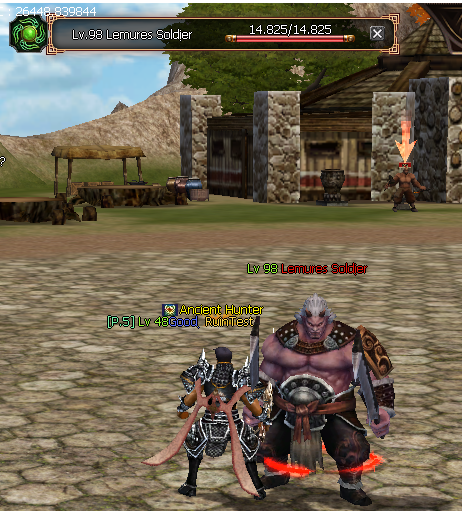
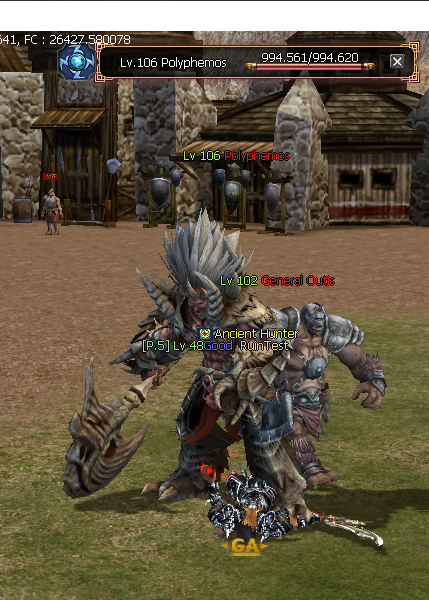
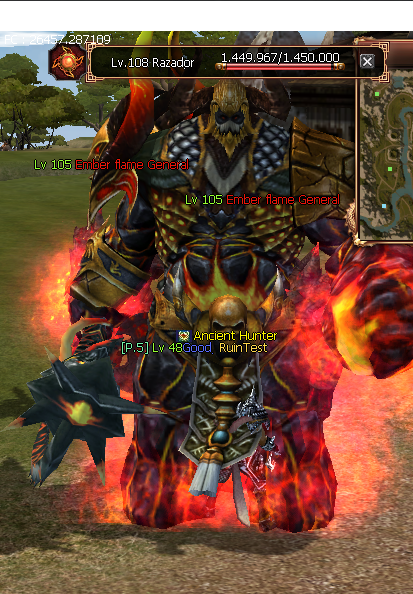
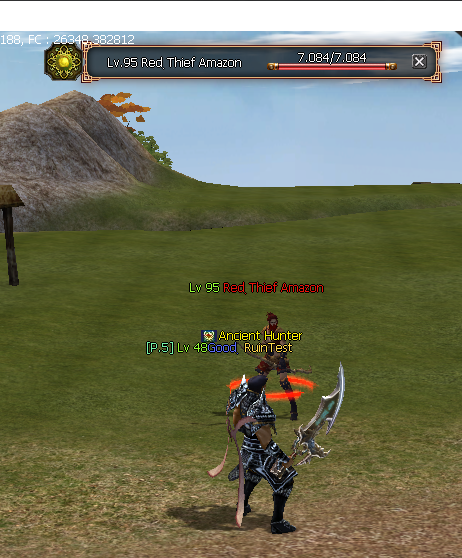
Mobların Özelliklerine göre canlarının yanına Ateş Simgesi Buz Simgesi Karanlık Simgesi Toprak Simgesi vs.
Simgeler gelmektedir..
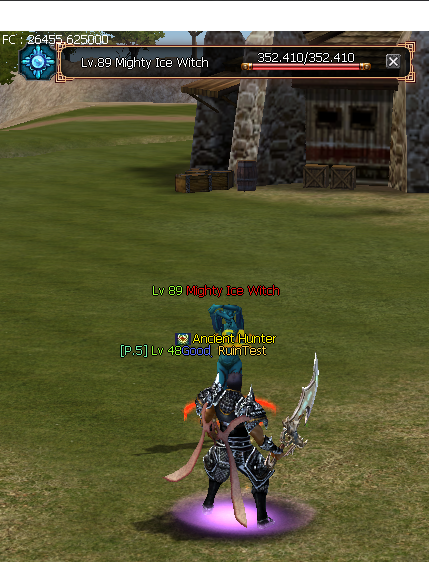
Metin2'de Moblara Element Simgesi Ekleme Rehberi
Giriş
Metin2 özel sunucularında oyun deneyimini artırmak istiyorsanız, moblara element simgesi eklemek oldukça etkili bir özelliktir. Bu işlem, oyun içi görsel açıdan zenginlik katarken, aynı zamanda oyuncuların mobların özelliklerini daha hızlı tanımasını sağlar. Bu rehberde, C++ ve Python kullanarak Metin2 özel sunucunuzda moblara element simgesi nasıl eklenir detaylıca anlatılacaktır.
Element Simgesi Nedir?
Metin2 oyununda bazı moblar belirli elementlere sahiptir. Örneğin ateşe karşı dayanıklı, suya karşı zayıf gibi. Bu element durumları, oyuncular tarafından görsel olarak anlaşılabilmeli ki stratejik savaşlar yapılabilsin. Element simgesi, mobun sol üst köşesinde veya isminin yanında görünen küçük bir ikondur. Bu simge, hangi elemente karşı güçlü ya da zayıf olduğunu gösterir.
Hazırlık Aşaması
Bu işlemi yapabilmek için öncelikle game core üzerinde değişiklik yapabilmek adına C++ bilginiz olması gerekir. Aynı zamanda uiscript dosyaları üzerinden Python tarafında GUI düzenlemeleri yapabilmeniz için py root bilginiz de olmalıdır. Gerekli kaynak kodlara erişiminiz varsa devam edebilirsiniz.
C++ Tarafında Yapılacaklar
Öncelikle game server dosyalarında bulunan char.cpp veya benzeri dosyada, mob nesnesi oluşturulurken element verisi atanmalıdır. Bu veri, mobun element tipine göre belirlenir. Örnek olarak:
Mob::SetElement(ElementType::FIRE);
Bu işlem, mobun element türünü belirler. Ardından, client tarafında bu bilgiyi alabilmek için pack içinde ilgili mesaj tanımlanmalıdır. Bu sayede client, mobun elementini alır ve ekrana simge olarak basabilir.
Python Tarafında Yapılacaklar
Py Root dosyasında, mobun isminin üzerine simgeyi yerleştirecek bir UI script yazılır. Bu script, UIScript içinde tanımlanan pencere yapısına göre çalışır. Örneğin bir python gui penceresi içinde mob ismi yazılırken, aynı zamanda element simgesi de eklenebilir.
Örnek Python Kodu:
element_icon = ui.ImageBox()
element_icon.LoadImage('locale/tr/effect/element/fire.tga')
element_icon.SetParent(mob_name_label)
element_icon.SetPosition(0, -20)
element_icon.Show()
Yukarıdaki kod parçası, mobun isminin üzerine bir ateş simgesi yerleştirir. Benzer şekilde diğer elementler için de farklı simgeler tanımlanabilir.
Simgelerin Hazırlanması
Element simgeleri genellikle küçük boyutlu PNG veya TGA formatında olur. Bu simgeler locale/tr/effect/element/ klasörü altında tutulur. Her element türü için ayrı bir simge hazırlanmalıdır. Örneğin ateş için 'fire.tga', buz için 'ice.tga' gibi.
Test ve Uygulama
Değişiklikler yapıldıktan sonra hem auth hem de game sunucuları yeniden başlatılmalıdır. Client tarafında da compile işlemi yapılarak değişiklikler aktif edilmelidir. Test sırasında farklı elementlere sahip moblar spawn edilerek simgelerin doğru şekilde görünüp görünmediği kontrol edilmelidir.
Sonuç
Moblara element simgesi eklemek, Metin2 özel sunucularında oyun deneyimini ciddi anlamda artırır. Hem C++ hem de Python tarafında yapılması gereken adımlar vardır. Bu rehber sayesinde, Martysama tarzı gelişmiş sistemlerin bile temelini oluşturan bu özelliği kendi sunucunuza entegre edebilirsiniz. Dilerseniz bu sistem üzerine PVP sistem entegrasyonu da yapılabilir.
Kaynak: Metin2 Lobby
Adding Element Icons to Mobs in Metin2
Introduction
To enhance the gameplay experience on your Metin2 private server, adding element icons to mobs can be highly effective. This feature enriches the visual aspect of the game and helps players identify mob attributes faster. In this guide, we will explain in detail how to add element icons to mobs using C++ and Python in Metin2 private servers.
What Is an Element Icon?
In the Metin2 game, some mobs possess specific elements. For example, they might be fire-resistant or weak against water. These elemental properties should be visually recognizable by players for strategic combat. An element icon is a small image that appears near the top-left corner or beside the name of the mob, indicating its elemental strengths or weaknesses.
Preparation Phase
To perform this task, you need knowledge of C++ to make modifications to the game core. Additionally, familiarity with py root and uiscript files is required to handle GUI adjustments on the Python side. Ensure you have access to the necessary source codes before proceeding.
What Needs to Be Done in C++
Firstly, in files like char.cpp within the game server files, the element data must be assigned when creating a mob object. This data determines the mob's elemental type. For example:
Mob::SetElement(ElementType::FIRE);
This action sets the elemental type of the mob. Then, to allow the client to retrieve this information, the relevant message must be defined within the pack. This way, the client receives the mob's element and can display it as an icon.
What Needs to Be Done in Python
Within the Py Root file, a UI script is written to place the icon above the mob's name. This script works according to the window structure defined in UIScript. For instance, inside a python gui window, while displaying the mob's name, an element icon can also be added.
Example Python Code:
element_icon = ui.ImageBox()
element_icon.LoadImage('locale/tr/effect/element/fire.tga')
element_icon.SetParent(mob_name_label)
element_icon.SetPosition(0, -20)
element_icon.Show()
The code snippet above places a fire icon above the mob's name. Similarly, different icons can be defined for other elements.
Preparing the Icons
Element icons are usually small-sized images in PNG or TGA format. These icons are stored under the locale/tr/effect/element/ folder. Separate icons must be prepared for each element type. For example, 'fire.tga' for fire and 'ice.tga' for ice.
Testing and Implementation
After making the changes, both the auth and game servers must be restarted. On the client side, a compile operation must be performed to activate the changes. During testing, mobs with different elements should be spawned to verify if the icons appear correctly.
Conclusion
Adding element icons to mobs significantly enhances the gameplay experience in Metin2 private servers. There are steps to be done on both C++ and Python sides. With this guide, you can integrate this feature into your own server, which forms the basis even for advanced systems like Martysama. If desired, integration with PVP systems can also be implemented on top of this system.
Source: Metin2 Lobby
Direk Konuya geçiyorum,,
Mobların Özelliklerine göre canlarının yanına Ateş Simgesi Buz Simgesi Karanlık Simgesi Toprak Simgesi vs.
Simgeler gelmektedir..
Ziyaretçiler için gizlenmiş link,görmek için üye olmalısınız!
Giriş yap veya üye ol.
Ziyaretçiler için gizlenmiş link,görmek için üye olmalısınız!
Giriş yap veya üye ol.
Metin2'de Moblara Element Simgesi Ekleme Rehberi
Giriş
Metin2 özel sunucularında oyun deneyimini artırmak istiyorsanız, moblara element simgesi eklemek oldukça etkili bir özelliktir. Bu işlem, oyun içi görsel açıdan zenginlik katarken, aynı zamanda oyuncuların mobların özelliklerini daha hızlı tanımasını sağlar. Bu rehberde, C++ ve Python kullanarak Metin2 özel sunucunuzda moblara element simgesi nasıl eklenir detaylıca anlatılacaktır.
Element Simgesi Nedir?
Metin2 oyununda bazı moblar belirli elementlere sahiptir. Örneğin ateşe karşı dayanıklı, suya karşı zayıf gibi. Bu element durumları, oyuncular tarafından görsel olarak anlaşılabilmeli ki stratejik savaşlar yapılabilsin. Element simgesi, mobun sol üst köşesinde veya isminin yanında görünen küçük bir ikondur. Bu simge, hangi elemente karşı güçlü ya da zayıf olduğunu gösterir.
Hazırlık Aşaması
Bu işlemi yapabilmek için öncelikle game core üzerinde değişiklik yapabilmek adına C++ bilginiz olması gerekir. Aynı zamanda uiscript dosyaları üzerinden Python tarafında GUI düzenlemeleri yapabilmeniz için py root bilginiz de olmalıdır. Gerekli kaynak kodlara erişiminiz varsa devam edebilirsiniz.
C++ Tarafında Yapılacaklar
Öncelikle game server dosyalarında bulunan char.cpp veya benzeri dosyada, mob nesnesi oluşturulurken element verisi atanmalıdır. Bu veri, mobun element tipine göre belirlenir. Örnek olarak:
Mob::SetElement(ElementType::FIRE);
Bu işlem, mobun element türünü belirler. Ardından, client tarafında bu bilgiyi alabilmek için pack içinde ilgili mesaj tanımlanmalıdır. Bu sayede client, mobun elementini alır ve ekrana simge olarak basabilir.
Python Tarafında Yapılacaklar
Py Root dosyasında, mobun isminin üzerine simgeyi yerleştirecek bir UI script yazılır. Bu script, UIScript içinde tanımlanan pencere yapısına göre çalışır. Örneğin bir python gui penceresi içinde mob ismi yazılırken, aynı zamanda element simgesi de eklenebilir.
Örnek Python Kodu:
element_icon = ui.ImageBox()
element_icon.LoadImage('locale/tr/effect/element/fire.tga')
element_icon.SetParent(mob_name_label)
element_icon.SetPosition(0, -20)
element_icon.Show()
Yukarıdaki kod parçası, mobun isminin üzerine bir ateş simgesi yerleştirir. Benzer şekilde diğer elementler için de farklı simgeler tanımlanabilir.
Simgelerin Hazırlanması
Element simgeleri genellikle küçük boyutlu PNG veya TGA formatında olur. Bu simgeler locale/tr/effect/element/ klasörü altında tutulur. Her element türü için ayrı bir simge hazırlanmalıdır. Örneğin ateş için 'fire.tga', buz için 'ice.tga' gibi.
Test ve Uygulama
Değişiklikler yapıldıktan sonra hem auth hem de game sunucuları yeniden başlatılmalıdır. Client tarafında da compile işlemi yapılarak değişiklikler aktif edilmelidir. Test sırasında farklı elementlere sahip moblar spawn edilerek simgelerin doğru şekilde görünüp görünmediği kontrol edilmelidir.
Sonuç
Moblara element simgesi eklemek, Metin2 özel sunucularında oyun deneyimini ciddi anlamda artırır. Hem C++ hem de Python tarafında yapılması gereken adımlar vardır. Bu rehber sayesinde, Martysama tarzı gelişmiş sistemlerin bile temelini oluşturan bu özelliği kendi sunucunuza entegre edebilirsiniz. Dilerseniz bu sistem üzerine PVP sistem entegrasyonu da yapılabilir.
Kaynak: Metin2 Lobby
Adding Element Icons to Mobs in Metin2
Introduction
To enhance the gameplay experience on your Metin2 private server, adding element icons to mobs can be highly effective. This feature enriches the visual aspect of the game and helps players identify mob attributes faster. In this guide, we will explain in detail how to add element icons to mobs using C++ and Python in Metin2 private servers.
What Is an Element Icon?
In the Metin2 game, some mobs possess specific elements. For example, they might be fire-resistant or weak against water. These elemental properties should be visually recognizable by players for strategic combat. An element icon is a small image that appears near the top-left corner or beside the name of the mob, indicating its elemental strengths or weaknesses.
Preparation Phase
To perform this task, you need knowledge of C++ to make modifications to the game core. Additionally, familiarity with py root and uiscript files is required to handle GUI adjustments on the Python side. Ensure you have access to the necessary source codes before proceeding.
What Needs to Be Done in C++
Firstly, in files like char.cpp within the game server files, the element data must be assigned when creating a mob object. This data determines the mob's elemental type. For example:
Mob::SetElement(ElementType::FIRE);
This action sets the elemental type of the mob. Then, to allow the client to retrieve this information, the relevant message must be defined within the pack. This way, the client receives the mob's element and can display it as an icon.
What Needs to Be Done in Python
Within the Py Root file, a UI script is written to place the icon above the mob's name. This script works according to the window structure defined in UIScript. For instance, inside a python gui window, while displaying the mob's name, an element icon can also be added.
Example Python Code:
element_icon = ui.ImageBox()
element_icon.LoadImage('locale/tr/effect/element/fire.tga')
element_icon.SetParent(mob_name_label)
element_icon.SetPosition(0, -20)
element_icon.Show()
The code snippet above places a fire icon above the mob's name. Similarly, different icons can be defined for other elements.
Preparing the Icons
Element icons are usually small-sized images in PNG or TGA format. These icons are stored under the locale/tr/effect/element/ folder. Separate icons must be prepared for each element type. For example, 'fire.tga' for fire and 'ice.tga' for ice.
Testing and Implementation
After making the changes, both the auth and game servers must be restarted. On the client side, a compile operation must be performed to activate the changes. During testing, mobs with different elements should be spawned to verify if the icons appear correctly.
Conclusion
Adding element icons to mobs significantly enhances the gameplay experience in Metin2 private servers. There are steps to be done on both C++ and Python sides. With this guide, you can integrate this feature into your own server, which forms the basis even for advanced systems like Martysama. If desired, integration with PVP systems can also be implemented on top of this system.
Source: Metin2 Lobby
