

Not: Martysama Source Kullananlar Yapmasina Gerek yoktur fixlidir saten
Game Source / Common / Service.h
Eklenir Müsait biyere
Game Source / Common / Service.h
Eklenir Müsait biyere
Kod:
#define ENABLE_GOHOME_IFNOMAP // Harita bulunmazsa köye ışınlarGame Source / char.cpp
Aratılır
Kod:
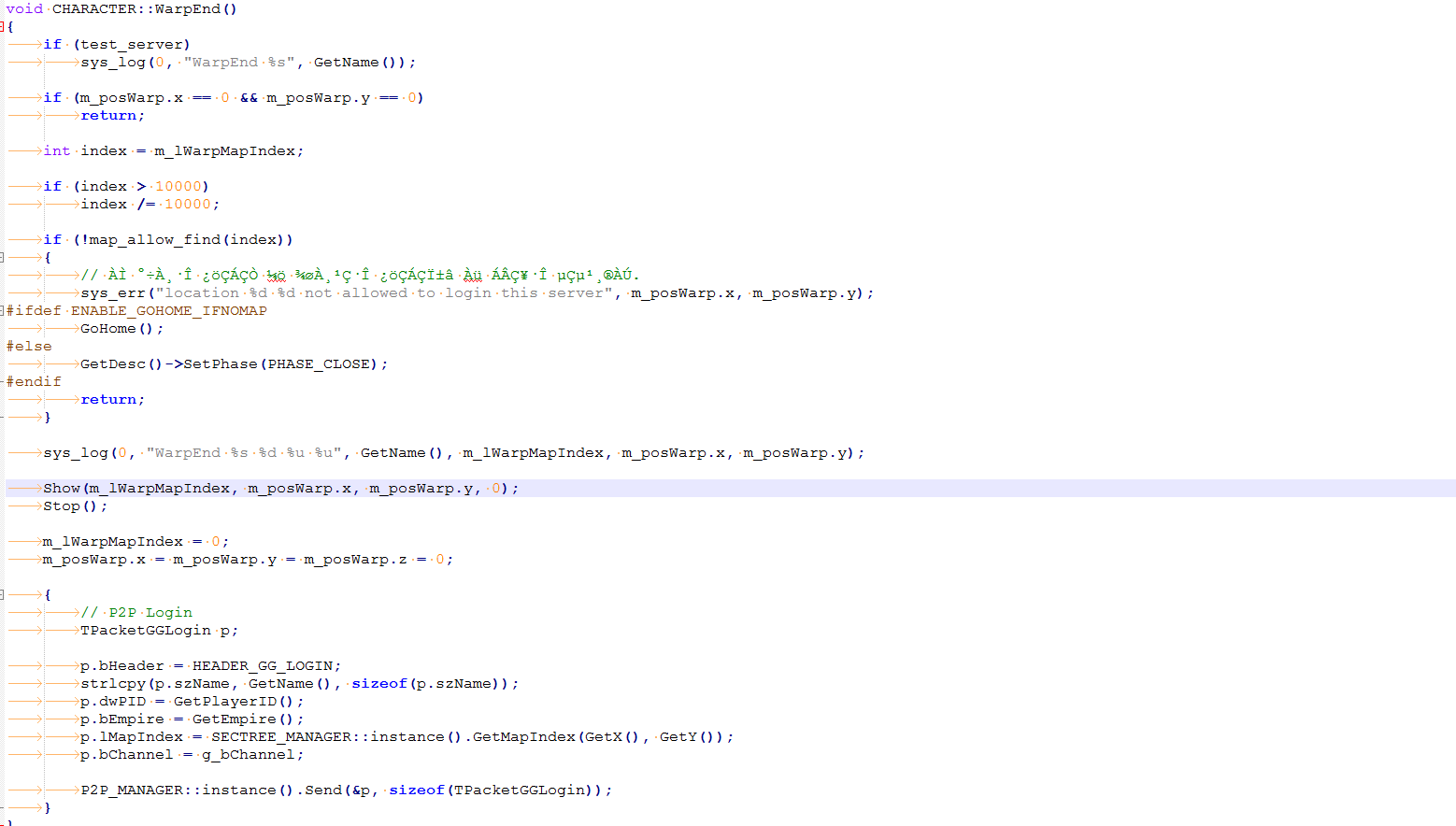
void CHARACTER::WarpEnd()Degiştir Blogu Komple
Kod:
void CHARACTER::WarpEnd() { if (test_server) sys_log(0, "WarpEnd %s", GetName()); if (m_posWarp.x == 0 && m_posWarp.y == 0) return; int index = m_lWarpMapIndex; if (index > 10000) index /= 10000; if (!map_allow_find(index)) { // ÀÌ °÷À¸·Î ¿öÇÁÇÒ ¼ö ¾øÀ¸¹Ç·Î ¿öÇÁÇϱâ Àü ÁÂÇ¥·Î µÇµ¹¸®ÀÚ. sys_err("location %d %d not allowed to login this server", m_posWarp.x, m_posWarp.y); #ifdef ENABLE_GOHOME_IFNOMAP GoHome(); #else GetDesc()->SetPhase(PHASE_CLOSE); #endif return; } sys_log(0, "WarpEnd %s %d %u %u", GetName(), m_lWarpMapIndex, m_posWarp.x, m_posWarp.y); Show(m_lWarpMapIndex, m_posWarp.x, m_posWarp.y, 0); Stop(); m_lWarpMapIndex = 0; m_posWarp.x = m_posWarp.y = m_posWarp.z = 0; { // P2P Login TPacketGGLogin p; p.bHeader = HEADER_GG_LOGIN; strlcpy(p.szName, GetName(), sizeof(p.szName)); p.dwPID = GetPlayerID(); p.bEmpire = GetEmpire(); p.lMapIndex = SECTREE_MANAGER::instance().GetMapIndex(GetX(), GetY()); p.bChannel = g_bChannel; P2P_MANAGER::instance().Send(&p, sizeof(TPacketGGLogin)); } }DrAlchemy - Harita Mevcut Değilse Bugda Kalma (Fix)
Metin2 özel sunucuları geliştirirken karşılaşılan yaygın sorunlardan birisi DrAlchemy sisteminin harita bulunamadığında oluştuğu bugdur. Bu durumda oyun donabilir veya oyuncu beklenmedik şekilde oyundan atılabilir. Bu yazıda DrAlchemy sisteminin 'Harita Mevcut Değilse Bugda Kalma' sorununu nasıl çözeceğinizi detaylı olarak anlatacağız.
DrAlchemy Nedir?
DrAlchemy, Metin2 özel sunucularında geliştirilen gelişmiş bir sistemdir. Oyunculara çeşitli haritalarda özel efektler, görsel değişiklikler ve dinamik içerik sunmayı amaçlar. Ancak bazı durumlarda sistemde eksiklikler veya hatalar oluşabiliyor. Bunlardan birisi de harita mevcut değilse sistemde kritik bir hata meydana gelmesidir.
Sorunun Kaynağı Nedir?
Bu hata genellikle oyun sırasında belirli bir haritaya erişim sağlanamadığında meydana gelir. Sistem, haritanın varlığını kontrol etmeksizin devam eder ve bu da hata mesajı ile birlikte oyunun donmasına neden olur. Bu durum özellikle PvP sunucularda ciddi bir deneyim bozukluğuna yol açabilir.
Fix Uygulaması
DrAlchemy sisteminde harita yoksa donma sorununu çözmek için öncelikle mevcut kaynak kodda harita kontrolü yapan fonksiyonu güncellememiz gerekir. Aşağıdaki adımları takip ederek hatayı minimuma indirebilirsiniz:
- DrAlchemy.py dosyasında bulunan LoadMap fonksiyonu kontrol edilmeli.
- Harita yükleme işlemi öncesinde os.path.exists() gibi bir fonksiyonla dosyanın gerçekten var olup olmadığı kontrol edilmeli.
- Eğer harita yoksa sistem hata vermeden diğer adıma geçmeli.
Örnek Kod Parçası
Kod:
[B]if os.path.exists(map_path):[/B][BR][/BR][B] LoadMap(map_path)[/B][BR][/BR][B]else:[/B][BR][/BR][B] print('Harita bulunamadi: ', map_path)[/B][BR][/BR][B] return False[/B]C++ Tarafında Entegrasyon
Python tarafında yapılan değişikliklerin C++ tarafıyla uyumlu olması gerekir. Özellikle DrAlchemy sistemini oyun çekirdeğiyle entegre eden geliştiriciler, C++ tarafında da benzer kontrollerin yapıldığından emin olmalıdır. Bu, hem stabilite hem de performans açısından kritiktir.
Test ve Onaylama
Yapılan değişikliklerden sonra sistemi test etmek oldukça önemlidir. Sunucuyu başlatıp farklı haritalarda gezinerek DrAlchemy sistemini test edin. Herhangi bir donma veya hata alınmıyorsa fix başarıyla uygulanmış demektir. Ayrıca log dosyalarında hata mesajı olup olmadığını kontrol edin.
Ekstra Güvenlik Önlemleri
Sunucu güvenliği ve stabilitesi için DrAlchemy sistemine ek olarak diğer modüllerin de benzer kontrollerle desteklenmesi önerilir. Özellikle harita, efekt veya ses dosyaları gibi dinamik içeriklerin kontrol edilmesi, sistemsel hataların önüne geçebilir.
Sonuç
DrAlchemy sisteminde harita bulunamadığında donma sorunu, doğru kodlamayla kolayca çözülebilir. Bu tip küçük ama etkili değişiklikler, kullanıcı deneyimini ciddi anlamda artırır. Metin2 özel sunucularında stabilite ve performans her zaman öncelikli hedeftir. Bu fix sayesinde DrAlchemy sisteminin daha güvenli ve sorunsuz çalışmasını sağlayabilirsiniz.
DrAlchemy - Fix for Stuck on Bug When Map Not Available
One of the common issues encountered while developing Metin2 private servers is the bug caused by the DrAlchemy system when a map is not available. In this case, the game may freeze or the player might be unexpectedly kicked from the game. In this article, we will explain in detail how to fix the 'Stuck on Bug When Map Not Available' issue in the DrAlchemy system.
What is DrAlchemy?
DrAlchemy is an advanced system developed for Metin2 private servers. It aims to provide players with special effects, visual changes, and dynamic content across various maps. However, sometimes there can be flaws or errors within the system. One of these issues occurs when a critical error happens if the map is not found.
What Causes the Problem?
This error typically occurs when access to a specific map fails during gameplay. The system continues without checking whether the map exists, which causes an error message and freezes the game. This situation can seriously disrupt the gaming experience, especially on PvP servers.
Applying the Fix
To resolve the issue where DrAlchemy freezes when a map is not available, we first need to update the function that checks for map availability in the source code. By following the steps below, you can minimize this error:
- Check the LoadMap function in the DrAlchemy.py file.
- Before loading the map, verify its existence using a function like os.path.exists().
- If the map doesn't exist, the system should proceed to the next step without throwing an error.
Sample Code Snippet
Kod:
[B]if os.path.exists(map_path):[/B][BR][/BR][B] LoadMap(map_path)[/B][BR][/BR][B]else:[/B][BR][/BR][B] print('Map not found: ', map_path)[/B][BR][/BR][B] return False[/B]Integration with C++ Side
The changes made on the Python side must be compatible with the C++ side. Developers who integrate the DrAlchemy system into the game core should ensure similar checks are performed on the C++ side as well. This is crucial for both stability and performance.
Testing and Verification
It's important to test the system after making changes. Start the server and navigate through different maps to test the DrAlchemy system. If no freezing or errors occur, the fix has been successfully applied. Also, check the log files for any error messages.
Additional Security Measures
For server security and stability, it's recommended to support other modules with similar checks alongside the DrAlchemy system. Especially verifying dynamic content such as maps, effects, or sound files can prevent systemic errors.
Conclusion
The bug caused by DrAlchemy when a map is unavailable can be easily fixed with correct coding. Such small but effective changes significantly improve user experience. Stability and performance are always top priorities in Metin2 private servers. With this fix, you can ensure the DrAlchemy system runs more securely and smoothly.
