

Selam,
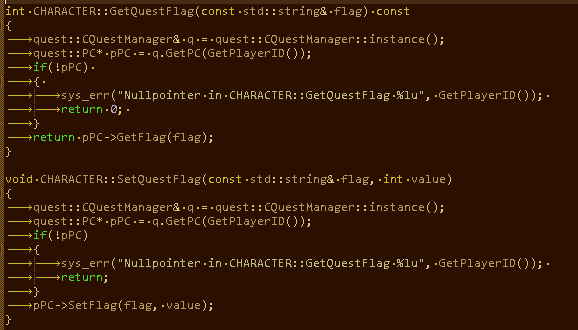
Metin2 Sunucu Geliştirme Sürecinde Karşılaşılan [FIX] quest:
 C::GetFlag Hatası ve Çözüm Yöntemleri
Metin2 özel sunucularında geliştirme yaparken birçok geliştirici, oyun içi görev sistemlerinde (quest system) belirli hata durumlarıyla karşılaşabilmektedir. Bu hatalardan biri olan [FIX] quest:
C::GetFlag hatası, oyuncu flag değerlerinin okunamaması veya hatalı bir şekilde işlenmesi durumunda ortaya çıkar. Bu yazıda, bu hatanın neden oluştuğunu, hangi senaryolarda görüldüğünü ve nasıl düzeltileceğini detaylıca inceleyeceğiz.Hatanın Tanımı ve Etkileri
quest:
C::GetFlag fonksiyonu, oyuncunun belirli bir flag değerini kontrol etmek için kullanılır. Bu flag'lar genellikle oyuncunun oynadığı görevlerin durumlarını takip etmek, olayları tetiklemek veya belirli özelliklerin aktif olup olmadığını anlamak için kullanılır. Ancak, bu fonksiyon doğru şekilde tanımlanmazsa ya da sistemde eksiklik varsa, sunucu tarafında crash (oyunun çökmesi) gibi ciddi sorunlar meydana gelebilir.Hatanın en belirgin etkisi, oyuncunun oyun içi görevleri başlatamaması veya devam ettirememesidir. Ayrıca, sunucu loglarında hata mesajları gözlemlenebilir. Bu tür hatalar, özellikle PvP sunucularında oyun akışını ciddi şekilde etkileyebilir.
Olası Nedenler
Bu hatanın temel nedenleri arasında şunlar yer alabilir:
- GetFlag fonksiyonuna geçirilen flag ID değeri geçersizse veya tanımlı değilse,
- Flag veritabanında eksik veya yanlış tanımlanmışsa,
- Quest script dosyasında flag kullanımı hatalıysa,
- Client ile Auth/Game sunucusu arasında veri senkronizasyonu eksikse.
Fix: quest:
C::GetFlag Hatasının GiderilmesiBu hatayı düzeltmek için aşağıdaki adımları takip edebilirsiniz:
1. Quest Script Dosyasını Kontrol Edin:.quest dosyasında GetFlag kullanımı doğrulanmalı. Flag ID'lerin doğru olduğundan emin olun. Örneğin:
Kod:
[B]local flag_value = pc.get_flag('flag_name')[/B]2. Veritabanında Flag Tanımlarını Kontrol Edin: Game DB'de flag tablosunda ilgili flag'in tanımlı olduğundan emin olun. Eğer eksikse, manuel olarak ekleyin veya script üzerinden tanımlayın.
3. Sunucu Loglarını İnceleyin: Sunucu log dosyalarında hata mesajlarını analiz ederek, tam olarak hangi flag değerinde sorun yaşandığını belirleyin.
4. Core Kodlarında Flag Sistemini Kontrol Edin: C++ sunucu kaynak kodlarında flag sistemi doğru şekilde implement edilmiş mi? pc_manager.cpp veya client_manager.cpp gibi dosyalarda ilgili fonksiyonlar kontrol edilmelidir.
Metin2 Sunucu Geliştirme Uzmanlığı
Metin2 özel sunucularında görev sistemleri, oyun deneyimini zenginleştirmenin önemli yollarındandır. Ancak, bu sistemlerin doğru çalışması için hem istemci hem de sunucu tarafında titizlikle yapılandırılmış kodlar gereklidir..quest dosyalarında yapılan küçük hatalar, sunucu çökmelerine neden olabilir. Bu nedenle, her değişiklikten sonra test aşamaları önemlidir.
Metin2 geliştiricileri, bu tür hatalarla karşılaştıklarında öncelikle logları incelemeli ve sistematik bir şekilde debug yapmalıdır..quest:
C::GetFlag hatası gibi durumlarda, hata mesajı baz alınarak, nerede neyin yanlış gittiği kolayca tespit edilebilir. Bu sayede hem sunucu stabilitesi artırılır hem de kullanıcı deneyimi optimize edilir.[FIX] quest:
C::GetFlag Error and Solution Methods During Metin2 Server DevelopmentWhile developing on Metin2 private servers, many developers may encounter certain error cases within the in-game quest systems. One of these errors, the [FIX] quest:
C::GetFlag error, occurs when player flag values cannot be read properly or are processed incorrectly. In this article, we will examine in detail why this error occurs, in which scenarios it appears, and how it can be fixed.Error Definition and Effects
The quest:
C::GetFlag function is used to check a specific flag value of the player. These flags are generally used to track the status of quests the player has played, trigger events, or determine if certain features are active. However, if this function is not defined correctly or there are deficiencies in the system, serious issues such as crashes (game termination) can occur on the server side.The most obvious effect of the error is that the player cannot start or continue their in-game quests. Additionally, error messages can be observed in the server logs. Such errors can seriously affect the flow of the game, especially on PvP servers.
Possible Causes
The main causes of this error include:
- If the flag ID passed to the GetFlag function is invalid or undefined,
- If the flag is missing or incorrectly defined in the database,
- If the usage of flags in the quest script file is incorrect,
- If data synchronization between the Client and Auth/Game server is incomplete.
Fix: Resolving the quest:
C::GetFlag ErrorTo fix this error, you can follow these steps:
1. Check the Quest Script File: Verify the usage of GetFlag in the .quest file. Ensure that the flag IDs are correct. For example:
Kod:
[B]local flag_value = pc.get_flag('flag_name')[/B]2. Check Flag Definitions in the Database: Ensure the relevant flag is defined in the flag table of the Game DB. If missing, add it manually or define it via script.
3. Review Server Logs: Analyze error messages in the server log files to identify exactly where the issue occurs with which flag value.
4. Check the Flag System in Core Code: Verify whether the flag system is properly implemented in the C++ server source code. Functions in files like pc_manager.cpp or client_manager.cpp should be checked.
Expertise in Metin2 Server Development
Quest systems in Metin2 private servers are one of the important ways to enrich the gaming experience. However, for these systems to work correctly, meticulously configured code is required on both the client and server sides. Small mistakes made in .quest files can cause server crashes. Therefore, testing stages after every change are critical.
When Metin2 developers encounter such errors, they should first examine logs and debug systematically. In cases like the quest:
C::GetFlag error, by referring to the error message, it is easy to detect what went wrong and where. This way, both server stability and user experience are optimized.