

metin2 yok bundan sonra bıraktım gta5 oynicam tek bişey öğrendiysem burdaki herkesin en az 10 tane sakladığı yüzü var (bazı kişiler hariç) bu yüzden tr ile 1-1 pazar guisini paylaşıyorum (aslında bu paylaşım vedamı duyurmak için fakat profilime yazsam kimse görmez xd beni hasanmacit, roku, Player 1 olarak tanıdınız elveda) düzgün kullanırsanız gui m2ksfdeki ve owsaptaki shopa uyuyor
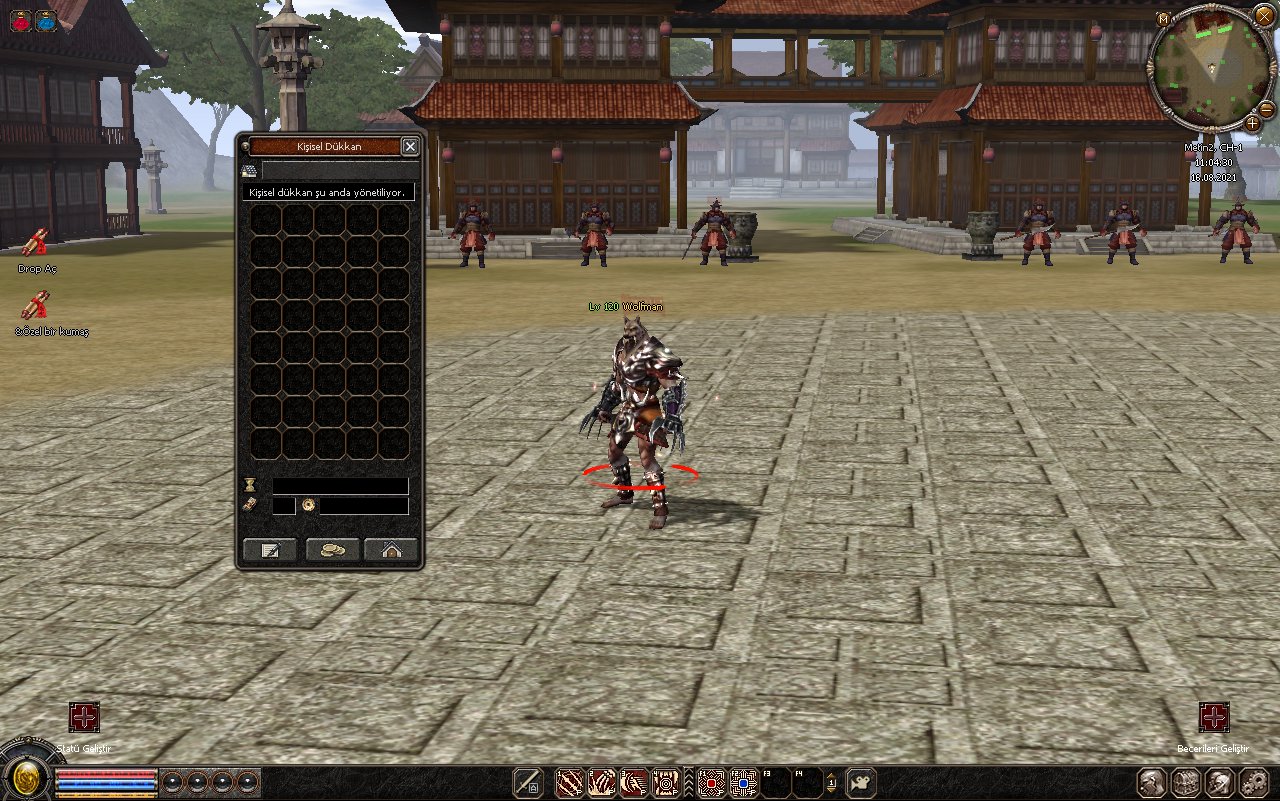
hasanmacit - Veda Paylaşımı (Offline Shop Gui)
Metin2 Lobby olarak, topluluk üyelerimizin katkılarıyla gelişen bir platform olma yolunda emin adımlarla ilerliyoruz. Bugün sizlerle paylaşacağımız içerik, Metin2 özel sunucularında önemli bir yere sahip olan Offline Shop Gui sistemiyle ilgili. Bu sistem, oyuncuların sunucu kapalıyken bile mağaza işlemleri yapabilmesine olanak tanır. Bu bağlamda, topluluğumuzdan hasanmacit tarafından yapılan veda paylaşımı oldukça değerli ve dikkat çekici.
Offline Shop Gui Nedir?
Offline Shop, Metin2 özel sunucularında oyuncuların oyun dışındayken bile eşya alıp satmalarını sağlayan bir özelliktir. Özellikle PVP odaklı sunucularda, oyuncuların savaş öncesi donanım alabilmeleri veya savaş sonrası kazandıkları eşyaları satabilmeleri için büyük kolaylık sağlar. Gui (Graphical User Interface), yani grafiksel arayüz sayesinde bu işlem daha kullanıcı dostu hale gelir.
hasanmacit Tarafından Sunulan Katkı
hasanmacit, uzun yıllardır Metin2 özel sunucu geliştirme konusunda aktif olan deneyimli bir geliştirici. Yaptığı katkılarla birçok geliştiriciye ilham verdi. Ancak artık bu alanda daha fazla devam edemeyeceğini belirtti ve bu nedenle Offline Shop Gui sistemini toplulukla paylaştı. Bu paylaşım, hem deneyimli hem de yeni başlayan geliştiriciler için büyük bir fırsat.
Sistem Özellikleri
Sistem, C++ tabanlı sunucu tarafında ve Python tabanlı istemci tarafında çalışmaktadır. Gui arayüzü, kullanıcıların kolayca navigasyon yapabilmesini sağlar. Sistem, Martysama tabanlı clientlere uyumlu olarak geliştirilmiştir. Eşya listeleme, fiyat belirleme, satın alma gibi temel fonksiyonlar mevcuttur. Ayrıca, veritabanı entegrasyonu sayesinde işlemler güvenli ve hızlı bir şekilde gerçekleştirilir.
Kullanım ve Entegrasyon
Not: Bu sistem sadece bilgi amaçlıdır. Herkesin kendi sorumluluğuyla kullanması gerekir. Entegrasyon sırasında mevcut sunucu yapısına uygun olarak yapılandırılmalıdır. Kaynak kodlar üzerinde değişiklik yapmadan önce mutlaka yedek alınmalıdır.
Neden Bu Sistem Önemli?
Metin2 özel sunucularında oyuncu deneyimi artırmak adına sürekli yenilikler yapılmalıdır. Offline Shop, oyuncuların aktif olmayan saatlerde de sunucuda var olduğunu hissetmelerini sağlar. Bu da oyuncu sadakati ve sunucu popülaritesi açısından ciddi bir avantajdır.
Sonuç
hasanmacit'in bu paylaşımı, Metin2 geliştiricileri için büyük bir hazine niteliğinde. Hem teknik anlamda hem de topluluk ruhu açısından önemli bir adım. Metin2 Lobby olarak, bu tür katkıları desteklemeye ve teşvik etmeye devam edeceğiz.
hasanmacit - Farewell Share (Offline Shop Gui)
Metin2 Lobby continues to grow as a platform driven by contributions from our community members. Today, we present content related to the Offline Shop Gui system, which holds significant importance in Metin2 private servers. This system allows players to perform shop transactions even when the server is offline. In this context, the farewell share made by hasanmacit from our community is particularly valuable and eye-catching.
What is Offline Shop Gui?
Offline Shop is a feature that enables players on Metin2 private servers to buy and sell items even while they are not in-game. Especially in PVP-focused servers, it offers great convenience for players to equip themselves before battles or sell items won after combat. With the Gui (Graphical User Interface), this process becomes more user-friendly.
Contribution Provided by hasanmacit
hasanmacit is an experienced developer who has been active in Metin2 private server development for many years. His contributions have inspired many developers. However, he has stated that he can no longer continue in this field and thus shared the Offline Shop Gui system with the community. This share is a great opportunity for both seasoned and beginner developers.
System Features
The system operates on the server side based on C++ and on the client side based on Python. The Gui interface allows users to navigate easily. The system is compatible with Martysama-based clients. Basic functions such as item listing, price setting, and purchasing are available. Additionally, database integration ensures transactions are secure and fast.
Usage and Integration
Note: This system is intended for informational purposes only. Everyone should use it at their own responsibility. During integration, adjustments must be made according to the existing server structure. Backups should always be taken before making any modifications to the source code.
Why is This System Important?
In Metin2 private servers, continuous innovations are needed to enhance player experience. Offline Shop allows players to feel present in the server even during inactive hours. This significantly boosts player loyalty and server popularity.
Conclusion
hasanmacit's share is a treasure trove for Metin2 developers. It is important both technically and in terms of community spirit. As Metin2 Lobby, we will continue to support and encourage such contributions.
Kod:
import uiScriptLocale ROOT_PATH = "d:/ymir work/ui/game/premium_private_shop/" WINDOW_WIDTH = 196 WINDOW_HEIGHT = 500 window = { "name" : "OfflineShopPanel", "style" : ("movable", "float",), "x" : SCREEN_WIDTH / 2 - WINDOW_WIDTH / 2, "y" : SCREEN_HEIGHT / 2 - WINDOW_HEIGHT / 2, "width" : WINDOW_WIDTH, "height" : WINDOW_HEIGHT, "children" : ( { "name" : "board", "type" : "board", "x" : 0, "y" : 0, "width" : WINDOW_WIDTH, "height" : WINDOW_HEIGHT, "children" : ( ## Title { "name" : "TitleBar", "type" : "titlebar", "style" : ("attach",), "x" : 8, "y" : 7, "width" : 181, "color" : "yellow", "children" : ( { "name":"TitleName", "type":"text", "x":90, "y":3, "text":"Kişisel Dükkan", "text_horizontal_align":"center" }, ), }, { "name" : "store_name", "type" : "image", "x" : 30, "y" : 32, "horizontal_align" : "left", "vertical_align" : "top", "image" : ROOT_PATH + "shop_name_text_bg.sub", }, { "name" : "store_icon", "type" : "image", "x" : 10, "y" : 53, "horizontal_align" : "left", "vertical_align" : "top", # "text" : "Premium pazar açılıyor.", "image" : ROOT_PATH + "notice_bg.sub", }, { "name" : "store_text", "type" : "text", "x" : 18, "y" : 56, "horizontal_align" : "left", "vertical_align" : "top", "text" : "Kişisel dükkan şu anda yönetiliyor.", "image" : ROOT_PATH + "notice_bg.sub", }, { "name" : "home_icon", "type" : "image", "x" : 7, "y" : 35, "horizontal_align" : "left", "vertical_align" : "top", "image" : ROOT_PATH + "position_icon.sub", }, ## Item Slot { "name" : "ItemSlot", "type" : "grid_table", "x" : 18, "y" : 75, "start_index" : 0, "x_count" : 5, "y_count" : 8, "x_step" : 32, "y_step" : 32, "image" : "d:/ymir work/ui/public/Slot_Base.sub", }, ## Remain Time Button { "name" : "sandglass_icon", "type" : "image", "x" : 10, "y" : 97, "horizontal_align" : "left", "vertical_align" : "bottom", "image" : ROOT_PATH + "sandglass_icon.sub", }, ## Remain Time Text { "name" : "remain_time_text_window", "type" : "window", "style" : ("attach",), "x" : 40, "y" : 97, "width" : 137, "height" : 18, "horizontal_align" : "left", "vertical_align" : "bottom", "children" : ( { "name" : "remain_time_text_bg", "type":"image", "x":0, "y":0, "image" : ROOT_PATH + "remain_time_text_bg.sub", }, { "name" : "remain_time_text", "type" : "text", "x" : 0, "y" : 0, "all_align" : "center", "text" : "", }, ), }, # won icon { "name":"won_icon", "type":"image", "x": 10, "y": 77, "horizontal_align" : "left", "vertical_align" : "bottom", "image":"d:/ymir work/ui/game/premium_private_shop/cheque_icon.sub", }, ## won text { "name" : "won_text_window", "type" : "window", "style" : ("attach",), "x" : 40, "y" : 77, "width" : 24, "height" : 20, "horizontal_align" : "left", "vertical_align" : "bottom", "children" : ( { "name" : "won_text_bg", "type":"image", "x":0, "y":0, "image" : ROOT_PATH + "won_text_bg.sub", }, { "name" : "won_text", "type" : "text", "x" : 0, "y" : 0, "all_align" : "center", "text" : "", }, ), }, # yang icon { "name":"yang_icon", "type":"image", "x": 69, "y": 77, "horizontal_align" : "left", "vertical_align" : "bottom", "image":"d:/ymir work/ui/game/windows/money_icon.sub", }, # yang slot { "name" : "yang_text_window", "type" : "window", "style" : ("attach",), "x" : 87, "y" : 77, "width" : 90, "height" : 20, "horizontal_align" : "left", "vertical_align" : "bottom", "children" : ( { "name" : "yang_text_bg", "type":"image", "x":0, "y":0, "image" : ROOT_PATH + "yang_text_bg.sub", }, { "name" : "yang_text", "type" : "text", "x" : 0, "y" : 0, "all_align" : "center", "text" : "", }, ), }, ## Button Close Shop { "name" : "CloseButton", "type" : "button", "x" : 65, "y" : 37, "horizontal_align" : "right", "vertical_align" : "bottom", "default_image" : ROOT_PATH + "shop_close_button_default.sub", "over_image" : ROOT_PATH + "shop_close_button_over.sub", "down_image" : ROOT_PATH + "shop_close_button_down.sub", }, ## Button Refresh Money { "name" : "GoldButton", "type" : "button", "x" : 0, "y" : 37, "horizontal_align" : "center", "vertical_align" : "bottom", "default_image" : ROOT_PATH + "tax_adjustment_button_default.sub", "over_image" : ROOT_PATH + "tax_adjustment_button_over.sub", "down_image" : ROOT_PATH + "tax_adjustment_button_down.sub", }, ## Edit Button { "name" : "EditButton", "type" : "button", "x" : 10, "y" : 37, "horizontal_align" : "left", "vertical_align" : "bottom", "default_image" : ROOT_PATH + "modify_button_default.sub", "over_image" : ROOT_PATH + "modify_button_over.sub", "down_image" : ROOT_PATH + "modify_button_down.sub", }, ), }, ), }hasanmacit - Veda Paylaşımı (Offline Shop Gui)
Metin2 Lobby olarak, topluluk üyelerimizin katkılarıyla gelişen bir platform olma yolunda emin adımlarla ilerliyoruz. Bugün sizlerle paylaşacağımız içerik, Metin2 özel sunucularında önemli bir yere sahip olan Offline Shop Gui sistemiyle ilgili. Bu sistem, oyuncuların sunucu kapalıyken bile mağaza işlemleri yapabilmesine olanak tanır. Bu bağlamda, topluluğumuzdan hasanmacit tarafından yapılan veda paylaşımı oldukça değerli ve dikkat çekici.
Offline Shop Gui Nedir?
Offline Shop, Metin2 özel sunucularında oyuncuların oyun dışındayken bile eşya alıp satmalarını sağlayan bir özelliktir. Özellikle PVP odaklı sunucularda, oyuncuların savaş öncesi donanım alabilmeleri veya savaş sonrası kazandıkları eşyaları satabilmeleri için büyük kolaylık sağlar. Gui (Graphical User Interface), yani grafiksel arayüz sayesinde bu işlem daha kullanıcı dostu hale gelir.
hasanmacit Tarafından Sunulan Katkı
hasanmacit, uzun yıllardır Metin2 özel sunucu geliştirme konusunda aktif olan deneyimli bir geliştirici. Yaptığı katkılarla birçok geliştiriciye ilham verdi. Ancak artık bu alanda daha fazla devam edemeyeceğini belirtti ve bu nedenle Offline Shop Gui sistemini toplulukla paylaştı. Bu paylaşım, hem deneyimli hem de yeni başlayan geliştiriciler için büyük bir fırsat.
Sistem Özellikleri
Sistem, C++ tabanlı sunucu tarafında ve Python tabanlı istemci tarafında çalışmaktadır. Gui arayüzü, kullanıcıların kolayca navigasyon yapabilmesini sağlar. Sistem, Martysama tabanlı clientlere uyumlu olarak geliştirilmiştir. Eşya listeleme, fiyat belirleme, satın alma gibi temel fonksiyonlar mevcuttur. Ayrıca, veritabanı entegrasyonu sayesinde işlemler güvenli ve hızlı bir şekilde gerçekleştirilir.
Kullanım ve Entegrasyon
Not: Bu sistem sadece bilgi amaçlıdır. Herkesin kendi sorumluluğuyla kullanması gerekir. Entegrasyon sırasında mevcut sunucu yapısına uygun olarak yapılandırılmalıdır. Kaynak kodlar üzerinde değişiklik yapmadan önce mutlaka yedek alınmalıdır.
Neden Bu Sistem Önemli?
Metin2 özel sunucularında oyuncu deneyimi artırmak adına sürekli yenilikler yapılmalıdır. Offline Shop, oyuncuların aktif olmayan saatlerde de sunucuda var olduğunu hissetmelerini sağlar. Bu da oyuncu sadakati ve sunucu popülaritesi açısından ciddi bir avantajdır.
Sonuç
hasanmacit'in bu paylaşımı, Metin2 geliştiricileri için büyük bir hazine niteliğinde. Hem teknik anlamda hem de topluluk ruhu açısından önemli bir adım. Metin2 Lobby olarak, bu tür katkıları desteklemeye ve teşvik etmeye devam edeceğiz.
hasanmacit - Farewell Share (Offline Shop Gui)
Metin2 Lobby continues to grow as a platform driven by contributions from our community members. Today, we present content related to the Offline Shop Gui system, which holds significant importance in Metin2 private servers. This system allows players to perform shop transactions even when the server is offline. In this context, the farewell share made by hasanmacit from our community is particularly valuable and eye-catching.
What is Offline Shop Gui?
Offline Shop is a feature that enables players on Metin2 private servers to buy and sell items even while they are not in-game. Especially in PVP-focused servers, it offers great convenience for players to equip themselves before battles or sell items won after combat. With the Gui (Graphical User Interface), this process becomes more user-friendly.
Contribution Provided by hasanmacit
hasanmacit is an experienced developer who has been active in Metin2 private server development for many years. His contributions have inspired many developers. However, he has stated that he can no longer continue in this field and thus shared the Offline Shop Gui system with the community. This share is a great opportunity for both seasoned and beginner developers.
System Features
The system operates on the server side based on C++ and on the client side based on Python. The Gui interface allows users to navigate easily. The system is compatible with Martysama-based clients. Basic functions such as item listing, price setting, and purchasing are available. Additionally, database integration ensures transactions are secure and fast.
Usage and Integration
Note: This system is intended for informational purposes only. Everyone should use it at their own responsibility. During integration, adjustments must be made according to the existing server structure. Backups should always be taken before making any modifications to the source code.
Why is This System Important?
In Metin2 private servers, continuous innovations are needed to enhance player experience. Offline Shop allows players to feel present in the server even during inactive hours. This significantly boosts player loyalty and server popularity.
Conclusion
hasanmacit's share is a treasure trove for Metin2 developers. It is important both technically and in terms of community spirit. As Metin2 Lobby, we will continue to support and encourage such contributions.

