

Merhabalar, Bir kaç kere paylaşılmış gördüm fakat hiçbiri çalışmaz kodlarda eksiklik ve olumsuzluklar var 
Verdiğim %100 çalışmaktadır.
Verdiğim %100 çalışmaktadır.
Açılır > char_battle.cpp
Aratılır:
Kod:
bool CHARACTER::Damage(LPCHARACTER pAttacker, int dam, EDamageType type) {Eklenir:
Kod:
if (pAttacker && this) { if (pAttacker->IsAffectFlag(AFF_GWIGUM) && !pAttacker->GetWear(WEAR_WEAPON)) { pAttacker->RemoveAffect(SKILL_GWIGEOM); return false; } if (pAttacker->IsAffectFlag(AFF_GEOMGYEONG) && !pAttacker->GetWear(WEAR_WEAPON)) { pAttacker->RemoveAffect(SKILL_GEOMKYUNG); return false; } }Örnek Resim:
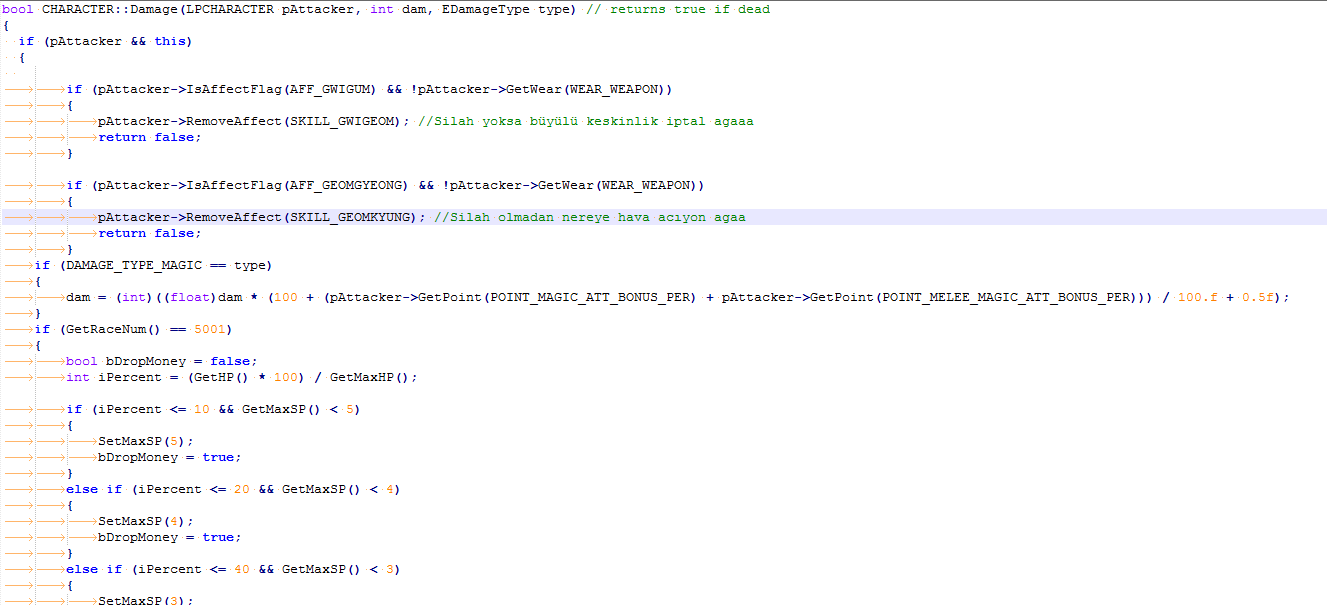
Note: Her hangi bir attack vurduğu zaman elinde silah yoksa otomatik kapanacaktır.
Kanıt:
Hava Kılıcı & Büyülü Silah Bug Fix - Metin2 Geliştirici Rehberi
Metin2 özel sunucularında hata giderimi ve sistem optimizasyonu, oyun deneyimini artırmak için kritik öneme sahiptir. Bu makalede, Hava Kılıcı ve Büyülü Silah gibi popüler eşyalarla ilgili karşılaşılan bugları nasıl düzelteceğinizi anlatacağız.
Bug Nedir?
Metin2 özel sunucularda bazı silahlarla ilgili animasyon, hasar veya efekt hataları meydana gelebilir. Özellikle Hava Kılıcı gibi görsel efekti yüksek olan eşyalarda bu tür sorunlar sıkça görülür. Bu durum, hem oyuncu deneyimini düşürür hem de sunucu itibarını etkileyebilir.
Neden Hata Oluşur?
Bu tür hatalar genellikle client-side (istemci tarafında) eksik veya yanlış tanımlanmış efekt dosyalarından kaynaklanır. Python GUI veya uiscript dosyalarında eksiklikler, hatalı efekt atamaları, veya game core tarafında tanımlanmamış efekt ID’leri nedeniyle bu eşyalar düzgün çalışmayabilir.
Hava Kılıcı Bug Fix Adımları
1. Client_src dosyasında bulunan effect_info.py dosyasını açın.
2. Hava Kılıcı efekti için doğru ID’nin tanımlandığından emin olun.
3. Eğer efekt görünmüyorsa, gr2 ve msc dosyalarının doğru şekilde pack içine dahil edildiğinden emin olun.
4. Game server programming kısmında, bu eşya için özel komut veya animasyon tanımlaması eksikse, C++ source dosyalarında gerekli düzenlemeleri yapın.
Büyülü Silah Hataları ve Çözümü
Benzer şekilde, Büyülü Silah ile ilgili hatalar da py root veya db core ile bağlantılı olabilir. Örneğin, hasar veya özel efekt tetiklenmiyor olabilir. Bu durumda:
1. item_proto dosyasında silahın applytype ve applyvalue değerlerinin doğru girildiğinden emin olun.
2. auth server ve game server senkronizasyonunu kontrol edin.
3. Silahın special effect ID’si client tarafında tanımlı değilse, bu efekt python gui veya uiscript üzerinden tanımlanmalıdır.
C++ Sistem ve Kaynak Kod Düzenlemesi
Eğer hata tamamiyle sunucu tarafında oluşuyorsa, C++ source dosyalarında CPacketHandler veya CItem sınıflarında değişiklik yapmanız gerekebilir. Bu işlem, core seviyesinde değişiklik gerektirdiği için dikkatle yapılmalıdır. Martysama gibi sistemlerde yapılan güncellemeler, bu tür hataları gidermede rehber alınabilir.
Sunucu Testi ve Hata Takibi
Değişiklik yaptıktan sonra, compile işlemini gerçekleştirin ve test sunucusunda bu eşyaları farklı karakterlerle deneyin. Log dosyalarında hata mesajlarını takip ederek eksiklikleri belirleyebilirsiniz. DB tarafında kayıt tutulan özel efekt veya hasar bilgilerini kontrol edin.
Sonuç
Hava Kılıcı ve Büyülü Silah gibi eşyaların hatalarını gidermek, Metin2 özel sunucularınızda oyuncu memnuniyetini artırır. Client src, server src, db ve C++ bilginizi kullanarak bu tür sistemsel hataları etkili bir şekilde çözebilirsiniz. Bu işlemler sırasında dikkatli olmak ve yedek almak önemlidir.
Air Sword & Magic Weapon Bug Fix - Metin2 Developer Guide
Bug fixing and system optimization on Metin2 private servers are critical for improving the gaming experience. In this article, we will explain how to fix bugs related to popular items such as the Air Sword and Magic Weapon.
What is a Bug?
On Metin2 private servers, certain weapons may experience issues related to animation, damage, or effects. These types of problems frequently occur with high-visual-effect items like the Air Sword. Such issues not only reduce player experience but can also affect server reputation.
Why Do Errors Occur?
These errors generally stem from missing or incorrectly defined effect files on the client-side. Missing elements in Python GUI or uiscript files, incorrect effect assignments, or undefined effect IDs in the game core can cause these items to malfunction.
Steps to Fix Air Sword Bug
1. Open the effect_info.py file located in the client_src folder.
2. Ensure that the correct ID is assigned for the Air Sword effect.
3. If the effect is not visible, confirm that gr2 and msc files are properly included in the pack.
4. In game server programming, if special commands or animations for the item are missing, make necessary adjustments in C++ source files.
Magic Weapon Issues and Solutions
Similarly, errors related to the Magic Weapon might be linked to py root or db core. For instance, damage or special effects may not trigger. In such cases:
1. Verify that the applytype and applyvalue values for the weapon are correctly entered in the item_proto file.
2. Check synchronization between the auth server and game server.
3. If the special effect ID of the weapon is not defined on the client side, it should be defined via python gui or uiscript.
C++ System and Source Code Modifications
If the error occurs entirely on the server side, you may need to modify C++ source files, particularly the CPacketHandler or CItem classes. This process requires careful execution since it involves changes at the core level. Updates made in systems like Martysama can serve as guides for resolving such issues.
Server Testing and Error Tracking
After making changes, perform a compile operation and test these items with different characters on your test server. You can identify deficiencies by monitoring error messages in log files. Also check DB-side records of special effects or damage logs.
Conclusion
Fixing bugs related to items such as the Air Sword and Magic Weapon increases player satisfaction on your Metin2 private servers. You can effectively resolve such systemic errors by leveraging your knowledge of Client src, Server src, DB, and C++. It is important to be cautious and take backups during these processes.
Kanıt:
Hava Kılıcı & Büyülü Silah Bug Fix - Metin2 Geliştirici Rehberi
Metin2 özel sunucularında hata giderimi ve sistem optimizasyonu, oyun deneyimini artırmak için kritik öneme sahiptir. Bu makalede, Hava Kılıcı ve Büyülü Silah gibi popüler eşyalarla ilgili karşılaşılan bugları nasıl düzelteceğinizi anlatacağız.
Bug Nedir?
Metin2 özel sunucularda bazı silahlarla ilgili animasyon, hasar veya efekt hataları meydana gelebilir. Özellikle Hava Kılıcı gibi görsel efekti yüksek olan eşyalarda bu tür sorunlar sıkça görülür. Bu durum, hem oyuncu deneyimini düşürür hem de sunucu itibarını etkileyebilir.
Neden Hata Oluşur?
Bu tür hatalar genellikle client-side (istemci tarafında) eksik veya yanlış tanımlanmış efekt dosyalarından kaynaklanır. Python GUI veya uiscript dosyalarında eksiklikler, hatalı efekt atamaları, veya game core tarafında tanımlanmamış efekt ID’leri nedeniyle bu eşyalar düzgün çalışmayabilir.
Hava Kılıcı Bug Fix Adımları
1. Client_src dosyasında bulunan effect_info.py dosyasını açın.
2. Hava Kılıcı efekti için doğru ID’nin tanımlandığından emin olun.
3. Eğer efekt görünmüyorsa, gr2 ve msc dosyalarının doğru şekilde pack içine dahil edildiğinden emin olun.
4. Game server programming kısmında, bu eşya için özel komut veya animasyon tanımlaması eksikse, C++ source dosyalarında gerekli düzenlemeleri yapın.
Büyülü Silah Hataları ve Çözümü
Benzer şekilde, Büyülü Silah ile ilgili hatalar da py root veya db core ile bağlantılı olabilir. Örneğin, hasar veya özel efekt tetiklenmiyor olabilir. Bu durumda:
1. item_proto dosyasında silahın applytype ve applyvalue değerlerinin doğru girildiğinden emin olun.
2. auth server ve game server senkronizasyonunu kontrol edin.
3. Silahın special effect ID’si client tarafında tanımlı değilse, bu efekt python gui veya uiscript üzerinden tanımlanmalıdır.
C++ Sistem ve Kaynak Kod Düzenlemesi
Eğer hata tamamiyle sunucu tarafında oluşuyorsa, C++ source dosyalarında CPacketHandler veya CItem sınıflarında değişiklik yapmanız gerekebilir. Bu işlem, core seviyesinde değişiklik gerektirdiği için dikkatle yapılmalıdır. Martysama gibi sistemlerde yapılan güncellemeler, bu tür hataları gidermede rehber alınabilir.
Sunucu Testi ve Hata Takibi
Değişiklik yaptıktan sonra, compile işlemini gerçekleştirin ve test sunucusunda bu eşyaları farklı karakterlerle deneyin. Log dosyalarında hata mesajlarını takip ederek eksiklikleri belirleyebilirsiniz. DB tarafında kayıt tutulan özel efekt veya hasar bilgilerini kontrol edin.
Sonuç
Hava Kılıcı ve Büyülü Silah gibi eşyaların hatalarını gidermek, Metin2 özel sunucularınızda oyuncu memnuniyetini artırır. Client src, server src, db ve C++ bilginizi kullanarak bu tür sistemsel hataları etkili bir şekilde çözebilirsiniz. Bu işlemler sırasında dikkatli olmak ve yedek almak önemlidir.
Air Sword & Magic Weapon Bug Fix - Metin2 Developer Guide
Bug fixing and system optimization on Metin2 private servers are critical for improving the gaming experience. In this article, we will explain how to fix bugs related to popular items such as the Air Sword and Magic Weapon.
What is a Bug?
On Metin2 private servers, certain weapons may experience issues related to animation, damage, or effects. These types of problems frequently occur with high-visual-effect items like the Air Sword. Such issues not only reduce player experience but can also affect server reputation.
Why Do Errors Occur?
These errors generally stem from missing or incorrectly defined effect files on the client-side. Missing elements in Python GUI or uiscript files, incorrect effect assignments, or undefined effect IDs in the game core can cause these items to malfunction.
Steps to Fix Air Sword Bug
1. Open the effect_info.py file located in the client_src folder.
2. Ensure that the correct ID is assigned for the Air Sword effect.
3. If the effect is not visible, confirm that gr2 and msc files are properly included in the pack.
4. In game server programming, if special commands or animations for the item are missing, make necessary adjustments in C++ source files.
Magic Weapon Issues and Solutions
Similarly, errors related to the Magic Weapon might be linked to py root or db core. For instance, damage or special effects may not trigger. In such cases:
1. Verify that the applytype and applyvalue values for the weapon are correctly entered in the item_proto file.
2. Check synchronization between the auth server and game server.
3. If the special effect ID of the weapon is not defined on the client side, it should be defined via python gui or uiscript.
C++ System and Source Code Modifications
If the error occurs entirely on the server side, you may need to modify C++ source files, particularly the CPacketHandler or CItem classes. This process requires careful execution since it involves changes at the core level. Updates made in systems like Martysama can serve as guides for resolving such issues.
Server Testing and Error Tracking
After making changes, perform a compile operation and test these items with different characters on your test server. You can identify deficiencies by monitoring error messages in log files. Also check DB-side records of special effects or damage logs.
Conclusion
Fixing bugs related to items such as the Air Sword and Magic Weapon increases player satisfaction on your Metin2 private servers. You can effectively resolve such systemic errors by leveraging your knowledge of Client src, Server src, DB, and C++. It is important to be cautious and take backups during these processes.
