

Kod:
[/CENTER] // cmd_general.cpp'de GetGift kod bloğunda arat if (item->IsDragonSoul()) { int iEmptyPos = ch->GetEmptyDragonSoulInventory(item->GetVnum(), item->GetSubType(), item->GetSize()); if (iEmptyPos != -1) { item->AddToCharacter(ch, TItemPos(DRAGON_SOUL_INVENTORY, iEmptyPos)); } else { M2_DESTROY_ITEM(item); ch->ChatPacket(CHAT_TYPE_INFO, LC_TEXT( "INVENTORY_FULL_ERROR")); force = true; continue; } } // altına 1 enter bırakıp ekle #ifdef ENABLE_SPECIAL_STORAGE_SYSTEM else if (item->IsBook()) { int iEmptyPos = ch->GetEmptyBookInventory(item->GetSize()); if (iEmptyPos != -1) item->AddToCharacter(ch, TItemPos(BOOK_INVENTORY, iEmptyPos)); else { M2_DESTROY_ITEM(item); ch->ChatPacket(CHAT_TYPE_INFO, LC_TEXT("INVENTORY_FULL_ERROR")); force = true; continue; } } else if (item->IsUpgradeItem()) { int iEmptyPos = ch->GetEmptyUpgradeInventory(item->GetSize()); if (iEmptyPos != -1) item->AddToCharacter(ch, TItemPos(UPGRADE_INVENTORY, iEmptyPos)); else { M2_DESTROY_ITEM(item); ch->ChatPacket(CHAT_TYPE_INFO, LC_TEXT("INVENTORY_FULL_ERROR")); force = true; continue; } } else if (item->IsStone()) { int iEmptyPos = ch->GetEmptyStoneInventory(item->GetSize()); if (iEmptyPos != -1) item->AddToCharacter(ch, TItemPos(STONE_INVENTORY, iEmptyPos)); else { M2_DESTROY_ITEM(item); ch->ChatPacket(CHAT_TYPE_INFO, LC_TEXT("INVENTORY_FULL_ERROR")); force = true; continue; } } else if (item->IsAttr()) { int iEmptyPos = ch->GetEmptyAttrInventory(item->GetSize()); if (iEmptyPos != -1) item->AddToCharacter(ch, TItemPos(ATTR_INVENTORY, iEmptyPos)); else { M2_DESTROY_ITEM(item); ch->ChatPacket(CHAT_TYPE_INFO, LC_TEXT("INVENTORY_FULL_ERROR")); force = true; continue; } } else if (item->IsFlower()) { int iEmptyPos = ch->GetEmptyFlowerInventory(item->GetSize()); if (iEmptyPos != -1) item->AddToCharacter(ch, TItemPos(FLOWER_INVENTORY, iEmptyPos)); else { M2_DESTROY_ITEM(item); ch->ChatPacket(CHAT_TYPE_INFO, LC_TEXT("INVENTORY_FULL_ERROR")); force = true; continue; } } else if (item->IsBlendS()) { int iEmptyPos = ch->GetEmptyBlendInventory(item->GetSize()); if (iEmptyPos != -1) item->AddToCharacter(ch, TItemPos(BLEND_INVENTORY, iEmptyPos)); else { M2_DESTROY_ITEM(item); ch->ChatPacket(CHAT_TYPE_INFO, LC_TEXT("INVENTORY_FULL_ERROR")); force = true; continue; } } #endif [CENTER]Bu aşağıdaki kod gibi kodları kendi sourcenize göre düzenlemeniz gerekmekte, sizin filesinizde nasılsa öyle eklemeniz gerek, isimleri değişik olabilir.
Kod:
item->IsBook() ch->GetEmptyBookInventoryBir örneğini bırakıyorum o şekilde düzenlersiniz.
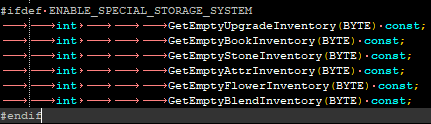
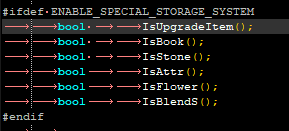
Filesim madem yakında paylaşılıcak ufaktan paylaşım yapayım dedim.
K Envanter Gift Uyarlaması
Metin2 özel sunucularında kullanıcı deneyimini artırmak için geliştirilen sistemlerden biri olan K Envanter Gift Uyarlaması, oyuncuların envanterlerinde belirli ödüllerin doğrudan görünmesini ve kullanılabilir olmasını sağlar. Bu sistem sayesinde, oyunculara özel etkinliklerde veya belirli görev tamamlamalarında envanterine otomatik olarak gönderilecek hediyeler gibi içerikler daha kolay yönetilebilir. Bu yazıda, K Envanter Gift Uyarlaması'nın ne olduğunu, nasıl çalıştığını ve Metin2 özel sunucu geliştirme süreçlerinde nasıl entegre edileceğini detaylıca ele alacağız.
K Envanter Gift Nedir?
K Envanter Gift, oyuncuların envanterlerine doğrudan eklenebilecek önceden tanımlanmış ödüllerin bulunduğu bir sistemdir. Bu sistem, genellikle özel etkinliklerde, PvP turnuvalarında veya belirli seviye milestone'larında kullanılır. Oyuncuya ödül vermek için manuel müdahale gerekmez; sistem üzerinden otomatik olarak gönderilir. Bu da hem geliştirici hem de oyuncu açısından büyük bir kolaylık sağlar.
Sistemin Avantajları
- Otomatik ödül dağıtımı
- Oyuncu motivasyonunu artırma
- Sunucu yönetiminde kolaylık
- Kodlama ile kolay entegrasyon
Uygulama Adımları
K Envanter Gift sistemini Metin2 özel sunucunuza entegre etmek için birkaç adımı takip etmeniz gerekir:
1. Veritabanı Ayarları: Öncelikle, envantere eklenecek ödüllerin veritabanında tanımlanması gerekir. Bu işlemler genellikle DB Core üzerinden yapılır.
2. Game Sunucusu Kodlama: C++ tabanlı sistem üzerinde, oyuncunun envanterine belirli bir ID ile tanımlanmış ödülleri gönderen bir fonksiyon yazılır. Bu işlem sırasında Core katmanında değişiklikler yapılabilir.
3. Client Tarafı Entegrasyon: Oyuncunun bu ödülleri görebilmesi için Client tarafında Uiscript ve Py Root düzenlemeleri yapılır. Bu sayede hediyeler envanterde doğru şekilde gösterilir.
Dikkat Edilmesi Gerekenler
Sistem entegrasyonunda dikkat edilmesi gereken bazı önemli noktalar vardır:
- Hediyelerin tekrar tekrar verilmemesi için kontrol mekanizmalarının eklenmesi
- Veritabanı güvenliği
- Ödüllerin sınırlı sayıda olup olmadığı durumunda kontrol
- Sunucu performansını etkileyebilecek kod optimizasyonları
Sonuç
K Envanter Gift Uyarlaması, Metin2 özel sunucularında kullanıcı memnuniyetini ve oyun içi etkinlik oranlarını artıran etkili bir özelliktir. Doğru uygulandığında, oyunculara otomatik ödül verme imkanı sunar ve sunucu yönetimi sürecini kolaylaştırır. Sistem, C++ kaynak kodlarla entegre çalışarak güçlü bir yapıya sahiptir ve geliştiricilerin ihtiyaçlarına göre özelleştirilebilir.
K Inventory Gift Adaptation
The K Inventory Gift Adaptation is one of the systems developed to enhance the user experience on Metin2 private servers, allowing certain rewards to appear directly in players’ inventories and be immediately usable. With this system, content such as gifts automatically sent into a player’s inventory during special events or upon completing specific quests can be managed more easily. In this article, we will examine in detail what the K Inventory Gift Adaptation is, how it works, and how it can be integrated into Metin2 private server development processes.
What is K Inventory Gift?
K Inventory Gift is a system where predefined rewards are added directly to players' inventories. It is often used in special events, PvP tournaments, or at certain level milestones. There is no need for manual intervention to reward the player; gifts are automatically sent via the system. This provides great convenience for both developers and players alike.
Benefits of the System
- Automatic reward distribution
- Increased player motivation
- Ease of server management
- Easy integration through coding
Implementation Steps
To integrate the K Inventory Gift system into your Metin2 private server, you must follow several steps:
1. Database Settings: First, the rewards to be added to the inventory must be defined in the database. These operations are typically handled through the DB Core.
2. Game Server Coding: On the C++ based system, a function is written that sends rewards identified by a specific ID into the player's inventory. During this process, modifications may be made to the Core layer.
3. Client-Side Integration: For the player to see these rewards, adjustments are made in Uiscript and Py Root on the Client side. This ensures that the gifts are displayed correctly within the inventory.
Important Considerations
There are several important points to consider during system integration:
- Adding control mechanisms to prevent gifts from being awarded repeatedly
- Database security
- Checks for whether rewards are limited in quantity
- Code optimizations that might affect server performance
Conclusion
The K Inventory Gift Adaptation is an effective feature that increases user satisfaction and in-game activity rates on Metin2 private servers. When properly implemented, it allows for automatic reward distribution to players and simplifies server management processes. The system operates with C++ source code, forming a robust structure and can be customized according to the needs of developers.
