

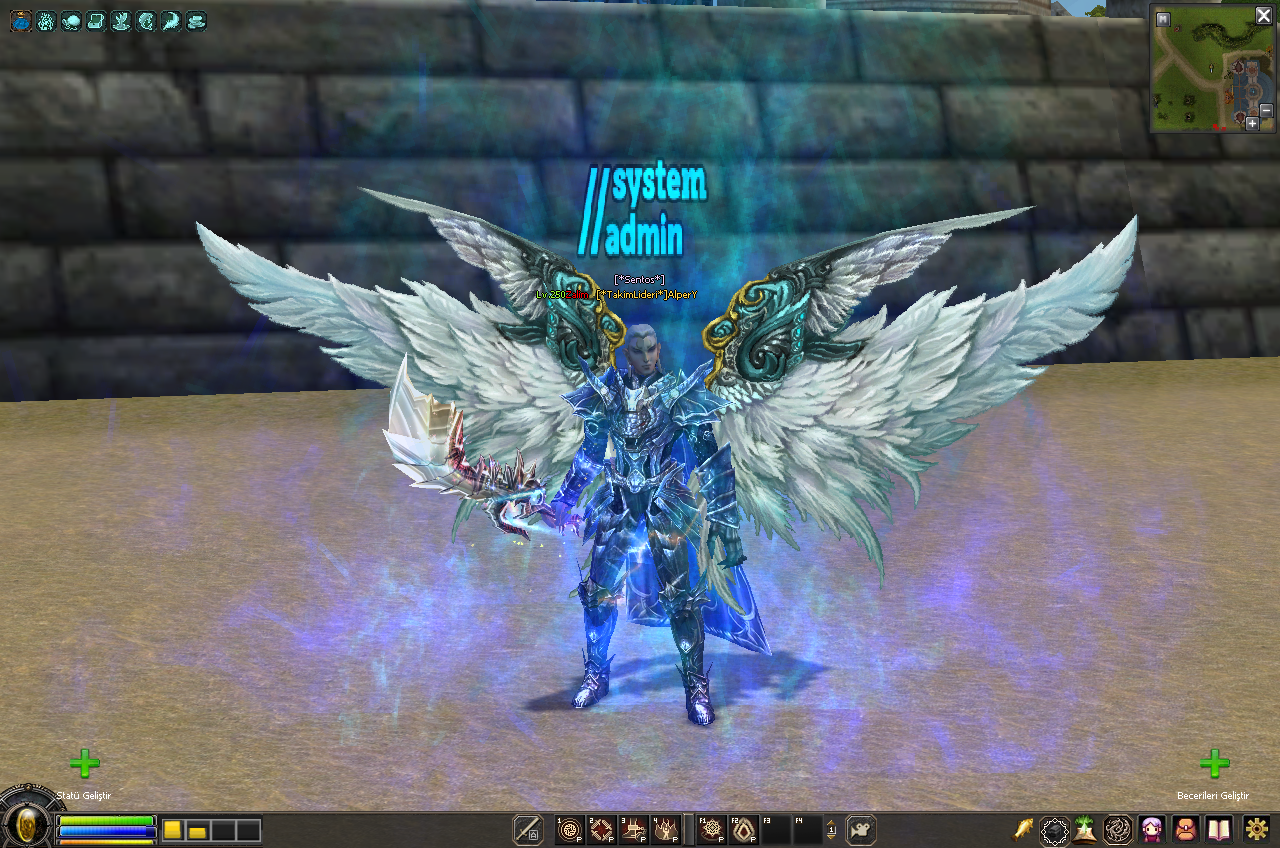
Baya abartı ama kullanmak isteyen olur heralde

Kurulumu:
Sadece Locale_TR packını açıp rardaki GM Efekt klasörünün içindekileri atın.
İndirme Linki
Kod:
https://www.dosyaupload.com/hXiUVirustotal
Kod:
https://www.virustotal.com/#/file/31b4d6a1c15b60c8d750b6e7ac4b21acb8491375f3522a1895c9cc996c2d91e9/detectionKanatlı Karakterlerde Mavi Dumanlı GM Efekti Nasıl Aktif Edilir?
Metin2 oyuncuları arasında popülerlik kazanan özel efektlerden biri olan mavi dumanlı GM efekti, özellikle kanatlı karakterler ile kullanıldığında görsel açıdan oldukça etkileyicidir. Bu efekt, oyuncuların karakterlerine profesyonel bir görünüm kazandırmasını sağlar ve PvP arenalarında dikkat çekmelerine yardımcı olur. Metin2Lobby.com üzerinden indirebileceğiniz özel client paketlerinde bu efekt genellikle önceden entegre edilmiş olarak gelir.
Dikkat: Mavi dumanlı GM efekti yalnızca kanatlı karakterlerde görülebilir. Kanatsız karakterlerde bu efekt aktif olmaz veya görünmez kalır. Bu nedenle efekti kullanmak isteyen oyuncuların öncelikle kanat sisteminin aktif olduğu bir client veya pack kullanması gerekir.
Bu efekti elde etmek için ilk adım, Metin2Lobby.com sitesinden uyumlu bir Metin2 PvP Client veya Metin2 Custom Client indirmektir. Bu tür client’ler genellikle özel efekt dosyaları, texture’lar ve shader’lar içerir. İndirme işlemi tamamlandıktan sonra client’ı kurmak için Metin2 Client Kurulum rehberimizi takip edebilirsiniz.
Kurulum tamamlandıktan sonra, oyun içinde GM komutları ile efekti aktif hale getirebilirsiniz. Genellikle kullanılan komut: /gm_effect 1 veya /set_gm_effect 2 şeklindedir. Ancak bu komutlar client’a göre değişiklik gösterebilir. Güvenilir bilgi için Metin2Lobby.com forumlarını ziyaret etmeniz önerilir.
Eğer efekt görünmüyorsa, muhtemelen effect.txt veya effect.lua gibi dosyalarda eksik tanımlama vardır. Bu durumda Metin2 Client Edit bölümümüzde yer alan rehberleri kullanarak ilgili dosyalara 'BlueSmoke_GM_Effect' gibi bir tanımlama eklemeniz gerekir. Ayrıca Metin2 Pack Extract işlemiyle mevcut pack dosyalarını açıp içerisindeki efekt dosyalarını kontrol edebilirsiniz.
 Mavi Dumanlı GM Efekti Demo Videosu
 Kanatlı Karakter ile Mavi Duman Efekti Görseli
Son olarak, bu efekti kalıcı hale getirmek istiyorsanız Metin2 Client Yama veya Metin2 Client Patch işlemleriyle ayarlarınızı sabitleyebilirsiniz. Güncellemelerde efekt kaybolmaması için yedek dosya tutmanız şarttır. Metin2Lobby.com olarak her hafta yeni Metin2 Client Update paketleri ve Metin2 Pack Download seçenekleri sunmaya devam ediyoruz.
Öneri: Efekti test etmek için önce şehir içinde, ardından PvP alanında deneyin. Bazı sunucular özel efektleri engelleyebilir; bu durumda Metin2 Client Fix rehberimizi inceleyin.
How to Activate the Blue Smoke GM Effect on Winged Characters
One of the most visually striking special effects popular among Metin2 players is the blue smoke GM effect, especially when used with winged characters. This effect gives characters a professional appearance and helps players stand out in PvP arenas. This effect is usually pre-integrated in custom client packages that can be downloaded from Metin2Lobby.com.
Warning: The blue smoke GM effect is only visible on winged characters. It will not activate or remain invisible on characters without wings. Therefore, players who want to use this effect must first use a client or pack where the wing system is active.
The first step to obtain this effect is to download a compatible Metin2 PvP Client or Metin2 Custom Client from Metin2Lobby.com. These types of clients typically include custom effect files, textures, and shaders. After completing the download, you can follow our Metin2 Client Installation guide to install the client.
Once the installation is complete, you can activate the effect in-game using GM commands. Commonly used commands include: /gm_effect 1 or /set_gm_effect 2. However, these commands may vary depending on the client. For reliable information, we recommend visiting the forums on Metin2Lobby.com.
If the effect does not appear, there is likely a missing definition in files such as effect.txt or effect.lua. In this case, you need to add a definition like 'BlueSmoke_GM_Effect' to the relevant files using the guides in our Metin2 Client Edit section. You can also use the Metin2 Pack Extract process to open existing pack files and check the effect files inside.
Finally, if you want to make this effect permanent, you can solidify your settings through Metin2 Client Patch or Metin2 Client Update processes. It is essential to keep backup files to prevent the effect from disappearing during updates. At Metin2Lobby.com, we continue to offer new Metin2 Client Update packages and Metin2 Pack Download options every week.
Tip: Test the effect first in-town, then in a PvP area. Some servers may block custom effects; in such cases, refer to our Metin2 Client Fix guide.

