

Resimdeki Gibi Efekt Vermek İsteyenler Aşağıda Vereceğim Linkten Konu'daki Kostümleri Kursun Pack'in İçine Ayarlı Kostüm Efektleri Kodlamasını Verdim. İsteyen ise 0'dan Başka Bir Kostüme Efekt Vermek İstiyorsa Ayrı Bir Anlatım.cpp Bıraktım. İsteyen İstediğini Kursun
Not : Kanıtlar Konu'ya Eklenir [/FONT]
Not : Kodlamalarda Lycan Kostümü İçin Kodlama Bulunmamaktadır. İsteyen Kendisi Kodlasın.
Not : Kanıtlar Konu'ya Eklenir
[/FONT]Not : Kodlamalarda Lycan Kostümü İçin Kodlama Bulunmamaktadır. İsteyen Kendisi Kodlasın.
Ziyaretçiler için gizlenmiş link,görmek için üye olmalısınız!
Giriş yap veya üye ol.
Ziyaretçiler için gizlenmiş link,görmek için üye olmalısınız!
Giriş yap veya üye ol.
Ziyaretçiler için gizlenmiş link,görmek için üye olmalısınız!
Giriş yap veya üye ol.
Ziyaretçiler için gizlenmiş link,görmek için üye olmalısınız!
Giriş yap veya üye ol.
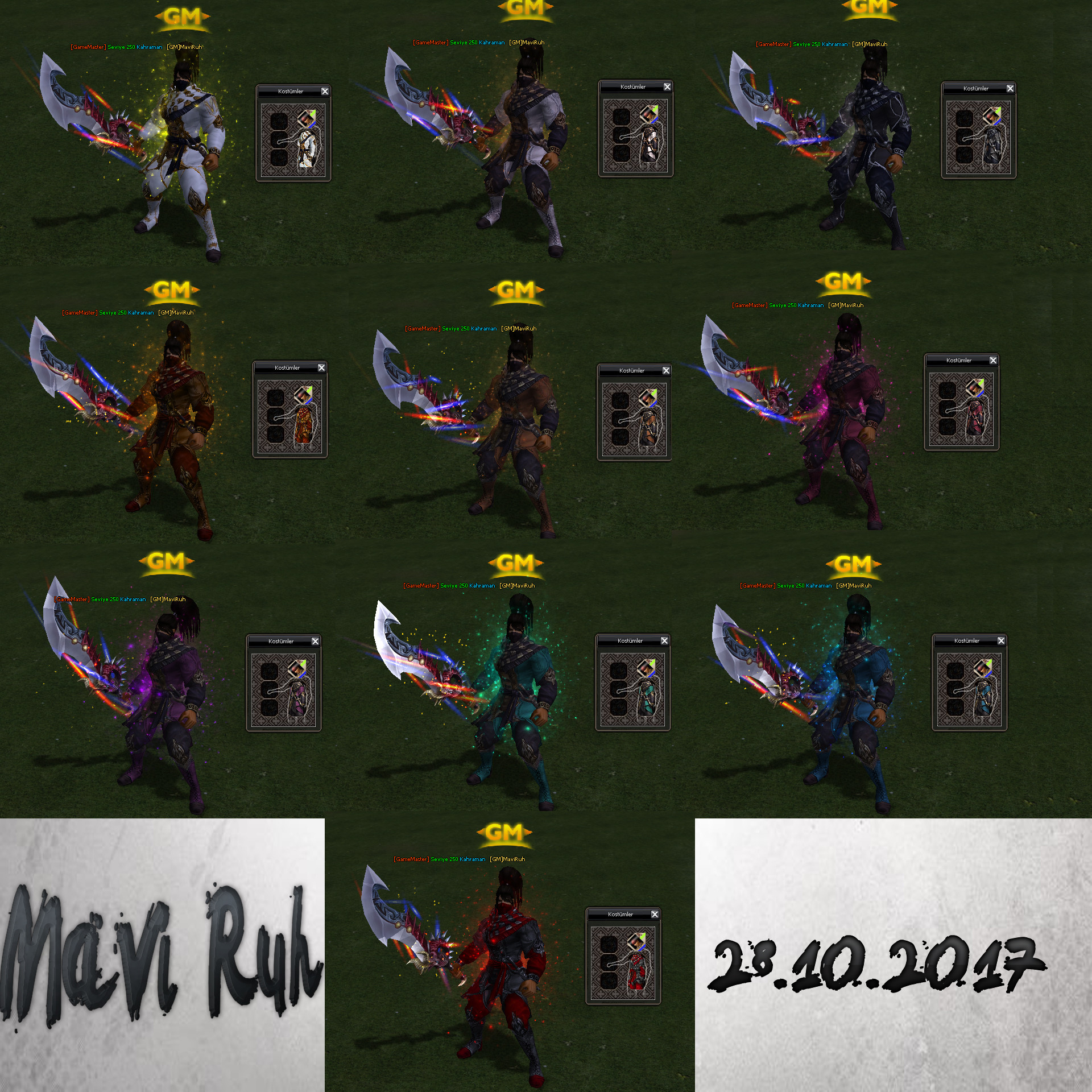
***************************************
Kanıt
Kostüme Efekt Verme Sistemi
Metin2 özel sunucularında oyuncuların kostüm takarken görsel olarak etkileyici efektler alması, hem oyun deneyimini artırır hem de karaktere özel bir hava katar. Bu sistem genellikle C++ tabanlı game server modifikasyonları ile entegre edilir. Bu rehberde, Metin2 özel sunucularında kostümlere efekt verme konusunda detaylı bir anlatım yapacağız.
Kostüm Efekti Nedir?
Kostüm efekti, oyuncu bir kostüm giydikten sonra otomatik olarak karakterin etrafında veya üzerinde beliren görsel efektlerdir. Bu efektler genellikle parlama, ışık, gölgelendirme veya hareketli partikül efektleridir. Bu efektler client tarafında uiscript ile yönetilirken, server tarafında C++ kodları ile tetiklenir.
Sistem Kurulumu[/CRCOLOR]
Efekt sisteminin doğru çalışabilmesi için öncelikle game server dosyalarında gerekli değişikliklerin yapılması gerekir. Bu işlem genellikle src dosyasında char_item.cpp veya benzeri dosyalarda yapılır. OnEquip fonksiyonuna özel bir hook eklenerek, kostüm giyildiğinde efekt başlatılır. Aynı zamanda client tarafında root klasöründe bulunan itemdata.txt dosyasında ilgili kostümün efekt ID'si tanımlanmalıdır.
Hata Ayıklama
Sistem çalıştırılırken client ve server arasında senkronizasyon bozukluğu yaşanabilir. Bu durumda Python tabanlı debug sistemleri kullanılabilir. Örneğin, py_root üzerinden log kayıtları alınarak hangi item eklendiğinde efektin çalışmadığı tespit edilebilir. Ayrıca Martysama gibi development araçları da hata ayıklamada destek sağlar.
Efekt Türleri ve Tanımlama
Metin2'de efekt türleri genellikle .msm formatında olur. Bu efektler game data klasörüne yerleştirilir. Client tarafından çağrılırken effect_data.xml dosyasında tanımlanmalıdır. Her efektin bir ID numarası vardır ve bu ID, item dosyasında referans alınır. Örneğin:
ItemID: 70001 -> EffectID: 1001
Paketleme ve Dağıtım
Oluşturulan sistem, pack dosyası haline getirilerek Metin2 özel sunucusuna entegre edilebilir. Bu süreçte auth server, game server ve client uyumlu olmalıdır. Compile işlemi sonrası test aşaması başlar. DB tarafında item tanımı yapılmışsa ve core kısmında gerekli hook tanımları yapıldıysa, sistem hatasız çalışacaktır.
Sonuç
Kostüme efekt verme sistemi, Metin2 özel sunucularında kullanıcı deneyimini ciddi anlamda artıran bir özelliktir. C++ ve Python tabanlı geliştirme ortamları ile kolayca entegre edilebilir. PyGUI, UIScript gibi araclar ile client tarafı düzenlenebilir. GameCore, DBCore gibi yapılarla da server tarafı optimize edilir.
Costume Effect System
In Metin2 private servers, giving visual effects to players while wearing costumes enhances the gaming experience and adds a unique feel to the character. This system is typically integrated through C++-based game server modifications. In this guide, we will provide a detailed explanation on how to add effects to costumes in Metin2 private servers.
What Is Costume Effect?
Costume effect refers to visual effects that automatically appear around or on the character when a player wears a costume. These effects usually include glow, light, shadows, or moving particle effects. These are managed on the client side with uiscript, and triggered on the server side via C++ code.
System Installation
To ensure the effect system works properly, necessary changes must be made in the game server files. This process is generally done in files such as char_item.cpp within the src folder. By adding a custom hook to the OnEquip function, the effect is triggered when a costume is worn. Additionally, the effect ID for the relevant costume must be defined in the itemdata.txt file located in the root folder on the client side.
Debugging
During execution, synchronization issues may occur between the client and server. In such cases, Python-based debug systems can be used. For example, logs taken via py_root can help identify which item does not trigger the effect. Tools like Martysama also assist in debugging.
Effect Types and Definitions
In Metin2, effect types are usually in .msm format. These effects are placed in the game data folder. When called by the client, they must be defined in the effect_data.xml file. Each effect has an ID number, which is referenced in the item file. Example:
ItemID: 70001 -> EffectID: 1001
Packaging and Distribution
The created system can be integrated into a Metin2 private server by packaging it into a pack file. During this process, auth server, game server, and client must be compatible. After the compile process, testing begins. If the item definition is set up in the DB and the required hook definitions are made in the core, the system will run without errors.
Conclusion
Adding effects to costumes significantly improves user experience in Metin2 private servers. It can be easily integrated using C++ and Python-based development environments. The client side can be adjusted using tools like PyGUI and UIScript. Meanwhile, server side can be optimized using structures like GameCore and DBCore.
