

input_login.cpp
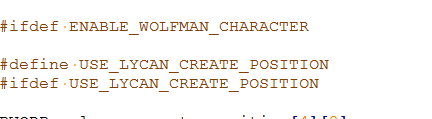
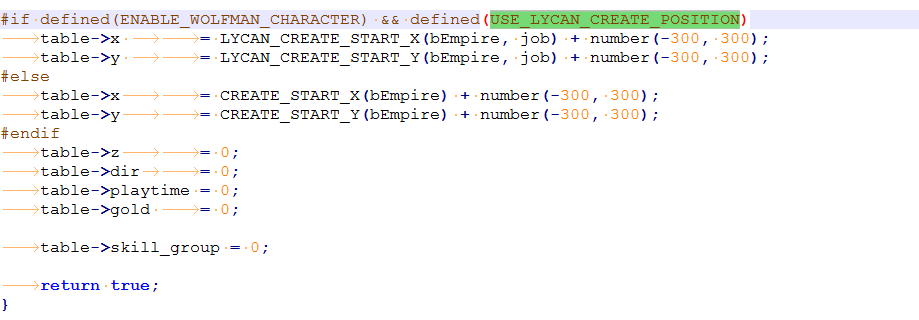
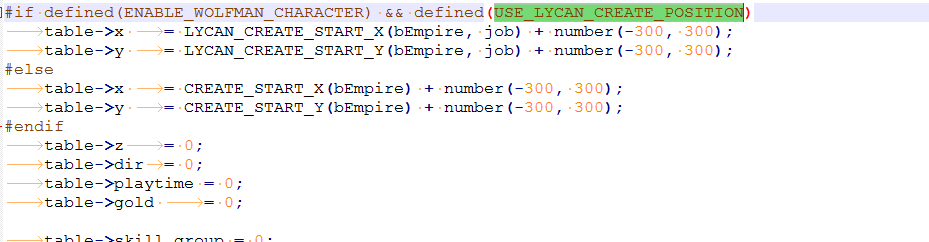
Not:Eklendikden Sonraki Halleri Fotoğrafdaki Gibi Olmalidir.
Ziyaretçiler için gizlenmiş link,görmek için üye olmalısınız!
Giriş yap veya üye ol.
Not:Eklendikden Sonraki Halleri Fotoğrafdaki Gibi Olmalidir.
Lycanı Kendi Mapında Başlatma Rehberi
Metin2 özel sunucularında gelişmiş sistemler kurmak isteyen geliştiriciler için Lycan, güçlü bir PvP odaklı yapıdır. Bu rehberde, Lycan sistemini kendi özel haritanızda başlatma sürecini adım adım ele alacağız. Bu işlem, hem server src hem de client tarafında bazı düzenlemeleri gerektirir. Bu nedenle, C++ bilgisi, Python script yazımı ve py GUI gibi konularda tecrübeli olmanız önerilir.
Lycan Nedir?
Lycan, Metin2 oyununda karakterinizi kurtadam gibi güçlü bir varlığa dönüştüren bir sistemdir. Bu sistem genellikle PvP sunucularında kullanılır ve karakterin gücünü belirli bir süre artırmayı sağlar. Lycan'ın doğru bir şekilde çalışması için gerekli scriptlerin, animasyonların ve harita ayarlarının yapılandırılması gerekir.
Harita Hazırlığı
Öncelikle, Lycan sistemini başlatmak istediğiniz haritayı tanımlamalısınız. Bu harita, genellikle bir dungeon ya da özel bir PvP alanı olabilir. Haritanın doğru şekilde client'e entegre edildiğinden emin olun. Harita dosyaları (.msc, .sct, .wnd) doğru şekilde düzenlenmeli ve sunucu tarafına aktarılmalıdır. Ayrıca, bu haritada Lycan sistemini tetikleyecek triggerlar veya event sistemleri tanımlanmalıdır.
C++ Tarafında Yapılacaklar
Sunucu tarafında Lycan sistemi genellikle C++ ile yazılmış bir özelliktir. Bu nedenle, game_src klasöründe gerekli fonksiyonları tanımlamalısınız. Lycan'ın başlatılması için özel bir command ya da skill tanımlanmalı ve bu komut, oyuncu haritaya girdiğinde veya belirli bir koşul sağlandığında çalışmalıdır. Ayrıca, karakterin dönüşüm sırasında sahip olacağı bonuslar, skill slotları ve görsel efektler de burada tanımlanır.
Python Tarafı ve UI Script
Client tarafında Lycan'ı başlatmak için genellikle bir UI penceresi veya buton gerekebilir. Bu UI, py_root altında tanımlanır ve py GUI kullanılarak tasarlanır. Uiscript ile arayüz oluşturulurken, Lycan aktivasyonu için bir toggle sistemi veya özel bir buton kullanılabilir. Bu buton, karakterin Lycan moduna geçmesini sağlayacak olan Python scriptini çağırır.
Trigger ve Event Ayarları
Haritada Lycan sistemini başlatmak için trigger eventleri tanımlamalısınız. Örneğin, belirli bir NPC ile etkileşim kurulduğunda veya belirli bir item kullanıldığında Lycan moduna geçilmelidir. Bu eventler, game server'da tanımlanmalı ve karakterin mevcut konumuna göre kontrol edilmelidir.
Pack ve Kaynak Kod Paylaşımı
Lycan sistemiyle ilgili tüm görsel ve ses dosyaları pack klasörüne eklenmelidir. Bu dosyalar, client tarafından doğru şekilde yüklenmelidir. Ayrıca, Lycan'ın çalışması için gerekli olan kaynak kodlar (src), hem auth hem de game server için düzenlenmelidir. Bu sayede karakterin dönüşümü hem sunucuda hem de client tarafında sorunsuz gerçekleşir.
Test ve Hata Ayıklama
Tüm yapılandırmalar tamamlandıktan sonra, Lycan sistemini test etmek önemlidir. Haritaya girip sistemle etkileşime geçmeli ve dönüşümün doğru şekilde gerçekleşip gerçekleşmediğini kontrol etmelisiniz. Gerekirse debug logları üzerinden hataları takip edebilirsiniz. Bu süreçte, db_core ve diğer core dosyalarında değişiklikler yaparken dikkatli olmalısınız.
Sonuç
Lycan sistemini kendi özel haritanızda başlatmak, Metin2 özel sunucularında yüksek seviye bir deneyim sunar. Bu işlem, hem teknik hem de yaratıcı yönlerden dikkatle planlanmalı ve uygulanmalıdır. Doğru yapılandırılmış bir Lycan sistemi, oyuncular için eğlenceli ve rekabetçi bir ortam yaratır.
Starting Lycan on Your Own Map Guide
For developers looking to implement advanced systems on their Metin2 private servers, Lycan is a powerful PvP-focused feature. In this guide, we will go over the process of launching the Lycan system on your own custom map step by step. This involves certain modifications on both the server src and client side. Therefore, it is recommended that you have experience with C++, Python scripting, and py GUI.
What is Lycan?
Lycan is a system in Metin2 that transforms your character into a powerful werewolf-like entity. This system is commonly used on PvP servers and allows for a temporary increase in character power. To ensure Lycan functions properly, scripts, animations, and map settings must be configured correctly.
Map Preparation
Firstly, define the map where you want to launch the Lycan system. This map is usually a dungeon or a special PvP area. Ensure the map is properly integrated into the client. The map files (.msc, .sct, .wnd) should be edited correctly and transferred to the server side. Additionally, triggers or event systems that activate the Lycan system within the map must be defined.
What Needs to Be Done in C++
On the server side, the Lycan system is typically implemented in C++. Therefore, you need to define the necessary functions in the game_src folder. A specific command or skill must be created to initiate Lycan, which activates when the player enters the map or a certain condition is met. Moreover, bonuses, skill slots, and visual effects that the character gains during transformation are defined here.
Python Side and UI Script
On the client side, a UI window or button is often required to activate Lycan. This UI is defined under py_root and designed using py GUI. When creating the interface with uiscript, a toggle system or special button can be used to initiate Lycan mode. This button calls the Python script responsible for triggering the character's transformation.
Trigger and Event Settings
You must define trigger events to start the Lycan system in the map. For example, interacting with a specific NPC or using a particular item should trigger Lycan mode. These events must be defined in the game server and checked based on the character's current location.
Pack and Source Code Sharing
All visual and audio files related to the Lycan system should be added to the pack folder. These files must be loaded correctly by the client. Additionally, the source codes (src) required for Lycan to work must be modified for both the auth and game server. This ensures the transformation occurs smoothly on both the server and client side.
Testing and Debugging
After all configurations are completed, it is crucial to test the Lycan system. Enter the map, interact with the system, and verify if the transformation occurs properly. If needed, you can track errors through debug logs. During this process, be careful when making changes to db_core and other core files.
Conclusion
Launching the Lycan system on your own custom map provides a high-level experience in Metin2 private servers. This process must be planned and executed carefully from both technical and creative perspectives. A well-configured Lycan system creates an entertaining and competitive environment for players.
