

Source :
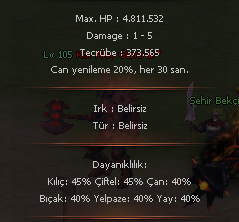
Mob Target sisteminde normal paylaşılanda bu kadar detay yoktur eklemek isteyenler olursa module'leri paylaşıyorum.
PythonNonPlayer.h
PythonNonPlayer.cpp
PythonNonPlayerModule.cpp
" ? " Tuşuna basınca açılacak yer;
uitarget.py
Mob Info System Yeni Modüller
Metin2 özel sunucularında geliştirme yaparken oyuncu deneyimini artırmak için önemli araçlardan biri olan Mob Info System sürekli güncellenmekte ve yeni modüllerle zenginleştirilmektedir. Bu sistem, oyuncuların oyun içindeki moblar hakkında detaylı bilgi almasını sağlar. Bu yazıda, Mob Info System'e son eklenen yeni modüllerden bahsedeceğiz ve bu modüllerin nasıl çalıştığını, ne gibi avantajlar sunduğunu anlatacağız.
Mob Info System Nedir?
Mob Info System, Metin2 özel sunucularında oyuncuların fareyle üzerine geldikleri moblar hakkında bilgi alabildikleri gelişmiş bir sistemdir. Klasik sistemde sadece isim ve level bilgisi gösterilirken, bu sistem sayesinde mobun canı, hasarı, zırhı, drop ettiği eşyalar ve hatta AI bilgileri gibi birçok detay görüntülenebilir.
Yeni Modül: Can ve Zırh Bilgisi
Geliştirilen yeni modül sayesinde, artık mobların can ve zırh bilgileri doğrudan sistem üzerinden gösterilebiliyor. Bu sayede oyuncular, hangi moba ne kadar hasar verebileceklerini ve kaç vuruşta düşmanı alt edebileceklerini tahmin edebiliyorlar. Özellikle PvP sistemlerinde bu bilgi stratejik olarak büyük önem taşıyor.
Yeni Modül: Drop Listesi
Diğer önemli bir eklenti ise drop listesi modülüdür. Bu modül sayesinde, bir mobun ne tür item'ları düşürebileceği önceden gösterilebiliyor. Oyuncular bu sayede hangi mobları daha karlı bulduklarını analiz edebiliyor ve hunt stratejilerini buna göre planlayabiliyorlar. Bu modül, DB Core üzerinde yapılandırılmaktadır ve her sunucuya özel özelleştirilebilir.
Yeni Modül: AI ve Davranış Bilgisi
Bazı özel Metin2 sunucularında, mobların davranışlarını ve AI sistemlerini bilmek strateji açısından kritik öneme sahiptir. Bu yeni modül sayesinde, oyuncular mobun saldırı modeli, kaçma ihtimali, grup saldırısı yapma durumu gibi bilgilere erişebiliyor. Bu modül, game core üzerinde yapılandırılır ve C++ tabanlı kodlamalarla entegre edilir.
Kurulum ve Entegrasyon
Modül kurulumları oldukça basittir. Py Root dosyalarına ekleme yapılırken, UIscript tarafında gerekli arayüz değişiklikleri yapılmalıdır. Sistem Python GUI ile entegre çalıştığından, kullanıcı dostu bir arayüze sahiptir. Ayrıca, Martysama tarafından geliştirilen bazı scriptlerle de uyumlu çalışmaktadır.
Sonuç
Mob Info System'in yeni modüllerle zenginleşmesi, Metin2 özel sunucularında oyuncu memnuniyetini ve oyun içi stratejik derinliği ciddi anlamda artırıyor. Oyun geliştiricileri için güçlü bir araç olan bu sistem, hem client tarafında hem de server tarafında kolayca özelleştirilebilir. Sunucunuzda bu modülleri kullanmak, oyuncularınızın deneyimini ciddi oranda artıracaktır.
Mob Info System New Modules
One of the important tools used in developing Metin2 private servers to enhance player experience is the Mob Info System, which is constantly updated and enriched with new modules. This system allows players to access detailed information about mobs within the game. In this article, we will discuss the latest modules added to the Mob Info System and explain how these modules work and what benefits they provide.
What is Mob Info System?
The Mob Info System is an advanced feature in Metin2 private servers that allows players to view information about mobs by hovering over them with their mouse. While only name and level were shown in the classic system, this system now enables players to see details such as health, damage, armor, items dropped, and even AI information of the mob.
New Module: Health and Armor Info
Thanks to the newly developed module, the health and armor values of mobs are now directly displayed through the system. This way, players can estimate how much damage they can deal to a mob and how many hits it will take to defeat the enemy. This information is strategically very important especially in PvP systems.
New Module: Drop List
Another significant addition is the drop list module. With this module, the items a mob may drop can be displayed in advance. This allows players to analyze which mobs are more profitable and plan their hunting strategies accordingly. This module is configured on the DB Core and can be customized for each server.
New Module: AI and Behavior Info
In some special Metin2 servers, knowing the behavior patterns and AI systems of mobs is critically important strategically. Thanks to this new module, players can access information such as a mob's attack pattern, probability of fleeing, and whether it attacks in groups. This module is configured on the game core and integrated via C++ based coding.
Installation and Integration
Module installations are quite simple. Additions are made to py root files, while necessary interface changes are made on the UIscript side. Since the system operates integrated with Python GUI, it features a user-friendly interface. Additionally, it works compatibly with scripts developed by Martysama.
Conclusion
The enrichment of the Mob Info System with new modules significantly increases player satisfaction and in-game strategic depth in Metin2 private servers. As a powerful tool for game developers, this system can be easily customized on both the client and server sides. Using these modules on your server will greatly enhance your players' gaming experience.
Ziyaretçiler için gizlenmiş link,görmek için üye olmalısınız!
Giriş yap veya üye ol.
Mob Target sisteminde normal paylaşılanda bu kadar detay yoktur eklemek isteyenler olursa module'leri paylaşıyorum.
PythonNonPlayer.h
Kod:
#ifdef ENABLE_TARGET_INFORMATION_SYSTEM // TARGET_INFO DWORD GetMonsterMaxHP(DWORD dwVnum); DWORD GetMonsterRaceFlag(DWORD dwVnum); DWORD GetMonsterLevel(DWORD dwVnum); DWORD GetMonsterDamage1(DWORD dwVnum); DWORD GetMonsterDamage2(DWORD dwVnum); DWORD GetMonsterExp(DWORD dwVnum); float GetMonsterDamageMultiply(DWORD dwVnum); DWORD GetMonsterST(DWORD dwVnum); DWORD GetMonsterDX(DWORD dwVnum); bool IsMonsterStone(DWORD dwVnum); DWORD GetMobResist(DWORD dwVnum, BYTE bResistNum); BYTE GetMobRegenCycle(DWORD dwVnum); BYTE GetMobRegenPercent(DWORD dwVnum); DWORD GetMobGoldMin(DWORD dwVnum); DWORD GetMobGoldMax(DWORD dwVnum); #endifPythonNonPlayer.cpp
Kod:
#ifdef ENABLE_TARGET_INFORMATION_SYSTEM DWORD CPythonNonPlayer::GetMonsterMaxHP(DWORD dwVnum) { const CPythonNonPlayer::TMobTable * c_pTable = GetTable(dwVnum); if (!c_pTable) { DWORD dwMaxHP = 0; return dwMaxHP; } return c_pTable->dwMaxHP; } DWORD CPythonNonPlayer::GetMonsterRaceFlag(DWORD dwVnum) { const CPythonNonPlayer::TMobTable * c_pTable = GetTable(dwVnum); if (!c_pTable) { DWORD dwRaceFlag = 0; return dwRaceFlag; } return c_pTable->dwRaceFlag; } DWORD CPythonNonPlayer::GetMonsterLevel(DWORD dwVnum) { const CPythonNonPlayer::TMobTable * c_pTable = GetTable(dwVnum); if (!c_pTable) { DWORD level = 0; return level; } return c_pTable->bLevel; } DWORD CPythonNonPlayer::GetMonsterDamage1(DWORD dwVnum) { const CPythonNonPlayer::TMobTable * c_pTable = GetTable(dwVnum); if (!c_pTable) { DWORD range = 0; return range; } return c_pTable->dwDamageRange[0]; } DWORD CPythonNonPlayer::GetMonsterDamage2(DWORD dwVnum) { const CPythonNonPlayer::TMobTable * c_pTable = GetTable(dwVnum); if (!c_pTable) { DWORD range = 0; return range; } return c_pTable->dwDamageRange[1]; } DWORD CPythonNonPlayer::GetMonsterExp(DWORD dwVnum) { const CPythonNonPlayer::TMobTable * c_pTable = GetTable(dwVnum); if (!c_pTable) { DWORD dwExp = 0; return dwExp; } return c_pTable->dwExp; } float CPythonNonPlayer::GetMonsterDamageMultiply(DWORD dwVnum) { const CPythonNonPlayer::TMobTable * c_pTable = GetTable(dwVnum); if (!c_pTable) { DWORD fDamMultiply = 0; return fDamMultiply; } return c_pTable->fDamMultiply; } DWORD CPythonNonPlayer::GetMonsterST(DWORD dwVnum) { const CPythonNonPlayer::TMobTable * c_pTable = GetTable(dwVnum); if (!c_pTable) { DWORD bStr = 0; return bStr; } return c_pTable->bStr; } DWORD CPythonNonPlayer::GetMonsterDX(DWORD dwVnum) { const CPythonNonPlayer::TMobTable * c_pTable = GetTable(dwVnum); if (!c_pTable) { DWORD bDex = 0; return bDex; } return c_pTable->bDex; } bool CPythonNonPlayer::IsMonsterStone(DWORD dwVnum) { const CPythonNonPlayer::TMobTable * c_pTable = GetTable(dwVnum); if (!c_pTable) { DWORD bType = 0; return false; } return c_pTable->bType == 2; } #endifPythonNonPlayerModule.cpp
Kod:
#ifdef ENABLE_TARGET_INFORMATION_SYSTEM PyObject * nonplayerGetMonsterMaxHP(PyObject * poSelf, PyObject * poArgs) { int race; if (!PyTuple_GetInteger(poArgs, 0, &race)) return Py_BuildException(); CPythonNonPlayer& rkNonPlayer = CPythonNonPlayer::Instance(); return Py_BuildValue("i", rkNonPlayer.GetMonsterMaxHP(race)); } PyObject * nonplayerGetRaceNumByVID(PyObject * poSelf, PyObject * poArgs) { int iVirtualID; if (!PyTuple_GetInteger(poArgs, 0, &iVirtualID)) return Py_BuildException(); CInstanceBase * pInstance = CPythonCharacterManager::Instance().GetInstancePtr(iVirtualID); if (!pInstance) return Py_BuildValue("i", -1); const CPythonNonPlayer::TMobTable * pMobTable = CPythonNonPlayer::Instance().GetTable(pInstance->GetVirtualNumber()); if (!pMobTable) return Py_BuildValue("i", -1); return Py_BuildValue("i", pMobTable->dwVnum); } PyObject * nonplayerGetMonsterRaceFlag(PyObject * poSelf, PyObject * poArgs) { int race; if (!PyTuple_GetInteger(poArgs, 0, &race)) return Py_BuildException(); CPythonNonPlayer& rkNonPlayer = CPythonNonPlayer::Instance(); return Py_BuildValue("i", rkNonPlayer.GetMonsterRaceFlag(race)); } PyObject * nonplayerGetMonsterLevel(PyObject * poSelf, PyObject * poArgs) { int race; if (!PyTuple_GetInteger(poArgs, 0, &race)) return Py_BuildException(); CPythonNonPlayer& rkNonPlayer = CPythonNonPlayer::Instance(); return Py_BuildValue("i", rkNonPlayer.GetMonsterLevel(race)); } PyObject * nonplayerGetMonsterDamage(PyObject * poSelf, PyObject * poArgs) { int race; if (!PyTuple_GetInteger(poArgs, 0, &race)) return Py_BuildException(); CPythonNonPlayer& rkNonPlayer = CPythonNonPlayer::Instance(); DWORD dmg1 = rkNonPlayer.GetMonsterDamage1(race); DWORD dmg2 = rkNonPlayer.GetMonsterDamage2(race); return Py_BuildValue("ii", dmg1, dmg2); } PyObject * nonplayerGetMonsterExp(PyObject * poSelf, PyObject * poArgs) { int race; if (!PyTuple_GetInteger(poArgs, 0, &race)) return Py_BuildException(); CPythonNonPlayer& rkNonPlayer = CPythonNonPlayer::Instance(); return Py_BuildValue("i", rkNonPlayer.GetMonsterExp(race)); } PyObject * nonplayerGetMonsterDamageMultiply(PyObject * poSelf, PyObject * poArgs) { int race; if (!PyTuple_GetInteger(poArgs, 0, &race)) return Py_BuildException(); CPythonNonPlayer& rkNonPlayer = CPythonNonPlayer::Instance(); return Py_BuildValue("f", rkNonPlayer.GetMonsterDamageMultiply(race)); } PyObject * nonplayerGetMonsterST(PyObject * poSelf, PyObject * poArgs) { int race; if (!PyTuple_GetInteger(poArgs, 0, &race)) return Py_BuildException(); CPythonNonPlayer& rkNonPlayer = CPythonNonPlayer::Instance(); return Py_BuildValue("i", rkNonPlayer.GetMonsterST(race)); } PyObject * nonplayerGetMonsterDX(PyObject * poSelf, PyObject * poArgs) { int race; if (!PyTuple_GetInteger(poArgs, 0, &race)) return Py_BuildException(); CPythonNonPlayer& rkNonPlayer = CPythonNonPlayer::Instance(); return Py_BuildValue("i", rkNonPlayer.GetMonsterDX(race)); } PyObject * nonplayerIsMonsterStone(PyObject * poSelf, PyObject * poArgs) { int race; if (!PyTuple_GetInteger(poArgs, 0, &race)) return Py_BuildException(); CPythonNonPlayer& rkNonPlayer = CPythonNonPlayer::Instance(); return Py_BuildValue("i", rkNonPlayer.IsMonsterStone(race) ? 1 : 0); } PyObject * nonplayerGetMobRegenCycle(PyObject * poSelf, PyObject * poArgs) { int race; if (!PyTuple_GetInteger(poArgs, 0, &race)) return Py_BuildException(); CPythonNonPlayer& rkNonPlayer = CPythonNonPlayer::Instance(); return Py_BuildValue("i", rkNonPlayer.GetMobRegenCycle(race)); } PyObject * nonplayerGetMobRegenPercent(PyObject * poSelf, PyObject * poArgs) { int race; if (!PyTuple_GetInteger(poArgs, 0, &race)) return Py_BuildException(); CPythonNonPlayer& rkNonPlayer = CPythonNonPlayer::Instance(); return Py_BuildValue("i", rkNonPlayer.GetMobRegenPercent(race)); } PyObject * nonplayerGetMobGoldMin(PyObject * poSelf, PyObject * poArgs) { int race; if (!PyTuple_GetInteger(poArgs, 0, &race)) return Py_BuildException(); CPythonNonPlayer& rkNonPlayer = CPythonNonPlayer::Instance(); return Py_BuildValue("i", rkNonPlayer.GetMobGoldMin(race)); } PyObject * nonplayerGetMobGoldMax(PyObject * poSelf, PyObject * poArgs) { int race; if (!PyTuple_GetInteger(poArgs, 0, &race)) return Py_BuildException(); CPythonNonPlayer& rkNonPlayer = CPythonNonPlayer::Instance(); return Py_BuildValue("i", rkNonPlayer.GetMobGoldMax(race)); } PyObject * nonplayerGetMobResist(PyObject * poSelf, PyObject * poArgs) { int race; if (!PyTuple_GetInteger(poArgs, 0, &race)) return Py_BuildException(); BYTE resistNum; if (!PyTuple_GetInteger(poArgs, 1, &resistNum)) return Py_BuildException(); CPythonNonPlayer& rkNonPlayer = CPythonNonPlayer::Instance(); return Py_BuildValue("i", rkNonPlayer.GetMobResist(race, resistNum)); } #endif /* ----------------------------------- ----------------------------------- */ #ifdef ENABLE_TARGET_INFORMATION_SYSTEM // TARGET_INFO { "GetRaceNumByVID", nonplayerGetRaceNumByVID, METH_VARARGS }, { "GetMonsterMaxHP", nonplayerGetMonsterMaxHP, METH_VARARGS }, { "GetMonsterRaceFlag", nonplayerGetMonsterRaceFlag, METH_VARARGS }, { "GetMonsterLevel", nonplayerGetMonsterLevel, METH_VARARGS }, { "GetMonsterDamage", nonplayerGetMonsterDamage, METH_VARARGS }, { "GetMonsterExp", nonplayerGetMonsterExp, METH_VARARGS }, { "GetMonsterDamageMultiply", nonplayerGetMonsterDamageMultiply, METH_VARARGS }, { "GetMonsterST", nonplayerGetMonsterST, METH_VARARGS }, { "GetMonsterDX", nonplayerGetMonsterDX, METH_VARARGS }, { "IsMonsterStone", nonplayerIsMonsterStone, METH_VARARGS }, {"GetMobRegenCycle", nonplayerGetMobRegenCycle, METH_VARARGS}, {"GetMobRegenPercent", nonplayerGetMobRegenPercent, METH_VARARGS}, {"GetMobGoldMin", nonplayerGetMobGoldMin, METH_VARARGS}, {"GetMobGoldMax", nonplayerGetMobGoldMax, METH_VARARGS}, {"GetResist", nonplayerGetMobResist, METH_VARARGS}, #endif" ? " Tuşuna basınca açılacak yer;
uitarget.py
Kod:
def __LoadInformation_Default(self, race): self.AppendSeperator() self.AppendTextLine(localeInfo.TARGET_INFO_MAX_HP % localeInfo.NumberToString(nonplayer.GetMonsterMaxHP(race))) # calc att damage monsterLevel = nonplayer.GetMonsterLevel(race) fHitRate = self.__LoadInformation_Default_GetHitRate(race) iDamMin, iDamMax = nonplayer.GetMonsterDamage(race) iDamMin = int((iDamMin + nonplayer.GetMonsterST(race)) * 2 * fHitRate) + monsterLevel * 2 iDamMax = int((iDamMax + nonplayer.GetMonsterST(race)) * 2 * fHitRate) + monsterLevel * 2 iDef = player.GetStatus(player.DEF_GRADE) * (100 + player.GetStatus(player.DEF_BONUS)) / 100 fDamMulti = nonplayer.GetMonsterDamageMultiply(race) iDamMin = int(max(0, iDamMin - iDef) * fDamMulti) iDamMax = int(max(0, iDamMax - iDef) * fDamMulti) if iDamMin < 1: iDamMin = 1 if iDamMax < 5: iDamMax = 5 self.AppendTextLine(localeInfo.TARGET_INFO_DAMAGE % (str(iDamMin), str(iDamMax))) idx = min(len(self.EXP_BASE_LVDELTA) - 1, max(0, (monsterLevel + 15) - player.GetStatus(player.LEVEL))) iExp = nonplayer.GetMonsterExp(race) * self.EXP_BASE_LVDELTA[idx] / 100 self.AppendTextLine(localeInfo.TARGET_INFO_EXP % localeInfo.NumberToString(iExp)) # self.AppendTextLine(localeInfo.TARGET_INFO_GOLD_MIN_MAX % (localeInfo.NumberToString(nonplayer.GetMobGoldMin(race)), localeInfo.NumberToString(nonplayer.GetMobGoldMax(race)))) self.AppendTextLine(localeInfo.TARGET_INFO_REGEN_INFO % (nonplayer.GetMobRegenPercent(race), nonplayer.GetMobRegenCycle(race)))Mob Info System Yeni Modüller
Metin2 özel sunucularında geliştirme yaparken oyuncu deneyimini artırmak için önemli araçlardan biri olan Mob Info System sürekli güncellenmekte ve yeni modüllerle zenginleştirilmektedir. Bu sistem, oyuncuların oyun içindeki moblar hakkında detaylı bilgi almasını sağlar. Bu yazıda, Mob Info System'e son eklenen yeni modüllerden bahsedeceğiz ve bu modüllerin nasıl çalıştığını, ne gibi avantajlar sunduğunu anlatacağız.
Mob Info System Nedir?
Mob Info System, Metin2 özel sunucularında oyuncuların fareyle üzerine geldikleri moblar hakkında bilgi alabildikleri gelişmiş bir sistemdir. Klasik sistemde sadece isim ve level bilgisi gösterilirken, bu sistem sayesinde mobun canı, hasarı, zırhı, drop ettiği eşyalar ve hatta AI bilgileri gibi birçok detay görüntülenebilir.
Yeni Modül: Can ve Zırh Bilgisi
Geliştirilen yeni modül sayesinde, artık mobların can ve zırh bilgileri doğrudan sistem üzerinden gösterilebiliyor. Bu sayede oyuncular, hangi moba ne kadar hasar verebileceklerini ve kaç vuruşta düşmanı alt edebileceklerini tahmin edebiliyorlar. Özellikle PvP sistemlerinde bu bilgi stratejik olarak büyük önem taşıyor.
Yeni Modül: Drop Listesi
Diğer önemli bir eklenti ise drop listesi modülüdür. Bu modül sayesinde, bir mobun ne tür item'ları düşürebileceği önceden gösterilebiliyor. Oyuncular bu sayede hangi mobları daha karlı bulduklarını analiz edebiliyor ve hunt stratejilerini buna göre planlayabiliyorlar. Bu modül, DB Core üzerinde yapılandırılmaktadır ve her sunucuya özel özelleştirilebilir.
Yeni Modül: AI ve Davranış Bilgisi
Bazı özel Metin2 sunucularında, mobların davranışlarını ve AI sistemlerini bilmek strateji açısından kritik öneme sahiptir. Bu yeni modül sayesinde, oyuncular mobun saldırı modeli, kaçma ihtimali, grup saldırısı yapma durumu gibi bilgilere erişebiliyor. Bu modül, game core üzerinde yapılandırılır ve C++ tabanlı kodlamalarla entegre edilir.
Kurulum ve Entegrasyon
Modül kurulumları oldukça basittir. Py Root dosyalarına ekleme yapılırken, UIscript tarafında gerekli arayüz değişiklikleri yapılmalıdır. Sistem Python GUI ile entegre çalıştığından, kullanıcı dostu bir arayüze sahiptir. Ayrıca, Martysama tarafından geliştirilen bazı scriptlerle de uyumlu çalışmaktadır.
Sonuç
Mob Info System'in yeni modüllerle zenginleşmesi, Metin2 özel sunucularında oyuncu memnuniyetini ve oyun içi stratejik derinliği ciddi anlamda artırıyor. Oyun geliştiricileri için güçlü bir araç olan bu sistem, hem client tarafında hem de server tarafında kolayca özelleştirilebilir. Sunucunuzda bu modülleri kullanmak, oyuncularınızın deneyimini ciddi oranda artıracaktır.
Mob Info System New Modules
One of the important tools used in developing Metin2 private servers to enhance player experience is the Mob Info System, which is constantly updated and enriched with new modules. This system allows players to access detailed information about mobs within the game. In this article, we will discuss the latest modules added to the Mob Info System and explain how these modules work and what benefits they provide.
What is Mob Info System?
The Mob Info System is an advanced feature in Metin2 private servers that allows players to view information about mobs by hovering over them with their mouse. While only name and level were shown in the classic system, this system now enables players to see details such as health, damage, armor, items dropped, and even AI information of the mob.
New Module: Health and Armor Info
Thanks to the newly developed module, the health and armor values of mobs are now directly displayed through the system. This way, players can estimate how much damage they can deal to a mob and how many hits it will take to defeat the enemy. This information is strategically very important especially in PvP systems.
New Module: Drop List
Another significant addition is the drop list module. With this module, the items a mob may drop can be displayed in advance. This allows players to analyze which mobs are more profitable and plan their hunting strategies accordingly. This module is configured on the DB Core and can be customized for each server.
New Module: AI and Behavior Info
In some special Metin2 servers, knowing the behavior patterns and AI systems of mobs is critically important strategically. Thanks to this new module, players can access information such as a mob's attack pattern, probability of fleeing, and whether it attacks in groups. This module is configured on the game core and integrated via C++ based coding.
Installation and Integration
Module installations are quite simple. Additions are made to py root files, while necessary interface changes are made on the UIscript side. Since the system operates integrated with Python GUI, it features a user-friendly interface. Additionally, it works compatibly with scripts developed by Martysama.
Conclusion
The enrichment of the Mob Info System with new modules significantly increases player satisfaction and in-game strategic depth in Metin2 private servers. As a powerful tool for game developers, this system can be easily customized on both the client and server sides. Using these modules on your server will greatly enhance your players' gaming experience.
