

Selamun aleyküm herkese iyi forumlar...
@
For @
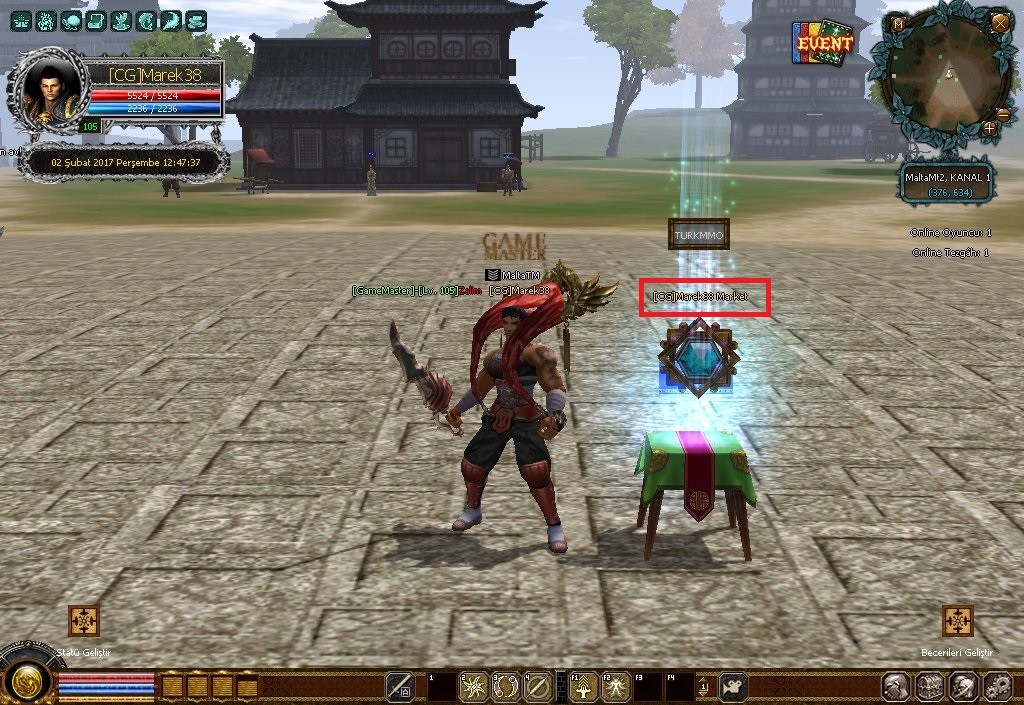
Olay şudur
Client source/UserInterface/InstanceBaseEffect.cpp açılır
Aratılır...
Altına eklenir...
Not= Sizin offline shop npc konunuz neyse 30000 yerine onu yazın örneğin benimki 30002
PythonMiniMap.cpp açılır
Aratılır...
Altına eklenir
Aratılır
değiştirilir
Not = 30000 npc kodu 'dur kendi eğer farklı bir npc görünümü felan yaptıysanız değişebilir ama orjinali budur... Orjinal görünümse ellemeyin...
Aratılır...
Altına eklenir
PythonMiniMap.h açılır
aratılır...
Altına eklenir
InstanceBase.h açılır
aratılır...
altına eklenir
PythonCharacterManagerModule.cpp açılır
Aratılır...
altına eklenir
şimdi root'un içinden introloading.py açılır
aratılır...
altına eklenir
Bu şekilde

Colorinfo.py açılır
Altına eklenir...
@
Ziyaretçiler için gizlenmiş link,görmek için üye olmalısınız!
Giriş yap veya üye ol.
; Arkadaşımızın isteği üzerine belki işine yarayanlar olacak onun için paylaşıyorum...For @
Ziyaretçiler için gizlenmiş link,görmek için üye olmalısınız!
Giriş yap veya üye ol.
;Olay şudur
Client source/UserInterface/InstanceBaseEffect.cpp açılır
Aratılır...
Kod:
IAbstractPlayer& rPlayer=IAbstractPlayer::GetSingleton(); if (rPlayer.IsPartyMemberByVID(GetVirtualID())) return NAMECOLOR_PARTY; return NAMECOLOR_PC + GetEmpireID(); }Altına eklenir...
Ziyaretçiler için gizlenmiş link,görmek için üye olmalısınız!
Giriş yap veya üye ol.
Not= Sizin offline shop npc konunuz neyse 30000 yerine onu yazın örneğin benimki 30002
PythonMiniMap.cpp açılır
Aratılır...
Kod:
m_WarpPositionVector.clear();Altına eklenir
Kod:
m_OfflineShopPositionVector.clear();Aratılır
Kod:
else if (pkInstEach->IsNPC()) { aMarkPosition.m_fX = ( m_fWidth - (float)m_WhiteMark.GetWidth() ) / 2.0f + fDistanceFromCenterX + m_fScreenX; aMarkPosition.m_fY = ( m_fHeight - (float)m_WhiteMark.GetHeight() ) / 2.0f + fDistanceFromCenterY + m_fScreenY; m_NPCPositionVector.push_back(aMarkPosition); }değiştirilir
Ziyaretçiler için gizlenmiş link,görmek için üye olmalısınız!
Giriş yap veya üye ol.
Not = 30000 npc kodu 'dur kendi eğer farklı bir npc görünümü felan yaptıysanız değişebilir ama orjinali budur... Orjinal görünümse ellemeyin...
Aratılır...
Ziyaretçiler için gizlenmiş link,görmek için üye olmalısınız!
Giriş yap veya üye ol.
Altına eklenir
Ziyaretçiler için gizlenmiş link,görmek için üye olmalısınız!
Giriş yap veya üye ol.
PythonMiniMap.h açılır
aratılır...
Kod:
TInstanceMarkPositionVectorm_WarpPositionVector;Altına eklenir
Kod:
TInstanceMarkPositionVectorm_OfflineShopPositionVector;InstanceBase.h açılır
aratılır...
Kod:
NAMECOLOR_WAYPOINT,altına eklenir
Kod:
NAMECOLOR_OFFLINE_SHOP, NAMECOLOR_OFFLINE_SHOP_MINIMAP,PythonCharacterManagerModule.cpp açılır
Aratılır...
Kod:
PyModule_AddIntConstant(poModule, "NAMECOLOR_WAYPOINT", CInstanceBase::NAMECOLOR_WAYPOINT);altına eklenir
Ziyaretçiler için gizlenmiş link,görmek için üye olmalısınız!
Giriş yap veya üye ol.
şimdi root'un içinden introloading.py açılır
aratılır...
Kod:
chrmgr.NAMECOLOR_EMPIRE_MOB : colorInfo.CHR_NAME_RGB_EMPIRE_MOB, chrmgr.NAMECOLOR_EMPIRE_NPC : colorInfo.CHR_NAME_RGB_EMPIRE_NPC, chrmgr.NAMECOLOR_EMPIRE_PC+1 : colorInfo.CHR_NAME_RGB_EMPIRE_PC_A, chrmgr.NAMECOLOR_EMPIRE_PC+2 : colorInfo.CHR_NAME_RGB_EMPIRE_PC_B, chrmgr.NAMECOLOR_EMPIRE_PC+3 : colorInfo.CHR_NAME_RGB_EMPIRE_PC_C, }altına eklenir
Ziyaretçiler için gizlenmiş link,görmek için üye olmalısınız!
Giriş yap veya üye ol.
Bu şekilde
Colorinfo.py açılır
Kod:
CHR_NAME_RGB_WAYPOINT = (255, 255, 255)Altına eklenir...
Kod:
CHR_NAME_RGB_OFFLINE_SHOP = (255, 215, 76) CHR_NAME_RGB_OFFLINE_SHOP_MINIMAP = (0, 166, 255)Offline Shop İsmi Rengini Ayarlama ve Mini Map'ta Gösterme
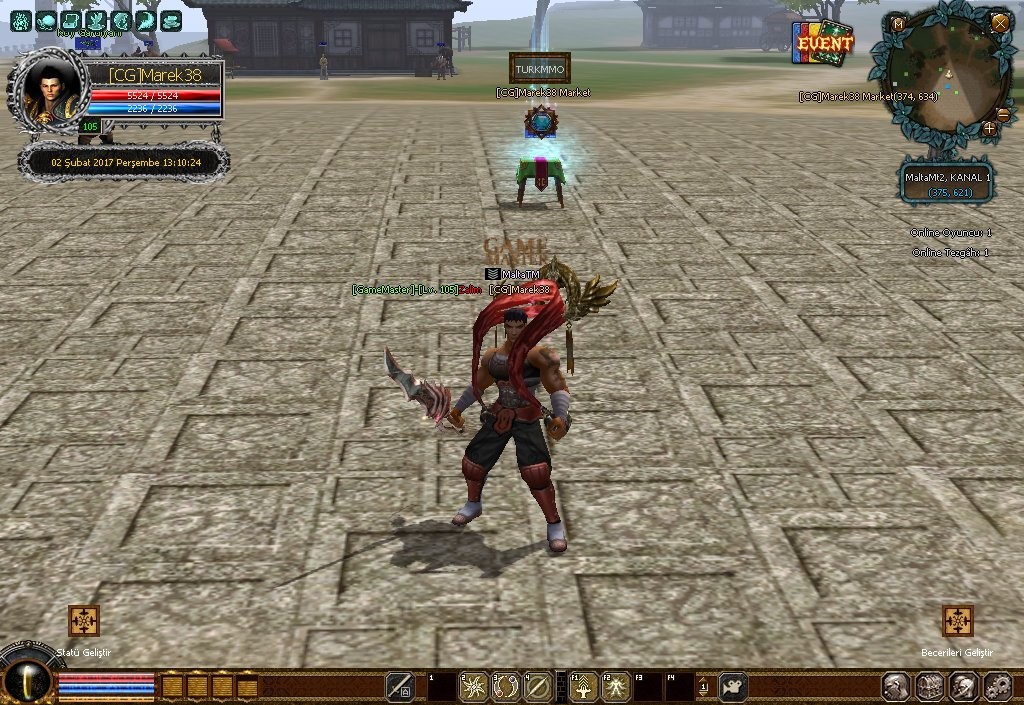
Metin2 özel sunucularında oyun içi deneyimi artırmak için geliştiriciler sürekli yenilikler eklemektedir. Bu yeniliklerden birisi de offline shop sistemidir. Oyuncuların oyun kapalıyken bile eşya alıp satması için geliştirilen bu sistemde, oyuncu isimleri belirli renklerle gösterilebilir. Ayrıca bu isimlerin mini haritada da belirmesi sağlanabilir. Bu yazıda, offline shop ismi rengini nasıl ayarlayacağınızı ve bu isimlerin mini map üzerinde nasıl görüneceğini anlatacağız.
Offline Shop Sistemi Nedir?
Metin2 özel sunucularında, oyuncuların aktif olmaması durumunda bile market gibi davranan offline shop sistemi oldukça popülerdir. Bu sistem sayesinde oyuncular, kendi envanterlerindeki eşyaları belirli bir fiyatla satmak için dükkan açabilirler. Bu esnada, o oyuncunun offline shop ismi diğer oyuncular tarafından görülebilir ve bu ismin rengi üzerinden bazı bilgiler çıkarılabilir. Örneğin, bir oyuncunun offline shop ismi kırmızı ise, bu oyun içinde PvP yapmış bir oyuncudur. Bu tür sistemler, hem oyun içi ekonomiyi destekler hem de aktiflik sağlar.
Offline Shop İsmi Rengi Ayarı
Offline shop isimlerinin rengini değiştirmek için, öncelikle client-side ve server-side kodların düzenlenmesi gerekir. Genellikle bu işlem, uiscript[/COORD] dosyalarında ve game server üzerindeki C++ kaynak kodları üzerinden yapılır. Oyuncunun statüsüne göre (örneğin, PvP yapan, normal oyuncu, GM vs.) farklı renkler atanabilir. Bu durumda, offline shop isimleri için özel bir fonksiyon yazılır ve bu fonksiyon, isim render edilirken çağrılır. Renk tanımlamaları genellikle RGB formatında verilir ve istenen rengi yansıtmak için doğru hexadecimal kodu kullanmak önemlidir.
Mini Map'ta Offline Shop Gösterimi[/COORD]
Oyuncunun offline shop açtığı konumun mini haritada gösterilmesi, hem oyun içi etkileşimi artırır hem de diğer oyuncuların ilgili konuma kolayca ulaşmasını sağlar. Bu işlem için PyGUI veya Python GUI sistemleri üzerinden geliştirme yapılmalıdır. Oyuncunun offline shop açtığı yerde bir simge veya isim belirtmek için, minimap.py dosyası düzenlenmelidir. Burada, offline shop sahibinin ismi belirli bir renkte ve sembol ile ekrana çizilir. Bu işlem sırasında, sunucudan gelen veriler doğru şekilde işlenmeli ve GUI tarafında uygun şekilde render edilmelidir. Sunucu tarafında, offline shop açıldığında ilgili konum bilgisi client'a gönderilir ve client, bu bilgiyi mini harita üzerinde işler.
Teknik Uygulama Adımları
1. Oyuncunun offline shop açtığı zaman, server-side'da bir event tetiklenmelidir.
2. Bu event sonucu, oyuncunun konumu ve ismi, client'a gönderilir.
3. Client tarafında, bu bilgi alınarak minimap.py dosyasında render edilir.
4. Aynı zamanda, offline shop isminin rengi, oyuncunun statüsüne göre belirlenir.
5. Tüm bu işlemler için, C++ server src ve client src düzenlenebilir.
Not: Bu tür gelişmiş sistemlerde hata ayıklama ve test süreci oldukça önemlidir. Özellikle client-server senkronizasyonu eksiksiz sağlanmalıdır. Aksi takdirde, offline shop isimleri görünmeyebilir ya da yanlış konumlarda görülebilir.
Setting Offline Shop Name Color and Showing on Minimap
In Metin2 private servers, developers constantly add innovations to enhance the in-game experience. One of these innovations is the offline shop system. This system allows players to buy and sell items even while their game is closed. In this article, we will explain how to set the color of offline shop names and how these names can be displayed on the minimap.
What Is The Offline Shop System?
In Metin2 private servers, the offline shop system allows players to act like merchants even when they are not online. With this system, players can open shops and sell items from their inventory at set prices. During this process, the name of the player's offline shop can be visible to other players, and certain information can be inferred from its color. For example, if a player's offline shop name appears in red, it may indicate that the player has engaged in PvP in the game. Such systems support both in-game economy and activity levels.
Setting Offline Shop Name Colors
To change the color of offline shop names, you need to modify both client-side and server-side code. Usually, this is done through uiscript files and C++ source codes on the game server. Different colors can be assigned based on the player's status (e.g., PvP-active, regular player, GM). A custom function is written for offline shop names, and this function is called when rendering the name. Color definitions are usually provided in RGB format, and using the correct hex code to reflect the desired color is important.
Displaying Offline Shops on the Minimap
Showing the location where a player opened an offline shop on the minimap increases in-game interaction and helps other players easily navigate to that area. This requires development via PyGUI or Python GUI systems. To display an icon or the player's name where the offline shop was opened, the minimap.py file must be modified. Here, the shop owner's name is rendered with a specific color and symbol on the screen. During this process, data sent from the server must be processed correctly and rendered properly on the GUI side. When an offline shop is opened, location data should be sent to the client, which then renders this information onto the minimap.
Technical Implementation Steps
1. An event should be triggered server-side when a player opens an offline shop.
2. As a result of this event, the player's location and name are sent to the client.
3. On the client side, this information is received and rendered in the minimap.py file.
4. Meanwhile, the color of the offline shop name is determined based on the player's status.
5. For all these operations, the C++ server src and client src can be modified.
Note: Debugging and testing processes are very important in such advanced systems. Especially, client-server synchronization must be flawless; otherwise, offline shop names may not appear or appear in incorrect locations.
