

MERHABA ARKADAŞLAR BUGUN SİZE OYUN İÇİ GÖREVLERDE YER ALMASINIZ İSTEDİĞİNİZ OYUN YARDIM QUEST İNİ PAYLAŞACAĞIM TAMAMEN KENDİ YAPIMIMDIR.
ÖNCELİKLE VERDİĞİM DOSYAYI İNDİRİN
Virüs Total
daha sonra filezilladan bu dosyayı cd/usr/game/share/locale/turkey/quest içerisine atın.
daha sonra putty e bağlanıp şunu yazın
cd /usr/game/share/locale/turkey/quest [ENTER]
./qc oyun_yardım.lua [ENTER]
DAHA SONRA OYUNA GİRİP GM İLE /reload q yapıp karakter atın ve bitti.
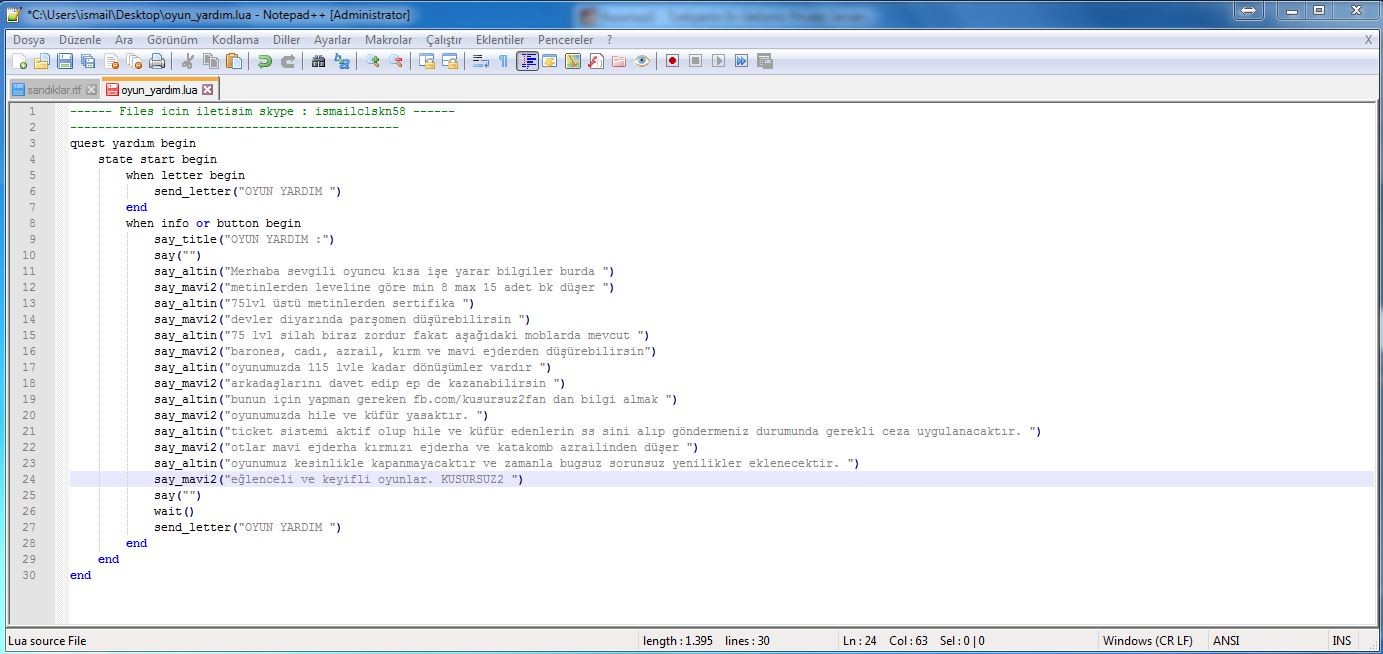
QUESTİN İÇİ RESİMDEKİ GİBİDİR İSTEDİĞİNİZ GİBİ DÜZENLEYEBİLİRSİNİZ
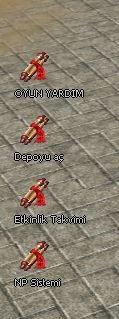
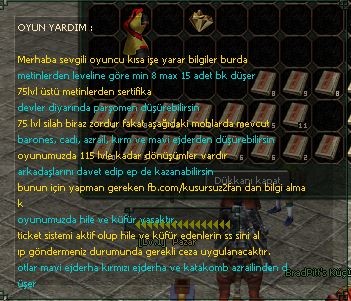
OYUN İÇİ GÖRÜNTÜSÜ
BİR TEŞEKKÜRÜ ÇOK GÖRMEZSENİZ...
Oyun İçi Yardım Penceresi Görevi Quest Oluşturma Detayı
Metin2 oyununda quest sistematiği, oyuncuların oyun içindeki ilerlemesini yönlendiren en temel yapı taşlarından biridir. Bu yapı sayesinde hem hikaye unsurları oyuna entegre edilir hem de oyuncuya belirli görevler verilerek deneyim kazandırılır. Bu yazıda özellikle oyun içi yardım penceresi görevi olarak bilinen.quest oluşturma sürecine odaklanacağız. Quest geliştirme, hem sunucu sahipleri hem de mod geliştiricileri için kritik bir beceridir.
Oyun içi yardım penceresi, Metin2 oyununda oyuncuların mevcut görevleri takip edebildiği, görev adımlarını görüntüleyebildiği önemli bir arayüzdür. Bir quest yazarken bu pencereye görev detaylarının doğru şekilde aktarılması, kullanıcı deneyimini doğrudan etkiler. Bu nedenle quest script yazarken, görevin başlangıcı, ilerleme durumu ve tamamlanması gibi adımlar dikkatlice tanımlanmalıdır.
Metin2 quest sistemi genellikle Lua dilinde yazılmaktadır. Lua scriptleri ile hem basit görevler hem de karmaşık quest chain yapıları oluşturulabilir. Yardım penceresi, görevin başlığı, açıklaması ve mevcut durumunu gösterir. Bu yüzden quest begin ve quest end tanımlamaları doğru yapılmalıdır.
Bir quest dosyası hazırlarken ilk adım, oyun içinde görevi başlatan trigger mekanizmasını kurmaktır. Genellikle bir NPC üzerinden tetiklenen görevler, oyuncu o NPC ile etkileşim kurduğunda başlatılır. Ardından quest state yönetimi önem kazanır. Oyuncunun hangi aşamada olduğu, hangi eylemleri gerçekleştirmesi gerektiği gibi durumlar, flag ve state değişkenleri ile yönetilir.
Yardım penceresi, oyuncunun görevin ne olduğunu ve hangi adımı gerçekleştirmesi gerektiğini anlamasını sağlar. Bu pencereye yazılacak metinler, quest script içinde tanımlanır. Örneğin: 'Görev: Canavarları Yen!'. Bu metin, oyuncunun görev listesinde görünür.
Görev tamamlandığında ise reward işlemleri yapılır. Bu ödüller, item, 경험 puanı veya para şeklinde olabilir. Quest scriptlerinde bu ödüller Lua komutları ile tanımlanır. Mob öldürme, belirli bir bölgeye gitme, NPC ile konuşma gibi görevler, yardım penceresinde doğru şekilde ifade edilmelidir.
Quest hataları genellikle script yazımında yapılan küçük eksikliklerden kaynaklanır. Örneğin, bir timer tanımlanmadığında görev zaman aşımına uğrayabilir ya da bir flag doğru ayarlanmadığında görev tamamlanamaz. Bu tür hataları gidermek için quest debug araçları kullanılmalıdır.
Daily quest sistemleri, oyuncuların günlük olarak tekrarlayabileceği görevlerdir. Bu görevlerin yardımıyla oyuncular sürekli oyunda kalır. Custom quest sistemleri ise sunucuya özgü özelleştirilmiş görevlerdir ve oyuncular için daha eğlenceli deneyimler sunabilir.
Metin2dev ve Martysama gibi platformlar, gelişmiş quest script örnekleri sunar. Bu kaynaklar, geliştiricilerin daha iyi anlayabilmesi ve kendi sistemlerini geliştirebilmesi için önemlidir.
Sonuç olarak, oyun içi yardım penceresi görevi oluşturmak, hem teknik hem de kullanıcı deneyimi açısından dikkat isteyen bir iştir. Doğru yapılandırılmış bir quest, oyuncuların oyunla olan bağını güçlendirir.
In-Game Help Window Quest Creation Details
In Metin2, the quest system is one of the fundamental elements that guide players' progression within the game. This structure allows both story elements and specific tasks to be integrated into the gameplay, enabling players to gain experience. In this article, we will focus specifically on creating quests related to the in-game help window task. Quest development is a critical skill for both server owners and mod developers.
The in-game help window is an important interface in Metin2 where players can track their current quests and view their steps. When writing a quest, ensuring that quest details are correctly displayed in this window directly affects user experience. Therefore, when writing quest scripts, the start, progress, and completion stages of the quest must be carefully defined.
The Metin2 quest system is generally written in the Lua language. Using Lua scripts, both simple quests and complex quest chains can be created. The help window displays the quest title, description, and current status. Thus, quest begin and quest end definitions must be done properly.
When preparing a quest file, the first step is setting up the trigger mechanism that starts the quest in-game. Usually, quests triggered through an NPC start when the player interacts with that NPC. Following this, quest state management becomes crucial. Player's current stage and required actions are managed using flag and state variables.
The help window helps the player understand what the quest is and which step they need to perform next. These texts displayed in the window are defined within the quest script. For example: 'Quest: Defeat Monsters!'. This text appears in the player's quest list.
Upon quest completion, reward processes are executed. These rewards can be in the form of items, experience points, or money. These rewards are defined using Lua commands within the quest scripts. Quests like defeating mobs, traveling to a certain location, or talking to an NPC must be clearly expressed in the help window.
Quest errors often stem from minor mistakes in script writing. For instance, if a timer is not defined, the quest may expire, or if a flag is not set correctly, the quest may fail to complete. To resolve such errors, quest debug tools should be used.
Daily quests are repeatable tasks that players can perform each day. Such systems keep players engaged continuously. Custom quests are unique to the server and can offer more entertaining experiences for players.
Metin2dev and Martysama platforms provide advanced quest script examples. These resources are essential for developers to better understand and enhance their own systems.
In conclusion, creating an in-game help window quest is a task that requires attention to both technical aspects and user experience. A well-configured quest strengthens the player's engagement with the game.
ÖNCELİKLE VERDİĞİM DOSYAYI İNDİRİN
Ziyaretçiler için gizlenmiş link,görmek için üye olmalısınız!
Giriş yap veya üye ol.
Virüs Total
Ziyaretçiler için gizlenmiş link,görmek için üye olmalısınız!
Giriş yap veya üye ol.
daha sonra filezilladan bu dosyayı cd/usr/game/share/locale/turkey/quest içerisine atın.
daha sonra putty e bağlanıp şunu yazın
cd /usr/game/share/locale/turkey/quest [ENTER]
./qc oyun_yardım.lua [ENTER]
DAHA SONRA OYUNA GİRİP GM İLE /reload q yapıp karakter atın ve bitti.
QUESTİN İÇİ RESİMDEKİ GİBİDİR İSTEDİĞİNİZ GİBİ DÜZENLEYEBİLİRSİNİZ
OYUN İÇİ GÖRÜNTÜSÜ
BİR TEŞEKKÜRÜ ÇOK GÖRMEZSENİZ...
Oyun İçi Yardım Penceresi Görevi Quest Oluşturma Detayı
Metin2 oyununda quest sistematiği, oyuncuların oyun içindeki ilerlemesini yönlendiren en temel yapı taşlarından biridir. Bu yapı sayesinde hem hikaye unsurları oyuna entegre edilir hem de oyuncuya belirli görevler verilerek deneyim kazandırılır. Bu yazıda özellikle oyun içi yardım penceresi görevi olarak bilinen.quest oluşturma sürecine odaklanacağız. Quest geliştirme, hem sunucu sahipleri hem de mod geliştiricileri için kritik bir beceridir.
Oyun içi yardım penceresi, Metin2 oyununda oyuncuların mevcut görevleri takip edebildiği, görev adımlarını görüntüleyebildiği önemli bir arayüzdür. Bir quest yazarken bu pencereye görev detaylarının doğru şekilde aktarılması, kullanıcı deneyimini doğrudan etkiler. Bu nedenle quest script yazarken, görevin başlangıcı, ilerleme durumu ve tamamlanması gibi adımlar dikkatlice tanımlanmalıdır.
Metin2 quest sistemi genellikle Lua dilinde yazılmaktadır. Lua scriptleri ile hem basit görevler hem de karmaşık quest chain yapıları oluşturulabilir. Yardım penceresi, görevin başlığı, açıklaması ve mevcut durumunu gösterir. Bu yüzden quest begin ve quest end tanımlamaları doğru yapılmalıdır.
Bir quest dosyası hazırlarken ilk adım, oyun içinde görevi başlatan trigger mekanizmasını kurmaktır. Genellikle bir NPC üzerinden tetiklenen görevler, oyuncu o NPC ile etkileşim kurduğunda başlatılır. Ardından quest state yönetimi önem kazanır. Oyuncunun hangi aşamada olduğu, hangi eylemleri gerçekleştirmesi gerektiği gibi durumlar, flag ve state değişkenleri ile yönetilir.
Yardım penceresi, oyuncunun görevin ne olduğunu ve hangi adımı gerçekleştirmesi gerektiğini anlamasını sağlar. Bu pencereye yazılacak metinler, quest script içinde tanımlanır. Örneğin: 'Görev: Canavarları Yen!'. Bu metin, oyuncunun görev listesinde görünür.
Görev tamamlandığında ise reward işlemleri yapılır. Bu ödüller, item, 경험 puanı veya para şeklinde olabilir. Quest scriptlerinde bu ödüller Lua komutları ile tanımlanır. Mob öldürme, belirli bir bölgeye gitme, NPC ile konuşma gibi görevler, yardım penceresinde doğru şekilde ifade edilmelidir.
Quest hataları genellikle script yazımında yapılan küçük eksikliklerden kaynaklanır. Örneğin, bir timer tanımlanmadığında görev zaman aşımına uğrayabilir ya da bir flag doğru ayarlanmadığında görev tamamlanamaz. Bu tür hataları gidermek için quest debug araçları kullanılmalıdır.
Daily quest sistemleri, oyuncuların günlük olarak tekrarlayabileceği görevlerdir. Bu görevlerin yardımıyla oyuncular sürekli oyunda kalır. Custom quest sistemleri ise sunucuya özgü özelleştirilmiş görevlerdir ve oyuncular için daha eğlenceli deneyimler sunabilir.
Metin2dev ve Martysama gibi platformlar, gelişmiş quest script örnekleri sunar. Bu kaynaklar, geliştiricilerin daha iyi anlayabilmesi ve kendi sistemlerini geliştirebilmesi için önemlidir.
Sonuç olarak, oyun içi yardım penceresi görevi oluşturmak, hem teknik hem de kullanıcı deneyimi açısından dikkat isteyen bir iştir. Doğru yapılandırılmış bir quest, oyuncuların oyunla olan bağını güçlendirir.
In-Game Help Window Quest Creation Details
In Metin2, the quest system is one of the fundamental elements that guide players' progression within the game. This structure allows both story elements and specific tasks to be integrated into the gameplay, enabling players to gain experience. In this article, we will focus specifically on creating quests related to the in-game help window task. Quest development is a critical skill for both server owners and mod developers.
The in-game help window is an important interface in Metin2 where players can track their current quests and view their steps. When writing a quest, ensuring that quest details are correctly displayed in this window directly affects user experience. Therefore, when writing quest scripts, the start, progress, and completion stages of the quest must be carefully defined.
The Metin2 quest system is generally written in the Lua language. Using Lua scripts, both simple quests and complex quest chains can be created. The help window displays the quest title, description, and current status. Thus, quest begin and quest end definitions must be done properly.
When preparing a quest file, the first step is setting up the trigger mechanism that starts the quest in-game. Usually, quests triggered through an NPC start when the player interacts with that NPC. Following this, quest state management becomes crucial. Player's current stage and required actions are managed using flag and state variables.
The help window helps the player understand what the quest is and which step they need to perform next. These texts displayed in the window are defined within the quest script. For example: 'Quest: Defeat Monsters!'. This text appears in the player's quest list.
Upon quest completion, reward processes are executed. These rewards can be in the form of items, experience points, or money. These rewards are defined using Lua commands within the quest scripts. Quests like defeating mobs, traveling to a certain location, or talking to an NPC must be clearly expressed in the help window.
Quest errors often stem from minor mistakes in script writing. For instance, if a timer is not defined, the quest may expire, or if a flag is not set correctly, the quest may fail to complete. To resolve such errors, quest debug tools should be used.
Daily quests are repeatable tasks that players can perform each day. Such systems keep players engaged continuously. Custom quests are unique to the server and can offer more entertaining experiences for players.
Metin2dev and Martysama platforms provide advanced quest script examples. These resources are essential for developers to better understand and enhance their own systems.
In conclusion, creating an in-game help window quest is a task that requires attention to both technical aspects and user experience. A well-configured quest strengthens the player's engagement with the game.
