

Pack uzantısını değiştirmej için EterPack/EterPac.cpp açın
aratın resimdeki gibi değiştirebilirsiniz bunu yaptıktan sonra epk eix uzantılarını exe tanımayacaktır tüm packlerin uzantısını değiştirmeniz gerekiyor root , locale_tr , pc , pc2 vb
Kod:
strcat(m_indexFileName, ".eix");[/FONT]aratın resimdeki gibi değiştirebilirsiniz bunu yaptıktan sonra epk eix uzantılarını exe tanımayacaktır tüm packlerin uzantısını değiştirmeniz gerekiyor root , locale_tr , pc , pc2 vb
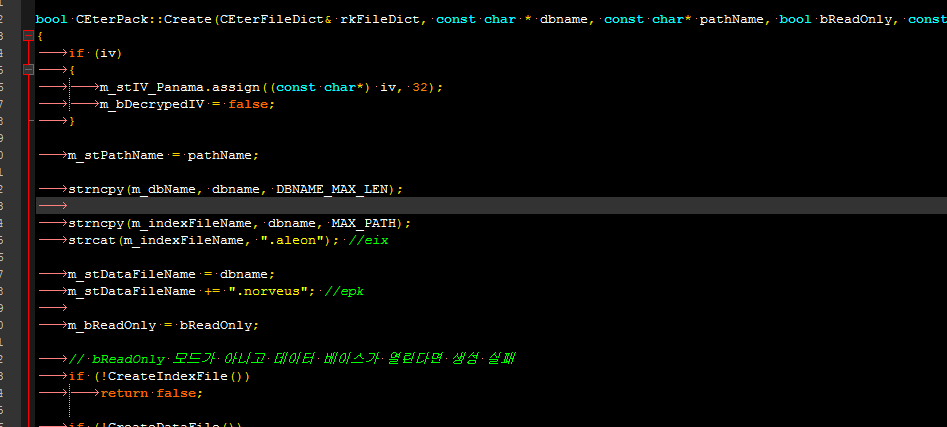
Pack Uzantısını Değiştirmek
Metin2 özel sunucularında oyun dosyalarının güvenliğini ve özelleştirilmesini artırmak amacıyla pack uzantısının değiştirilmesi oldukça yaygın bir yöntemdir. Pack uzantısı, oyunun grafik, ses, animasyon gibi dosyalarını barındıran arşiv dosyasıdır. Varsayılan olarak .pack uzantısıyla gelir. Ancak saldırganların bu dosyalara kolayca erişmesini engellemek veya sunucu sahiplerinin kendi özgün sistemlerini geliştirmek istemesi durumunda pack uzantısının değiştirilmesi önemlidir.
Pack Nedir?
Pack, Metin2 oyununda kullanılan bir dosya arşivleme formatıdır. Oyun içeriği bu dosyalar üzerinde saklanır. Bu dosyaların uzantısı varsayılan olarak '.pack' şeklindedir. Pack dosyaları genellikle Martysama, UIScript, Py Root gibi sistemlerle birlikte kullanılır. Client src kısmında bu dosyalarla doğrudan etkileşim kurulabilir. Pack dosyaları hem görsel hem de sistemsel açıdan çok önemlidir. Bu nedenle pack uzantısının değiştirilmesi, güvenlik açısından büyük faydalar sağlar.
Pack Uzantısını Değiştirmek Neden Gerekli?
Metin2 özel sunucularında, saldırganlar genellikle standart pack uzantısını hedef alarak oyun dosyalarına erişim sağlar. Bu sayede sunucuya ait özel sistemleri, karakter grafiklerini, efektleri veya script dosyalarını çalabilirler. Pack uzantısının değiştirilmesi, bu tür saldırılara karşı koruma sağlar. Ayrıca pack uzantısını değiştirmek, sunucunun daha özgün görünmesini sağlar. Bu, oyuncuların dikkatini çekebilir ve sunucunuzun diğerlerinden farklı olduğunu gösterir.
Nasıl Pack Uzantısı Değiştirilir?
Pack uzantısını değiştirmek için öncelikle client src üzerinde değişiklik yapılması gerekir. Client src, oyunun istemci tarafında çalışan kodudur. Burada pack dosyalarının okunması ile ilgili yapılandırılmış fonksiyonlar vardır. Bu fonksiyonlarda '.pack' uzantısı aranır ve istenilen yeni uzantıyla değiştirilir. Örneğin, pack uzantısı 'mygame' yapılabilir. Bu durumda tüm pack dosyalarının uzantısı '.mygame' olarak değiştirilmelidir. Ayrıca game server programming sırasında bu değişikliklerin sunucu tarafında da dikkate alınması gerekir. DB Core ve Game Core gibi sistemlerde pack dosyaları ile entegrasyon sağlanıyorsa, burada da aynı değişiklikler yapılmalıdır.
Pack Uzantısı Değişikliğinde Dikkat Edilmesi Gerekenler
Pack uzantısı değiştirilirken dikkat edilmesi gereken bazı önemli noktalar vardır. İlk olarak, pack dosyalarının adları değiştirildiğinde sunucunun doğru çalışması için tüm sistemlerin bu yeni uzantıya göre yapılandırılması gerekir. Bu işlem sırasında hem client hem de server src üzerinde değişiklikler yapılmalıdır. Ayrıca, bazı C++ sistemlerinde pack uzantısı sabit olarak tanımlanmış olabilir. Bu durumda bu sistemlerin yeniden derlenmesi (compile) gerekebilir. Metin2 Compile işlemi sırasında hata alınmaması için, pack uzantısı değişikliği dikkatli yapılmalıdır. Py GUI veya Python GUI sistemlerinde pack dosyaları ile doğrudan etkileşim varsa, bu sistemlerin de uyumlu hale getirilmesi gerekir.
Hata Alınmaması İçin[/BR]Pack uzantısı değiştirilirken bazı hatalar alınabilir. Bunlardan biri, oyunun pack dosyalarını tanıyamamasıdır. Bu durumda, client src üzerindeki fonksiyonlar kontrol edilmeli ve pack uzantısının doğru girildiğinden emin olunmalıdır. Aynı zamanda, Auth ve Game Server arasındaki bağlantıda da pack uzantısı ile ilgili bir uyumsuzluk olabilir. Bu nedenle, DB Core ve Game Core sistemleri de gözden geçirilmelidir. Eğer bir Metin2 PVP sistem geliştiriyorsanız, bu sistemlerin pack dosyalarına erişimi varsa, bu sistemlerin de yeni uzantıya göre ayarlanması gerekir.
Sonuç olarak, pack uzantısını değiştirmek Metin2 özel sunucularında güvenlik ve özgün sistem geliştirme açısından oldukça faydalıdır. Ancak bu işlem detaylı bir şekilde yapılmalı ve tüm sistemlerle uyumlu hale getirilmelidir. Pack uzantısı değişikliği, Metin2 Development sürecinde önemli bir adımdır ve doğru uygulanması halinde sunucunuzun daha güvenli ve özgün hale gelmesini sağlar.
Changing the Pack Extension
In Metin2 private servers, changing the pack extension is a common method to increase security and customization of game files. The pack extension is an archive file that contains the game's graphics, sounds, animations, etc. It comes with the default .pack extension. However, changing the pack extension is important to prevent attackers from easily accessing these files or when server owners want to develop their own unique systems.
What is Pack?
Pack is an archiving format used in the Metin2 game. The game content is stored on these files. These files have the extension '.pack' by default. Pack files are generally used together with systems such as Martysama, UIScript, and Py Root. On the client src side, interactions can be made directly with these files. Pack files are very important both visually and systematically. Therefore, changing the pack extension provides significant benefits in terms of security.
Why Is Changing the Pack Extension Necessary?
On Metin2 private servers, attackers often target the standard pack extension to access game files. This way, they can steal custom systems, character graphics, effects, or script files of the server. Changing the pack extension protects against such attacks. Moreover, changing the pack extension makes the server appear more original. This can attract players' attention and show that your server is different from others.
How to Change the Pack Extension?[/BR]To change the pack extension, modifications must first be made on the client src. Client src is the code running on the client-side of the game. There are configured functions here related to reading pack files. In these functions, the '.pack' extension is searched and replaced with the desired new extension. For example, the pack extension can be changed to 'mygame'. In this case, all pack file extensions should be changed to '.mygame'. Additionally, during game server programming, these changes must also be taken into account on the server side. If systems like DB Core and Game Core integrate with pack files, the same changes must be applied there too.
Things to Consider When Changing Pack Extension
There are some important points to consider when changing the pack extension. First, when the names of pack files are changed, all systems must be configured according to the new extension for the server to work correctly. Changes must be made on both client and server src in this process. Moreover, in some C++ systems, the pack extension may be defined as fixed. In this case, recompiling these systems might be necessary. During the Metin2 Compile process, the pack extension change must be done carefully to avoid errors. If there is direct interaction with pack files in Py GUI or Python GUI systems, these systems must also be made compatible with the new extension.
To Avoid Errors
Some errors may occur while changing the pack extension. One of them is the game failing to recognize the pack files. In this case, the functions on the client src should be checked and it should be ensured that the pack extension has been entered correctly. At the same time, there might be an incompatibility regarding the pack extension in the connection between Auth and Game Server. Therefore, DB Core and Game Core systems should also be reviewed. If you are developing a Metin2 PVP system, and if these systems access pack files, then these systems must be adjusted according to the new extension.
In conclusion, changing the pack extension is highly beneficial in terms of security and developing unique systems on Metin2 private servers. However, this process must be done meticulously and made compatible with all systems. Changing the pack extension is an important step in the Metin2 Development process and, when implemented correctly, helps make your server more secure and unique.
