

Ziyaretçiler için gizlenmiş link,görmek için üye olmalısınız!
Giriş yap veya üye ol.
Ziyaretçiler için gizlenmiş link,görmek için üye olmalısınız!
Giriş yap veya üye ol.
NOT:
ALINTIDIR METİN2 DEV
Penguen Pet: Metin2 Oyununda Özel ve Sevimli Bir Yol Arkadaşı
Metin2, uzun yıllardır oyuncuların sevgisini kazanmış, özellikle Asya kökenli MMORPG türünde öne çıkan bir oyun deneyimidir. Bu oyunun en dikkat çeken özelliklerinden birisi, karakterinize eşlik eden özel pet sistemidir. Bunlardan birisi olan Penguen Pet, hem estetik hem de fonksiyonel olarak dikkat çekmektedir. Özellikle Metin2 3D modelleme tutkunu olanlar için bu pet, farklı şekillerde özelleştirilebilir ve geliştirilebilir. Bu yazıda Penguen Pet'in ne olduğu, nasıl elde edildiği ve 3D modelleme açısından nasıl değerlendirileceği üzerinde duracağız.
Penguen Pet Nedir?
Penguen Pet, Metin2 oyununda karakterinize eşlik eden, sevimli ve eğlenceli bir varlıktır. Oyuncular tarafından genellikle mizah ve dostluk sembolü olarak görülse de, bazı Penguen Pet'ler özel bonuslar da sağlayabilir. Bu pet, genellikle oyun içi etkinliklerden, kutulardan veya sınırlı zamanlı etkinliklerden kazanılabilir. Penguen Pet'in en büyük özelliği, sahip olduğu komik davranışlarıdır. Oyuncunun hareketlerini takip eder, bazen düşer, bazen dans eder ve karakterle uyum içinde hareket eder.
Metin2 3D Modelleme Açısından Penguen Pet
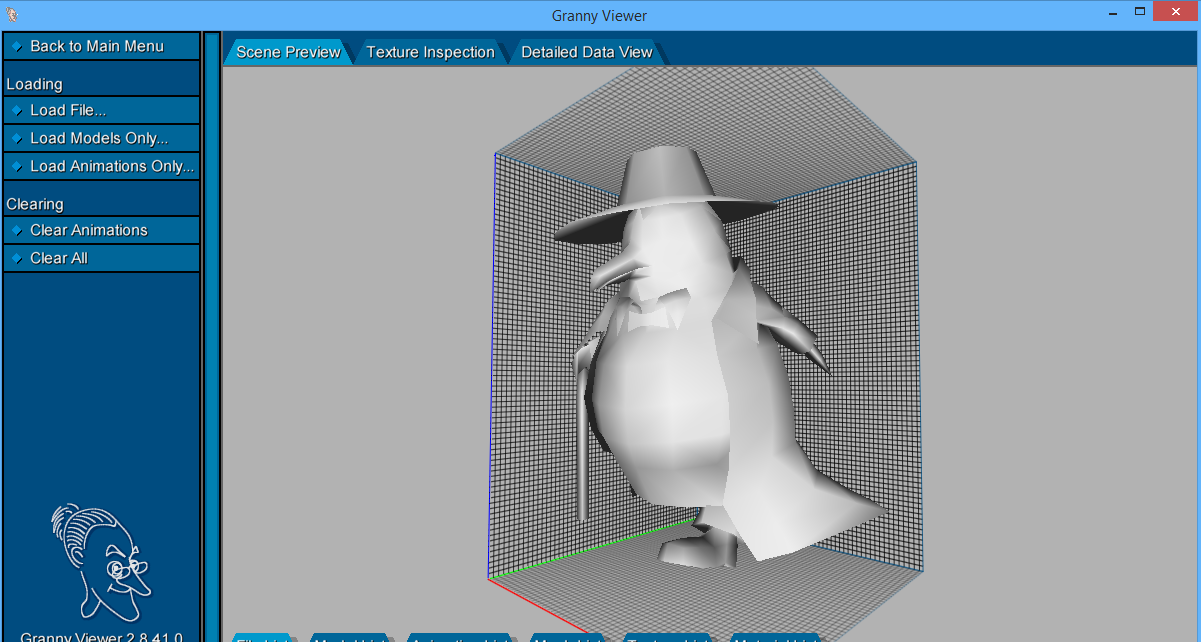
Metin2 3D modelleme ile ilgilenen oyuncular ve geliştiriciler için Penguen Pet, oldukça ilginç bir çalışmadır. Metin2 NPC model yapısı, karakterlerin, petlerin ve diğer nesnelerin 3D olarak tasarlanmasını sağlar. Penguen Pet'in model yapısı, GR2 formatında sunulmuştur. GR2 formatı, Metin2 oyun motoruna özel bir dosya türüdür ve 3D modelleme programlarında (özellikle Blender ve 3DS Max) bu modelin düzenlenmesi için uygun eklentiler gerekmektedir.
Penguen Pet modeli, genellikle Low-poly bir yapıya sahiptir. Bu sayede hem performansı korur hem de oyun içinde daha hızlı yüklenir. Penguen modeli üzerinde UV haritalama, dokular (texture), renk düzenlemeleri gibi işlemler yapılabilir. Bu işlemleri yapabilmek için Metin2 texture ve Metin2 skin sistemleri iyi bilinmelidir. Penguen Pet'e özel bir görünüm vermek isterseniz, custom model sistemleri üzerinden kendi tasarımlarınızı entegre edebilirsiniz.
Penguen Pet ile İlgili 3D Modelleme Araçları
Metin2 3D modelleme yaparken kullanabileceğiniz bazı araçlar vardır. Penguen Pet modelini düzenlemek veya geliştirmek isterseniz şu yazılımları kullanabilirsiniz:
- Blender: Ücretsiz ve güçlü bir 3D modelleme aracıdır. Metin2 için Blender üzerine geliştirilmiş özel eklentiler sayesinde GR2 formatında modelleme yapılabilir.
- 3DS Max: Profesyonel düzeyde modelleme için tercih edilir. Blender kadar yaygın olmasa da bazı geliştiriciler tarafından tercih edilir.
- MartySama Tools: Metin2 için özel geliştirilmiş bir araçtır. Model import/export işlemleri için kullanılır.
Penguen Pet Nasıl Özelleştirilir?
Penguen Pet modeli, doğru araçlarla kolayca özelleştirilebilir. Aşağıdaki adımları takip ederek kendi Penguen Pet’inizi oluşturabilirsiniz:
1. Modeli İçe Aktarın: Blender veya 3DS Max kullanarak Penguen Pet modelini içeri aktarın.
2. UV Haritası ve Dokuları Düzenleyin: Penguen Pet’in görünümünü değiştirmek için UV haritası üzerinde değişiklikler yapabilirsiniz.
3. Renk ve Efekt Ekleme: Penguen Pet’e özel efektler ve renkler ekleyerek onu daha da özgün hale getirebilirsiniz.
4. Modeli Dışa Aktarın: Hazırladığınız modeli GR2 formatında dışa aktararak oyun içine entegre edin.
Sonuç
Penguen Pet, Metin2 oyununda sadece estetik değil aynı zamanda duygusal bir bağ oluşturan bir ögedir. Özellikle Metin2 3D modelleme tutkunu olanlar için bu pet, hem eğlenceli hem de teknik bir proje haline gelebilir. Penguen Pet’in 3D modeli üzerinde çalışmak, Metin2 NPC model, Metin2 monster model ve diğer modlama süreçleri için de temel oluşturur. Bu küçük ama sevimli pet, Metin2 dünyasında size eşlik ederken aynı zamanda yaratıcılığınızı da ortaya çıkarabilir.
Penguin Pet: A Special and Cute Companion in Metin2
Metin2 is a long-standing MMORPG that has captured the hearts of players, especially with its roots in Asian gaming culture. One of the game’s most notable features is its unique pet system that accompanies your character. Among these pets, the Penguin Pet stands out for both its aesthetic appeal and functional role. For those passionate about Metin2 3D modeling, this pet can be customized and developed in various ways. In this article, we will discuss what the Penguin Pet is, how to obtain it, and how it can be evaluated from a 3D modeling perspective.
What is the Penguin Pet?
The Penguin Pet is a cute and entertaining entity that follows your character in Metin2. While often seen by players as a humorous and friendly companion, some Penguin Pets may offer special bonuses. This pet is typically obtained through in-game events, boxes, or limited-time activities. The Penguin Pet's most distinctive feature is its funny behaviors. It follows the player's movements, sometimes falls down, dances, and moves in harmony with the character.
Penguin Pet from a Metin2 3D Modeling Perspective
For players and developers interested in Metin2 3D modeling, the Penguin Pet is quite an interesting project. The structure of Metin2 NPC models allows characters, pets, and other objects to be designed in 3D. The Penguin Pet model is provided in GR2 format. GR2 is a file type specific to the Metin2 game engine, and specific plugins are required in 3D modeling programs (especially Blender and 3DS Max) to edit this model.
The Penguin Pet model generally has a low-poly structure. This preserves performance while ensuring faster loading within the game. Adjustments such as UV mapping, textures, and color edits can be made on the penguin model. To perform these tasks, Metin2 texture and Metin2 skin systems must be well understood. If you wish to give the Penguin Pet a unique appearance, you can integrate your own designs via custom model systems.
Tools Related to Penguin Pet 3D Modeling
There are certain tools available when working on Metin2 3D modeling. If you wish to edit or enhance the Penguin Pet model, you can use the following software:
- Blender: A free and powerful 3D modeling tool. With specific plugins developed for Metin2, modeling in GR2 format is possible in Blender.
- 3DS Max: Preferred for professional-level modeling. Although less common than Blender, it is still favored by some developers.
- MartySama Tools: A specialized tool developed for Metin2. It is used for model import/export operations.
How to Customize the Penguin Pet?
The Penguin Pet model can easily be customized with the right tools. Follow the steps below to create your own Penguin Pet:
1. Import the Model: Import the Penguin Pet model into Blender or 3DS Max.
2. Edit UV Maps and Textures: You can make changes to the UV map to alter the appearance of the Penguin Pet.
3. Add Colors and Effects: You can make the Penguin Pet more unique by adding special effects and colors.
4. Export the Model: Export your completed model in GR2 format and integrate it into the game.
Conclusion
The Penguin Pet is not only aesthetically pleasing but also emotionally bonding in the Metin2 game. Especially for those passionate about Metin2 3D modeling, this pet can become both an entertaining and technical project. Working on the 3D model of the Penguin Pet serves as a foundation for Metin2 NPC models, Metin2 monster models, and other modding processes. This small yet adorable pet, while accompanying you in the world of Metin2, can also bring out your creativity.
