


Root game.py aratın
Kod:
# END_OF_SCREENSHOT_CWDSAVE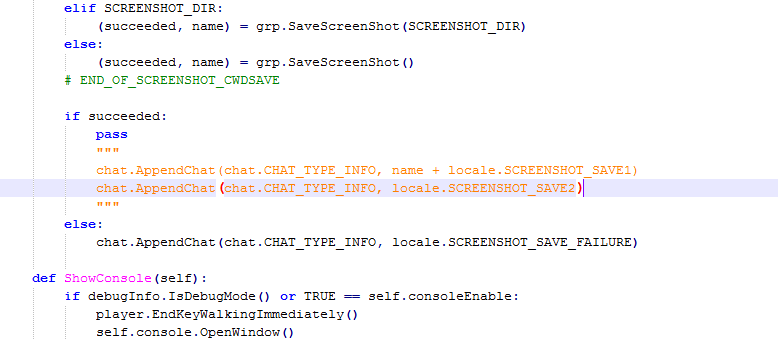
Resimde gördüğünüz turuncu renkli yazıların hepsini silip aynı yere ekleyin
Kod:
chat.AppendChat(chat.CHAT_TYPE_INFO, name)Son hali;

Print Screen Tuşuyla Alınan Resimlerin Dizinini Sohbet Penceresinde Gösterme Rehberi
Metin2 özel sunucularında geliştirme yaparken, hem oyun içi hem de geliştirme sürecinde kullanıcı dostu özellikler eklemek önemlidir. Bu yazıda, Windows işletim sisteminde Print Screen (PrtScn) tuşu ile alınan ekran görüntülerinin otomatik olarak bir klasöre kaydedilip, bu görüntülerin oyun içi sohbet penceresinde doğrudan görüntülenmesini sağlayan bir yöntemi ele alacağız. Bu yöntem özellikle Metin2 PvP sistemleri ve C++ tabanlı geliştirme süreçlerinde oldukça kullanışlıdır.
Print Screen Tuşunun Fonksiyonu ve Dizin Yolu
Windows sisteminde Print Screen tuşuna basıldığında ekran görüntüsü clipboard’a alınır. Ancak bu işlem manuel olarak yapılır ve kullanıcı genellikle görüntüyü bir düzenleyiciye yapıştırıp manuel olarak kaydetmek zorundadır. Bu durum, özellikle hızlı testler veya anlık geri bildirimler için yetersiz kalabilir. Geliştiriciler, bu süreci otomatikleştirmek için Python gibi dillerde GUI tabanlı uygulamalar geliştirebilir. PyQt veya Tkinter gibi kütüphaneler sayesinde, ekran görüntüsünü otomatik olarak belirtilen bir klasöre kaydeden ve dosya yolunu terminal ya da grafiksel arayüz üzerinden gösteren sistemler kurulabilir.
Otomatik Kayıt Sistemi Oluşturma
Bir Python uygulaması geliştirilerek, Print Screen tuşuna basıldığında ekran görüntüsünün bir klasöre otomatik olarak kaydedilmesi sağlanabilir. Bu işlem sırasında PIL (Pillow) kütüphanesi kullanılır. Pillow, Python'da görsel işleme konusunda güçlü bir araçtır. Bu sistemle birlikte, her ekran görüntüsü bir zaman damgasıyla birlikte belirtilen dizine (.png formatında) kaydedilir. Bu sayede geliştiriciler, test aşamasında anlık ekran yakalamalarını kolayca takip edebilirler.
Sohbet Penceresinde Görüntü Gösterimi
Metin2 özel sunucularında, oyun içi sohbet sistemine entegre edilen bu tür fonksiyonlar, kullanıcıların hızlıca ekran görüntülerini paylaşmasını sağlayabilir. Örneğin, bir C++ tabanlı game server üzerinde çalışan bir sistemde, belirli bir komutla (örneğin /ss) son alınan ekran görüntüsünün dosya yolu otomatik olarak sohbet penceresinde gösterilebilir. Bu, hem geliştirme hem de oyun içi deneyim açısından büyük kolaylık sağlar. Bu tür entegrasyonlar, UIScript ile Py Root arasında koordineli çalışmayı gerektirir.
Güvenlik ve Performans Konuları
Bu tür sistemlerin geliştirilmesinde dikkat edilmesi gereken bazı güvenlik ve performans meseleleri vardır. Öncelikle, ekran görüntülerinin kaydedildiği dizin, sunucu tarafında izinsiz erişime karşı korunmalıdır. Ayrıca, sürekli ekran yakalama işlemi, özellikle yoğun PvP sunucularında sistem performansını etkileyebilir. Bu nedenle, ekran yakalama sıklığı ve dosya boyutları optimize edilmelidir. Pack sistemi üzerinden bu görsellerin oyun içi veri olarak kullanılması da mümkündür. Bu durumda, Martysama tarzı sistemlerle entegre bir yapı oluşturulabilir.
Sonuç
Print Screen ile alınan ekran görüntülerinin otomatik olarak kaydedilmesi ve bu görüntülerin sohbet penceresinde görünmesi, hem geliştirme hem de kullanıcı deneyimi açısından faydalı bir özelliktir. Metin2 özel sunucularında bu tarz işlevselliği entegre etmek, C++ ve Python tabanlı sistemlerle mümkün olmaktadır. Geliştiriciler, bu yöntemi kullanarak hem daha verimli test süreçleri oluşturabilir hem de oyuncular için daha keyifli bir deneyim sağlayabilir.
Enabling Print Screen Image Directory to Appear in Chat Window
When developing Metin2 private servers, adding user-friendly features both in-game and during development is crucial. In this article, we will discuss a method that allows screenshots taken with the Print Screen (PrtScn) key to be automatically saved into a folder and displayed directly within the game chat window. This approach is particularly useful for Metin2 PvP systems and C++ based development processes.
The Function of the Print Screen Key and Directory Path
In Windows systems, pressing the Print Screen key captures the screen image to the clipboard. However, this process is manual, and users typically have to paste the image into an editor and save it manually. This can be insufficient for quick tests or immediate feedback. Developers can automate this process by creating GUI-based applications using languages like Python. Libraries such as PyQt or Tkinter allow the creation of systems that automatically save screenshots to a specific folder and display the file path via terminal or graphical interface.
Creating an Automatic Save System
By developing a Python application, you can ensure that screenshots are automatically saved to a folder upon pressing the Print Screen key. The PIL (Pillow) library is used in this process. Pillow is a powerful tool for image processing in Python. With this system, each screenshot is saved in the designated directory (as a .png file) with a timestamp. This allows developers to easily track instantaneous screen captures during testing phases.
Displaying Images in the Chat Window
In Metin2 private servers, integrating such functions into the in-game chat system allows users to quickly share their screenshots. For example, on a C++-based game server, a command (such as /ss) can display the file path of the last captured screenshot directly in the chat window. This provides significant convenience for both development and gameplay experience. Such integrations require coordinated work between UIScript and Py Root.
Security and Performance Considerations
There are certain security and performance concerns to consider when developing such systems. First, the directory where screenshots are saved must be protected against unauthorized access from the server side. Additionally, continuous screenshot capturing may affect system performance, especially on high-intensity PvP servers. Therefore, the frequency of screen captures and file sizes should be optimized. It is also possible to use these images as in-game data through the Pack system. In such cases, a structure integrated with systems like Martysama can be created.
Conclusion
Automatically saving screenshots taken with Print Screen and displaying them in the chat window is a beneficial feature for both development and user experience. Integrating such functionality into Metin2 private servers is possible using C++ and Python-based systems. Developers can create more efficient testing processes and provide players with a more enjoyable experience by utilizing this method.
