


HD :
Ziyaretçiler için gizlenmiş link,görmek için üye olmalısınız!
Giriş yap veya üye ol.
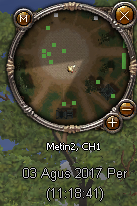
Anlatım :
Ziyaretçiler için gizlenmiş link,görmek için üye olmalısınız!
Giriş yap veya üye ol.
ProGamer - Astek Tarzı Minimap Altı Tarih Saat Sistemi
Metin2 özel sunucularında kullanıcı deneyimini artırmak, oyuncuların oyun içi zaman ve tarih bilgisine kolayca ulaşabilmesi açısından büyük önem taşır. Bu bağlamda, ProGamer tarafından geliştirilen Astek tarzı minimap altı tarih saat sistemi, Metin2 geliştiricilerinin dikkatini çekmeyi başarmıştır. Bu yazıda, bu sistemin ne olduğu, nasıl çalıştığı ve Metin2 özel sunucularına nasıl entegre edilebileceği hakkında detaylı bilgi vereceğiz.
Sistem Nedir?
Astek tarzı tarih saat sistemi, minimap üzerinde veya altında, oyuncuların anlık olarak tarih ve saati görebilmesini sağlar. Bu sayede oyuncular, sunucu içi etkinlikler, turnuvalar ya da PvP zamanları gibi kritik anları takip edebilirler. Sistem genellikle Python tabanlı UI Script dosyaları üzerinden entegre edilir ve kolayca özelleştirilebilir yapıya sahiptir.
Neden Kullanılmalıdır?[/BR][/BR]Metin2 özel sunucularında rekabetçi ortamın yoğunluğu, zaman yönetimi gerektiren etkinliklerle birleştiğinde, oyuncuların zamanı doğru takip etmesi hayati önem taşır. Bu sistem sayesinde:
- Oyuncular zamanı hızlıca kontrol edebilir.
- Turnuva, raid veya özel etkinlik zamanlarını takip etmek kolaylaşır.
- Görsel açıdan sade ve estetik bir arayüz sunulabilir.
Kurulum ve Entegrasyon[/BR][/BR]Python GUI tabanlı sistemlerde, bu modül genellikle 'uiGame.py', 'uiscript.py' gibi dosyalar üzerinden entegre edilir. Kurulum aşamasında dikkat edilmesi gereken bazı önemli adımlar vardır:
1. Öncelikle ProGamer tarafından sağlanan dosyalar indirilir.
2. Gerekli Python script dosyaları sunucu kök dizinine yüklenir.
3. Uygulanan değişiklikler, 'game' veya 'client' tarafında test edilir.
4. Gerekirse UI pozisyonu ve renk ayarları değiştirilir.
Özelleştirme Seçenekleri[/BR][/BR]Bu sistem oldukça esnek yapıya sahiptir. Geliştiriciler, aşağıdaki özelleştirmeleri yapabilir:
- Saatin gösterim formatı (24 saat / 12 saat)
- Tarih formatı (GG/AA/YYYY)
- Yazı rengi ve font boyutu
- Pozisyon (minimap altında, sağ üst köşe vb.)
Avantajları[/BR][/BR]ProGamer tarafından geliştirilen bu sistem, Metin2 özel sunucu geliştiricileri için birçok avantaj sunar:
- Kullanımı kolaydır.
- Python tabanlıdır, dolayısıyla kolayca değiştirilebilir.
- Performans kaybı oluşturmaz.
- Temiz ve okunaklı koddan oluşur.
Sonuç[/BR][/BR]Astek tarzı minimap altı tarih saat sistemi, Metin2 özel sunucularında kullanıcı deneyimini artırmak isteyen geliştiriciler için değerli bir özelliktir. Kolay kurulumu, özelleştirilebilir yapısı ve performans dostu kod yapısı ile dikkat çeker. Bu sistemi doğru şekilde entegre eden sunucular, oyuncularına daha verimli ve keyifli bir oyun ortamı sunabilirler.
Kaynak Kod Paylaşımları konusunda daha fazla örnek ve destek için Metin2Lobby'i takip etmeyi unutmayın.
ProGamer - Astek Style Minimap Date Time System
Enhancing user experience on Metin2 private servers is crucial for allowing players to easily access in-game time and date information. In this context, the Astek-style date-time system below the minimap developed by ProGamer has caught the attention of Metin2 developers. In this article, we will provide detailed information about what this system is, how it works, and how it can be integrated into Metin2 private servers.
What Is The System?
The Astek-style date-time system allows players to see the current date and time instantly either on or below the minimap. This helps players track critical moments such as server events, tournaments, or PvP times. The system is typically integrated via Python-based UI Script files and features a customizable structure.
Why Should It Be Used?[/BR][/BR]In competitive environments of Metin2 private servers, where activities often depend heavily on precise timing, accurate time tracking becomes vital for players. Thanks to this system:
- Players can quickly check the time.
- Tournament, raid, or special event schedules become easier to follow.
- A visually clean and aesthetic interface can be provided.
Installation and Integration[/BR][/BR]In Python GUI-based systems, this module is usually integrated through files like 'uiGame.py' or 'uiscript.py'. There are some important steps to consider during installation:
1. First, download the files provided by ProGamer.
2. Upload necessary Python script files to the server root directory.
3. Test applied changes on the 'game' or 'client' side.
4. If needed, adjust UI position and color settings.
Customization Options[/BR][/BR]This system offers a highly flexible structure. Developers can customize the following:
- Time display format (24-hour / 12-hour)
- Date format (DD/MM/YYYY)
- Text color and font size
- Position (below minimap, top-right corner, etc.)
Advantages[/BR][/BR]This system developed by ProGamer provides several benefits for Metin2 private server developers:
- Easy to use.
- Python-based, thus easily modifiable.
- Does not cause performance loss.
- Features clean and readable code.
Conclusion[/BR][/BR]The Astek-style date-time system under the minimap is a valuable feature for developers looking to enhance user experience on their Metin2 private servers. With its easy setup, customizable nature, and performance-friendly code structure, it stands out. Servers that properly integrate this system can offer their players a more efficient and enjoyable gaming environment.
For more examples and support regarding Source Code Sharing, don't forget to follow Metin2Lobby.
