

Aç: root.eix.epk & uitooltip.py açılır
Ara:
Altına ekle:
Ara:
Değiştir:
Aç: locale_tr.eix epk & locale_game.txt
Ara: TOOLTIP_UNSEAL_LEFT_TIME Ruhtan ayrılma: %dST %dDK sonra
Değiştir: TOOLTIP_UNSEAL_LEFT_TIME Ruhtan ayrılma: %dST %dDK %dSN sonra
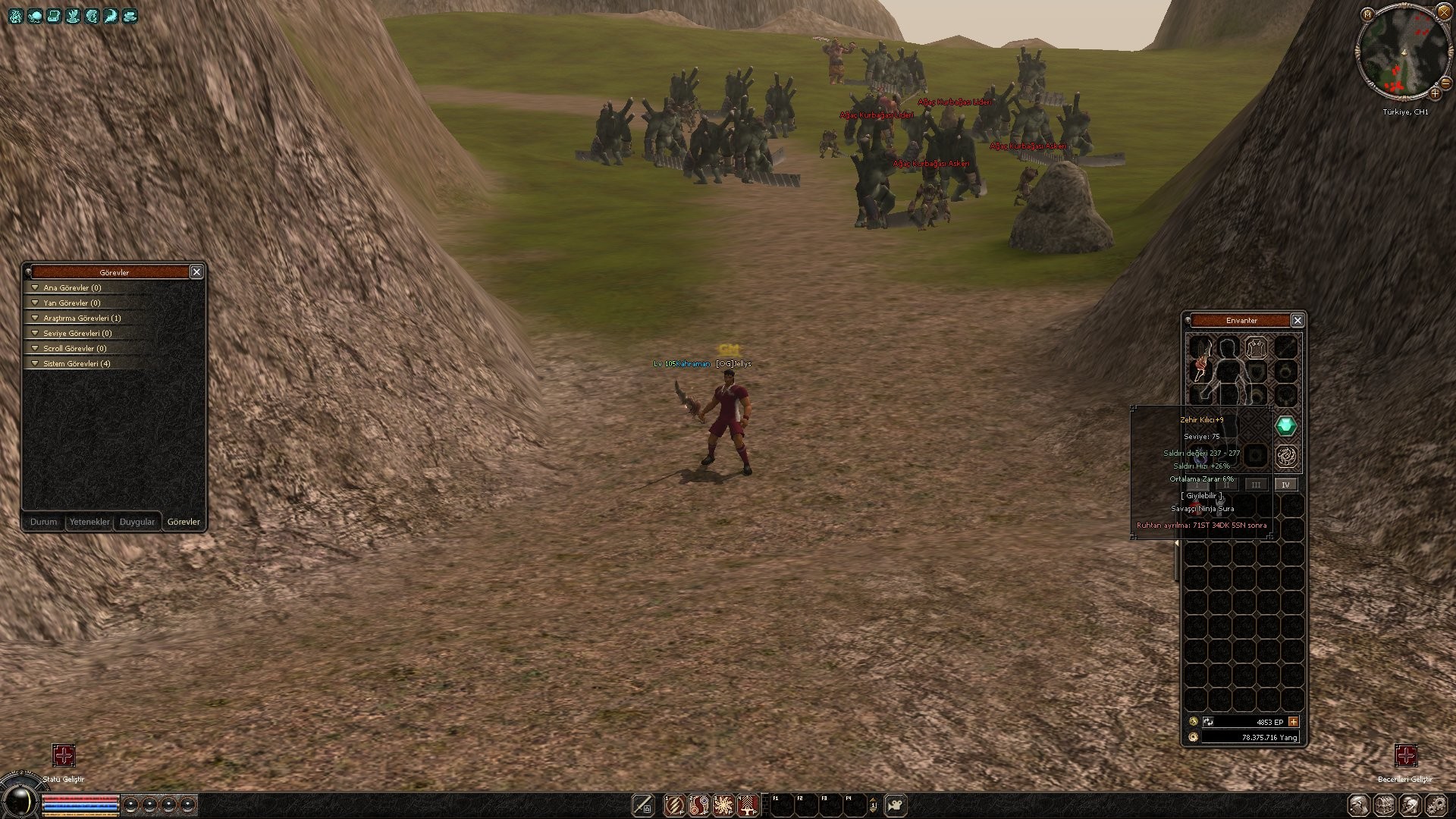
Metin2'de Ruhtan Ayrılma Süresi: Saat, Dakika ve Saniye Gösterimi
Metin2 özel sunucularında oyun deneyimini artırmak isteyen geliştiriciler, oyun mekaniklerinin detaylarına odaklanmalıdır. Bu mekaniklerden birisi de ruhtan ayrılma süresidir. Bu süre, oyuncunun öldükten sonra ruhunun belirli bir süre haritada kalmasının ardından silinmesiyle ilgilidir. Ancak bu sürenin kullanıcı dostu bir şekilde gösterilmesi, hem oyun içi stratejiyi hem de oyuncu memnuniyetini artırır. Bu nedenle, ruhtan ayrılma süresinin saat, dakika ve saniye cinsinden dinamik olarak gösterilmesi büyük önem taşır.
Ruhtan Ayrılma Süresi Nedir?
Metin2 oyununda bir karakter öldüğünde, kısa bir süre boyunca ruh olarak haritada kalabilir. Bu süreçte diğer oyuncular tarafından görülebilir ve bazı eylemler yapılabilir. Ancak bu süre sonunda ruh yok olur. Oyuncuların bu süreyi net şekilde takip edebilmesi için, sürenin saat (h), dakika (m) ve saniye (s) cinsinden okunabilir bir biçimde sunulması gerekir. Bu gösterim, hem PvP savaşlarında hem de grup stratejilerinde büyük kolaylık sağlar.
C++ ve Python Kullanarak Uygulama
Metin2 özel sunucularında bu süreyi göstermek için öncelikle game_core üzerinde değişiklikler yapılması gerekir. game server tarafında, oyuncu öldüğünde başlatılan bir sayaç sistemi kurulur. Bu sayaç, Python tarafında yazılmış GUI üzerinden client_src ile eşleştirilerek ekrana yazdırılır. Örnek olarak:
- Oyuncu öldüğünde bir sayaç başlatılır.
- Bu sayaç, py_root üzerinde bir fonksiyon ile saat:dakika:saniye formatında dönüştürülür.
- Elde edilen sonuç, oyun arayüzünde uiscript yardımıyla label olarak gösterilir.
Sayaç Formatı ve Dinamik Güncelleme
Süre gösterimi şu şekilde yapılandırılabilir:
Bu fonksiyon, kalan süreyi her saniye güncellenerek oyuncuya gösterilebilir. Böylece hem stratejik planlama hem de geri sayım bilinci artırılır.
Sunucu Tarafında Optimizasyon
Bu tür sayaç sistemlerinin performans üzerinde etkisi olabilir. Özellikle çok oyunculu PvP ortamlarında, her karakter için ayrı sayaç çalıştırılması DB ve server_src üzerinde yük yaratabilir. Bu yüzden sayaçların optimize edilmesi, event_loop veya timer sistemleri ile yönetilmesi önerilir.
Özel Sunucular İçin Avantajlar
Ruhtan ayrılma süresinin detaylı gösterimi:
- Oyuncuların stratejik planlamalar yapabilmesini sağlar.
- PvP savaşlarında zamanlama avantajı sunar.
- Oyun içi etkileşimi artırır.
- Geliştiricilerin sistem üzerinde daha fazla kontrol sahibi olmasına olanak tanır.
Sonuç
Metin2 özel sunucularında ruhtan ayrılma süresinin saat, dakika ve saniye cinsinden gösterimi, oyun deneyimini ciddi anlamda geliştirir. Bu tür küçük ama etkili değişiklikler, C++ ve Python tabanlı sistemlerle kolayca entegre edilebilir. Geliştiriciler, martysama gibi kaynaklardan yararlanarak bu tür sistemleri uygulamaya koyabilirler.
Metin2 Spirit Separation Time: Displaying Hours, Minutes, Seconds
Developers who aim to enhance the gaming experience on Metin2 private servers must pay attention to the details of game mechanics. One such mechanic is the spirit separation time. This duration refers to how long a player's spirit remains on the map after death before being removed. However, displaying this time in a user-friendly way increases both in-game strategy and player satisfaction. Therefore, displaying the spirit separation time dynamically in hours, minutes, and seconds is crucial.
What Is Spirit Separation Time?
In Metin2, when a character dies, their spirit remains on the map for a short period. During this time, they may be visible to other players and certain actions can occur. After this duration ends, the spirit vanishes. To ensure players can track this time clearly, it should be displayed in an understandable format like hours (h), minutes (m), and seconds (s). This display facilitates strategic planning during PvP battles and group tactics.
Implementation Using C++ and Python
To implement this feature on private servers, modifications are required on the game_core. On the game server side, a countdown timer starts when a player dies. This timer is converted into a hours:minutes:seconds format via a function written in Python within py_root and then displayed on the game interface using uiscript. For example:
- A timer starts upon player death.
- The remaining time is formatted into hh:mm:ss using a Python function.
- The result is shown as a label on the game UI.
Timer Format and Dynamic Updates
The time display can be structured as follows:
This function updates every second and shows the remaining time to the player, enhancing both strategic planning and time awareness.
Optimization on Server Side
Such timer systems can impact performance, especially in multiplayer PvP environments where timers run for each player. This can create load on DB and server_src. Therefore, optimizing timers using event_loop or timer systems is recommended.
Advantages for Private Servers
Detailed display of spirit separation time:
- Enables players to make strategic plans.
- Offers timing advantages in PvP battles.
- Increases in-game interaction.
- Allows developers more control over the system.
Conclusion
Displaying the spirit separation time in hours, minutes, and seconds on Metin2 private servers significantly enhances the gameplay experience. Such small but effective changes can easily be integrated using C++ and Python based systems. Developers can leverage resources like martysama to implement these features.
Ara:
Kod:
itemSoulTime -= 60 * minsAltına ekle:
Kod:
secs = itemSoulTime / 1 itemSoulTime -= 1 * secsAra:
Kod:
self.AppendTextLine(localeInfo.TOOLTIP_UNSEAL_LEFT_TIME % (hrs, mins), self.NEGATIVE_COLOR)Değiştir:
Kod:
self.AppendTextLine(localeInfo.TOOLTIP_UNSEAL_LEFT_TIME % (hrs, mins, sec), self.NEGATIVE_COLOR)Aç: locale_tr.eix epk & locale_game.txt
Ara: TOOLTIP_UNSEAL_LEFT_TIME Ruhtan ayrılma: %dST %dDK sonra
Değiştir: TOOLTIP_UNSEAL_LEFT_TIME Ruhtan ayrılma: %dST %dDK %dSN sonra
Metin2'de Ruhtan Ayrılma Süresi: Saat, Dakika ve Saniye Gösterimi
Metin2 özel sunucularında oyun deneyimini artırmak isteyen geliştiriciler, oyun mekaniklerinin detaylarına odaklanmalıdır. Bu mekaniklerden birisi de ruhtan ayrılma süresidir. Bu süre, oyuncunun öldükten sonra ruhunun belirli bir süre haritada kalmasının ardından silinmesiyle ilgilidir. Ancak bu sürenin kullanıcı dostu bir şekilde gösterilmesi, hem oyun içi stratejiyi hem de oyuncu memnuniyetini artırır. Bu nedenle, ruhtan ayrılma süresinin saat, dakika ve saniye cinsinden dinamik olarak gösterilmesi büyük önem taşır.
Ruhtan Ayrılma Süresi Nedir?
Metin2 oyununda bir karakter öldüğünde, kısa bir süre boyunca ruh olarak haritada kalabilir. Bu süreçte diğer oyuncular tarafından görülebilir ve bazı eylemler yapılabilir. Ancak bu süre sonunda ruh yok olur. Oyuncuların bu süreyi net şekilde takip edebilmesi için, sürenin saat (h), dakika (m) ve saniye (s) cinsinden okunabilir bir biçimde sunulması gerekir. Bu gösterim, hem PvP savaşlarında hem de grup stratejilerinde büyük kolaylık sağlar.
C++ ve Python Kullanarak Uygulama
Metin2 özel sunucularında bu süreyi göstermek için öncelikle game_core üzerinde değişiklikler yapılması gerekir. game server tarafında, oyuncu öldüğünde başlatılan bir sayaç sistemi kurulur. Bu sayaç, Python tarafında yazılmış GUI üzerinden client_src ile eşleştirilerek ekrana yazdırılır. Örnek olarak:
- Oyuncu öldüğünde bir sayaç başlatılır.
- Bu sayaç, py_root üzerinde bir fonksiyon ile saat:dakika:saniye formatında dönüştürülür.
- Elde edilen sonuç, oyun arayüzünde uiscript yardımıyla label olarak gösterilir.
Sayaç Formatı ve Dinamik Güncelleme
Süre gösterimi şu şekilde yapılandırılabilir:
Kod:
[B]def[/B] [I]format_remaining_time[/I](seconds):[BR][/BR] hours = seconds // 3600[BR][/BR] minutes = (seconds % 3600) // 60[BR][/BR] secs = seconds % 60[BR][/BR] [B]return[/B] f'{hours:02d}h {minutes:02d}m {secs:02d}s'Bu fonksiyon, kalan süreyi her saniye güncellenerek oyuncuya gösterilebilir. Böylece hem stratejik planlama hem de geri sayım bilinci artırılır.
Sunucu Tarafında Optimizasyon
Bu tür sayaç sistemlerinin performans üzerinde etkisi olabilir. Özellikle çok oyunculu PvP ortamlarında, her karakter için ayrı sayaç çalıştırılması DB ve server_src üzerinde yük yaratabilir. Bu yüzden sayaçların optimize edilmesi, event_loop veya timer sistemleri ile yönetilmesi önerilir.
Özel Sunucular İçin Avantajlar
Ruhtan ayrılma süresinin detaylı gösterimi:
- Oyuncuların stratejik planlamalar yapabilmesini sağlar.
- PvP savaşlarında zamanlama avantajı sunar.
- Oyun içi etkileşimi artırır.
- Geliştiricilerin sistem üzerinde daha fazla kontrol sahibi olmasına olanak tanır.
Sonuç
Metin2 özel sunucularında ruhtan ayrılma süresinin saat, dakika ve saniye cinsinden gösterimi, oyun deneyimini ciddi anlamda geliştirir. Bu tür küçük ama etkili değişiklikler, C++ ve Python tabanlı sistemlerle kolayca entegre edilebilir. Geliştiriciler, martysama gibi kaynaklardan yararlanarak bu tür sistemleri uygulamaya koyabilirler.
Metin2 Spirit Separation Time: Displaying Hours, Minutes, Seconds
Developers who aim to enhance the gaming experience on Metin2 private servers must pay attention to the details of game mechanics. One such mechanic is the spirit separation time. This duration refers to how long a player's spirit remains on the map after death before being removed. However, displaying this time in a user-friendly way increases both in-game strategy and player satisfaction. Therefore, displaying the spirit separation time dynamically in hours, minutes, and seconds is crucial.
What Is Spirit Separation Time?
In Metin2, when a character dies, their spirit remains on the map for a short period. During this time, they may be visible to other players and certain actions can occur. After this duration ends, the spirit vanishes. To ensure players can track this time clearly, it should be displayed in an understandable format like hours (h), minutes (m), and seconds (s). This display facilitates strategic planning during PvP battles and group tactics.
Implementation Using C++ and Python
To implement this feature on private servers, modifications are required on the game_core. On the game server side, a countdown timer starts when a player dies. This timer is converted into a hours:minutes:seconds format via a function written in Python within py_root and then displayed on the game interface using uiscript. For example:
- A timer starts upon player death.
- The remaining time is formatted into hh:mm:ss using a Python function.
- The result is shown as a label on the game UI.
Timer Format and Dynamic Updates
The time display can be structured as follows:
Kod:
[B]def[/B] [I]format_remaining_time[/I](seconds):[BR][/BR] hours = seconds // 3600[BR][/BR] minutes = (seconds % 3600) // 60[BR][/BR] secs = seconds % 60[BR][/BR] [B]return[/B] f'{hours:02d}h {minutes:02d}m {secs:02d}s'This function updates every second and shows the remaining time to the player, enhancing both strategic planning and time awareness.
Optimization on Server Side
Such timer systems can impact performance, especially in multiplayer PvP environments where timers run for each player. This can create load on DB and server_src. Therefore, optimizing timers using event_loop or timer systems is recommended.
Advantages for Private Servers
Detailed display of spirit separation time:
- Enables players to make strategic plans.
- Offers timing advantages in PvP battles.
- Increases in-game interaction.
- Allows developers more control over the system.
Conclusion
Displaying the spirit separation time in hours, minutes, and seconds on Metin2 private servers significantly enhances the gameplay experience. Such small but effective changes can easily be integrated using C++ and Python based systems. Developers can leverage resources like martysama to implement these features.