

Merhabalar.
Öncelikle taskbar kurmayı bilmiyorsanız kesinlikle bulaşmayın derim.
Tepkilere göre daha iyi paylaşımlar gelecektir
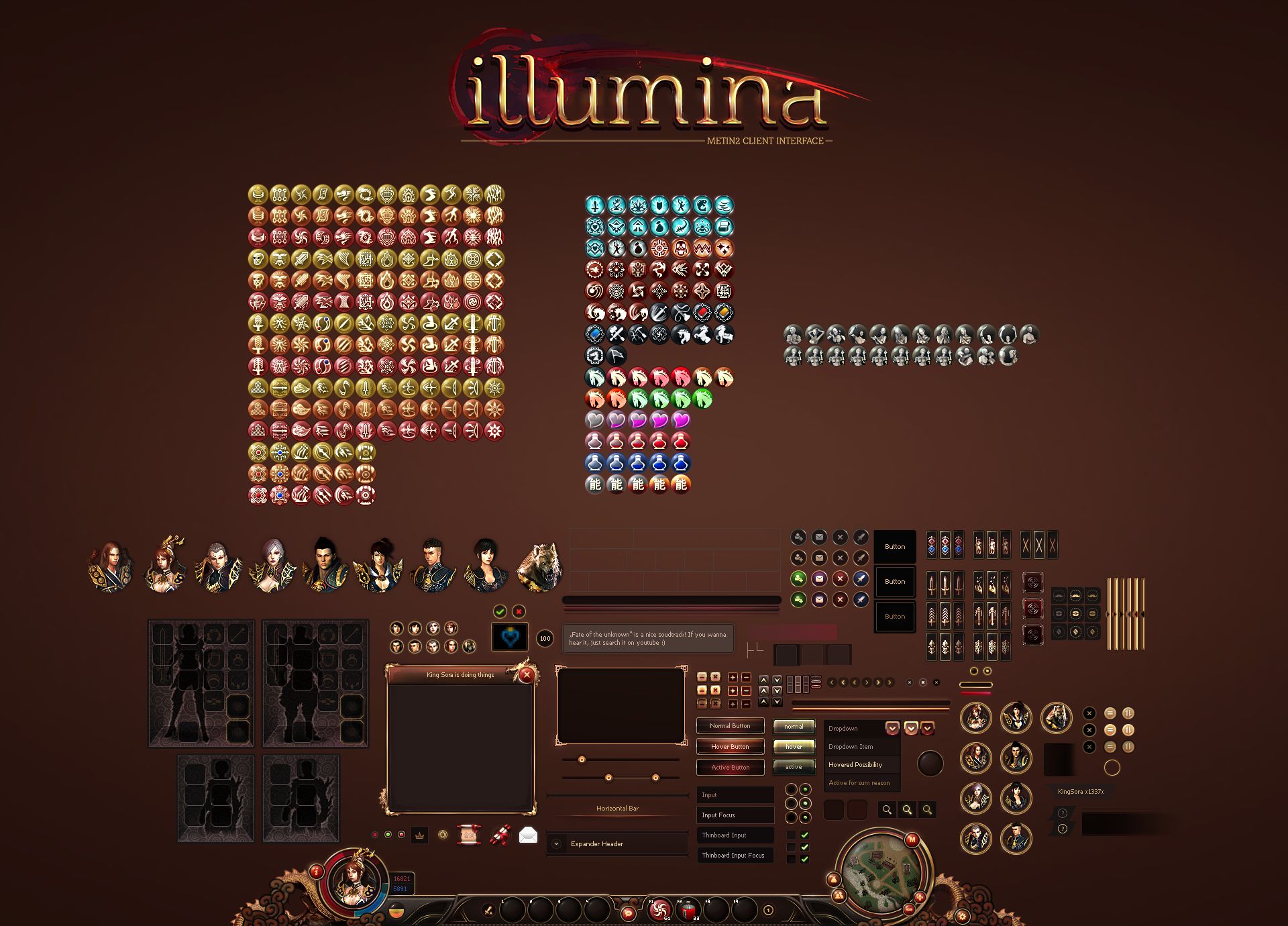
Konudaki eklentilerin hepsinin beraber olduğu fotoğraf
Öncelikle taskbar kurmayı bilmiyorsanız kesinlikle bulaşmayın derim.
Tepkilere göre daha iyi paylaşımlar gelecektir
Konudaki eklentilerin hepsinin beraber olduğu fotoğraf
Kod:
class Board(Window):bu kodu değiştirin
Kod:
class Board(Window): CORNER_WIDTH = 32 CORNER_HEIGHT = 32 LINE_WIDTH = 128 LINE_HEIGHT = 128 LT = 0 LB = 1 RT = 2 RB = 3 L = 0 R = 1 T = 2 B = 3 def __init__(self): Window.__init__(self) self.MakeBoard("d:/ymir work/ui/pattern/Board_Corner_", "d:/ymir work/ui/pattern/Board_Line_") self.MakeBase() def MakeBoard(self, cornerPath, linePath, decorPath): CornerFileNames = [ cornerPath+dir+".tga" for dir in ("LeftTop", "LeftBottom", "RightTop", "RightBottom", ) ] LineFileNames = [ linePath+dir+".tga" for dir in ("Left", "Right", "Top", "Bottom", ) ] self.Corners = [*] for fileName in CornerFileNames: Corner = ExpandedImageBox() Corner.AddFlag("not_pick") Corner.LoadImage(fileName) Corner.SetParent(self) Corner.SetPosition(0, 0) Corner.Show() self.Corners.append(Corner) self.Lines = [*] for fileName in LineFileNames: Line = ExpandedImageBox() Line.AddFlag("not_pick") Line.LoadImage(fileName) Line.SetParent(self) Line.SetPosition(0, 0) Line.Show() self.Lines.append(Line) self.Lines[self.L].SetPosition(0, self.CORNER_HEIGHT) self.Lines[self.T].SetPosition(self.CORNER_WIDTH, 0) def MakeBase(self): self.Base = ExpandedImageBox() self.Base.AddFlag("not_pick") self.Base.LoadImage("d:/ymir work/ui/pattern/Board_Base.tga") self.Base.SetParent(self) self.Base.SetPosition(self.CORNER_WIDTH, self.CORNER_HEIGHT) self.Base.Show() def __del__(self): Window.__del__(self) def SetSize(self, width, height): width = max(self.CORNER_WIDTH*2, width) height = max(self.CORNER_HEIGHT*2, height) Window.SetSize(self, width, height) self.Corners[self.LB].SetPosition(0, height - self.CORNER_HEIGHT) self.Corners[self.RT].SetPosition(width - self.CORNER_WIDTH, 0) self.Corners[self.RB].SetPosition(width - self.CORNER_WIDTH, height - self.CORNER_HEIGHT) self.Lines[self.R].SetPosition(width - self.CORNER_WIDTH, self.CORNER_HEIGHT) self.Lines[self.B].SetPosition(self.CORNER_HEIGHT, height - self.CORNER_HEIGHT) verticalShowingPercentage = float((height - self.CORNER_HEIGHT*2) - self.LINE_HEIGHT) / self.LINE_HEIGHT horizontalShowingPercentage = float((width - self.CORNER_WIDTH*2) - self.LINE_WIDTH) / self.LINE_WIDTH self.Lines[self.L].SetRenderingRect(0, 0, 0, verticalShowingPercentage) self.Lines[self.R].SetRenderingRect(0, 0, 0, verticalShowingPercentage) self.Lines[self.T].SetRenderingRect(0, 0, horizontalShowingPercentage, 0) self.Lines[self.B].SetRenderingRect(0, 0, horizontalShowingPercentage, 0) if self.Base: self.Base.SetRenderingRect(0, 0, horizontalShowingPercentage, verticalShowingPercentage)Bu kod ile değiştirin
Kod:
class Board(Window): CORNER_WIDTH = 55 CORNER_HEIGHT = 55 LINE_WIDTH = 128 LINE_HEIGHT = 128 UT = 0 UB = 1 UR = 2 UL = 3 ULT = 0 ULB = 1 URT = 2 URB = 3 D = 0 LT = 0 LB = 1 RT = 2 RB = 3 L = 0 R = 1 T = 2 B = 3 def __init__(self): Window.__init__(self) self.MakeBoard("kanort_work/images/controls/common/board/shadow_bar_", "kanort_work/images/controls/common/board/shadow_corner_", "kanort_work/images/controls/common/board/corner_", "kanort_work/images/controls/common/board/bar_", "kanort_work/images/controls/common/board/decoration_" ) self.MakeBase() self.MakeShadow() def MakeBoard(self, shadowbarPath, shadowcornerPath, cornerPath, linePath, decorPath): ShadowbarFileNames = [ shadowbarPath+dir+".tga" for dir in ("top", "bottom", "right", "left", ) ] ShadowcornerFileNames = [ shadowcornerPath+dir+".tga" for dir in ("lefttop", "leftbottom", "righttop", "rightbottom", ) ] CornerFileNames = [ cornerPath+dir+".tga" for dir in ("lefttop", "leftbottom", "righttop", "rightbottom", ) ] LineFileNames = [ linePath+dir+".tga" for dir in ("left", "right", "top", "bottom", ) ] DecorFileNames = [ decorPath+dir+".tga" for dir in ("leftbottom", ) ] self.Shadowbar = [*] for fileName in ShadowbarFileNames: Shadowbar = ExpandedImageBox() Shadowbar.AddFlag("not_pick") Shadowbar.LoadImage(fileName) Shadowbar.SetParent(self) Shadowbar.SetPosition(0, 0) Shadowbar.Show() self.Shadowbar.append(Shadowbar) self.Shadowcorner = [*] for fileName in ShadowcornerFileNames: Shadowcorner = ExpandedImageBox() Shadowcorner.AddFlag("not_pick") Shadowcorner.LoadImage(fileName) Shadowcorner.SetParent(self) Shadowcorner.SetPosition(0, 0) Shadowcorner.Show() self.Shadowcorner.append(Shadowcorner) self.Corners = [*] for fileName in CornerFileNames: Corner = ExpandedImageBox() Corner.AddFlag("not_pick") Corner.LoadImage(fileName) Corner.SetParent(self) Corner.SetPosition(0, 0) Corner.Show() self.Corners.append(Corner) self.Lines = [*] for fileName in LineFileNames: Line = ExpandedImageBox() Line.AddFlag("not_pick") Line.LoadImage(fileName) Line.SetParent(self) Line.SetPosition(0, 0) Line.Show() self.Lines.append(Line) self.Decor = [*] for fileName in DecorFileNames: Decor = ExpandedImageBox() Decor.AddFlag("not_pick") Decor.LoadImage(fileName) Decor.SetParent(self) Decor.SetPosition(0, 0) Decor.Show() self.Decor.append(Decor) self.Lines[self.L].SetPosition(0, self.CORNER_HEIGHT) self.Shadowbar[self.UL].SetPosition(-18, self.CORNER_HEIGHT) self.Lines[self.T].SetPosition(self.CORNER_WIDTH, 0) self.Shadowbar[self.UT].SetPosition(self.CORNER_WIDTH, -18) def MakeBase(self): self.Base = ExpandedImageBox() self.Base.AddFlag("not_pick") self.Base.LoadImage("kanort_work/images/controls/common/board/fill.tga") self.Base.SetParent(self) self.Base.SetPosition(self.CORNER_WIDTH, self.CORNER_HEIGHT) self.Base.Show() def MakeShadow(self): self.Shadow = ExpandedImageBox() self.Shadow.AddFlag("not_pick") self.Shadow.LoadImage("kanort_work/images/controls/common/board/shadow_fill.tga") self.Shadow.SetParent(self) self.Shadow.SetPosition(self.CORNER_WIDTH, self.CORNER_HEIGHT) self.Shadow.Show() def __del__(self): Window.__del__(self) def SetSize(self, width, height): width = max(self.CORNER_WIDTH*2, width) height = max(self.CORNER_HEIGHT*2, height) Window.SetSize(self, width, height) self.Shadowcorner[self.ULT].SetPosition(-18,-18) self.Shadowcorner[self.ULB].SetPosition(-18, height - self.CORNER_HEIGHT) self.Corners[self.LB].SetPosition(0, height - self.CORNER_HEIGHT) self.Shadowcorner[self.URT].SetPosition(width - self.CORNER_WIDTH, -18) self.Corners[self.RT].SetPosition(width - self.CORNER_WIDTH, 0) self.Shadowcorner[self.URB].SetPosition(width - self.CORNER_WIDTH, height - self.CORNER_HEIGHT) self.Corners[self.RB].SetPosition(width - self.CORNER_WIDTH, height - self.CORNER_HEIGHT) self.Decor[self.D].SetPosition(0 - 5, height - self.CORNER_HEIGHT) self.Lines[self.R].SetPosition(width - self.CORNER_WIDTH, self.CORNER_HEIGHT) self.Shadowbar[self.UR].SetPosition(width - self.CORNER_WIDTH, self.CORNER_HEIGHT) self.Lines[self.B].SetPosition(self.CORNER_HEIGHT, height - self.CORNER_HEIGHT) self.Shadowbar[self.UB].SetPosition(self.CORNER_HEIGHT, height - self.CORNER_HEIGHT) verticalShowingPercentage = float((height - self.CORNER_HEIGHT*2) - self.LINE_HEIGHT) / self.LINE_HEIGHT horizontalShowingPercentage = float((width - self.CORNER_WIDTH*2) - self.LINE_WIDTH) / self.LINE_WIDTH self.Lines[self.L].SetRenderingRect(0, 0, 0, verticalShowingPercentage) self.Lines[self.R].SetRenderingRect(0, 0, 0, verticalShowingPercentage) self.Lines[self.T].SetRenderingRect(0, 0, horizontalShowingPercentage, 0) self.Lines[self.B].SetRenderingRect(0, 0, horizontalShowingPercentage, 0) self.Shadowbar[self.UL].SetRenderingRect(0, 0, 0, height - self.CORNER_HEIGHT*2 - 1) self.Shadowbar[self.UR].SetRenderingRect(0, 0, 0, height - self.CORNER_HEIGHT*2 - 1) self.Shadowbar[self.UT].SetRenderingRect(0, 0, width - self.CORNER_WIDTH*2 - 1, 0) self.Shadowbar[self.UB].SetRenderingRect(0, 0, width - self.CORNER_WIDTH*2 - 1, 0) if self.Base: self.Base.SetRenderingRect(0, 0, horizontalShowingPercentage, verticalShowingPercentage) if self.Shadow: self.Shadow.SetRenderingRect(0, 0, horizontalShowingPercentage, verticalShowingPercentage)2.Thinboard
root.epk/.eix açın
dosyasında ui.py bulun
Kod:
class ThinBoard(Window):Bu kodu değiştirin:
Kod:
class ThinBoard(Window): CORNER_WIDTH = 16 CORNER_HEIGHT = 16 LINE_WIDTH = 16 LINE_HEIGHT = 16 BOARD_COLOR = grp.GenerateColor(0.0, 0.0, 0.0, 0.51) LT = 0 LB = 1 RT = 2 RB = 3 L = 0 R = 1 T = 2 B = 3 def __init__(self, layer = "UI"): Window.__init__(self, layer) CornerFileNames = [ "d:/ymir work/ui/pattern/ThinBoard_Corner_"+dir+".tga" for dir in ["LeftTop","LeftBottom","RightTop","RightBottom"] ] LineFileNames = [ "d:/ymir work/ui/pattern/ThinBoard_Line_"+dir+".tga" for dir in ["Left","Right","Top","Bottom"] ] self.Corners = [*] for fileName in CornerFileNames: Corner = ExpandedImageBox() Corner.AddFlag("attach") Corner.AddFlag("not_pick") Corner.LoadImage(fileName) Corner.SetParent(self) Corner.SetPosition(0, 0) Corner.Show() self.Corners.append(Corner) self.Lines = [*] for fileName in LineFileNames: Line = ExpandedImageBox() Line.AddFlag("attach") Line.AddFlag("not_pick") Line.LoadImage(fileName) Line.SetParent(self) Line.SetPosition(0, 0) Line.Show() self.Lines.append(Line) Base = Bar() Base.SetParent(self) Base.AddFlag("attach") Base.AddFlag("not_pick") Base.SetColor(self.BOARD_COLOR) Base.SetPosition(self.CORNER_WIDTH, self.CORNER_HEIGHT) Base.Show() self.Base = Base self.Lines[self.L].SetPosition(0, self.CORNER_HEIGHT) self.Lines[self.T].SetPosition(self.CORNER_WIDTH, 0) def __del__(self): Window.__del__(self) def SetSize(self, width, height): width = max(self.CORNER_WIDTH*2, width) height = max(self.CORNER_HEIGHT*2, height) Window.SetSize(self, width, height) self.Corners[self.LB].SetPosition(0, height - self.CORNER_HEIGHT) self.Corners[self.RT].SetPosition(width - self.CORNER_WIDTH, 0) self.Corners[self.RB].SetPosition(width - self.CORNER_WIDTH, height - self.CORNER_HEIGHT) self.Lines[self.R].SetPosition(width - self.CORNER_WIDTH, self.CORNER_HEIGHT) self.Lines[self.B].SetPosition(self.CORNER_HEIGHT, height - self.CORNER_HEIGHT) verticalShowingPercentage = float((height - self.CORNER_HEIGHT*2) - self.LINE_HEIGHT) / self.LINE_HEIGHT horizontalShowingPercentage = float((width - self.CORNER_WIDTH*2) - self.LINE_WIDTH) / self.LINE_WIDTH self.Lines[self.L].SetRenderingRect(0, 0, 0, verticalShowingPercentage) self.Lines[self.R].SetRenderingRect(0, 0, 0, verticalShowingPercentage) self.Lines[self.T].SetRenderingRect(0, 0, horizontalShowingPercentage, 0) self.Lines[self.B].SetRenderingRect(0, 0, horizontalShowingPercentage, 0) if self.Base: self.Base.SetSize(width - self.CORNER_WIDTH*2, height - self.CORNER_HEIGHT*2) def ShowInternal(self): self.Base.Show() for wnd in self.Lines: wnd.Show() for wnd in self.Corners: wnd.Show() def HideInternal(self): self.Base.Hide() for wnd in self.Lines: wnd.Hide() for wnd in self.Corners: wnd.Hide()Bununla:
Kod:
class ThinBoard(Window): CORNER_WIDTH = 21 CORNER_HEIGHT = 21 LINE_WIDTH = 21 LINE_HEIGHT = 21 UL = 0 UR = 1 UT = 2 UB = 3 ULT = 0 ULB = 1 URT = 2 URB = 3 LT = 0 LB = 1 RT = 2 RB = 3 L = 0 R = 1 T = 2 B = 3 def __init__(self, layer = "UI"): Window.__init__(self, layer) ShadowbarFileNames = [ "kanort_work/images/controls/common/thinboard_transparent/shadow_bar_"+dir+".tga" for dir in ["left","right","top","bottom"] ] ShadowcornerFileNames = [ "kanort_work/images/controls/common/thinboard_transparent/shadow_corner_"+dir+".tga" for dir in ["lefttop","leftbottom","righttop","rightbottom"] ] CornerFileNames = [ "kanort_work/images/controls/common/thinboard_transparent/corner_"+dir+".tga" for dir in ["lefttop","leftbottom","righttop","rightbottom"] ] LineFileNames = [ "kanort_work/images/controls/common/thinboard_transparent/bar_"+dir+".tga" for dir in ["left","right","top","bottom"] ] self.Shadowbars = [*] for fileName in ShadowbarFileNames: Shadowbar = ExpandedImageBox() Shadowbar.AddFlag("attach") Shadowbar.AddFlag("not_pick") Shadowbar.LoadImage(fileName) Shadowbar.SetParent(self) Shadowbar.SetPosition(0, 0) Shadowbar.Show() self.Shadowbars.append(Shadowbar) self.Shadowcorners = [*] for fileName in ShadowcornerFileNames: Shadowcorner = ExpandedImageBox() Shadowcorner.AddFlag("attach") Shadowcorner.AddFlag("not_pick") Shadowcorner.LoadImage(fileName) Shadowcorner.SetParent(self) Shadowcorner.SetPosition(0, 0) Shadowcorner.Show() self.Shadowcorners.append(Shadowcorner) self.Corners = [*] for fileName in CornerFileNames: Corner = ExpandedImageBox() Corner.AddFlag("attach") Corner.AddFlag("not_pick") Corner.LoadImage(fileName) Corner.SetParent(self) Corner.SetPosition(0, 0) Corner.Show() self.Corners.append(Corner) self.Lines = [*] for fileName in LineFileNames: Line = ExpandedImageBox() Line.AddFlag("attach") Line.AddFlag("not_pick") Line.LoadImage(fileName) Line.SetParent(self) Line.SetPosition(0, 0) Line.Show() self.Lines.append(Line) Base = ExpandedImageBox() Base.SetParent(self) Base.AddFlag("attach") Base.AddFlag("not_pick") Base.SetPosition(self.CORNER_WIDTH, self.CORNER_HEIGHT) Base.LoadImage("kanort_work/images/controls/common/thinboard_transparent/fill.tga") Base.Show() self.Base = Base self.Shadowbars[self.UL].SetPosition(-11, self.CORNER_HEIGHT) self.Shadowbars[self.UT].SetPosition(self.CORNER_WIDTH, -11) self.Lines[self.L].SetPosition(0, self.CORNER_HEIGHT) self.Lines[self.T].SetPosition(self.CORNER_WIDTH, 0) def __del__(self): Window.__del__(self) def SetSize(self, width, height): width = max(self.CORNER_WIDTH*2, width) height = max(self.CORNER_HEIGHT*2, height) Window.SetSize(self, width, height) self.Shadowcorners[self.ULT].SetPosition(-11, -11) self.Shadowcorners[self.ULB].SetPosition(-11, height - self.CORNER_HEIGHT) self.Shadowcorners[self.URT].SetPosition(width - self.CORNER_WIDTH, -11) self.Shadowcorners[self.URB].SetPosition(width - self.CORNER_WIDTH, height - self.CORNER_HEIGHT) self.Shadowbars[self.UR].SetPosition(width - self.CORNER_WIDTH, self.CORNER_HEIGHT) self.Shadowbars[self.UB].SetPosition(self.CORNER_HEIGHT, height - self.CORNER_HEIGHT) self.Corners[self.LB].SetPosition(0, height - self.CORNER_HEIGHT) self.Corners[self.RT].SetPosition(width - self.CORNER_WIDTH, 0) self.Corners[self.RB].SetPosition(width - self.CORNER_WIDTH, height - self.CORNER_HEIGHT) self.Lines[self.R].SetPosition(width - self.CORNER_WIDTH, self.CORNER_HEIGHT) self.Lines[self.B].SetPosition(self.CORNER_HEIGHT, height - self.CORNER_HEIGHT) verticalShowingPercentage = float((height - self.CORNER_HEIGHT*2) - self.LINE_HEIGHT) / self.LINE_HEIGHT horizontalShowingPercentage = float((width - self.CORNER_WIDTH*2) - self.LINE_WIDTH) / self.LINE_WIDTH self.Lines[self.L].SetRenderingRect(0, 0, 0, verticalShowingPercentage) self.Lines[self.R].SetRenderingRect(0, 0, 0, verticalShowingPercentage) self.Lines[self.T].SetRenderingRect(0, 0, horizontalShowingPercentage, 0) self.Lines[self.B].SetRenderingRect(0, 0, horizontalShowingPercentage, 0) self.Base.SetRenderingRect(0, 0, width - self.CORNER_WIDTH*2 - 1, height - self.CORNER_HEIGHT*2 - 1) self.Shadowbars[self.UT].SetRenderingRect(0, 0, width - self.CORNER_WIDTH*2 - 1, 0) self.Shadowbars[self.UB].SetRenderingRect(0, 0, width - self.CORNER_WIDTH*2 - 1, 0) self.Shadowbars[self.UR].SetRenderingRect(0, 0, 0, height - self.CORNER_HEIGHT*2 - 1) self.Shadowbars[self.UL].SetRenderingRect(0, 0, 0, height - self.CORNER_HEIGHT*2 - 1) def ShowInternal(self): self.Base.Show() for wnd in self.Lines: wnd.Show() for wnd in self.Corners: wnd.Show() for wnd in self.Shadowbars: wnd.Show() for wnd in self.Shadowcorners: wnd.Show() def HideInternal(self): self.Base.Hide() for wnd in self.Lines: wnd.Hide() for wnd in self.Corners: wnd.Hide() for wnd in self.Shadowbars: wnd.Hide() for wnd in self.Shadowcorners: wnd.Hide()3.Arabaşlık çubuğu
root.epk/.eix açın
dosyasında ui.py bulun
Kod:
class BoardWithTitleBar(Board):
Kod:
class BoardWithTitleBar(Board): def __init__(self): Board.__init__(self) titleBar = TitleBar() titleBar.SetParent(self) titleBar.MakeTitleBar(0, "red") titleBar.SetPosition(8, 7) titleBar.Show() titleName = TextLine() titleName.SetParent(titleBar) titleName.SetPosition(0, 4) titleName.SetWindowHorizontalAlignCenter() titleName.SetHorizontalAlignCenter() titleName.Show() self.titleBar = titleBar self.titleName = titleName self.SetCloseEvent(self.Hide) def __del__(self): Board.__del__(self) self.titleBar = None self.titleName = None def SetSize(self, width, height): self.titleBar.SetWidth(width - 15) #self.pickRestrictWindow.SetSize(width, height - 30) Board.SetSize(self, width, height) self.titleName.UpdateRect() def SetTitleColor(self, color): self.titleName.SetPackedFontColor(color) def SetTitleName(self, name): self.titleName.SetText(name) def SetCloseEvent(self, event): self.titleBar.SetCloseEvent(event)Bununla :
Kod:
class BoardWithTitleBar(Board): def __init__(self): Board.__init__(self) titleBar = TitleBar() titleBar.SetParent(self) titleBar.MakeTitleBar(0, "red") titleBar.SetPosition(8, 7) titleBar.Show() titleName = TextLine() titleName.SetParent(titleBar) titleName.SetPosition(0, 8) titleName.SetWindowHorizontalAlignCenter() titleName.SetHorizontalAlignCenter() titleName.SetFontColor(0.9020, 0.8157, 0.6353) titleName.Show() self.titleBar = titleBar self.titleName = titleName self.SetCloseEvent(self.Hide) def __del__(self): Board.__del__(self) self.titleBar = None self.titleName = None def SetSize(self, width, height): self.titleBar.SetWidth(width - 18) Board.SetSize(self, width, height) self.titleName.UpdateRect() def SetTitleColor(self, color): self.titleName.SetPackedFontColor(color) def SetTitleName(self, name): self.titleName.SetText(name) def SetCloseEvent(self, event): self.titleBar.SetCloseEvent(event)4.TitleBar
Ziyaretçiler için gizlenmiş link,görmek için üye olmalısınız!
Giriş yap veya üye ol.
Kod:
class TitleBar(Window):Bu kodu değiştirin:
Kod:
class TitleBar(Window): BLOCK_WIDTH = 35 BLOCK_HEIGHT = 28 def __init__(self): Window.__init__(self) self.AddFlag("attach") def __del__(self): Window.__del__(self) def MakeTitleBar(self, width, color): ## 현재 Color는 사용하고 있지 않음 width = max(self.BLOCK_WIDTH*2, width) imgLeft = ImageBox() imgCenter = ExpandedImageBox() imgRight = ImageBox() imgDecor = ImageBox() imgLeft.AddFlag("not_pick") imgCenter.AddFlag("not_pick") imgRight.AddFlag("not_pick") imgDecor.AddFlag("not_pick") imgLeft.SetParent(self) imgCenter.SetParent(self) imgRight.SetParent(self) imgDecor.SetParent(self) if localeInfo.IsARABIC(): imgLeft.LoadImage("locale/ae/ui/pattern/titlebar_left.tga") imgCenter.LoadImage("locale/ae/ui/pattern/titlebar_center.tga") imgRight.LoadImage("locale/ae/ui/pattern/titlebar_right.tga") else: imgLeft.LoadImage("d:/ymir work/control/altele/titlu/stanga.tga") imgCenter.LoadImage("d:/ymir work/control/altele/titlu/centru.tga") imgRight.LoadImage("d:/ymir work/control/altele/titlu/dreapta.tga") imgDecor.LoadImage("d:/ymir work/control/altele/titlu/decor_dreapta.tga") imgLeft.Show() imgCenter.Show() imgRight.Show() imgDecor.Show() btnClose = Button() btnClose.SetParent(self) btnClose.SetUpVisual("d:/ymir work/control/altele/buton/board_inchide_01.tga") btnClose.SetOverVisual("d:/ymir work/control/altele/buton/board_inchide_02.tga") btnClose.SetDownVisual("d:/ymir work/control/altele/buton/board_inchide_03.tga") btnClose.SetToolTipText(localeInfo.UI_CLOSE, 0, -23) btnClose.Show() self.imgLeft = imgLeft self.imgCenter = imgCenter self.imgRight = imgRight self.btnClose = btnClose self.imgDecor = imgDecor self.SetWidth(width) def SetWidth(self, width): self.imgLeft.SetPosition(0, 4) self.imgCenter.SetRenderingRect(0, 0, float((width - self.BLOCK_WIDTH*4) - self.BLOCK_WIDTH) / self.BLOCK_WIDTH, 0) self.imgCenter.SetPosition(self.BLOCK_WIDTH, 4) self.imgRight.SetPosition(width - self.BLOCK_WIDTH, 4) self.imgDecor.SetPosition(width - 47, -14) if localeInfo.IsARABIC(): self.btnClose.SetPosition(0, 0) else: self.btnClose.SetPosition(width - self.btnClose.GetWidth(), 1) self.SetSize(width, self.BLOCK_HEIGHT) def SetCloseEvent(self, event): self.btnClose.SetEvent(event)Bununla:
Kod:
class TitleBar(Window): BLOCK_WIDTH = 35 BLOCK_HEIGHT = 28 LINE_WIDTH = 152 def __init__(self): Window.__init__(self) self.AddFlag("attach") def __del__(self): Window.__del__(self) def MakeTitleBar(self, width, color): width = max(self.BLOCK_WIDTH*2, width) imgLeft = ImageBox() imgCenter = ExpandedImageBox() imgRight = ImageBox() imgDecor = ImageBox() imgLeft.AddFlag("not_pick") imgCenter.AddFlag("not_pick") imgRight.AddFlag("not_pick") imgDecor.AddFlag("not_pick") imgLeft.SetParent(self) imgCenter.SetParent(self) imgRight.SetParent(self) imgDecor.SetParent(self) imgLeft.LoadImage("kanort_work/images/controls/common/titlebar/left.tga") imgCenter.LoadImage("kanort_work/images/controls/common/titlebar/center.tga") imgRight.LoadImage("kanort_work/images/controls/common/titlebar/right.tga") imgDecor.LoadImage("kanort_work/images/controls/common/titlebar/decoration_right.tga") imgLeft.Show() imgCenter.Show() imgRight.Show() imgDecor.Show() btnClose = Button() btnClose.SetParent(self) btnClose.SetUpVisual("kanort_work/images/controls/common/buton/board_close_01_normal.tga") btnClose.SetOverVisual("kanort_work/images/controls/common/buton/board_close_02_hover.tga") btnClose.SetDownVisual("kanort_work/images/controls/common/buton/board_close_03_active.tga") btnClose.SetToolTipText(localeInfo.UI_CLOSE, 0, -23) btnClose.Show() self.imgLeft = imgLeft self.imgCenter = imgCenter self.imgRight = imgRight self.btnClose = btnClose self.imgDecor = imgDecor self.SetWidth(width) def SetWidth(self, width): self.imgLeft.SetPosition(0, 3) self.imgCenter.SetRenderingRect(0.0, 0.0, float((width - self.BLOCK_WIDTH*2) - self.LINE_WIDTH) / self.LINE_WIDTH, 0.0) self.imgCenter.SetPosition(self.BLOCK_WIDTH, 3) self.imgRight.SetPosition(width - self.BLOCK_WIDTH, 3) self.btnClose.SetPosition(width - self.btnClose.GetWidth(), 3) self.imgDecor.SetPosition(width - 47, -15) self.SetSize(width, self.BLOCK_HEIGHT) def SetCloseEvent(self, event): self.btnClose.SetEvent(event)root.epk/.eix açın
localeInfo.py dosyasında
Bu kodu değiştirin:
Bununla:
uiscript.epk/.eix açın
gamewindow.py dosyasında
Bulun:
Şunu ekleyin:
Bulun:
Aşağıda bulabilirsiniz:
Yukarıdaki kodu onunla değiştirin:
Bulun:
Aşağıda bulabilirsiniz:
Yukarıdaki kodu onunla değiştirin:
Bulun:
Aşağıda bulabilirsiniz:
Yukarıdaki kodu bununla değiştirin:
c.Emoticon simgesi
root.epk/.eix açın
emoticon.py dosyasında
Bu kodu değiştirin :
Bununla :
A.Kostüm Penceresi
uiscript.epk/.eix açın
costumewindow.py dosyada
Tüm kodu şu şekilde değiştirin:
uiinventory.py dosyasında
Bulun:
Şunu Ekle:
Bulun:
Şunu Ekle:
Bulun:
Şunu Ekle:
Bulun:
Şunu Ekle:
Merhaba Metin2 topluluğu!
Bugün sizlere önemli bir güncelleme haberi getiriyoruz. Yabancı forumlardan alınan güvenilir kaynaklara dayanarak, Metin2Lobby ekibi olarak yeni bir Task Bar (Görev Çubuğu) sisteminin test sürecine başladığını doğruladık. Bu yenilik, özellikle PVP odaklı metin2 client paketleri kullanan oyuncular için büyük kolaylıklar sunacak.
Bu güncelleme ne anlama geliyor?
Yeni Task Bar, oyuncuların görevleri daha hızlı, daha akıllı ve daha şeffaf bir şekilde takip edebilmesini sağlayacak. Eskiden sadece metin tabanlı olan görev açıklamaları artık görsel ipuçları, otomatik yönlendirme ve gerçek zamanlı ilerleme çubukları ile desteklenecek. Bu sayede, özellikle yeni başlayan oyuncular için oyun içi gezinme çok daha kullanıcı dostu hale gelecek.

Yeni Task Bar arayüzü önizlemesi (Kaynak: Güvenilir yabancı forum)
Bu sistemin en büyük avantajlarından biri, özel metin2 client paketleri ile tam uyumlu çalışması. Yani hem standart hem de custom client kullanan kullanıcılar bu yeniliğin faydalarından eşit şekilde yararlanabilecek. Ayrıca, görev hileleriyle ilgili riskler de minimuma indirgenecek; çünkü sistem, görev hedeflerine otomatik olarak yönlendirme yapacak ve yanlışlıkla hileli eylemlere yol açacak durumları engelleyecek.
Metin2Lobby'de bu güncellemeyi nasıl takip edebilirsiniz?
Sitemiz üzerinden en güncel metin2 client indir bağlantılarını takip ederek, bu yeni Task Bar özelliğini içeren sürümleri erken erişimle deneyimleyebilirsiniz. Özellikle PVP metin2 client severler için hazırlanan özel paketlerde bu özellik zaten entegre edilmiş durumda. Ayrıca, metin2 pack aç veya metin2 client edit işlemleri yapan gelişmiş kullanıcılar için de detaylı teknik dökümanlar yakında yayımlanacak.

Client güncelleme rehberi videosu için tıklayınız
Not: Bu güncelleme şu anda test aşamasında olduğundan, bazı metin2 client hata raporları alınabilir. Bunun için Metin2Lobby forumlarında 'Client Hata Bildirimi' kategorisini aktif kullanmanızı öneririz. Topluluk desteğiyle birlikte daha stabil bir sürüm için çalışmalarımız devam ediyor.
Son olarak, unutmayın: Her zaman güvenilir kaynaklardan metin2 pack indir yapmalı ve virüs taraması yaptırmalısınız. Sitemizdeki tüm dosyalar resmi ve güvenli sertifikalı olduğundan, Metin2Lobby üzerinden indirdiğiniz her içerik tamamen güvenlidir.
Hello Metin2 community!
Today we bring you important update news. Based on reliable sources from foreign forums, the Metin2Lobby team has confirmed that a new Task Bar system has entered the testing phase. This innovation will offer significant conveniences, especially for players using PVP-focused metin2 client packs.
What does this update mean?
The new Task Bar will allow players to track quests faster, smarter, and more transparently. Previously text-based quest descriptions will now be supported by visual cues, automatic navigation, and real-time progress bars. This will make in-game navigation much more user-friendly, especially for new players.
Preview of the new Task Bar interface (Source: Trusted foreign forum)
One of the biggest advantages of this system is its full compatibility with custom metin2 client packs. Whether you use standard or custom client, all users will benefit equally from this innovation. Additionally, risks related to quest hacks will be minimized, as the system will automatically guide players toward quest objectives and prevent accidental actions that could trigger anti-cheat mechanisms.
How can you follow this update on Metin2Lobby?
By downloading the latest metin2 client versions via our website, you can experience early access to this new Task Bar feature. It is already integrated into special packs prepared especially for PVP metin2 client enthusiasts. Detailed technical documentation for advanced users performing metin2 pack extract or metin2 client edit operations will also be published soon.
Click here for the client update guide video
Note: Since this update is currently in the testing phase, some metin2 client error reports may occur. We recommend actively using the 'Client Error Reports' category on Metin2Lobby forums. Our work continues with community support to deliver a more stable version.
Finally, remember: Always download metin2 packs from trusted sources and run virus scans. All files on our site are officially certified and secure, so any content downloaded from Metin2Lobby is completely safe.
Bu kodu değiştirin:
Kod:
def GetLetterImageName(): return "season1/icon/scroll_close.tga" def GetLetterOpenImageName(): return "season1/icon/scroll_open.tga" def GetLetterCloseImageName(): return "season1/icon/scroll_close.tga"Bununla:
Kod:
def GetLetterImageName(): return "kanort_work/images/icons/special/quest_closed.tga" def GetLetterOpenImageName(): return "kanort_work/images/icons/special/quest_open.tga" def GetLetterCloseImageName(): return "kanort_work/images/icons/special/quest_closed.tga"b."Plus" Buton
uiscript.epk/.eix açın
gamewindow.py dosyasında
Bulun:
Kod:
import uiScriptLocaleŞunu ekleyin:
Kod:
ROBERT_WORK_F = "kanort_work/images/controls/common/buton/"Bulun:
Kod:
"name":"HelpButton",Aşağıda bulabilirsiniz:
Kod:
"default_image" : "d:/ymir work/ui/game/windows/btn_bigplus_up.sub", "over_image" : "d:/ymir work/ui/game/windows/btn_bigplus_over.sub", "down_image" : "d:/ymir work/ui/game/windows/btn_bigplus_down.sub",Yukarıdaki kodu onunla değiştirin:
Kod:
"default_image" : ROBERT_WORK_F + "stats_increase_01_normal.tga", "over_image" : ROBERT_WORK_F + "stats_increase_02_hover.tga", "down_image" : ROBERT_WORK_F + "stats_increase_03_active.tga",Bulun:
Kod:
"name":"StatusPlusButton",Aşağıda bulabilirsiniz:
Kod:
"default_image" : "d:/ymir work/ui/game/windows/btn_bigplus_up.sub", "over_image" : "d:/ymir work/ui/game/windows/btn_bigplus_over.sub", "down_image" : "d:/ymir work/ui/game/windows/btn_bigplus_down.sub",Yukarıdaki kodu onunla değiştirin:
Kod:
"default_image" : ROBERT_WORK_F + "stats_increase_01_normal.tga", "over_image" : ROBERT_WORK_F + "stats_increase_02_hover.tga", "down_image" : ROBERT_WORK_F + "stats_increase_03_active.tga",Bulun:
Kod:
"name":"SkillPlusButton",Aşağıda bulabilirsiniz:
Kod:
"default_image" : "d:/ymir work/ui/game/windows/btn_bigplus_up.sub", "over_image" : "d:/ymir work/ui/game/windows/btn_bigplus_over.sub", "down_image" : "d:/ymir work/ui/game/windows/btn_bigplus_down.sub",Yukarıdaki kodu bununla değiştirin:
Kod:
"default_image" : ROBERT_WORK_F + "stats_increase_01_normal.tga", "over_image" : ROBERT_WORK_F + "stats_increase_02_hover.tga", "down_image" : ROBERT_WORK_F + "stats_increase_03_active.tga",c.Emoticon simgesi
root.epk/.eix açın
emoticon.py dosyasında
Bu kodu değiştirin :
Kod:
ICON_DICT = { EMOTION_CLAP : "d:/ymir work/ui/game/windows/emotion_clap.sub", EMOTION_CHEERS_1 : "d:/ymir work/ui/game/windows/emotion_cheers_1.sub", EMOTION_CHEERS_2 : "d:/ymir work/ui/game/windows/emotion_cheers_2.sub", EMOTION_DANCE_1 : "icon/action/dance1.tga", EMOTION_DANCE_2 : "icon/action/dance2.tga", EMOTION_CONGRATULATION : "icon/action/congratulation.tga", EMOTION_FORGIVE : "icon/action/forgive.tga", EMOTION_ANGRY : "icon/action/angry.tga", EMOTION_ATTRACTIVE : "icon/action/attractive.tga", EMOTION_SAD : "icon/action/sad.tga", EMOTION_SHY : "icon/action/shy.tga", EMOTION_CHEERUP : "icon/action/cheerup.tga", EMOTION_BANTER : "icon/action/banter.tga", EMOTION_JOY : "icon/action/joy.tga", EMOTION_DANCE_1 : "icon/action/dance1.tga", EMOTION_DANCE_2 : "icon/action/dance2.tga", EMOTION_DANCE_3 : "icon/action/dance3.tga", EMOTION_DANCE_4 : "icon/action/dance4.tga", EMOTION_DANCE_5 : "icon/action/dance5.tga", EMOTION_DANCE_6 : "icon/action/dance6.tga", EMOTION_KISS : "d:/ymir work/ui/game/windows/emotion_kiss.sub", EMOTION_FRENCH_KISS : "d:/ymir work/ui/game/windows/emotion_french_kiss.sub", EMOTION_SLAP : "d:/ymir work/ui/game/windows/emotion_slap.sub", }Bununla :
Kod:
ICON_DICT = { EMOTION_CLAP : "kanort_work/images/icons/aplauze.tga", EMOTION_CHEERS_1 : "kanort_work/images/icons/bucurie1.tga", EMOTION_CHEERS_2 : "kanort_work/images/icons/bucurie2.tga", EMOTION_CONGRATULATION : "kanort_work/images/icons/acord.tga", EMOTION_FORGIVE : "kanort_work/images/icons/iertare.tga", EMOTION_ANGRY : "kanort_work/images/icons/neplacut.tga", EMOTION_ATTRACTIVE : "kanort_work/images/icons/tentatie.tga", EMOTION_SAD : "kanort_work/images/icons/trist.tga", EMOTION_SHY : "kanort_work/images/icons/refuz.tga", EMOTION_CHEERUP : "kanort_work/images/icons/bucuros.tga", EMOTION_BANTER : "kanort_work/images/icons/rautacios.tga", EMOTION_JOY : "kanort_work/images/icons/fericire.tga", EMOTION_DANCE_1 : "kanort_work/images/icons/dans1.tga", EMOTION_DANCE_2 : "kanort_work/images/icons/dans2.tga", EMOTION_DANCE_3 : "kanort_work/images/icons/dans3.tga", EMOTION_DANCE_4 : "kanort_work/images/icons/dans4.tga", EMOTION_DANCE_5 : "kanort_work/images/icons/dans5.tga", EMOTION_DANCE_6 : "kanort_work/images/icons/dans6.tga", EMOTION_KISS : "kanort_work/images/icons/sarut.tga", EMOTION_FRENCH_KISS : "kanort_work/images/icons/sarutfr.tga", EMOTION_SLAP : "kanort_work/images/icons/lovitura.tga", }A.Kostüm Penceresi
uiscript.epk/.eix açın
costumewindow.py dosyada
Tüm kodu şu şekilde değiştirin:
Kod:
import uiScriptLocale import item COSTUME_START_INDEX = item.COSTUME_SLOT_START window = { "name" : "CostumeWindow", "x" : SCREEN_WIDTH - 175 - 147, "y" : SCREEN_HEIGHT - 37 - 565, "style" : ("movable", "float",), "width" : 147, "height" : 188, "children" : ( { "name" : "board", "type" : "board", "style" : ("attach",), "x" : 0, "y" : 0, "width" : 147, "height" : 188, "children" : ( { "name" : "TitleBar", "type" : "titlebar", "style" : ("attach",), "x" : 8, "y" : 7, "width" : 131, "color" : "yellow", "children" : ( { "name":"TitleName", "type":"text", "x":60, "y":7, "r" : 0.9020, "g": 0.8157, "b" : 0.6353, "a" : 1.0, "text":uiScriptLocale.COSTUME_WINDOW_TITLE, "text_horizontal_align":"center" }, ), }, { "name" : "Costume_Base", "type" : "image", "x" : 14, "y" : 38, "image" : "d:/ymir work/ui/costume_bg.dds", "children" : ( { "name" : "CostumeSlot", "type" : "slot", "x" : 3, "y" : 3, "width" : 127, "height" : 145, "slot" : ( {"index":COSTUME_START_INDEX+0, "x":50, "y":42, "width":32, "height":64}, {"index":COSTUME_START_INDEX+1, "x":50, "y": 5, "width":32, "height":32}, {"index":COSTUME_START_INDEX+4, "x":10, "y":10, "width":32, "height":96}, ), }, ), }, ), }, ), }root.eix/epk açın
uiinventory.py dosyasında
Bulun:
Kod:
import grpŞunu Ekle:
Kod:
import playerSettingModuleBulun:
Kod:
ITEM_FLAG_APPLICABLE = 1 << 14Şunu Ekle:
Kod:
ROBERT_WORK_BG_IMG_COSTUME = { playerSettingModule.RACE_WARRIOR_M : "kanort_work/images/controls/special/inventory/costume_m.tga", playerSettingModule.RACE_WARRIOR_W : "kanort_work/images/controls/special/inventory/costume_w.tga", playerSettingModule.RACE_ASSASSIN_M : "kanort_work/images/controls/special/inventory/costume_m.tga", playerSettingModule.RACE_ASSASSIN_W : "kanort_work/images/controls/special/inventory/costume_w.tga", playerSettingModule.RACE_SURA_M : "kanort_work/images/controls/special/inventory/costume_m.tga", playerSettingModule.RACE_SURA_W : "kanort_work/images/controls/special/inventory/costume_w.tga", playerSettingModule.RACE_SHAMAN_M : "kanort_work/images/controls/special/inventory/costume_m.tga", playerSettingModule.RACE_SHAMAN_W : "kanort_work/images/controls/special/inventory/costume_w.tga", playerSettingModule.RACE_WOLFMAN_M : "kanort_work/images/controls/special/inventory/costume_m.tga", }Bulun:
Kod:
def RefreshCostumeSlot(self): getItemVNum=player.GetItemIndexŞunu Ekle:
Kod:
race = net.GetMainActorRace() ## BackgroundImage try: BackGroundImageName = ROBERT_WORK_BG_IMG_COSTUME[race] try: self.BackGroundImage.LoadImage(BackGroundImageName) except: self.BackGroundImage.Hide() except KeyError: self.BackGroundImage.Hide()Bulun:
Kod:
wndEquip = self.GetChild("CostumeSlot")Şunu Ekle:
Kod:
self.BackGroundImage = self.GetChild("Costume_Base")
Ziyaretçiler için gizlenmiş link,görmek için üye olmalısınız!
Giriş yap veya üye ol.
Yabancı Forumdan Alıntı: Yeni Task Bar Güncellemesi
Merhaba Metin2 topluluğu!
Bugün sizlere önemli bir güncelleme haberi getiriyoruz. Yabancı forumlardan alınan güvenilir kaynaklara dayanarak, Metin2Lobby ekibi olarak yeni bir Task Bar (Görev Çubuğu) sisteminin test sürecine başladığını doğruladık. Bu yenilik, özellikle PVP odaklı metin2 client paketleri kullanan oyuncular için büyük kolaylıklar sunacak.
Bu güncelleme ne anlama geliyor?
Yeni Task Bar, oyuncuların görevleri daha hızlı, daha akıllı ve daha şeffaf bir şekilde takip edebilmesini sağlayacak. Eskiden sadece metin tabanlı olan görev açıklamaları artık görsel ipuçları, otomatik yönlendirme ve gerçek zamanlı ilerleme çubukları ile desteklenecek. Bu sayede, özellikle yeni başlayan oyuncular için oyun içi gezinme çok daha kullanıcı dostu hale gelecek.
Yeni Task Bar arayüzü önizlemesi (Kaynak: Güvenilir yabancı forum)
Bu sistemin en büyük avantajlarından biri, özel metin2 client paketleri ile tam uyumlu çalışması. Yani hem standart hem de custom client kullanan kullanıcılar bu yeniliğin faydalarından eşit şekilde yararlanabilecek. Ayrıca, görev hileleriyle ilgili riskler de minimuma indirgenecek; çünkü sistem, görev hedeflerine otomatik olarak yönlendirme yapacak ve yanlışlıkla hileli eylemlere yol açacak durumları engelleyecek.
Metin2Lobby'de bu güncellemeyi nasıl takip edebilirsiniz?
Sitemiz üzerinden en güncel metin2 client indir bağlantılarını takip ederek, bu yeni Task Bar özelliğini içeren sürümleri erken erişimle deneyimleyebilirsiniz. Özellikle PVP metin2 client severler için hazırlanan özel paketlerde bu özellik zaten entegre edilmiş durumda. Ayrıca, metin2 pack aç veya metin2 client edit işlemleri yapan gelişmiş kullanıcılar için de detaylı teknik dökümanlar yakında yayımlanacak.
Client güncelleme rehberi videosu için tıklayınız
Not: Bu güncelleme şu anda test aşamasında olduğundan, bazı metin2 client hata raporları alınabilir. Bunun için Metin2Lobby forumlarında 'Client Hata Bildirimi' kategorisini aktif kullanmanızı öneririz. Topluluk desteğiyle birlikte daha stabil bir sürüm için çalışmalarımız devam ediyor.
Son olarak, unutmayın: Her zaman güvenilir kaynaklardan metin2 pack indir yapmalı ve virüs taraması yaptırmalısınız. Sitemizdeki tüm dosyalar resmi ve güvenli sertifikalı olduğundan, Metin2Lobby üzerinden indirdiğiniz her içerik tamamen güvenlidir.
— Metin2Lobby Teknik Destek Ekibi
Quote from Foreign Forum: New Task Bar Update
Hello Metin2 community!
Today we bring you important update news. Based on reliable sources from foreign forums, the Metin2Lobby team has confirmed that a new Task Bar system has entered the testing phase. This innovation will offer significant conveniences, especially for players using PVP-focused metin2 client packs.
What does this update mean?
The new Task Bar will allow players to track quests faster, smarter, and more transparently. Previously text-based quest descriptions will now be supported by visual cues, automatic navigation, and real-time progress bars. This will make in-game navigation much more user-friendly, especially for new players.
Preview of the new Task Bar interface (Source: Trusted foreign forum)
One of the biggest advantages of this system is its full compatibility with custom metin2 client packs. Whether you use standard or custom client, all users will benefit equally from this innovation. Additionally, risks related to quest hacks will be minimized, as the system will automatically guide players toward quest objectives and prevent accidental actions that could trigger anti-cheat mechanisms.
How can you follow this update on Metin2Lobby?
By downloading the latest metin2 client versions via our website, you can experience early access to this new Task Bar feature. It is already integrated into special packs prepared especially for PVP metin2 client enthusiasts. Detailed technical documentation for advanced users performing metin2 pack extract or metin2 client edit operations will also be published soon.
Click here for the client update guide video
Note: Since this update is currently in the testing phase, some metin2 client error reports may occur. We recommend actively using the 'Client Error Reports' category on Metin2Lobby forums. Our work continues with community support to deliver a more stable version.
Finally, remember: Always download metin2 packs from trusted sources and run virus scans. All files on our site are officially certified and secure, so any content downloaded from Metin2Lobby is completely safe.
— Metin2Lobby Technical Support Team
