

Sistem Çok Basit Bir Şekilde Çalışıyor İsteyen İstediği Şekilde de Geliştirebilir
Herkese Hayırlı Kullanımlar Dilerim
F5 : Selamun Aleyküm
F6 : Aleyküm Selam
For :
Herkese Hayırlı Kullanımlar Dilerim
F5 : Selamun Aleyküm
F6 : Aleyküm Selam
For :
Ziyaretçiler için gizlenmiş link,görmek için üye olmalısınız!
Giriş yap veya üye ol.
Ziyaretçiler için gizlenmiş link,görmek için üye olmalısınız!
Giriş yap veya üye ol.
@hasanbey07
Ziyaretçiler için gizlenmiş link,görmek için üye olmalısınız!
Giriş yap veya üye ol.
Ziyaretçiler için gizlenmiş link,görmek için üye olmalısınız!
Giriş yap veya üye ol.
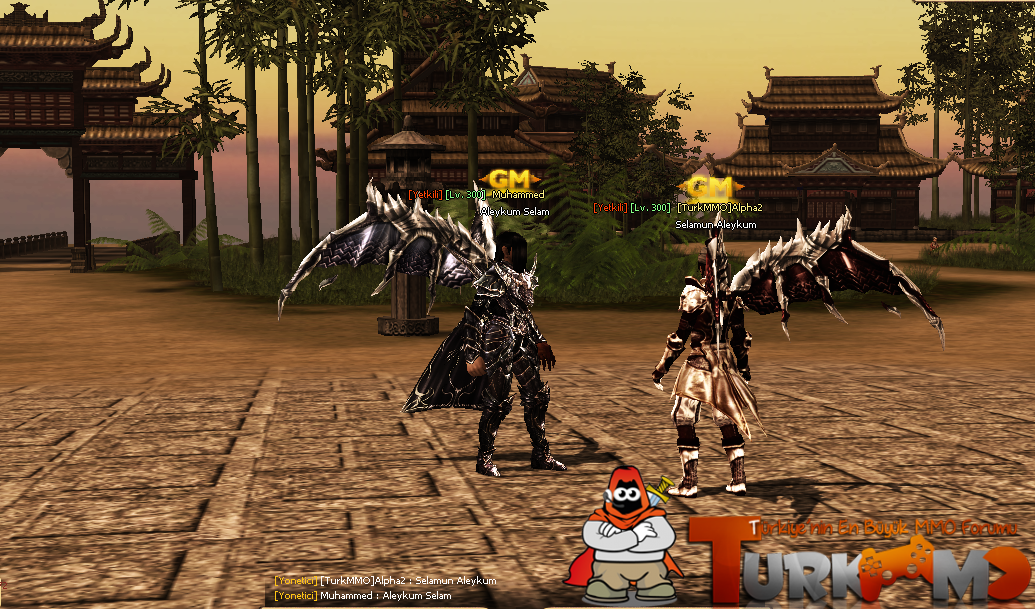
Tuşa Bas Selam VER, Tuşa Bas Selam AL - Metin2 Python GUI Sistemi
Metin2 özel sunucularında kullanıcı deneyimini artırmak, oyun içi etkileşimleri çeşitlendirmek için geliştirilen sistemlerden biri de 'Tuşa Bas Selam VER, Tuşa Bas Selam AL' sistemidir. Bu sistem sayesinde oyuncular kolayca birbirleriyle selamlaşabilir, arkadaşlıklar pekiştirilebilir veya sadece iyi niyet mesajları paylaşılabilir. Bu yazıda, Python tabanlı bir GUI arayüz ile nasıl bu sistemi Metin2 özel sunucunuza entegre edebileceğinizi anlatacağız.
Python GUI Nedir?
Python GUI (Graphical User Interface), kullanıcıların görsel olarak etkileşime girebildiği arayüzlere verilen addır. Metin2 özel sunucularda, oyun içi menü sistemleri, özel butonlar, komut paneli gibi yapılar Python ile geliştirilebilir. Bu sistemler genellikle Uiscript ile birlikte çalışır ve py root klasörlerinde barındırılır.
Sistem Özellikleri
Bu sistemde temel olarak şu özellikler yer alır:
- Oyuncu listesi üzerinden hızlı selamlaşma
- Tuş ataması ile anlık selam verme
- Görsel geri bildirim (popup, efekt)
- Sunucu taraflı loglama
Geliştirme Adımları
Öncelikle Python GUI dosyanızı hazırlamanız gerekir. Bu dosya genellikle 'selam_gui.py' gibi bir isimle saklanır. Ardından bu GUI, oyun içinde bir butonla veya tuş kombinasyonuyla açılır. Kullanıcı bir oyuncu seçip butona bastığında, selam mesajı hem göndericiye hem alıcıya gönderilir. Bu işlem sırasında sunucu tarafında bir event handler devreye girer ve eylemi kontrol eder.
Teknik Detaylar
Sistemde kullanılacak ana bileşenler şunlardır:
- Python Root klasörüne konumlandırılacak script dosyası
- Uiscript ile entegre olacak GUI dosyası
- DB veya Auth server ile haberleşen backend fonksiyonları
Neden Bu Sistemi Kullanmalısınız?
Oyuncuların birbirleriyle olan etkileşimi, Metin2 gibi PVP odaklı oyunlarda önemlidir. Bu sistem sayesinde, savaş ortamında dahi dostça temas kurulabilir. Aynı zamanda, sunucu sahipleri bu sayede daha sosyal bir topluluk yapısı kurabilirler. Bu da oyuncu sadakatini artırır.
Sonuç
Tuşa bas selam ver, tuşa bas selam al sistemi, Metin2 özel sunucularında kullanıcı memnuniyetini artırabilecek küçük ama etkili bir özelliktir. Python GUI sistemleri sayesinde bu tür geliştirmeler kolayca yapılabilir ve sunucuya özgü kişiselleştirilebilir. Eğer Metin2 geliştirme konusunda tecrübeliyseniz, bu sistemle oyuncularınız arasında daha fazla etkileşim yaratabilirsiniz.
Press Button Say Hello, Press Button Get Hello - Metin2 Python GUI System
One of the systems developed to enhance user experience and diversify in-game interactions in Metin2 private servers is the 'Press Button Say Hello, Press Button Get Hello' system. With this system, players can easily greet each other, strengthen friendships, or simply share goodwill messages. In this article, we will explain how you can integrate this system into your Metin2 private server using a Python-based GUI interface.
What is Python GUI?
Python GUI (Graphical User Interface) refers to visual interfaces that allow users to interact directly. In Metin2 private servers, menu systems, custom buttons, command panels, etc., can be developed using Python. These systems typically work alongside Uiscript and are stored within py root folders.
System Features
The main features included in this system are:
- Quick greeting through player list
- Instant greeting via key binding
- Visual feedback (popup, effect)
- Server-side logging
Development Steps
Firstly, you need to prepare your Python GUI file. This file is usually named something like 'hello_gui.py'. Then, this GUI opens via a button or key combination inside the game. When a user selects a player and clicks the button, the greeting message is sent to both sender and receiver. During this process, an event handler on the server side activates and manages the action.
Technical Details
Main components used in the system are:
- Script file placed in the Python Root folder
- GUI file integrated with Uiscript
- Backend functions communicating with DB or Auth server
Why Should You Use This System?
Player interaction is important in games like Metin2 which are focused on PVP environments. Thanks to this system, friendly contact can be established even during battle. Additionally, server owners can build more social community structures. This increases player loyalty.
Conclusion
The 'Press Button Say Hello, Press Button Get Hello' system is a small but effective feature that can increase user satisfaction in Metin2 private servers. Thanks to Python GUI systems, such improvements can be easily implemented and customized according to your server's needs. If you have experience in Metin2 development, you can create more interaction among your players with this system.

