

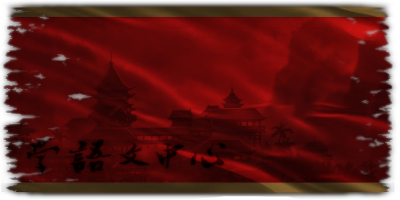
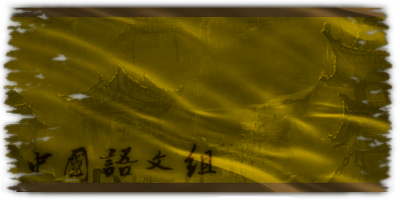
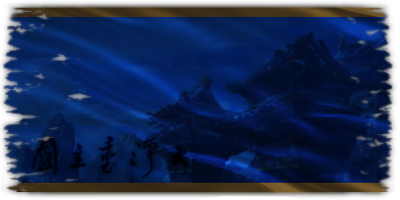
[YENİ] KIRMIZI - MAVİ - SARI BAYRAK TASARIMI
Metin2 Lobby olarak, Metin2 oyunu için geliştirilen 3D modelleme çözümleri konusunda uzmanlaşmış bir topluluk olarak, yeni bayrak tasarımlarının da sanatsal yönünü ele almayı seviyoruz. Bu yazıda, Kırmızı - Mavi - Sarı renklerinden oluşan yeni nesil bayrak tasarımını detaylıca inceleyeceğiz. Bu tasarım, hem görsel estetiği hem de sembolik derinliğiyle dikkat çekmektedir. Bayrağın renklerinin 3D modelleme sürecinde nasıl yansıtıldığı, renklerin UV mapping süreçlerinde nasıl optimize edildiği gibi teknik detaylara da değineceğiz.
Bayrak Tasarımında Renklerin Önemi
Kırmızı, güç, cesaret ve direnişi temsil eder. Mavi ise barış, istikrar ve derinliği simgeler. Sarı ise enerji, umut ve ışığı ifade eder. Bu üçlü kombinasyon, hem geleneksel hem de modern bir estetikle harmanlanarak güçlü bir görsel dil yaratmaktadır. Metin2 dünyasında karakterler, NPC’ler veya arka plan objeleri olarak kullanılacak bayrak modellerinde bu renklerin dengeli bir şekilde yer alması, oyun atmosferine katkı sağlar.
Metin2 İçin Bayrak Modeli Oluşturma Süreci
Metin2 oyununda bayrak modeli oluşturmak isteyen geliştiriciler için bazı önemli adımlar mevcuttur. İlk olarak modelin 3D ortamda oluşturulması gerekir. Bu işlem Blender veya 3ds Max gibi yazılımlarla yapılabilmektedir. Modelin GR2 formatında dışa aktarılması önemlidir. GR2 formatı, Metin2 oyun motoru tarafından desteklenen özel bir model formatıdır. Bu format sayesinde modelin animasyonları, dokuları ve kurgu sistemleri doğru şekilde çalışır.
UV Mapping ve Texture Uyumlu Bayrak Dokusu
UV Mapping aşaması, bayrağın renklerinin doğru şekilde dokuya aktarılması için kritiktir. Kırmızı - Mavi - Sarı renklerinin her biri için ayrı ayrı UV alanları ayarlanmalıdır. Bu sayede doku, modelin yüzeyinde bozulmadan, düzgün bir şekilde yer alır. Ayrıca, doku dosyasının PNG veya DDS formatında olması önerilir. Bu formatlar, yüksek kalite sunarken performans kaybını da en aza indirger.
Modelin Oyuna Entegrasyonu
Metin2 oyununda oluşturulan bayrak modeli, model replace yöntemiyle mevcut oyun dosyalarının içine entegre edilebilir. Alternatif olarak, yeni bir NPC veya map objesi olarak da eklenebilir. Bu süreçte texture ve mesh[/COORD] uyumunun kontrol edilmesi büyük önem taşır.
Bayrak Animasyonu ve Dinamik Hareket
Rigging işlemi sayesinde, bayrak modeline rüzgar etkisi gibi dinamik animasyonlar kazandırılabilir. Bu sayede model, oyunda daha gerçekçi bir etki yaratır. Bone yapısı doğru şekilde tanımlanarak, bayrağın dalgalanma hareketi doğal görünebilir. Animation dosyaları da GR2 formatı ile uyumlu olmalıdır.
Sonuç
Kırmızı - Mavi - Sarı bayrak tasarımı, hem görsel açıdan etkileyici hem de sembolik olarak anlamlı bir yapıya sahiptir. Metin2 dünyasında bu tarz modellerin kullanımı, oyun deneyimini zenginleştirir. 3D modelleme, texturing, UV mapping ve animation gibi teknik adımlar dikkatlice uygulanarak, profesyonel düzeyde içerikler üretilebilir. Metin2 Lobby olarak, bu alandaki tüm gelişmeleri yakından takip ediyor ve topluluğa aktarıyoruz.
[NEW] RED - BLUE - YELLOW FLAG DESIGN
Metin2 Lobby, as a community specialized in 3D modeling solutions for the Metin2 game, enjoys exploring the artistic aspects of new flag designs. In this article, we will examine the new generation flag design consisting of Red - Blue - Yellow colors in detail. This design attracts attention with both its visual aesthetics and symbolic depth. We will also touch upon how the colors of the flag are reflected in the 3D modeling process and how they are optimized during UV mapping procedures.
Importance of Colors in Flag Design
Red symbolizes strength, courage, and resistance. Blue represents peace, stability, and depth. Yellow expresses energy, hope, and light. This triple combination creates a powerful visual language by blending traditional and modern aesthetics. The balanced placement of these colors in flag models used as characters, NPCs, or background objects in the Metin2 world contributes to the game atmosphere.
Process of Creating a Flag Model for Metin2
Metin2 developers who wish to create a flag model must follow certain important steps. First, the model needs to be created in a 3D environment. This can be done using software such as Blender or 3ds Max. Exporting the model in GR2 format is essential. The GR2 format is a special model format supported by the Metin2 game engine. Thanks to this format, animations, textures, and rigging systems of the model operate correctly.
UV Mapping and Texture-Compatible Flag Texture
UV Mapping is critical for correctly transferring the colors of the flag onto the texture. Separate UV areas should be assigned for each of the Red - Blue - Yellow colors. This ensures that the texture appears on the surface of the model without distortion and in a proper manner. Additionally, it is recommended that the texture file be in PNG or DDS format. These formats provide high quality while minimizing performance loss.
Integration of the Model into the Game[/BR]
Metin2 flag models created can be integrated into the existing game files via the model replace method. Alternatively, they can be added as a new NPC or map object. In this process, ensuring compatibility between texture and mesh is crucial.
Flag Animation and Dynamic Movement
Thanks to the rigging process, dynamic animations like wind effects can be added to the flag model. This makes the model appear more realistic within the game. By properly defining the bone structure, the waving motion of the flag can appear natural. Animation files must also be compatible with the GR2 format.
Conclusion
The Red - Blue - Yellow flag design has a visually impressive and symbolically meaningful structure. The use of such models in the Metin2 world enriches the gaming experience. By carefully implementing technical steps such as 3D modeling, texturing, UV mapping, and animation, professional-level content can be produced. As Metin2 Lobby, we closely monitor all developments in this field and share them with the community.
