

Unpack edilen dosyaların listesi
Kod:
effect icon locale_de metin2_patch_catchking metin2_patch_common metin2_patch_costume_soccer metin2_patch_dawnmist_dungeon metin2_patch_mundi metin2_patch_ramadan_costume metin2_patch_weapon_summer_2018 metin2_patch_worldcup2018 root uiscript
Ziyaretçiler için gizlenmiş link,görmek için üye olmalısınız!
Giriş yap veya üye ol.
VirusTotal
Görsel
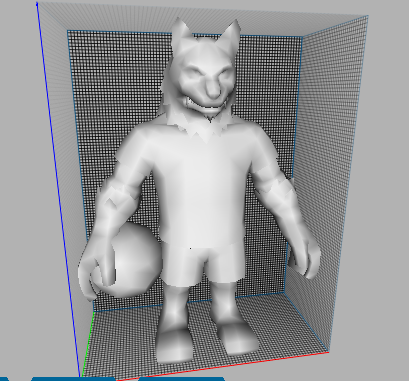
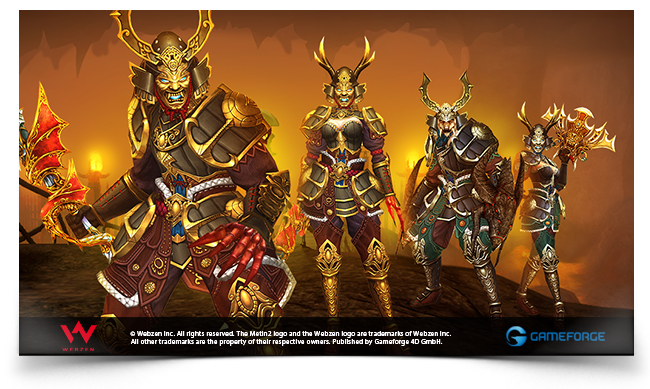
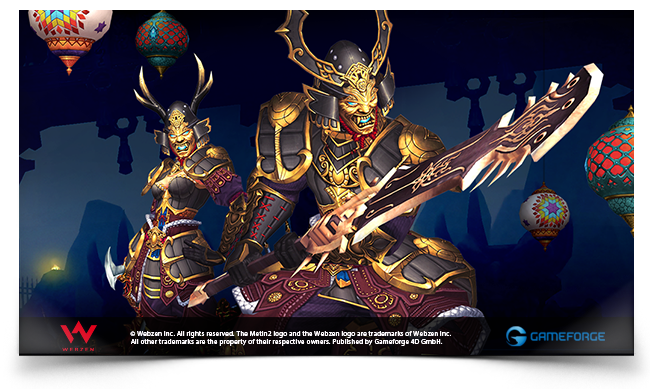
18.2 Unpack 15.05.2018: Metin2 Model ve Veri Paketi Açma Rehberi
Metin2 Lobby, Metin2 oyununda 3D modelleme, model düzenleme, efekt ekleme ve grafiksel değişiklikler yapmayı seven geliştiriciler ve oyuncular için geniş bir kaynak sunar. Bu yazıda, 18.2 Unpack adı verilen önemli bir araçtan bahsedeceğiz. Bu araç, 15.05.2018 tarihinde yayınlanan Metin2 paket dosyalarının açılıp içeriğinin incelenmesini sağlar. Özellikle model edit, NPC model, monster model gibi konularda çalışanlar için kritik öneme sahiptir.
18.2 Unpack Nedir?
18.2 Unpack, Metin2 oyunu içindeki .gr2, .eix, .epk gibi özel dosya uzantılarını açmaya yarayan bir araçtır. Bu tür dosyalar, oyunun 3D modellerini, harita objelerini, efektlerini ve diğer görsel öğelerini içerir. 15.05.2018 tarihli sürümde yapılan değişiklikler, daha önce çalışmayan bazı model formatlarının açılabilir hale gelmesini sağlamıştır.
Metin2 Model Editörleri ve 18.2 Unpack Kombinasyonu
Metin2 model edit işlemlerinde, doğru unpack aracını kullanmak büyük önem taşır. 18.2 Unpack sayesinde, character model, item model ve map model gibi öğeler kolayca dışa aktarılabilir. Bu sayede 3DS Max ya da Blender gibi yazılımlarda düzenlenebilirler. Ayrıca, gr2 export ve gr2 import işlemleri için de temel bir başlangıç noktası oluşturur.
Granny3D ve GR2 Formatları
Granny3D (veya kısa adıyla gr2), Metin2 oyununda kullanılan temel 3D model formatıdır. 18.2 Unpack sayesinde bu dosyalar açılıp, Blender veya 3ds Max ortamında düzenlenebilir hale getirilebilir. Bu sayede rigging, animation, mesh ve texture gibi işlemleri profesyonel düzeyde gerçekleştirebilirsiniz. Bone yapıları da bu süreçte düzenlenebilir.
Metin2 Texture ve UV Map
Texture (doku) ve UV Mapping, 3D modelleme sürecinin ayrılmaz parçalarıdır. 18.2 Unpack ile açılan model dosyalarından doku dosyaları (.dds, .tga vb.) çıkarılabilir. Bu sayede skin veya visual mod geliştirmek isteyenler için büyük bir avantaj sağlar. UV Map düzenlemesi sayesinde modelin dokusunun doğru şekilde yerleştirilmesi sağlanır.
Model Değiştirme ve Özel Tasarımlar
Metin2 model replace işlemi, mevcut NPC, karakter veya eşya modellerinin değiştirilmesini sağlar. 18.2 Unpack ile açılan orijinal model dosyaları üzerinde değişiklik yapıldıktan sonra yeniden paketlenerek sunucuya entegre edilebilir. Bu işlem, custom model oluşturma sürecinin temelidir. MartySama ve benzeri mod geliştiricilerin kullandığı yöntemlerden biridir.
EterPack ve 3D Asset Yönetimi
EterPack, Metin2 sunucularında kullanılan bir başka önemli sistemdir. EterPack ile paketlenmiş modeller, efektler ve harita objeleri daha hızlı yüklenebilir. 18.2 Unpack bu paketlerin içeriğini açarak geliştiricilere esneklik sağlar. Building model, dungeon model, terrain gibi yapılar bu sayede özelleştirilebilir.
Metin2 Development ve Geliştirici Araçları
Metin2 development sürecinde model ve efekt dosyaları sık sık analiz edilmelidir. 18.2 Unpack bu bağlamda önemli bir yardımcıdır. Effect model, map object, animation gibi bileşenlerin doğrudan incelenmesi ve modifiye edilmesi mümkün hale gelir. Metin2Dev platformları da bu tür işlemleri destekler.
Sonuç
18.2 Unpack 15.05.2018 versiyonu, Metin2 3D modelleme dünyasında kritik bir araçtır. Hem yeni başlayanlar hem de deneyimli geliştiriciler için model çıkarma, değiştirme ve özelleştirme konularında güçlü bir temel oluşturur. Metin2 Lobby olarak, bu araçların doğru şekilde kullanılması gerektiğini vurgulamak isteriz. Modifikasyon yaparken dikkatli olunmalı, lisans ve sunucu kurallarına uyulmalıdır.
18.2 Unpack 15.05.2018: Guide to Unpacking Metin2 Data Packages
Metin2 Lobby offers a vast resource for developers and players who enjoy 3D modeling, model editing, adding effects, and making graphical changes in the game Metin2. In this article, we will discuss a significant tool called 18.2 Unpack. This tool enables opening and inspecting package files from Metin2 released on 15.05.2018. It is particularly critical for those working with model edit, NPC models, monster models, and similar topics.
What is 18.2 Unpack?
18.2 Unpack is a tool used to open special file extensions like .gr2, .eix, .epk found within the Metin2 game. These types of files contain 3D models, map objects, effects, and other visual elements of the game. The version released on May 15, 2018 introduced changes that enabled previously non-functional model formats to be opened successfully.
Metin2 Model Editors and the 18.2 Unpack Combination
In Metin2 model editing, using the correct unpack tool is crucial. Thanks to 18.2 Unpack, elements such as character models, item models, and map models can be easily exported and edited in software like 3DS Max or Blender. Additionally, it serves as a foundational starting point for gr2 export and gr2 import operations.
Granny3D and GR2 Formats
Granny3D (or shortly gr2) is the primary 3D model format used in Metin2. With 18.2 Unpack, these files can be opened and made editable in Blender or 3ds Max environments. Thus, you can perform professional-level operations such as rigging, animation, mesh, and texture. Bone structures can also be adjusted during this process.
Metin2 Texture and UV Mapping
Textures and UV Mapping are integral parts of the 3D modeling process. Through 18.2 Unpack, texture files (.dds, .tga, etc.) can be extracted from opened model files. This provides a great advantage for those looking to develop skins or visual mods. Proper UV mapping ensures textures are placed correctly on the model.
Model Replacement and Custom Designs
Metin2 model replacement allows changing existing NPC, character, or item models. After modifications on original model files opened via 18.2 Unpack, they can be repackaged and integrated into the server. This process forms the basis of creating custom models. This method is often used by mod developers like MartySama.
EterPack and 3D Asset Management
EterPack is another important system used in Metin2 servers. Models, effects, and map objects packed with EterPack load faster. 18.2 Unpack grants flexibility to developers by allowing access to the contents of these packages. Structures like building models, dungeon models, and terrain can be customized through this method.
Metin2 Development and Developer Tools
During Metin2 development, model and effect files must frequently be analyzed. 18.2 Unpack serves as a key helper in this context. It makes direct inspection and modification of components like effect models, map objects, and animations possible. Metin2Dev platforms support such operations as well.
Conclusion
The 18.2 Unpack version dated 15.05.2018 is a critical tool in the world of Metin2 3D modeling. It provides a strong foundation for both newcomers and experienced developers in extracting, modifying, and customizing models. As Metin2 Lobby, we emphasize the importance of using these tools correctly. Be cautious while making modifications and always adhere to licensing and server rules.
