

19.6 Güncellemelerinden en son gelenlerden birisi forumda göremedim o yüzden paylaşmak istedim eğer var ise kapatılabilir.
Pack İçeriği :
Loncalar için gelen sistemin pack tarafı.
Lonca PVE sistemine ait slot boss ve harita.
2 Yeni pet.
Tüm sürüm packları unpack halde locale root vesaire içerisindedir.
İçerik Görseli :
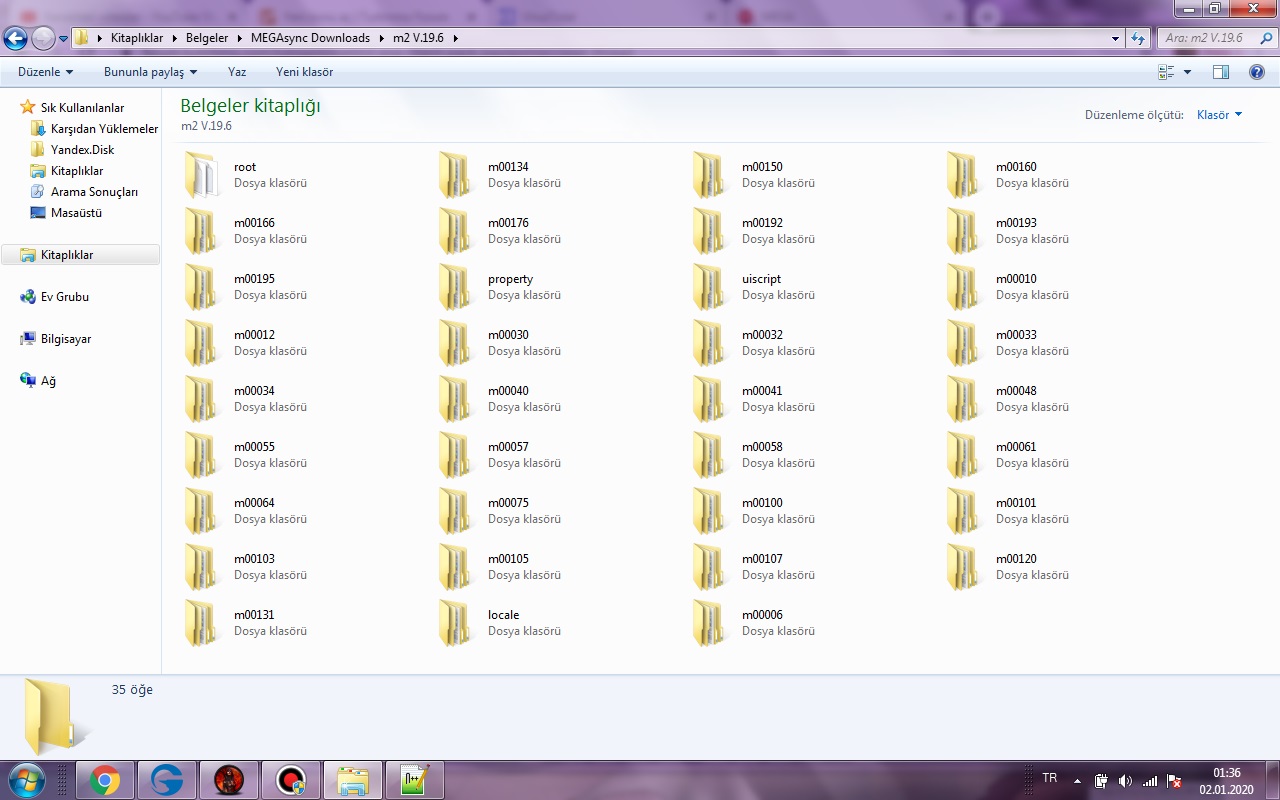
Pack İçeriği :
Loncalar için gelen sistemin pack tarafı.
Lonca PVE sistemine ait slot boss ve harita.
2 Yeni pet.
Tüm sürüm packları unpack halde locale root vesaire içerisindedir.
Ziyaretçiler için gizlenmiş link,görmek için üye olmalısınız!
Giriş yap veya üye ol.
Ziyaretçiler için gizlenmiş link,görmek için üye olmalısınız!
Giriş yap veya üye ol.
İçerik Görseli :
İçerikle alakalı video :
Not : Sadece boss ve petleri gösterdim gerisine indirip bakabilirsiniz.
19.6 (Ejderha Kralı Güncellemesi Packlar Unpack)
Metin2 oyuncuları için en büyük heyecan kaynağından biri olan Ejderha Kralı güncellemesi, 19.6 sürümüyle birlikte oyun dünyasına yepyeni bir soluk getirdi. Bu güncelleme ile birlikte gelen yeni itemler, büyüler, haritalar ve sistem değişiklikleri, oyuncuların eski client dosyalarını kullanmaya devam etmesini zorlaştırdı. İşte bu noktada packları unpack etme işlemi devreye giriyor. Metin2Lobby, bu süreçte sizlere en güncel ve güvenilir çözümleri sunmak için burada.
Uyarı: Pack dosyalarını unpack etmeden önce mutlaka orijinal client dosyalarınızın yedeğini alın. Aksi takdirde kalıcı veri kaybı yaşayabilirsiniz.
Pack dosyaları, Metin2'nin grafik, ses, animasyon ve veri dosyalarını içeren sıkıştırılmış arşivlerdir. 19.6 güncellemesiyle birlikte bu dosyalar yapısal olarak değiştiği için eski unpack yöntemleri çalışmayabilir. Bu nedenle güncel unpack araçları ve doğru adımlar büyük önem taşır. Metin2Lobby'de paylaştığımız 19.6 özel client paketi, bu değişikliklere tam uyumlu şekilde dizayn edilmiştir. Paketi indirdikten sonra aşağıdaki adımları izleyerek pack dosyalarınızı güvenle unpack edebilirsiniz:
1. Client'ı temiz bir klasöre çıkarın (örneğin: C:\Metin2_19.6)
2. Unpack aracını client klasörüne yerleştirin
3. Komut satırından veya GUI arayüzüyle 'extract all' komutunu çalıştırın
4. Çıkarılan dosyaların root/client yapısına uygun şekilde yerleştiğinden emin olun
Bu işlem sonrası hem PVP odalarında hem de normal sunucularda 19.6 güncellemesinin tüm içeriklerini sorunsuz görüntüleyebilirsiniz. Ayrıca Metin2Lobby'de yer alan teknik destek forumu, unpack sırasında karşılaşabileceğiniz hatalar için adım adım çözüm sunar. Örneğin 'texture.pak corrupt' hatası alan kullanıcılar için özel bir fix dosyası hazırladık.
Eğer kendi özel client'inizi geliştirmek istiyorsanız, unpack işlemi size orijinal dosyalar üzerinde değişiklik yapma imkanı verir. Texture, effect veya sound dosyalarınızı özelleştirip tekrar pack ederek tamamen kişisel Metin2 deneyimi yaratabilirsiniz. Bu konuda Metin2Lobby'nin client edit rehberleri size büyük kolaylık sağlayacaktır.
Son olarak, 19.6 güncellemesiyle birlikte gelen Ejderha Kralı bölümünün tüm gizemlerini keşfetmek istiyorsanız, pack dosyalarını doğru unpack etmek elinizde olan en önemli anahtardır. Metin2Lobby, sadece client paylaşımı değil, aynı zamanda doğru bilgi ve araçlarla destek sunar. Bugün ücretsiz olarak 19.6 client paketini indirin ve Ejderha Kralı'nın izinden yürümeye başlayın!
Uyarı: Pack dosyalarını unpack etmeden önce mutlaka orijinal client dosyalarınızın yedeğini alın. Aksi takdirde kalıcı veri kaybı yaşayabilirsiniz.
Pack dosyaları, Metin2'nin grafik, ses, animasyon ve veri dosyalarını içeren sıkıştırılmış arşivlerdir. 19.6 güncellemesiyle birlikte bu dosyalar yapısal olarak değiştiği için eski unpack yöntemleri çalışmayabilir. Bu nedenle güncel unpack araçları ve doğru adımlar büyük önem taşır. Metin2Lobby'de paylaştığımız 19.6 özel client paketi, bu değişikliklere tam uyumlu şekilde dizayn edilmiştir. Paketi indirdikten sonra aşağıdaki adımları izleyerek pack dosyalarınızı güvenle unpack edebilirsiniz:
1. Client'ı temiz bir klasöre çıkarın (örneğin: C:\Metin2_19.6)
2. Unpack aracını client klasörüne yerleştirin
3. Komut satırından veya GUI arayüzüyle 'extract all' komutunu çalıştırın
4. Çıkarılan dosyaların root/client yapısına uygun şekilde yerleştiğinden emin olun
Bu işlem sonrası hem PVP odalarında hem de normal sunucularda 19.6 güncellemesinin tüm içeriklerini sorunsuz görüntüleyebilirsiniz. Ayrıca Metin2Lobby'de yer alan teknik destek forumu, unpack sırasında karşılaşabileceğiniz hatalar için adım adım çözüm sunar. Örneğin 'texture.pak corrupt' hatası alan kullanıcılar için özel bir fix dosyası hazırladık.
Eğer kendi özel client'inizi geliştirmek istiyorsanız, unpack işlemi size orijinal dosyalar üzerinde değişiklik yapma imkanı verir. Texture, effect veya sound dosyalarınızı özelleştirip tekrar pack ederek tamamen kişisel Metin2 deneyimi yaratabilirsiniz. Bu konuda Metin2Lobby'nin client edit rehberleri size büyük kolaylık sağlayacaktır.
Son olarak, 19.6 güncellemesiyle birlikte gelen Ejderha Kralı bölümünün tüm gizemlerini keşfetmek istiyorsanız, pack dosyalarını doğru unpack etmek elinizde olan en önemli anahtardır. Metin2Lobby, sadece client paylaşımı değil, aynı zamanda doğru bilgi ve araçlarla destek sunar. Bugün ücretsiz olarak 19.6 client paketini indirin ve Ejderha Kralı'nın izinden yürümeye başlayın!
19.6 (Dragon King Update Packs Unpack)
One of the biggest sources of excitement for Metin2 players, the Dragon King update, brought a brand new breath to the game world with version 19.6. The new items, spells, maps, and system changes that came with this update made it difficult for players to continue using old client files. This is where the process of unpacking packs comes into play. Metin2Lobby is here to provide you with the most up-to-date and reliable solutions during this process.
Warning: Always back up your original client files before unpacking pack files. Otherwise, you may experience permanent data loss.
Pack files are compressed archives containing Metin2's graphics, sound, animation, and data files. With the 19.6 update, these files have structurally changed, so old unpacking methods may not work. Therefore, current unpacking tools and correct steps are of great importance. The 19.6 special client package shared on Metin2Lobby is designed to be fully compatible with these changes. After downloading the package, you can safely unpack your pack files by following these steps:
1. Extract the client to a clean folder (e.g., C:\Metin2_19.6)
2. Place the unpack tool into the client folder
3. Run the 'extract all' command via command line or GUI interface
4. Ensure the extracted files are placed according to the root/client structure
After this process, you can view all the content of the 19.6 update seamlessly, both in PVP rooms and normal servers. Additionally, the technical support forum on Metin2Lobby offers step-by-step solutions for errors you may encounter during unpacking. For example, we have prepared a special fix file for users who receive the 'texture.pak corrupt' error.
If you want to develop your own custom client, the unpacking process gives you the opportunity to modify the original files. You can customize your texture, effect, or sound files and repack them to create a completely personalized Metin2 experience. In this regard, Metin2Lobby's client edit guides will provide you with great convenience.
Finally, if you want to explore all the mysteries of the Dragon King section that came with the 19.6 update, correctly unpacking the pack files is the most important key in your hands. Metin2Lobby offers not only client sharing but also support with correct information and tools. Download the 19.6 client package for free today and start walking in the footsteps of the Dragon King!
Warning: Always back up your original client files before unpacking pack files. Otherwise, you may experience permanent data loss.
Pack files are compressed archives containing Metin2's graphics, sound, animation, and data files. With the 19.6 update, these files have structurally changed, so old unpacking methods may not work. Therefore, current unpacking tools and correct steps are of great importance. The 19.6 special client package shared on Metin2Lobby is designed to be fully compatible with these changes. After downloading the package, you can safely unpack your pack files by following these steps:
1. Extract the client to a clean folder (e.g., C:\Metin2_19.6)
2. Place the unpack tool into the client folder
3. Run the 'extract all' command via command line or GUI interface
4. Ensure the extracted files are placed according to the root/client structure
After this process, you can view all the content of the 19.6 update seamlessly, both in PVP rooms and normal servers. Additionally, the technical support forum on Metin2Lobby offers step-by-step solutions for errors you may encounter during unpacking. For example, we have prepared a special fix file for users who receive the 'texture.pak corrupt' error.
If you want to develop your own custom client, the unpacking process gives you the opportunity to modify the original files. You can customize your texture, effect, or sound files and repack them to create a completely personalized Metin2 experience. In this regard, Metin2Lobby's client edit guides will provide you with great convenience.
Finally, if you want to explore all the mysteries of the Dragon King section that came with the 19.6 update, correctly unpacking the pack files is the most important key in your hands. Metin2Lobby offers not only client sharing but also support with correct information and tools. Download the 19.6 client package for free today and start walking in the footsteps of the Dragon King!
