

2004 Yılında Kullanılan GM Logusudur.
Arşivimde duruyordu, yabancı forumda paylaşıldığını gördüm paylaşayım dedim.
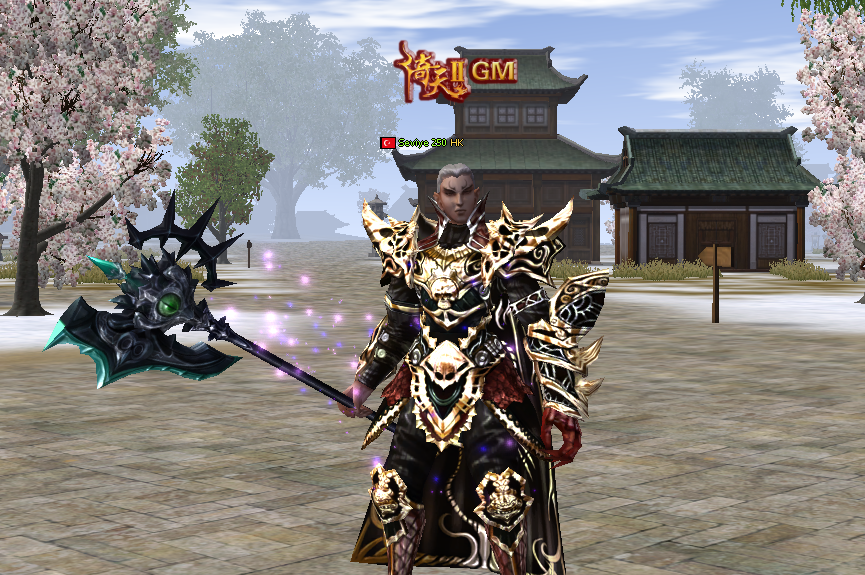
Arşivimde duruyordu, yabancı forumda paylaşıldığını gördüm paylaşayım dedim.
Ziyaretçiler için gizlenmiş link,görmek için üye olmalısınız!
Giriş yap veya üye ol.
Ziyaretçiler için gizlenmiş link,görmek için üye olmalısınız!
Giriş yap veya üye ol.
2004 GM LOGOSU Upload - HK-DEV
Merhaba Metin2 topluluğu!
Bugün sizlerle, eski zamanlardan kalan ve nostaljik bir anıyı canlandıran 2004 GM Logosu'nu paylaşmak istiyoruz. Bu logo, Metin2Lobby.com ekibi tarafından özenle hazırlanmış ve HK-DEV etiketiyle sunulmuştur. Eğer Metin2 client, Metin2 pack veya özellikle Metin2 pvp client gibi projeler üzerinde çalışıyorsanız, bu logo muhtemelen size tanıdık gelecektir.
Dikkat: Bu içerik yalnızca eğitim ve kişisel kullanım içindir. Ticari amaçlı kullanımı yasaktır ve telif hakkı ihlali teşkil edebilir.
2004 yılı, Metin2 tarihinde oldukça önemli bir dönemdir. O dönemde oyun henüz Türkiye'de yaygınlaşmaya başlamıştı ve birçok oyuncu ilk kez bu epik dünyaya adım atmıştı. GM (Game Master) logoları, o zamanlar sadece yetkili kişiler tarafından kullanılan ve oyun içi otoriteyi simgeleyen özel grafiklerdi. 2004 GM Logosu, basit ama etkileyici tasarımıyla birçok oyuncunun hafızasında yer etmiştir. Şimdi ise bu logoyu Metin2 client edit işlemlerinizde, Metin2 pack aç çalışmalarınızda veya hatta kendi Metin2 custom client'ınızı geliştirirken kullanabilirsiniz.
Bu logo, özellikle Metin2 client dosyaları içinde texture veya effect klasörlerine yerleştirilerek kullanılabilir. Ayrıca Metin2 pack extract işlemi sonrası elde edilen dosyalarda bu logoyu bulabilir ve kendi Metin2 client skin tasarımlarınıza entegre edebilirsiniz. Eğer Metin2 client kurulum sırasında özel bir görünüm istiyorsanız, bu logo mükemmel bir başlangıç noktası olabilir.
Nasıl Kullanılır?
1. Logoyu indirdikten sonra Metin2 client klasörünüze gidin.
2. İlgili texture klasörüne (örneğin logo veya interface) dosyayı kopyalayın.
3. Gerekli Metin2 client yama veya Metin2 client patch işlemlerini yaparak logoyu aktif hale getirin.
4. Oyunu başlattığınızda ana ekranda 2004 GM Logosu'nu görmelisiniz.
Eğer karşılaştığınız herhangi bir Metin2 client hata ile karşılaşırsanız veya Metin2 client fix desteğine ihtiyacınız olursa, Metin2Lobby.com forumlarımızı ziyaret edebilirsiniz. Topluluk üyelerimizden hızlıca yardım alabilirsiniz.
Ayrıca bu logoyu Metin2 eter pack gibi özel paketlerinizde kullanarak diğer oyuncularla paylaşabilirsiniz. Unutmayın ki Metin2 client paylaşım ve Metin2 pack paylaşım gibi faaliyetler, topluluğun büyümesine büyük katkı sağlar.
Son olarak, Metin2Dev client veya Martysama client gibi popüler modifikasyonlarda da bu logoyu görmek mümkündür. Eğer kendi Metin2 özel client'ınızı geliştiriyorsanız, bu nostaljik logo ile oyunculara unutulmaz bir deneyim sunabilirsiniz.
İndirme Bağlantısı: 2004 GM Logosu - HK-DEV
Keyifli kullanımlar dileriz!
Metin2Lobby.com – Her Zaman Seninle!
2004 GM LOGO Upload - HK-DEV
Hello Metin2 community!
Today, we would like to share the 2004 GM Logo, a nostalgic relic from the past, carefully prepared by the Metin2Lobby.com team and presented under the HK-DEV label. If you are working on projects such as Metin2 client, Metin2 pack, or especially Metin2 pvp client, this logo will likely feel familiar to you.
Warning: This content is for educational and personal use only. Commercial use is prohibited and may constitute copyright infringement.
The year 2004 was a highly significant period in Metin2 history. At that time, the game was just beginning to gain popularity in Turkey, and many players were stepping into this epic world for the first time. GM (Game Master) logos were special graphics used exclusively by authorized personnel at the time, symbolizing in-game authority. The 2004 GM Logo has secured its place in the memories of many players with its simple yet impressive design. Now, you can use this logo in your Metin2 client edit projects, Metin2 pack extract operations, or even when developing your own Metin2 custom client.
This logo can be used by placing it in the texture or effect folders within your Metin2 client files. You can also find this logo in files obtained after Metin2 pack extract operations and integrate it into your own Metin2 client skin designs. If you want a unique look during Metin2 client installation, this logo could be a perfect starting point.
How to Use?
1. After downloading the logo, navigate to your Metin2 client folder.
2. Copy the file into the relevant texture folder (e.g., logo or interface).
3. Apply necessary Metin2 client patch or Metin2 client update procedures to activate the logo.
4. When you launch the game, you should see the 2004 GM Logo on the main screen.
If you encounter any Metin2 client errors or need Metin2 client fix support, feel free to visit our Metin2Lobby.com forums. You can quickly get help from our community members.
You can also use this logo in special packs like Metin2 eter pack and share it with other players. Remember that activities such as Metin2 client sharing and Metin2 pack sharing greatly contribute to the growth of the community.
Finally, you may also encounter this logo in popular modifications such as Metin2Dev client or Martysama client. If you are developing your own Metin2 custom client, you can offer players an unforgettable experience with this nostalgic logo.
Download Link: 2004 GM Logo - HK-DEV
Enjoy!
Metin2Lobby.com – Always With You!
