

Nasıl Item Eklenir Videosu
Deneme Moderatör olmamın şerefine, Metin2 Development bölümlerindeki oyun içi görsellerde kullanım amaçlı bir 3D Model yaptım.
:angel2:Basit de olsa oyun içerisinde gayet güzel duruyor :angel2:
Umarım beğenirsiniz
(Tıklayarak Sketchfab üzerinden 3D görüntüleyebilirsiniz)
.
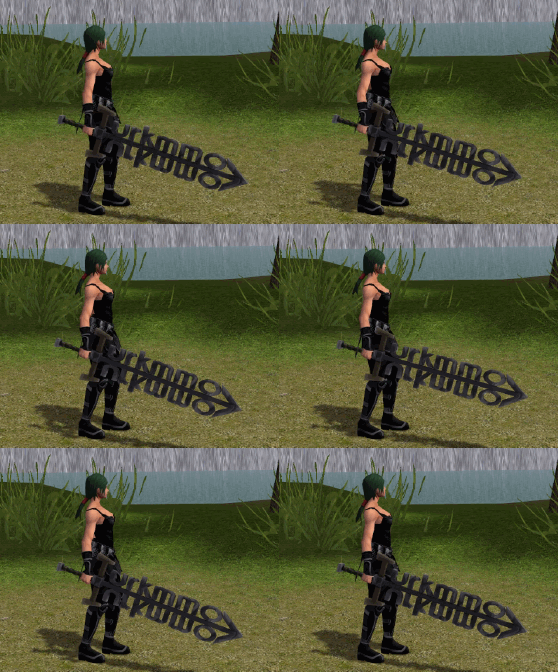
Deneme Moderatör olmamın şerefine, Metin2 Development bölümlerindeki oyun içi görsellerde kullanım amaçlı bir 3D Model yaptım.
:angel2:Basit de olsa oyun içerisinde gayet güzel duruyor :angel2:
Umarım beğenirsiniz
Ziyaretçiler için gizlenmiş link,görmek için üye olmalısınız!
Giriş yap veya üye ol.
(Tıklayarak Sketchfab üzerinden 3D görüntüleyebilirsiniz)
.
İndir
Ziyaretçiler için gizlenmiş link,görmek için üye olmalısınız!
Giriş yap veya üye ol.
VirusTotal
Ziyaretçiler için gizlenmiş link,görmek için üye olmalısınız!
Giriş yap veya üye ol.
Ziyaretçiler için gizlenmiş link,görmek için üye olmalısınız!
Giriş yap veya üye ol.
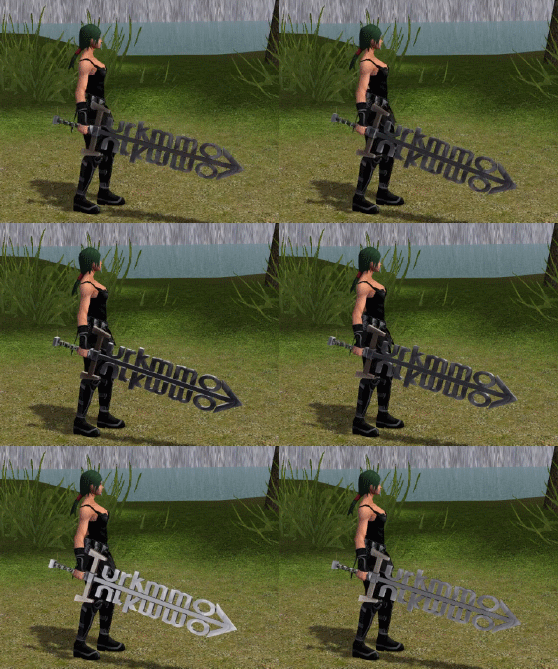
Oyun içinde gözükmemesinin sebebi Granny sürümü olabilir.
Ben 2.8 altında export yapamıyorum o yüzden OBJ halini paylaşıyorum.
Ziyaretçiler için gizlenmiş link,görmek için üye olmalısınız!
Giriş yap veya üye ol.
2:23 de anlatım başlıyor
[3D] Metin2Lobby Kılıcı: Metin2 İçin Olağanüstü 3D Modelleme Serüveni!
Metin2Lobby platformu, Metin2 oyun dünyasında 3D modelleme sanatına adanmış bir topluluk olarak öne çıkar. Bu yazıda, metin2lobby.com üzerinden sunulan Metin2 3D kılıç modeliyle ilgili bilgilere değineceğiz. Metin2 için özel 3D kılıç modeli tasarımı, gr2 formatında dışa aktarım, texture uyumu ve animation entegrasyonu gibi konulara odaklanacağız. Ayrıca Blender ve 3ds Max kullanarak bu modelin nasıl yapılandırılacağına dair ipuçları da sunulacaktır.
Metin2 3D Kılıç Modeli Nedir?
Metin2 oyununda özel silah tasarımları, oyuncuların karakterlerini özelleştirmeleri açısından büyük önem taşır. Kılıç gibi silahların 3D model versiyonlarını oluşturmak, hem oyun içinde görsellik katmak hem de geliştiriciler için alternatif paketler hazırlamak açısından kritik rol oynar. Metin2lobby.com, bu alanda profesyonel düzeyde içerikler sunarak, kullanıcıların Metin2 deneyimini zenginleştirmesine yardımcı olur.
3D Model Formatları: GR2 ve Granny3D
Metin2 oyun motoru, özellikle GR2 ve Granny3D formatlarını destekler. Bu formatlar, modelin doğru şekilde oyun içine entegre edilebilmesi için uygun şekilde dışa aktarılmalıdır. Gr2 export ve gr2 import işlemleri, Blender veya 3ds Max üzerinden uygun eklentilerle yapılabilir. Modelin doğru UV mapping (UV haritalama) ve texture ataması ile birlikte hazırlanması, sonucun daha gerçekçi ve oyunla uyumlu olmasına yardımcı olur.
Blender ve 3ds Max ile Metin2 3D Modelleme
Blender, açık kaynak kodlu ve güçlü modelleme araçları sunan bir yazılımdır. Metin2 için 3D kılıç modellemesi yaparken, Blender üzerinde mesh, bone ve rigging işlemleri doğru şekilde yapılmalıdır. Martysama gibi gelişmiş araçlar sayesinde gr2 formatına dönüştürme işlemi kolayca gerçekleştirilebilir. 3ds Max ise, özellikle Metin2 development süreçlerinde profesyonel geliştiriciler tarafından tercih edilir. Her iki programda da animation desteği sayesinde, kılıç modeline özel hareket efektleri de eklenebilir.
Texture ve UV Mapping
Metin2’de texture uyumu, modelin oyun içinde doğal gözükmesi için oldukça önemlidir. UV mapping işlemi sırasında, modelin yüzeylerine doğru şekilde dokuların yerleştirilmesi gerekir. Metin2 texture[/B] formatları genellikle DDS olarak kullanılır. Skin ve visual mod olarak tanımlanan bu dokular, modelin görsel kalitesini doğrudan etkiler. Metin2lobby üzerinden erişilen modeller, genellikle bu dokularla birlikte gelir ve doğrudan oyun içine entegre edilebilir.
Nasıl Kullanılır?
Metin2lobby.com üzerinden indirdiğiniz 3D kılıç modelini, Metin2 oyun dosyalarına entegre etmek için model replace yöntemleri kullanılabilir. EterPack veya Metin2Dev gibi sistemler üzerinden, mevcut kılıç modeli özel modelinizle değiştirilebilir. Bu sayede hem oyun içinde farklı bir görünüm elde edersiniz hem de sunucularınızda özgün bir atmosfer yaratmanız mümkün olur.
Sonuç
Metin2lobby üzerinden sunulan 3D kılıç modeli, hem geliştiriciler hem de oyuncular için Metin2 deneyimini geliştiren harika bir özelliktir. 3D modelleme, texturing, animation ve format uyumu gibi konular, bu projelerin başarısı için kritik öneme sahiptir. Metin2lobby ile bu süreci daha keyifli ve verimli hale getirebilirsiniz.
[3D] Metin2Lobby Sword: An Extraordinary 3D Modeling Journey for Metin2!
Metin2Lobby stands out as a community dedicated to 3D modeling in the world of Metin2. In this article, we will discuss the Metin2 3D sword model available through metin2lobby.com. We'll focus on topics such as designing custom 3D sword models for Metin2, exporting in GR2 format, texture compatibility, and animation integration. Additionally, tips will be provided on how to configure these models using Blender and 3ds Max.
What Is a Metin2 3D Sword Model?
Custom weapon designs in Metin2 are very important for players looking to personalize their characters. Creating 3D versions of weapons like swords helps enhance in-game visuals and allows developers to create alternative packages. Metin2lobby.com provides professional-level content in this area, helping users enrich their Metin2 experience.
3D Model Formats: GR2 and Granny3D
The Metin2 game engine supports formats like GR2 and Granny3D. These formats must be correctly exported so that models integrate properly into the game. Gr2 export and gr2 import operations can be done via add-ons in Blender or 3ds Max. Proper UV mapping and texture assignment ensure that the final result looks realistic and fits well within the game.
Metin2 3D Modeling with Blender and 3ds Max
Blender is an open-source software with powerful modeling tools. When creating 3D swords for Metin2, operations like mesh, bone, and rigging must be performed correctly in Blender. Tools like Martysama allow easy conversion into the GR2 format. 3ds Max is preferred by professional developers especially during Metin2 development processes. Both programs support animations, allowing special movement effects to be added to sword models.
Texture and UV Mapping
Texture compatibility in Metin2 is crucial for the model to look natural within the game. During the UV mapping process, textures must be placed correctly on the surface of the model. Metin2 textures are usually in DDS format. These textures, defined as skin and visual mods, directly affect the visual quality of the model. Models accessed through Metin2lobby typically come with these textures and can be integrated directly into the game.
How to Use It?
To integrate the 3D sword model downloaded from Metin2lobby.com into your Metin2 game files, model replace methods can be used. Through systems like EterPack or Metin2Dev, you can replace the existing sword model with your custom model. This way, you can achieve a unique appearance in the game and create a distinct atmosphere on your servers.
Conclusion
The 3D sword model offered through Metin2lobby is a great feature for both developers and players looking to enhance the Metin2 experience. Topics like 3D modeling, texturing, animation, and format compatibility are critical for the success of these projects. With Metin2lobby, you can make this process more enjoyable and efficient.
