

Selamun aleykum
arkadaşlar
Bİ FİLESTEN ALDIĞIM AFK MOD
SİSTEMİNİN OTURMA MODELİNİ PAYLAŞICAM
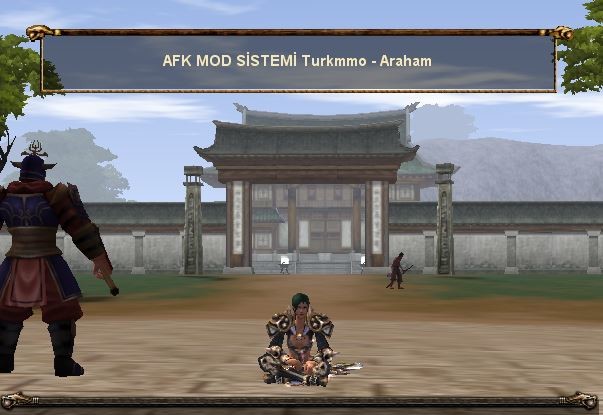
AFK Kalınca Oturan Mod Sisteminin Oturma Modeli
Metin2 oyununda AFK (Away From Keyboard) kalmak, oyuncuların belirli görevleri otomatik olarak yerine getirebilmesi için oldukça yaygın bir yöntemdir. Bu süreçte karakterin hareket etmemesi ve dikkat çekici olmaması önemlidir. AFK kalınca oturan mod sistemi, oyuncuların AFK olduklarında karakterlerinin oturmasını sağlar. Bu sistem sayesinde hem karakter daha doğal durur hem de sunucu tarafında dikkat çekmez. Bu yazıda, AFK kalınca oturan mod sisteminin oturma modeli detaylı şekilde incelenecektir.
AFK Oturma Sisteminin Temeli
AFK oturan sistemleri genellikle Metin2 özel client veya pack'lerde bulunur. Bu sistemler, oyuncunun AFK olduğunu belirleyen bir mekanizmaya sahiptir. Belirli bir süre hareket etmeyen karakter, AFK olarak işaretlenir ve otomatik olarak oturur. Bu işlem genellikle client-side olarak çalışır. Yani oyun istemcisi üzerinde gerçekleşir.
Oturma Animasyonu ve Görsel Etki[/BR][/BR]
Oturma animasyonu, karakterin AFK olduğunu belli eden görsel bir özelliktir. Bu animasyonlar genellikle karakterin belirli bir pozisyonda oturmasıdır. Bazı Metin2 client versiyonlarında bu animasyonlar oldukça detaylıdır. Oyuncu AFK olduğunda karakterin gözleri kapalı gibi görünür ya da başı eğilir. Bu animasyonlar, texture ve effect dosyalarıyla desteklenir.
Sistem Nasıl Çalışır?[/BR][/BR]
AFK oturan sistemleri, belirli bir zaman aralığında karakterin hareket etmemesi durumunda devreye girer. Bu zaman genellikle 30 ila 60 saniye arasındadır. Zamanlayıcı başlatılır ve karakter belirlenen süre boyunca hareket etmezse, sistem oturma komutunu verir. Bu komut, karakterin AFK olarak algılanmasına neden olur ve oturur pozisyonuna geçer.
Client Dosyalarında Yapılan Değişiklikler[/BR][/BR]
AFK oturan sistemlerini etkinleştirmek için bazı client dosyaları üzerinde değişiklik yapılması gerekir. Bu dosyalar arasında genellikle game.py, system.py gibi Python dosyaları yer alır. Bu dosyalarda AFK kontrol mekanizması tanımlanır ve karakterin oturma komutu yerleştirilir. Bu değişiklikler genellikle Metin2 client edit işlemleriyle yapılır.
Pack İçerisinde AFK Oturan Sistem[/BR][/BR]
Bazı Metin2 pack sistemleri bu özelliği doğrudan içerir. Özellikle PvP server odaklı pack’lerde AFK sistemleri oldukça gelişmiştir. Bu sistemler, kullanıcı deneyimini artırmak için pack editörleri tarafından özel olarak tasarlanır. AFK oturan mod, bu pack’lerin önemli özelliklerinden biridir.
AFK Oturma Sisteminin Avantajları[/BR][/BR]
AFK oturan sistem sayesinde karakterler AFK esnasında daha gerçekçi bir şekilde davranır. Bu durum hem diğer oyuncular açısından daha estetiktir hem de sunucu yönetimi açısından faydalıdır. Karakterlerin AFK olduğu belliyse, sunucuda fazladan dikkat çekici olmazlar. Ayrıca bu sistem, Metin2 client üzerinde yapılan küçük ama etkili geliştirmelerden biridir.
Sonuç[/BR][/BR]
AFK kalınca oturan mod sistemi, Metin2 oyununda AFK kalma deneyimini ciddi anlamda iyileştirir. Bu sistem, doğru yapılandırıldığında karakterin AFK esnasında doğal bir şekilde oturmasını sağlar. Bu da oyun içinde daha dengeli ve estetik bir ortam sunar. Metin2 client sistemlerinde bu tür modifikasyonlar yapmak, oyunun kullanıcı dostu olmasına yardımcı olur.
The Sitting Model of the AFK Sitting Mode System
In Metin2, staying AFK (Away From Keyboard) is a common method for players to perform certain tasks automatically. During this period, it is important that the character does not move and remains unnoticeable. The AFK sitting mode system allows the character to sit down automatically when the player becomes AFK. This system ensures that the character appears more natural and less noticeable on the server. In this article, we will examine the sitting model of the AFK sitting mode system in detail.
Foundation of the AFK Sitting System
AFK sitting systems are commonly found in custom Metin2 clients or packs. These systems have a mechanism to detect when a player goes AFK. If a character remains idle for a certain period, it gets marked as AFK and automatically sits down. This process typically runs on the client-side, meaning it occurs within the game client itself.
Sitting Animation and Visual Effects[/BR][/BR]
The sitting animation is a visual feature indicating that the character is AFK. These animations usually show the character in a seated position. In some Metin2 client versions, these animations are highly detailed. When AFK, the character may appear to have closed eyes or a lowered head. These animations are supported by texture and effect files.
How Does the System Work?[/BR][/BR]
AFK sitting systems activate after a set time interval if the character remains inactive. This time is generally between 30 to 60 seconds. A timer starts, and if the character does not move during the defined time, the system sends a command to sit. As a result, the character enters an AFK state and assumes a sitting pose.
Modifications in Client Files[/BR][/BR]
To enable the AFK sitting system, modifications must be made to certain client files. These files often include Python scripts like game.py and system.py. Within these files, the AFK detection mechanism is defined, and the sitting command is implemented. Such changes are typically part of Metin2 client edits.
AFK Sitting System in Packs[/BR][/BR]
Some Metin2 packs include this feature by default. Particularly in PvP server-oriented packs, AFK systems are quite advanced. These systems are specially designed by pack editors to enhance user experience. The AFK sitting mode is one of the key features in such packs.
Advantages of the AFK Sitting System[/BR][/BR]
Thanks to the AFK sitting system, characters behave more realistically while AFK. This not only appears more aesthetic to other players but also benefits server management. When it's clear that characters are AFK, they do not unnecessarily draw attention. Additionally, this system represents a small but impactful improvement in Metin2 clients.
Conclusion[/BR][/BR]
The AFK sitting mode system significantly improves the AFK experience in Metin2. When properly configured, it allows the character to sit naturally during AFK periods. This provides a more balanced and aesthetic environment within the game. Implementing such modifications in Metin2 clients contributes to making the game more user-friendly.
arkadaşlar
Bİ FİLESTEN ALDIĞIM AFK MOD
SİSTEMİNİN OTURMA MODELİNİ PAYLAŞICAM
AFK Kalınca Oturan Mod Sisteminin Oturma Modeli
Metin2 oyununda AFK (Away From Keyboard) kalmak, oyuncuların belirli görevleri otomatik olarak yerine getirebilmesi için oldukça yaygın bir yöntemdir. Bu süreçte karakterin hareket etmemesi ve dikkat çekici olmaması önemlidir. AFK kalınca oturan mod sistemi, oyuncuların AFK olduklarında karakterlerinin oturmasını sağlar. Bu sistem sayesinde hem karakter daha doğal durur hem de sunucu tarafında dikkat çekmez. Bu yazıda, AFK kalınca oturan mod sisteminin oturma modeli detaylı şekilde incelenecektir.
AFK Oturma Sisteminin Temeli
AFK oturan sistemleri genellikle Metin2 özel client veya pack'lerde bulunur. Bu sistemler, oyuncunun AFK olduğunu belirleyen bir mekanizmaya sahiptir. Belirli bir süre hareket etmeyen karakter, AFK olarak işaretlenir ve otomatik olarak oturur. Bu işlem genellikle client-side olarak çalışır. Yani oyun istemcisi üzerinde gerçekleşir.
Oturma Animasyonu ve Görsel Etki[/BR][/BR]
Oturma animasyonu, karakterin AFK olduğunu belli eden görsel bir özelliktir. Bu animasyonlar genellikle karakterin belirli bir pozisyonda oturmasıdır. Bazı Metin2 client versiyonlarında bu animasyonlar oldukça detaylıdır. Oyuncu AFK olduğunda karakterin gözleri kapalı gibi görünür ya da başı eğilir. Bu animasyonlar, texture ve effect dosyalarıyla desteklenir.
Sistem Nasıl Çalışır?[/BR][/BR]
AFK oturan sistemleri, belirli bir zaman aralığında karakterin hareket etmemesi durumunda devreye girer. Bu zaman genellikle 30 ila 60 saniye arasındadır. Zamanlayıcı başlatılır ve karakter belirlenen süre boyunca hareket etmezse, sistem oturma komutunu verir. Bu komut, karakterin AFK olarak algılanmasına neden olur ve oturur pozisyonuna geçer.
Client Dosyalarında Yapılan Değişiklikler[/BR][/BR]
AFK oturan sistemlerini etkinleştirmek için bazı client dosyaları üzerinde değişiklik yapılması gerekir. Bu dosyalar arasında genellikle game.py, system.py gibi Python dosyaları yer alır. Bu dosyalarda AFK kontrol mekanizması tanımlanır ve karakterin oturma komutu yerleştirilir. Bu değişiklikler genellikle Metin2 client edit işlemleriyle yapılır.
Pack İçerisinde AFK Oturan Sistem[/BR][/BR]
Bazı Metin2 pack sistemleri bu özelliği doğrudan içerir. Özellikle PvP server odaklı pack’lerde AFK sistemleri oldukça gelişmiştir. Bu sistemler, kullanıcı deneyimini artırmak için pack editörleri tarafından özel olarak tasarlanır. AFK oturan mod, bu pack’lerin önemli özelliklerinden biridir.
AFK Oturma Sisteminin Avantajları[/BR][/BR]
AFK oturan sistem sayesinde karakterler AFK esnasında daha gerçekçi bir şekilde davranır. Bu durum hem diğer oyuncular açısından daha estetiktir hem de sunucu yönetimi açısından faydalıdır. Karakterlerin AFK olduğu belliyse, sunucuda fazladan dikkat çekici olmazlar. Ayrıca bu sistem, Metin2 client üzerinde yapılan küçük ama etkili geliştirmelerden biridir.
Sonuç[/BR][/BR]
AFK kalınca oturan mod sistemi, Metin2 oyununda AFK kalma deneyimini ciddi anlamda iyileştirir. Bu sistem, doğru yapılandırıldığında karakterin AFK esnasında doğal bir şekilde oturmasını sağlar. Bu da oyun içinde daha dengeli ve estetik bir ortam sunar. Metin2 client sistemlerinde bu tür modifikasyonlar yapmak, oyunun kullanıcı dostu olmasına yardımcı olur.
The Sitting Model of the AFK Sitting Mode System
In Metin2, staying AFK (Away From Keyboard) is a common method for players to perform certain tasks automatically. During this period, it is important that the character does not move and remains unnoticeable. The AFK sitting mode system allows the character to sit down automatically when the player becomes AFK. This system ensures that the character appears more natural and less noticeable on the server. In this article, we will examine the sitting model of the AFK sitting mode system in detail.
Foundation of the AFK Sitting System
AFK sitting systems are commonly found in custom Metin2 clients or packs. These systems have a mechanism to detect when a player goes AFK. If a character remains idle for a certain period, it gets marked as AFK and automatically sits down. This process typically runs on the client-side, meaning it occurs within the game client itself.
Sitting Animation and Visual Effects[/BR][/BR]
The sitting animation is a visual feature indicating that the character is AFK. These animations usually show the character in a seated position. In some Metin2 client versions, these animations are highly detailed. When AFK, the character may appear to have closed eyes or a lowered head. These animations are supported by texture and effect files.
How Does the System Work?[/BR][/BR]
AFK sitting systems activate after a set time interval if the character remains inactive. This time is generally between 30 to 60 seconds. A timer starts, and if the character does not move during the defined time, the system sends a command to sit. As a result, the character enters an AFK state and assumes a sitting pose.
Modifications in Client Files[/BR][/BR]
To enable the AFK sitting system, modifications must be made to certain client files. These files often include Python scripts like game.py and system.py. Within these files, the AFK detection mechanism is defined, and the sitting command is implemented. Such changes are typically part of Metin2 client edits.
AFK Sitting System in Packs[/BR][/BR]
Some Metin2 packs include this feature by default. Particularly in PvP server-oriented packs, AFK systems are quite advanced. These systems are specially designed by pack editors to enhance user experience. The AFK sitting mode is one of the key features in such packs.
Advantages of the AFK Sitting System[/BR][/BR]
Thanks to the AFK sitting system, characters behave more realistically while AFK. This not only appears more aesthetic to other players but also benefits server management. When it's clear that characters are AFK, they do not unnecessarily draw attention. Additionally, this system represents a small but impactful improvement in Metin2 clients.
Conclusion[/BR][/BR]
The AFK sitting mode system significantly improves the AFK experience in Metin2. When properly configured, it allows the character to sit naturally during AFK periods. This provides a more balanced and aesthetic environment within the game. Implementing such modifications in Metin2 clients contributes to making the game more user-friendly.
