

Arkadaşlar eğer daha önce açıldıysa konuyu RAPOR ederseniz ilgileniriz. Başka bir yerden alıntı olarak alınmıştır.
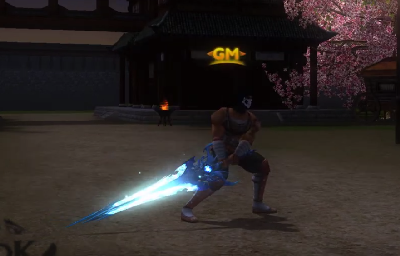
Ziyaretçiler için gizlenmiş link,görmek için üye olmalısınız!
Giriş yap veya üye ol.
Ziyaretçiler için gizlenmiş link,görmek için üye olmalısınız!
Giriş yap veya üye ol.
Metin2 oyununda görsel deneyimi zenginleştirmek isteyen geliştiriciler ve oyuncular için animasyonlu modeller hayati öneme sahiptir. Bu modeller, NPC'ler, canavarlar, karakterler, eşyalar ve harita objeleri gibi birçok alanda kullanılır.
Animasyonlu Metin2 Modelleri Nedir?
Metin2 oyununda animasyonlu modeller, karakterlerin, canavarların veya diğer nesnelerin hareket edebilen 3D yapılarıdır. Bu modeller genellikle 3ds Max veya Blender gibi 3D modelleme programları ile oluşturulur ve GR2 formatında dışa aktarılır. Bu format, Metin2'in kendi sistemine uyumlu olan dosya türüdür.
GR2 Formatı ve İçe/Dışa Aktarma
GR2 formatı, Metin2 oyun motoru tarafından desteklenen bir 3D model formatıdır. Bu format sayesinde 3D modellerin hem mesh yapısı hem de bone (iskelet) sistemi korunarak aktarılabilir. GR2 dışa aktarma işlemi sırasında doğru bone isimleri ve UV haritaları dikkatle ayarlanmalıdır. Bu sayede modelin oyun içine hatasızca entegre edilmesi sağlanır.
Blender ve 3ds Max Kullanımı
Metin2 için 3D modelleme yaparken Blender ve 3ds Max en çok tercih edilen yazılımlardır. Blender, ücretsiz ve güçlü bir alternatif sunarken, 3ds Max profesyonel düzeyde modelleme ve animasyon için tercih edilir. Her iki yazılım da GR2 formatına dönüştürme imkanı sağlar. Blender için gerekli eklentiler ile modelin doğru boyutlarda ve formatlarda dışa aktarılması kolayca yapılabilir.
Metin2 Model Editörleri ve Araçlar
Metin2 özelinde geliştirilmiş bazı model editörleri ve araçlar vardır. Bu araçlar, modelin içeri aktarılması, dışa aktarılması ve oyunla uyumlu hale getirilmesi için kullanılır. Örneğin, eterpack veya Eter araçları ile modellerin paketlenmesi ve oyun içine entegrasyonu kolaylaşır. Martysama model editörü gibi özel yazılımlar da bu süreçte büyük kolaylık sağlar.
UV Mapping ve Doku Uyumluğu[/COLUMN]
Metin2 modellerinde UV haritalama işlemi oldukça önemlidir. Doğru UV haritası ile doku (texture) modelin yüzeyine hatasız şekilde uygulanabilir. Bu sayede modelin görsel kalitesi artar ve oyun içinde daha gerçekçi bir görünüm elde edilir. Özellikle karakter ve NPC modelleri için dikkatli UV çalışması yapılmalıdır.
Rigging ve Animasyon
Modelin animasyonu için doğru bir iskelet (bone) sistemi kurulmalıdır. Rigging işlemi, modelin hareket edebilir parçalarının iskelet sistemiyle bağlanmasıdır. Bu işlem doğru yapılmazsa animasyonlar bozuk veya yanlış çalışabilir. Metin2 formatında bone isimleri standartlara uygun olmalıdır. Animasyonlar genellikle Blender ya da 3ds Max üzerinde tanımlanır ve GR2 formatında dışa aktarılır.
NPC ve Canavar Modelleri
Metin2'de NPC ve canavar modelleri, oyunun atmosferini zenginleştiren önemli ögelerdir. Bu modellerin doğru şekilde tasarlanması ve animasyonlarının sorunsuz çalışması, oyun deneyimini doğrudan etkiler. Özel modellemeler ile sunucularınızda özgün NPC'ler ve canavarlar oluşturabilirsiniz. Bu modeller genellikle özel efektlerle birlikte gelir ve oyun içi etkileşimi artırır.
Harita ve Bina Modelleri
Metin2 haritalarında bulunan binalar, çalılar, kayalar gibi objeler de animasyonlu ya da sabit olarak modellenebilir. Bu modeller, haritanın görsel zenginliğini artırır. Harita modellemede dikkat edilmesi gereken en önemli konulardan biri optimize edilmiş mesh kullanımıdır. Bu sayede performans kaybı en aza indirgenir.
Sonuç
Animasyonlu Metin2 modelleri, oyunun görsel kalitesini ve kullanıcı deneyimini ciddi anlamda artırır. 3ds Max, Blender gibi yazılımlar ile oluşturulan modeller, doğru GR2 dışa aktarma işlemleri ile Metin2 sistemine entegre edilebilir. Bu süreçte dikkat edilmesi gereken pek çok teknik detay vardır. Uygun araçlar ve bilgi ile özgün, yüksek kaliteli modeller üretmek mümkündür.
Animated models are of vital importance for developers and players who want to enrich the visual experience in Metin2 game. These models are used in many areas such as NPCs, monsters, characters, items, and map objects.
What Are Animated Metin2 Models?
In Metin2, animated models are 3D structures that allow characters, monsters, or other objects to move. These models are usually created with 3D modeling programs like 3ds Max or Blender and exported in GR2 format. This format is the file type compatible with Metin2's own system.
GR2 Format and Import/Export
The GR2 format is a 3D model format supported by the Metin2 game engine. Thanks to this format, both the mesh structure and the bone system of 3D models can be transferred while preserved. During the GR2 export process, correct bone names and UV maps must be carefully adjusted. This ensures that the model is integrated into the game without errors.
Using Blender and 3ds Max
When creating 3D models for Metin2, Blender and 3ds Max are the most preferred software tools. While Blender offers a free and powerful alternative, 3ds Max is preferred for professional-level modeling and animation. Both softwares offer the ability to convert into GR2 format. With necessary add-ons in Blender, exporting models in correct dimensions and formats can be easily achieved.
Metin2 Model Editors and Tools
There are some model editors and tools specifically developed for Metin2. These tools are used to import, export, and make models compatible with the game. For instance, tools like eterpack or Eter make packaging models and integrating them into the game easier. Specialized softwares like Martysama model editor also provide great convenience during this process.
UV Mapping and Texture Compatibility
UV mapping is very important in Metin2 models. With correct UV mapping, textures can be applied to the surface of the model without error. This increases the visual quality of the model and results in a more realistic appearance within the game. Careful UV work must especially be done for character and NPC models.
Rigging and Animation
To animate a model, a proper skeleton (bone) system must be established. Rigging refers to connecting the movable parts of the model to the skeleton system. If not done correctly, animations may run incorrectly or appear broken. Bone names in Metin2 format must comply with standards. Animations are generally defined in Blender or 3ds Max and exported in GR2 format.
NPC and Monster Models
NPC and monster models in Metin2 are important elements that enrich the atmosphere of the game. Proper design and smooth functioning of their animations directly affect the gaming experience. With custom modeling, you can create unique NPCs and monsters in your servers. These models often come with special effects and increase interaction within the game.
Map and Building Models
Objects like buildings, bushes, rocks found on Metin2 maps can be modeled as animated or static. These models enhance the visual richness of the map. One of the most important aspects to consider in map modeling is the use of optimized meshes. This minimizes performance loss.
Conclusion
Animated Metin2 models significantly improve the visual quality and user experience of the game. Models created with softwares like 3ds Max and Blender can be integrated into the Metin2 system via correct GR2 export procedures. There are many technical details to pay attention to throughout this process. With appropriate tools and knowledge, it is possible to create original, high-quality models.
