

İyi Kullanımlar
Kanıt:
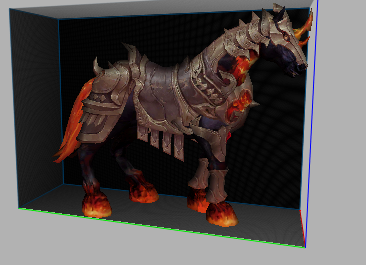
Dowland :
Kanıt:
Dowland :
Ziyaretçiler için gizlenmiş link,görmek için üye olmalısınız!
Giriş yap veya üye ol.
Virüs Total :
Ziyaretçiler için gizlenmiş link,görmek için üye olmalısınız!
Giriş yap veya üye ol.
Balkabağı Bineği, Metin2 dünyasında görsel deneyimi zenginleştirmek isteyen geliştiriciler ve 3D modelleme meraklıları için önemli bir araçtır.
Bu özel efekt modeli, özellikle oyun içinde mevsimsel etkinlikler, özel efekt animasyonları veya harita üzerinde dikkat çekici objeler oluşturmak amacıyla kullanılır.
Metin2 3D modelleme sürecinde, bu tür özel nesnelerin entegrasyonu, oyun atmosferine daha fazla derinlik ve estetik değer katar.
Balkabağı Bineği Modelinin Özellikleri
Balkabağı Bineği, genellikle korkutucu ama eğlenceli bir havaya sahip olan, Halloween temalı bir modeldir.
Bu model, 3ds Max veya Blender gibi yazılımlarda oluşturulmuş, GR2 formatında dışa aktarılmış bir 3D nesnesidir.
Metin2 model edit süreçlerinde bu tür özel efekt objeleri, hem animasyon hem de UV mapping açısından dikkatle hazırlanmalıdır.
Modelin dokusu (texture) ve gövde yapısı (mesh), oyun motoru ile uyumlu olacak şekilde optimize edilmelidir.
Metin2 İçin Balkabağı Bineği Oluşturmak
Bir Balkabağı Bineği modeli oluşturmak için öncelikle 3D modelleme yazılımı olan Blender veya 3ds Max kullanılabilir.
Modelleme tamamlandıktan sonra, nesne GR2 formatına dönüştürülmeli ve Metin2'in desteklediği granny3d yapısına uygun hale getirilmelidir.
Bu işlem sırasında doku koordinatlarının (UV Map) doğru ayarlanması, nesnenin oyun içinde doğal gözükmesi açısından kritiktir.
Ayrıca, modelin boyutu ve detay seviyesi, performansı etkilememesi için optimize edilmelidir.
Nasıl Entegre Edilir?
Oluşturulan Balkabağı Bineği modeli, Metin2'in NPC veya obje sistemine entegre edilebilir.
Bu işlem sırasında modelin konumlandırılması, döndürülmesi ve haritaya sabitlenmesi için gerekli ayarlar yapılmalıdır.
Metin2 model import işlemleri sırasında, GR2 dosyasının doğru konfigürasyonla yüklenmesi gerekir.
Ayrıca, bu modelin harita üzerindeki konumu, oyun içi scriptlerle tanımlanabilir.
Teknik Detaylar
Balkabağı Bineği modeli, genellikle düşük poligonlu bir yapıya sahiptir.
Bu, oyun performansını koruyarak görsel kaliteyi yüksek tutmayı sağlar.
Modelin iskelet yapısı (bone) yoksa, sadece statik obje olarak kullanılabilir.
Ancak, bazı versiyonlarında basit animasyonlar da yer alabilir.
Bu tür modeller, eterpack veya Martysama gibi popüler Metin2 modlama platformlarında da paylaşılabilir.
Dikkat Edilmesi Gerekenler
Metin2 özel efekt modelleri oluştururken dikkat edilmesi gereken bazı önemli hususlar vardır.
Özellikle GR2 formatı, Metin2 sistemine özel olduğundan, hatalı dışa aktarımlar nedeniyle model çalışmaz hale gelebilir.
UV mapping işleminin eksiksiz yapılması, doku uyumsuzluklarını önler.
Ayrıca, modelin boyutu çok büyükse oyunun FPS'sini düşürebilir; bu yüzden optimize edilmiş bir yapı tercih edilmelidir.
The Pumpkin Lantern is an important tool for developers and 3D modeling enthusiasts who wish to enhance the visual experience in the world of Metin2.
This special effect model is used particularly for seasonal events within the game, special effect animations, or creating eye-catching objects on maps.
In the process of Metin2 3D modeling, integrating such special objects adds more depth and aesthetic value to the game atmosphere.
Features of the Pumpkin Lantern Model
The Pumpkin Lantern typically features a spooky but fun vibe, making it a Halloween-themed model.
This model is a 3D object created using software like 3ds Max or Blender and exported in GR2 format.
In Metin2 model editing processes, such special effect objects must be carefully prepared in terms of both animation and UV mapping.
Its texture and mesh structure must be optimized to be compatible with the game engine.
Creating a Pumpkin Lantern for Metin2
To create a Pumpkin Lantern model, 3D modeling software like Blender or 3ds Max can be used.
After completing the modeling, the object should be converted into GR2 format and adjusted to fit the granny3d structure supported by Metin2.
During this process, correctly setting the UV mapping is critical for the object to appear naturally in the game.
Additionally, its size and detail level should be optimized not to affect performance.
How to Integrate?
The created Pumpkin Lantern model can be integrated into Metin2's NPC or object system.
During integration, adjustments must be made for positioning, rotation, and anchoring the model onto the map.
During Metin2 model import procedures, the GR2 file must be loaded with correct configurations.
Furthermore, its location on the map can be defined via in-game scripts.
Technical Details
The Pumpkin Lantern model usually has a low-polygon structure.
This ensures high visual quality while maintaining game performance.
If the model does not have a bone structure, it can only be used as a static object.
However, some versions may include simple animations.
Such models can also be shared on popular Metin2 modding platforms like eterpack or Martysama.
Things to Consider
There are several important points to consider when creating special effect models for Metin2.
Especially since the GR2 format is specific to the Metin2 system, incorrect exports can render the model unusable.
Properly performing UV mapping prevents texture mismatches.
Moreover, if the model is too large, it might decrease the game's FPS; thus, an optimized structure is preferred.
