

Ziyaretçiler için gizlenmiş link,görmek için üye olmalısınız!
Giriş yap veya üye ol.
Ziyaretçiler için gizlenmiş link,görmek için üye olmalısınız!
Giriş yap veya üye ol.
Metin2 Lobby'da Beceri Rengi Seçme Sistemi Nedir?
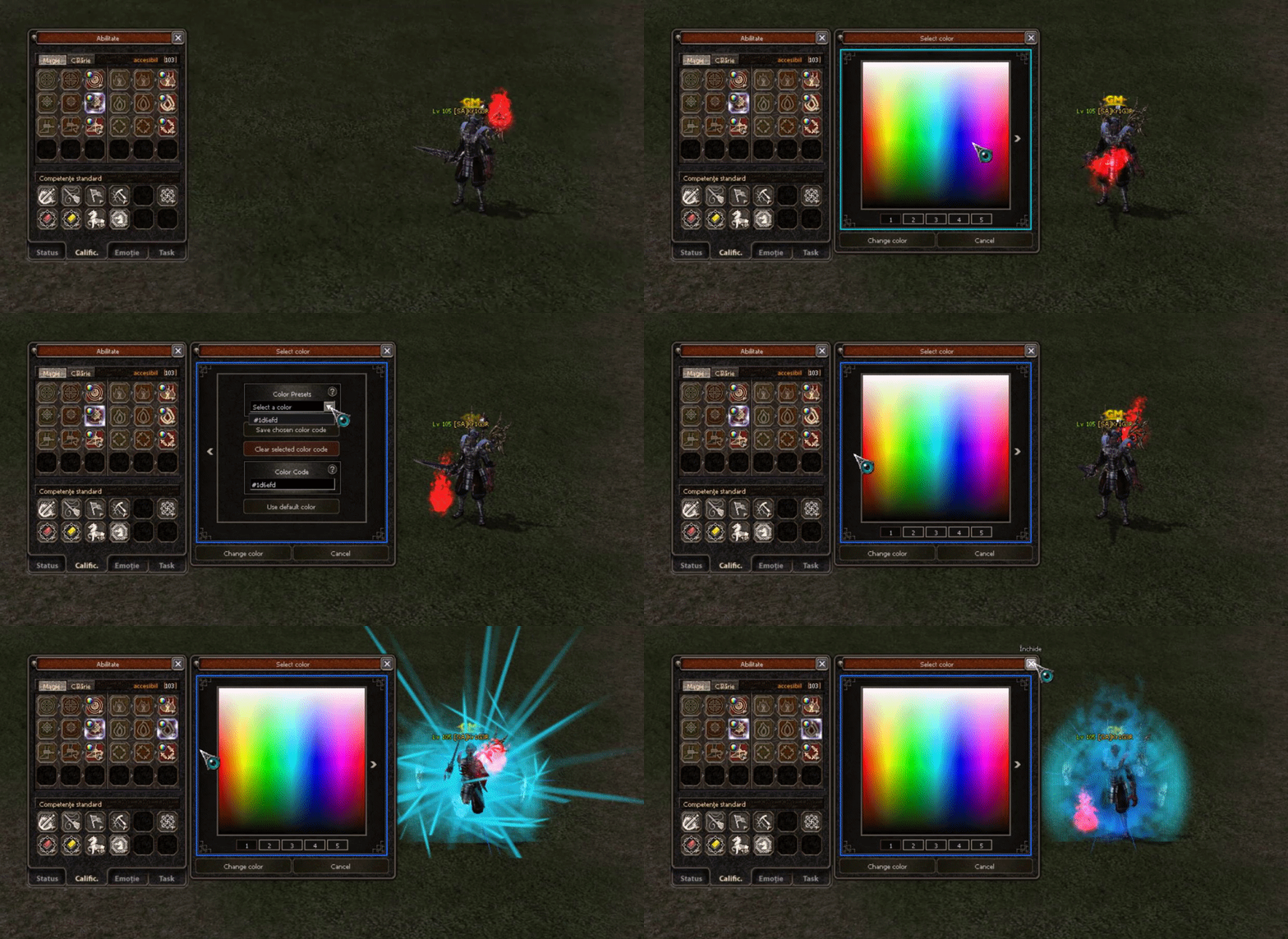
Metin2 özel sunucularında oyun deneyimini zenginleştirmek amacıyla geliştirilen birçok sistem vardır. Bunlardan birisi de beceri rengi seçme sistemidir. Bu sistem sayesinde oyuncular kendi karakter becerilerine özel renk atamaları yapabilir, bu da hem estetik hem de stratejik açıdan avantajlar sağlar. Bu yazıda, Metin2 Lobby platformunda geliştirilen beceri rengi seçme sisteminin detaylarını, nasıl çalıştığını ve neden bu kadar önemli olduğunu inceleyeceğiz.
Beceri Rengi Sisteminin Temelleri
Metin2 oyununda beceriler, karakterlerin savaşta veya diğer aktivitelerde kullandığı temel araçlardır. Her beceri varsayılan olarak belirli bir simge ve renk ile gelir. Ancak bazı özel sunucularda geliştirilen sistemlerle bu becerilerin rengini değiştirebilirsiniz. Bu, özellikle PvP sistemlerinde rakibinizin hangi yeteneği kullandığını görsel olarak tahmin etmesini zorlaştırır.
Neden Beceri Rengi Değiştirme Gereksinimi Duyulur?
Oyuncuların beceri rengi seçme isteği çoğunlukla iki temel nedenden doğar:
- Estetik Değer: Oyuncular kendi karakterlerine özel bir görünüm yaratmak ister. Bu sayede karakterler daha özgün ve kişiselleştirilmiş olur.
- Stratejik Avantaj: Özellikle Metin2 gibi hızlı tempolu savaş sistemine sahip oyunlarda, rakip oyuncunun kullandığı beceriyi renk üzerinden tanıyabilmek büyük bir üstünlük sağlar. Renkleri özelleştirerek bu avantajı ortadan kaldırabilirsiniz.
Sistem Nasıl Çalışır?
Beceri rengi seçme sistemi genellikle bir GUI arayüzü ile entegre edilir. Bu sistem genellikle Python tabanlı bir UI Script (uiscript) ile geliştirilir. Py Root klasörlerinde yer alan GUI dosyaları düzenlenerek kullanıcı dostu bir arayüz hazırlanır. Kullanıcı beceri listesinden birini seçer, ardından listeden bir renk belirler ve bu değişikliği oyun içine kaydeder.
Bu işlem sırasında veriler genellikle DB Core üzerinde tutulur. Auth ve Game sunucuları arasında senkronize bir yapı kurularak beceri rengi bilgisi kalıcı hale getirilir. Bu tür sistemlerin çoğu C++ kaynak kodları üzerinde geliştirilir ve derlenerek Metin2 özel sunuculara entegre edilir.
Python GUI ve Uiscript Entegrasyonu
Python ile geliştirilen GUI sistemleri, Metin2 özel sunucularında kullanıcı arayüzlerini geliştirmek için oldukça yaygındır. Py GUI sistemleri ile beceri rengi seçim ekranı oluşturulabilir. Bu arayüzler genellikle uiscript dosyaları ile çalışır ve beceri listesi, renk paleti gibi bileşenler içerir. Bu sayede kullanıcılar kolayca becerilerinin rengini özelleştirebilir.
Sistem Kurulumu ve Geliştirme Süreci
Beceri rengi seçme sisteminin kurulumu birkaç ana adımı içerir:
1. Py Root Dosyalarının Hazırlanması: Uiscript ve Python dosyaları düzenlenir.
2. C++ Kaynak Kodlarında Gerekli Değişiklikler: Oyun içi render ve beceri sistemlerinde rengi okuyacak fonksiyonlar eklenir.
3. DB Core ve Veri Tabanı Ayarları: Beceri rengi verileri kalıcı olarak saklanır.
Metin2 Lobby ve Özel Sunucu Geliştirme
Metin2 Lobby, Metin2 özel sunucu geliştiricileri için gerekli tüm kaynakları barındıran bir platformdur. C++ system, Python GUI, uiscript, pack, server src gibi konularda gelişmiş rehberler ve örnek sistemler sunulur. Beceri rengi seçme sistemi gibi özelleştirilebilir sistemler, burada bulunan kaynaklarla kolayca geliştirilebilir ve test edilebilir.
What is the Skill Color Selection System in Metin2 Lobby?
There are many systems developed to enhance the gaming experience in Metin2 private servers. One of these is the skill color selection system. This system allows players to assign custom colors to their character skills, providing both aesthetic and strategic advantages. In this article, we will examine the details of the skill color selection system developed on the Metin2 Lobby platform, how it works, and why it is so important.
Basics of the Skill Color System
In the Metin2 game, skills are the primary tools used by characters during combat or other activities. Each skill comes with a default icon and color. However, in some private servers, systems have been developed that allow players to change the color of these skills. This makes the gameplay more visually distinct and can also provide tactical benefits in PvP scenarios, making it harder for opponents to identify which ability is being used.
Why Is Skill Color Customization Needed?
Players' desire to customize skill colors generally stems from two main reasons:
- Aesthetic Value: Players want to create a unique appearance for their characters. This makes the characters more personalized and original.
- Strategic Advantage: In fast-paced games like Metin2, recognizing the opponent's ability through its color can provide a significant advantage. By customizing the colors, you can eliminate this advantage for your opponents.
How Does the System Work?
The skill color selection system typically integrates via a GUI interface. The system is often developed using a Python-based UI Script (uiscript). User-friendly interfaces are created by editing GUI files located in the Py Root folders. Users select a skill from the list, choose a color, and save the change into the game.
During this process, data is usually stored within the DB Core. A synchronized structure between the Auth and Game servers ensures that the skill color information remains persistent. Such systems are mostly developed on C++ source code and integrated into Metin2 private servers after compilation.
Python GUI and Uiscript Integration
Python-based GUI systems are quite common for enhancing user interfaces in Metin2 private servers. Py GUI systems can be used to create skill color selection screens. These interfaces typically work with uiscript files and may include components such as skill lists and color palettes. This allows users to easily customize the colors of their skills.
System Installation and Development Process
Installing the skill color selection system involves several key steps:
1. Preparing Py Root Files: Uiscript and Python files are edited accordingly.
2. Making Necessary Changes in C++ Source Code: Functions that read color values within the game's rendering and skill systems are added.
3. DB Core and Database Setup: Skill color data is stored persistently.
Metin2 Lobby and Private Server Development
Metin2 Lobby is a platform that hosts all necessary resources for Metin2 private server developers. It offers advanced guides and sample systems on topics such as C++ system, Python GUI, uiscript, pack, and server src. Customizable systems like the skill color selection system can be easily developed and tested using the resources available here.
