

Forumda Paylaşıldımı Görmedim Eğer Paylaşıldıysa Raporlayınız.
İyi Kullanımlar
İyi Forumlar...
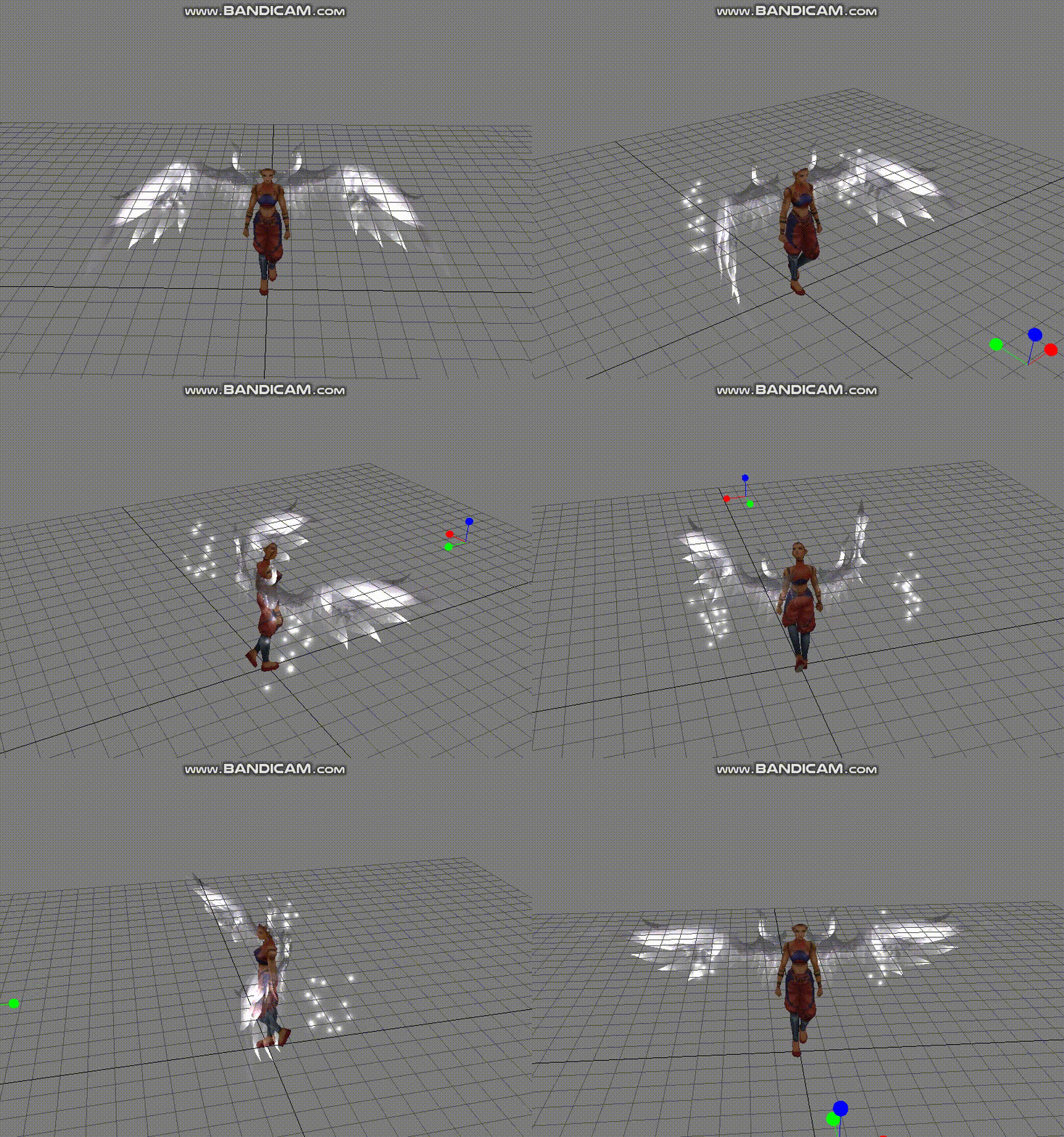
İyi Kullanımlar
İyi Forumlar...
Ziyaretçiler için gizlenmiş link,görmek için üye olmalısınız!
Giriş yap veya üye ol.
Ziyaretçiler için gizlenmiş link,görmek için üye olmalısınız!
Giriş yap veya üye ol.
Beyaz Anka Kanadı Nedir? Metin2 3D Modelleme Bağlamında Özel Etkisi
Metin2 oyununda benzersiz ve estetik değişiklikler yapmayı seven oyuncular için Beyaz Anka Kanadı, görsellik ve oynanış arasında mükemmel bir denge sunmaktadır. Bu özel efekt modeli, karakterlerin arkasında yer alan kanat animasyonu ile hem dikkat çekici hem de zarif bir görünüm sağlar. Bu makalede, Metin2 3D modelleme dünyasında özel bir yere sahip olan Beyaz Anka Kanadı modelini detaylı olarak ele alacağız. Aynı zamanda bu modelin nasıl import, export, edit edileceği ve texture, UV map, animation gibi konularda nasıl optimize edileceği üzerinde duracağız.
Beyaz Anka Kanadı ve Metin2'de Görsellik
Metin2, karakterlerin ve nesnelerin özelleştirilebilmesiyle bilinen bir MMORPG oyunudur. Oyuncuların karakterlerini farklı kıyafetler, silahlar ve efektlerle özelleştirmesi, oyunun keyfini katlanarak artırır. Bu bağlamda Beyaz Anka Kanadı, özellikle karakterin arkasında yer alarak görsel olarak etkileyici bir izlenim bırakır. Bu kanat modeli, genellikle character model kısmına entegre edilerek kullanılır. Özel efektlere sahip olan bu model, gr2 formatında sunulduğu için Metin2 model edit işlemleri sırasında kolayca entegre edilebilir.
Metin2'de 3D Model Edit ve Beyaz Anka Kanadı
Metin2 3D modelleme sürecinde Beyaz Anka Kanadı modeli, Blender ya da 3DS Max gibi yazılımlarla düzenlenebilir. Bu modelin doğru şekilde import ve export edilmesi için GR2 formatına dönüştürülmesi gerekir. Metin2 GR2 formatı, oyun motorunun tanıyabilmesi için özel bir yapıya sahiptir. Granny3D veya EterPack gibi araçlar bu dönüşümü kolaylaştırır. Bu süreçte mesh, bone, rigging gibi teknik detaylara dikkat etmek büyük önem taşır.
UV Mapping ve Texture Uyumlu Hale Getirme
Beyaz Anka Kanadı modelinin görsel kalitesini artırmak için UV mapping işlemi yapılmalıdır. Bu işlem sayesinde texture dosyaları modelin yüzeyine doğru şekilde yerleştirilir. Metin2 texture sistemine uyumlu şekilde hazırlanmış UV haritaları, modelin oyun içinde daha net ve kaliteli gözükmesini sağlar. Ayrıca skin ve animation uyumu da bu aşamada kontrol edilmelidir. Animation uyumu eksikse kanat hareketleri doğal görünmeyebilir.
Modelin Metin2'e Entegrasyonu
Hazırlanan Beyaz Anka Kanadı modeli, Metin2 model import süreçlerinden geçirildikten sonra model replace işlemleriyle mevcut karakter modeliyle değiştirilebilir. Bu işlem sırasında Metin2Dev veya Martysama gibi gelişmiş editörler kullanılabilir. Özel model olarak tanımlanan bu kanat efekti, karakterin arka planında dikkat çeken bir detay olarak kalıcı hale getirilebilir. Visual mod olarak tanımlanan bu tür modifikasyonlar, oyunun grafiksel deneyimini ciddi anlamda geliştirir.
Sonuç
Metin2 dünyasında özelleştirme sınırları giderek genişlemektedir. Beyaz Anka Kanadı gibi özel efekt modelleri, hem teknik hem de estetik açıdan oyunculara harika bir alternatif sunar. 3D modelleme, texture düzenleme, animation ve model import gibi adımlar bir araya gelerek bu tür modellerin oyun içinde sorunsuz çalışmasını sağlar. Metin2lobby.com olarak bu tür özgün içeriklerin geliştirilmesini destekliyoruz.
What is White Phoenix Wing? Special Effect in Context of Metin2 3D Modeling
For players who enjoy making unique and aesthetic changes in Metin2 game, the White Phoenix Wing offers a perfect balance between visuals and gameplay. This special effect model provides both striking and elegant appearance with its wing animation placed behind the characters. In this article, we will examine the White Phoenix Wing model, which holds a special place in the world of Metin2 3D modeling. We will also discuss how to import, export, edit this model, and how to optimize it regarding textures, UV maps, and animations.
White Phoenix Wing and Visuals in Metin2
Metin2 is known as an MMORPG where players can customize their characters and objects. Customizing characters with different clothes, weapons, and effects significantly enhances the gaming experience. In this context, the White Phoenix Wing, especially placed on the back of the character, leaves a visually impressive impression. This wing model is usually integrated into the character model section. With its special effects, this model can be easily integrated during Metin2 model editing processes since it is provided in gr2 format.
3D Model Editing in Metin2 and White Phoenix Wing
In the process of Metin2 3D modeling, the White Phoenix Wing model can be edited using software like Blender or 3DS Max. To correctly import and export this model, it needs to be converted to the GR2 format. The Metin2 GR2 format has a special structure recognized by the game engine. Tools such as Granny3D or EterPack simplify this conversion. During this process, technical details such as mesh, bone, and rigging must be carefully considered.
UV Mapping and Texture Alignment
To enhance the visual quality of the White Phoenix Wing model, UV mapping should be performed. This process ensures that texture files are correctly applied onto the surface of the model. Metin2-compatible textures prepared through proper UV mapping allow the model to appear sharper and higher quality within the game. Additionally, compatibility with skin and animation should be checked at this stage. If animation alignment is lacking, the wing movements may not look natural.
Integration of the Model into Metin2
After going through Metin2 model import processes, the prepared White Phoenix Wing model can be replaced with the existing character model via model replace operations. Advanced editors such as Metin2Dev or Martysama can be used during this process. As a custom model, this wing effect can remain as an eye-catching detail behind the character. Such modifications defined as visual mods significantly enhance the graphical experience of the game.
Conclusion
The limits of customization in the world of Metin2 are expanding. Special effect models like White Phoenix Wing offer great alternatives both technically and aesthetically for players. Steps such as 3D modeling, texture editing, animation, and model import work together to ensure smooth performance of these models within the game. At Metin2lobby.com, we support the development of such original content.
