

Başka Forumda Gördüm Hoş Buldum Sizinle Paylaşmak İstedim Buyrun.
Model Resmi ;

Model Resmi ;
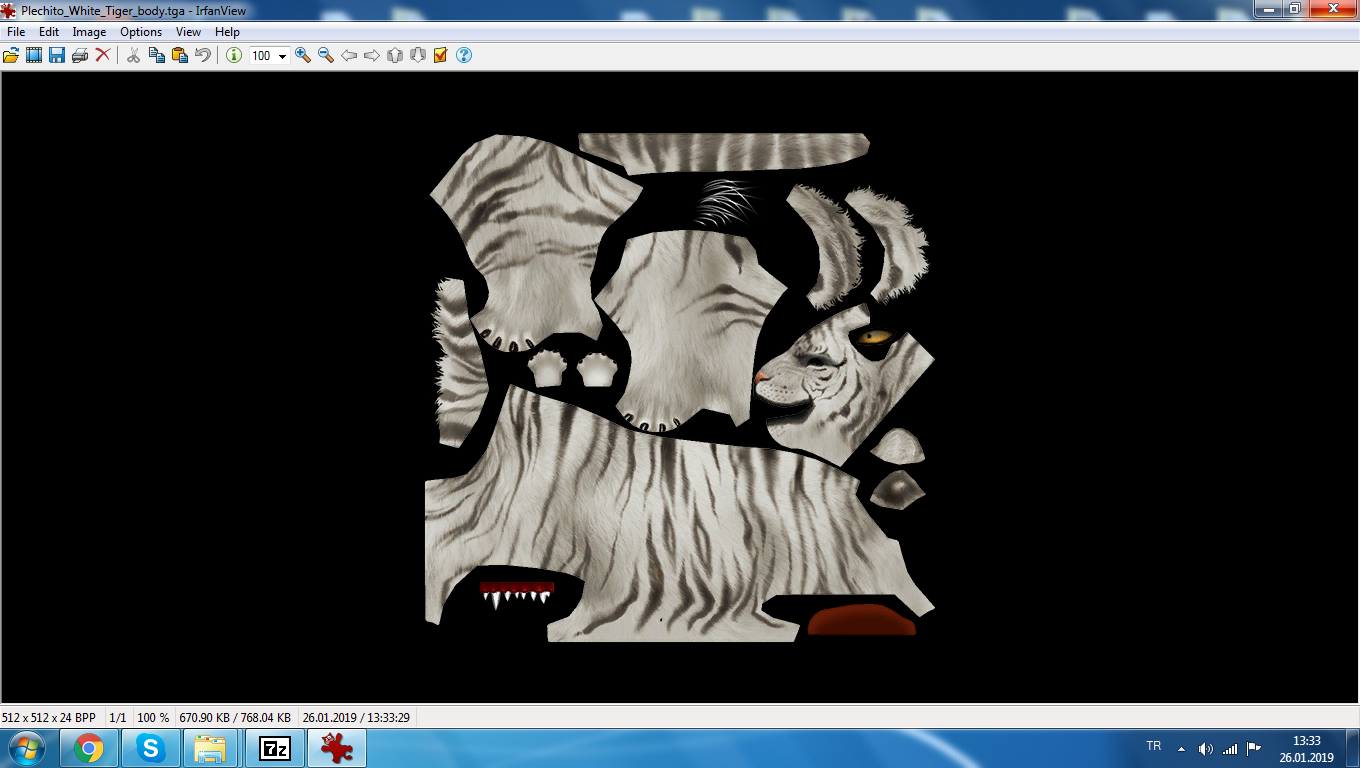
Ziyaretçiler için gizlenmiş link,görmek için üye olmalısınız!
Giriş yap veya üye ol.
Ziyaretçiler için gizlenmiş link,görmek için üye olmalısınız!
Giriş yap veya üye ol.
Beyaz Kaplan Bineği Nedir? Metin2 NPC ve Monster Modellleme Bağlamında Anlamı
Metin2 sunucusu üzerinde gezegenler arasında dolaşan oyuncular için geliştirilen özel NPC'lerden biri olan 'Beyaz Kaplan Bineği', hem görsel açıdan dikkat çekici hem de oyun içi etkileşim açısından önemli bir özelliktir. Bu binek, özellikle Metin2 3D modelleme dünyasında özel bir yere sahiptir çünkü hem karakter modeli hem de NPC modeli olarak değerlendirilebilir. Oyuncuların seyahat etmesini kolaylaştıran bu binek, aynı zamanda Metin2 model edit süreçlerinde de önemli bir konuya dönüşmüştür.
Metin2 NPC Modellemesi: Beyaz Kaplan Bineği Nasıl Geliştirilir?
Metin2 NPC modellemesi, 3ds Max veya Blender gibi yazılımlar aracılığıyla yapılır. Beyaz Kaplan Bineği modeli için de bu yazılımlar kullanılır. Bu süreçte Metin2 GR2 formatı çok önemlidir. GR2, Metin2 oyun motorunun kullandığı 3D model formatıdır. Bu nedenle, modelin doğru çalışması için GR2 formatında dışa aktarılması gerekir. Aynı zamanda Granny3D formatı da eski sistemlerde kullanılmaktadır. Blender ve 3ds Max için geliştirilmiş özel eklentiler sayesinde bu formatlar desteklenmektedir.
Metin2 Binek Sistemi ve Görsel Tasarım
Metin2'de binek sistemleri, oyuncuların harita üzerinde daha hızlı hareket etmelerini sağlar. Beyaz Kaplan Bineği, hem estetik hem de fonksiyonel açıdan tasarlanmıştır. Bu modelin oluşturulmasında UV mapping ve texture işlemleri büyük rol oynar. UV haritalama sayesinde tekstürler doğru şekilde modele uygulanabilir. Ayrıca Rigging işlemi ile bineğin animasyonları aktif edilir; bu sayede oyuncu üzerinde doğal hareketler sergilenebilir.
Metin2 Monster Model Olarak Beyaz Kaplan Bineği
Bazı sunucularda Beyaz Kaplan Bineği, sadece binek değil, aynı zamanda bir monster modeli olarak da tasarlanabilir. Bu durumda modelin boyutu, yapısı ve animasyonları farklı şekillerde ayarlanmalıdır. Bu tür modellerde Metin2 monster model standartları dikkate alınarak hem görsel hem de teknik açıdan uygunluk sağlanmalıdır. Blender Metin2 eklentileri sayesinde bu tür özel modellemeler oldukça kolay hale gelmiştir.
Metin2 Custom Model ve Geliştirme Süreçleri
Oyuncuların veya geliştiricilerin istekleri doğrultusunda özelleştirilmiş modeller (custom model) geliştirilebilir. Beyaz Kaplan Bineği bu süreçte en çok tercih edilen modellerden biridir. Metin2 model replace işlemleri sırasında dikkat edilmesi gereken en önemli konulardan birisi, modelin oyun içi performansını etkilememesidir. Bu yüzden modelin mesh yapısı optimize edilmelidir. Aynı zamanda Metin2 animation işlemleri ile bineğin koşma, durma gibi hareketleri doğrudan oyun motoruna entegre edilir.
Model Edit ve Import/Export İşlemleri
Metin2 model edit işlemleri sırasında GR2 formatında içe aktarma (import) ve dışa aktarma (export) işlemleri yapılır. Bu işlemler sırasında GR2 import ve GR2 export komutları sıklıkla kullanılır. Blender ya da 3ds Max üzerinden yapılan modelleme, GR2 formatına dönüştürüldüğünde Metin2 oyun motoru tarafından tanınabilir. Bu sayede model, sunucuda doğru şekilde görüntülenebilir.
Metin2 Lobby ve 3D Model Topluluğu
Metin2 Lobby gibi platformlar, Metin2 3D modelleme ile ilgilenen geliştiriciler için önemli bir kaynaktır. Burada paylaşılan Metin2 eter paketleri, EterPack dosyaları ve Martysama model gibi içerikler, geliştiricilerin projelerini hızlandırmalarına yardımcı olur. Beyaz Kaplan Bineği gibi modeller de bu platformlar üzerinden paylaşılabilir ve toplulukla birlikte geliştirilebilir.
What is White Tiger Mount? Its Significance in the Context of Metin2 NPC and Monster Modeling
The 'White Tiger Mount' is one of the special NPCs developed for players traveling across worlds in the Metin2 server. Visually striking and significant in terms of gameplay interaction, this mount holds a special place in the world of Metin2 3D modeling, as it can be considered both a character model and an NPC model. Facilitating player travel, this mount has also become a significant topic within Metin2 model editing processes.
Metin2 NPC Modeling: How Is the White Tiger Mount Developed?
Metin2 NPC modeling is done using software like 3ds Max or Blender. These tools are also used for creating the White Tiger Mount model. In this process, the Metin2 GR2 format is very important. GR2 is the 3D model format used by the Metin2 game engine. Therefore, the model must be exported correctly in the GR2 format to function properly. The Granny3D format is also used in older systems. Special plugins for Blender and 3ds Max support these formats.
Metin2 Mount System and Visual Design
Mount systems in Metin2 allow players to move faster across maps. The White Tiger Mount is designed both aesthetically and functionally. Creating this model involves UV mapping and texture work. UV mapping allows textures to be applied correctly to the model. Additionally, rigging activates the mount's animations, allowing natural movement while being ridden.
White Tiger Mount as a Metin2 Monster Model
In some servers, the White Tiger Mount can also be designed as a monster model. In such cases, the model's size, structure, and animations must be adjusted differently. In such models, Metin2 monster model standards must be followed to ensure compatibility both visually and technically. With the help of Blender Metin2 plugins, creating such custom models has become much easier.
Custom Models and Development Processes in Metin2
Custom models can be developed based on the requests of players or developers. The White Tiger Mount is among the most preferred models in this context. During Metin2 model replace operations, one of the most important considerations is ensuring that the model does not negatively impact in-game performance. Therefore, the model's mesh structure should be optimized. Furthermore, Metin2 animation processes integrate movements like running and idle states directly into the game engine.
Model Editing and Import/Export Operations
During Metin2 model editing, import and export operations are performed in the GR2 format. During these operations, GR2 import and GR2 export commands are frequently used. When modeling done via Blender or 3ds Max is converted into the GR2 format, it becomes recognizable by the Metin2 game engine. This allows the model to be correctly displayed on the server.
Metin2 Lobby and the 3D Model Community
Platforms like Metin2 Lobby serve as important resources for developers interested in Metin2 3D modeling. Content shared here, such as Metin2 eter packages, EterPack files, and Martysama models, helps accelerate projects. Models like the White Tiger Mount can also be shared and developed collaboratively through these platforms.
