

Herkese iyi forumlar dilerim arkadaşlar, bugün sizlere şebnemleri içtiğinizde efektler kısmında -sol üst köşe- şebnemlerin ikon olarak nasıl gözükeceğini göstereceğim. Vegas'ın yaptığı kodlamalardaki hataları düzelttim.
Örnek Fotoğraf;
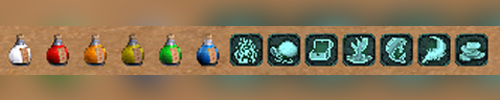
[C++] Efektler Kısmında Şebnem İkonları
Metin2 özel sunucularında geliştirme yaparken, oyuncu deneyimini artırmak adına birçok görsel ve mekanik değişiklik yapılabilir. Bunlardan birisi de şebnem ikonlarının efektler kısmında görünmesidir. Bu tür ikonlar, oyuncuların aktif güçlendirmelerini daha net görmesini sağlar. Bu yazıda, C++ tabanlı sistemlerde nasıl şebnem ikonlarının efekt listesi içerisine entegre edileceğini adım adım ele alacağız.
Efekt Sistemine Genel Bakış
Metin2 oyununda efektler, oyuncunun üzerinde aktif olan güçlendirmeleri gösterir. Bu efektler genellikle sağ alt köşede belirir ve bir simge ile birlikte isim ve süresi görüntülenir. Standart olarak gelen bu sistem, özel sunucularda geliştirici tarafından özelleştirilebilir. Özellikle Martysama gibi popüler kaynak kodlar kullanıldığında, bu tür değişiklikler kolayca yapılabilir.
C++ Kaynak Kodlarda Değişiklik
Efekt listesinde şebnem ikonlarının görünmesi için öncelikle game core tarafında değişiklik yapılması gerekir. Oyuna özel efektler tanımlanırken, bu efektlerin hangi simge ile gösterileceği belirlenmelidir. Bu işlem genellikle client/src klasöründe bulunan UI script dosyaları ve game/src içindeki C++ dosyaları üzerinden yapılır.
İkon Yükleme ve Tanımlama
Önce ikonların doğru şekilde yüklendiğinden emin olunmalıdır. Bu dosyalar genellikle root/ui/ıcons veya benzeri bir dizin altında tutulur. Ardından, efekt sistemine özel bir ID atanarak bu ikonun efekt listesinde gözükmesi sağlanır. Bu işlem sırasında uiscript dosyalarında da değişiklik yapılması gerekebilir.
Python GUI Kullanımı
Bazı durumlarda, efekt paneli tamamen yeniden tasarlanabilir. Bu tür gelişmiş düzenlemelerde Python GUI (Py Root) kullanılır. Py dosyaları ile daha esnek ve dinamik arayüzler oluşturulabilir. Ancak bu, daha fazla dikkat ve deneyim gerektirir.
Sunucu Tarafında Entegrasyon
Oyuncuya bir efekt verildiğinde, bu efektin doğru simge ile ekranda gözükmesi için hem game server hem de auth server tarafında uyumlu çalışması gerekir. Özellikle DB Core kısmında efekt verilerinin doğru saklanması önemlidir. Bu sayede sunucu, istemciye doğru simgeyi gönderir.
Derleme ve Test
Tüm değişiklikler yapıldıktan sonra, hem client hem de server tarafı derlenerek test edilmelidir. Derleme işlemi sırasında hata alınmaması için source edit işlemleri dikkatlice yapılmalıdır. Hataların erken tespiti, sistemin stabil çalışmasını sağlar.
Kaynak Kod Paylaşımı
Metin2 özel sunucu geliştirme sürecinde, open-source veya paylaşılan kaynak kodlar büyük kolaylık sağlar. Metin2Lobby.com olarak biz de bu konuda destek vermeye devam ediyoruz. Geliştiriciler, pack dosyaları, compile örnekleri ve C++ script örnekleriyle projelerini hızlandırabilirler.
Sonuç
Efektlerde şebnem ikonlarının görünmesi, oyuncu deneyimini artıran küçük ama etkili bir özelliktir. Bu işlem için hem C++ hem de Python bilgisi gerekebilir. Doğru yapılandırılmış bir sistemle, efekt paneli daha kullanıcı dostu hale getirilebilir. Geliştiricilerin bu konuda yaratıcı olmaları, sunucuların farklılaşmasına katkı sağlar.
[C++] Effects Section with Sebnem Icons
When developing Metin2 private servers, various visual and mechanical changes can be made to enhance the player experience. One such change is making sebnem icons appear in the effects section. These icons help players see their active buffs more clearly. In this article, we will explain step by step how to integrate sebnem icons into the effect list within C++ based systems.
Overview of the Effect System
In Metin2, effects display the buffs currently active on a player. These effects typically appear at the bottom right corner of the screen, showing an icon along with the name and duration. This default system can be customized in private servers. Popular source codes like Martysama make such modifications easier to implement.
Modifications in C++ Source Code
To make sebnem icons visible in the effect list, modifications must first be made on the game core side. When defining custom effects for the game, you must specify which icon will represent each effect. This process usually involves files located under client/src for UI scripts and game/src for C++ files.
Loading and Defining Icons
First, ensure that the icons are properly loaded. These files are usually stored in directories such as root/ui/icons or similar. Then, assign a specific ID to the effect so that it appears in the effect list with the desired icon. Modifications in uiscript files may also be necessary during this process.
Using Python GUI
In some cases, the effect panel might be completely redesigned. Such advanced customizations often involve using Python GUI (Py Root). Py files allow for more flexible and dynamic interfaces. However, this requires greater attention and experience.
Server-Side Integration
When assigning an effect to a player, the correct icon must be displayed on the screen, requiring synchronized work between both game server and auth server. Especially in the DB Core section, storing effect data correctly is important. This ensures the server sends the right icon to the client.
Compilation and Testing
After all changes are completed, both client and server sides should be compiled and tested. Careful source edit operations are crucial to avoid errors during compilation. Early detection of issues helps maintain system stability.
Sharing Source Codes
During Metin2 private server development, shared or open-source code significantly simplifies the process. At Metin2Lobby.com, we continue to provide support in this area. Developers can speed up their projects using pack files, compile examples, and C++ script samples.
Conclusion
Displaying sebnem icons in the effects panel is a small but impactful feature that enhances the player experience. This process may require knowledge in both C++ and Python. With a well-configured system, the effect panel becomes more user-friendly. Creativity in this area allows developers to differentiate their servers.
Ziyaretçiler için gizlenmiş link,görmek için üye olmalısınız!
Giriş yap veya üye ol.
Ziyaretçiler için gizlenmiş link,görmek için üye olmalısınız!
Giriş yap veya üye ol.
Örnek Fotoğraf;
[C++] Efektler Kısmında Şebnem İkonları
Metin2 özel sunucularında geliştirme yaparken, oyuncu deneyimini artırmak adına birçok görsel ve mekanik değişiklik yapılabilir. Bunlardan birisi de şebnem ikonlarının efektler kısmında görünmesidir. Bu tür ikonlar, oyuncuların aktif güçlendirmelerini daha net görmesini sağlar. Bu yazıda, C++ tabanlı sistemlerde nasıl şebnem ikonlarının efekt listesi içerisine entegre edileceğini adım adım ele alacağız.
Efekt Sistemine Genel Bakış
Metin2 oyununda efektler, oyuncunun üzerinde aktif olan güçlendirmeleri gösterir. Bu efektler genellikle sağ alt köşede belirir ve bir simge ile birlikte isim ve süresi görüntülenir. Standart olarak gelen bu sistem, özel sunucularda geliştirici tarafından özelleştirilebilir. Özellikle Martysama gibi popüler kaynak kodlar kullanıldığında, bu tür değişiklikler kolayca yapılabilir.
C++ Kaynak Kodlarda Değişiklik
Efekt listesinde şebnem ikonlarının görünmesi için öncelikle game core tarafında değişiklik yapılması gerekir. Oyuna özel efektler tanımlanırken, bu efektlerin hangi simge ile gösterileceği belirlenmelidir. Bu işlem genellikle client/src klasöründe bulunan UI script dosyaları ve game/src içindeki C++ dosyaları üzerinden yapılır.
İkon Yükleme ve Tanımlama
Önce ikonların doğru şekilde yüklendiğinden emin olunmalıdır. Bu dosyalar genellikle root/ui/ıcons veya benzeri bir dizin altında tutulur. Ardından, efekt sistemine özel bir ID atanarak bu ikonun efekt listesinde gözükmesi sağlanır. Bu işlem sırasında uiscript dosyalarında da değişiklik yapılması gerekebilir.
Python GUI Kullanımı
Bazı durumlarda, efekt paneli tamamen yeniden tasarlanabilir. Bu tür gelişmiş düzenlemelerde Python GUI (Py Root) kullanılır. Py dosyaları ile daha esnek ve dinamik arayüzler oluşturulabilir. Ancak bu, daha fazla dikkat ve deneyim gerektirir.
Sunucu Tarafında Entegrasyon
Oyuncuya bir efekt verildiğinde, bu efektin doğru simge ile ekranda gözükmesi için hem game server hem de auth server tarafında uyumlu çalışması gerekir. Özellikle DB Core kısmında efekt verilerinin doğru saklanması önemlidir. Bu sayede sunucu, istemciye doğru simgeyi gönderir.
Derleme ve Test
Tüm değişiklikler yapıldıktan sonra, hem client hem de server tarafı derlenerek test edilmelidir. Derleme işlemi sırasında hata alınmaması için source edit işlemleri dikkatlice yapılmalıdır. Hataların erken tespiti, sistemin stabil çalışmasını sağlar.
Kaynak Kod Paylaşımı
Metin2 özel sunucu geliştirme sürecinde, open-source veya paylaşılan kaynak kodlar büyük kolaylık sağlar. Metin2Lobby.com olarak biz de bu konuda destek vermeye devam ediyoruz. Geliştiriciler, pack dosyaları, compile örnekleri ve C++ script örnekleriyle projelerini hızlandırabilirler.
Sonuç
Efektlerde şebnem ikonlarının görünmesi, oyuncu deneyimini artıran küçük ama etkili bir özelliktir. Bu işlem için hem C++ hem de Python bilgisi gerekebilir. Doğru yapılandırılmış bir sistemle, efekt paneli daha kullanıcı dostu hale getirilebilir. Geliştiricilerin bu konuda yaratıcı olmaları, sunucuların farklılaşmasına katkı sağlar.
[C++] Effects Section with Sebnem Icons
When developing Metin2 private servers, various visual and mechanical changes can be made to enhance the player experience. One such change is making sebnem icons appear in the effects section. These icons help players see their active buffs more clearly. In this article, we will explain step by step how to integrate sebnem icons into the effect list within C++ based systems.
Overview of the Effect System
In Metin2, effects display the buffs currently active on a player. These effects typically appear at the bottom right corner of the screen, showing an icon along with the name and duration. This default system can be customized in private servers. Popular source codes like Martysama make such modifications easier to implement.
Modifications in C++ Source Code
To make sebnem icons visible in the effect list, modifications must first be made on the game core side. When defining custom effects for the game, you must specify which icon will represent each effect. This process usually involves files located under client/src for UI scripts and game/src for C++ files.
Loading and Defining Icons
First, ensure that the icons are properly loaded. These files are usually stored in directories such as root/ui/icons or similar. Then, assign a specific ID to the effect so that it appears in the effect list with the desired icon. Modifications in uiscript files may also be necessary during this process.
Using Python GUI
In some cases, the effect panel might be completely redesigned. Such advanced customizations often involve using Python GUI (Py Root). Py files allow for more flexible and dynamic interfaces. However, this requires greater attention and experience.
Server-Side Integration
When assigning an effect to a player, the correct icon must be displayed on the screen, requiring synchronized work between both game server and auth server. Especially in the DB Core section, storing effect data correctly is important. This ensures the server sends the right icon to the client.
Compilation and Testing
After all changes are completed, both client and server sides should be compiled and tested. Careful source edit operations are crucial to avoid errors during compilation. Early detection of issues helps maintain system stability.
Sharing Source Codes
During Metin2 private server development, shared or open-source code significantly simplifies the process. At Metin2Lobby.com, we continue to provide support in this area. Developers can speed up their projects using pack files, compile examples, and C++ script samples.
Conclusion
Displaying sebnem icons in the effects panel is a small but impactful feature that enhances the player experience. This process may require knowledge in both C++ and Python. With a well-configured system, the effect panel becomes more user-friendly. Creativity in this area allows developers to differentiate their servers.
