

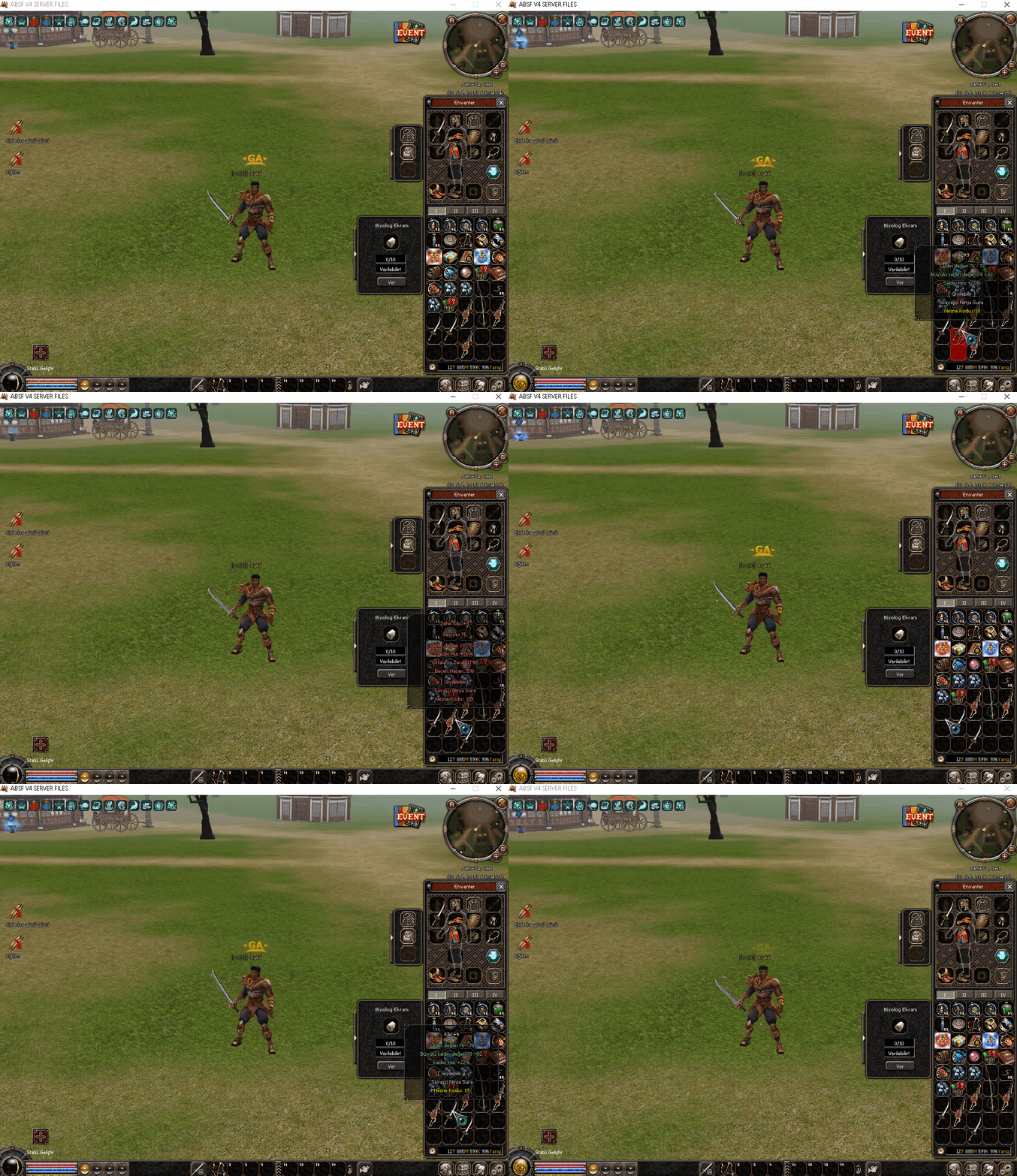
Char_item.cpp açılır ve aratılır
Kod:
LPITEM CHARACTER::GetItem(TItemPos Cell) constKod bloğu altına eklenir
Kod:
LPITEM CHARACTER::GetItem_NEW(const TItemPos &Cell) const { CItem * cellItem = GetItem(Cell); if (cellItem) return cellItem; //There's no item in this cell, but that does not mean there is not an item which currently uses up this cell. uint16_t bCell = Cell.cell; uint8_t bPage = bCell / (4); for (int j = -5; j < 0; ++j) { uint8_t p = bCell + (5 * j); if (p / (4) != bPage) continue; if (p >= INVENTORY_MAX_NUM) // Eeh just for the sake of... continue; CItem * curCellItem = GetItem(TItemPos(INVENTORY, p)); if (!curCellItem) continue; if (p + (curCellItem->GetSize() - 1) * 5 < Cell.cell) //Doesn't reach Cell.cell continue; return curCellItem; } return NULL; }Aratılır
Kod:
if (!IsEmptyItemGrid(DestCell, item->GetSize(), Cell.cell)) return false;Değiştirilir
Kod:
if (!IsEmptyItemGrid(DestCell, item->GetSize(), Cell.cell)) //It's not empty - Let's try swapping. { if (count != 0 && count != item->GetCount()) //Can't swap if not the item as a whole is being moved return false; if (!DestCell.IsDefaultInventoryPosition() || !Cell.IsDefaultInventoryPosition()) //Only this kind of swapping on inventory return false; CItem * targetItem = GetItem_NEW(DestCell); if (!targetItem) return false; if (targetItem->GetVID() == item->GetVID()) //Can't swap over my own slots return false; if (targetItem) { DestCell = TItemPos(INVENTORY, targetItem->GetCell()); } if (item->IsExchanging() || (targetItem && targetItem->IsExchanging())) return false; if (targetItem->isLocked() == true) return false; uint8_t basePage = DestCell.cell / (4); std::map<uint16_t, CItem *> moveItemMap; uint8_t sizeLeft = item->GetSize(); for (uint16_t i = 0; i < item->GetSize(); ++i) { uint16_t cellNumber = DestCell.cell + i * 5; uint8_t cPage = cellNumber / (4); if (basePage != cPage) return false; CItem * mvItem = GetItem(TItemPos(INVENTORY, cellNumber)); if (mvItem) { if (mvItem->GetSize() > item->GetSize()) return false; if (mvItem->IsExchanging()) return false; moveItemMap.insert({ Cell.cell + i * 5, mvItem }); sizeLeft -= mvItem->GetSize(); if (mvItem->GetSize() > 1) i += mvItem->GetSize() - 1; //Skip checking the obviously used cells } else { sizeLeft -= 1; //Empty slot } } if (sizeLeft != 0) return false; //This map will hold cell positions for syncing the quickslots afterwards std::map<uint8_t, uint16_t> syncCells; //Quickslot pos -> Target cell. //Let's remove the original item syncCells.insert({ GetQuickslotPosition(QUICKSLOT_TYPE_ITEM, item->GetCell()), DestCell.cell }); item->RemoveFromCharacter(); for (auto & it : moveItemMap) { uint16_t toCellNumber = it.first; CItem * mvItem = it.second; syncCells.insert({ GetQuickslotPosition(QUICKSLOT_TYPE_ITEM, mvItem->GetCell()), toCellNumber }); mvItem->RemoveFromCharacter(); #ifdef __HIGHLIGHT_SYSTEM__ SetItem(TItemPos(INVENTORY, toCellNumber), mvItem, false); #else SetItem(TItemPos(INVENTORY, toCellNumber), mvItem); #endif } #ifdef __HIGHLIGHT_SYSTEM__ SetItem(DestCell, item, false); #else SetItem(DestCell, item); #endif //Sync quickslots only after all is set for (auto & sCell : syncCells) { TQuickslot qs; qs.type = QUICKSLOT_TYPE_ITEM; qs.pos = sCell.second; SetQuickslot(sCell.first, qs); } return true; }char.h açılır ve aratılır
Kod:
LPITEM GetItem(TItemPos Cell) const;Altına eklenir
Kod:
LPITEM GetItem_NEW(const TItemPos &Cell) const;Aratılır
Kod:
void SyncQuickslot(BYTE bType, BYTE bOldPos, BYTE bNewPos);altına eklenir
Kod:
int32_t GetQuickslotPosition(uint8_t bType, uint16_t bInventoryPos) const;char_quickslot.cpp açılır ve aratılır
Kod:
bool CHARACTER::GetQuickslot(BYTE pos, TQuickslot ** ppSlot)üstüne eklenir
Metin2 Sunucu Geliştirme: C++ ile Öğelerin Yer Değiştirmesi
Metin2 özel sunucularında geliştirme yaparken, özellikle C++ diline hakim olmak büyük avantaj sağlar. Oyun içindeki nesnelerin, karakterlerin veya diğer öğelerin belirli bir algoritmaya göre yer değiştirmesi, sunucu tarafında yazılım becerilerini gerektiren karmaşık bir işlemdir. Bu yazıda, C++ kullanarak Metin2 oyunu içindeki öğelerin nasıl yer değiştirebileceğini detaylı olarak inceleyeceğiz.
Öğe Yer Değiştirme Nedir?
Oyun geliştirme sürecinde 'öğelerin yer değiştirmesi', bir nesnenin mevcut konumundan başka bir konuma taşınmasını ifade eder. Bu işlem genellikle fiziksel etkileşimler, kullanıcı girdileri veya belirli algoritmalarla tetiklenir. Metin2 özel sunucularında bu, karakter hareketi, envanterde eşya taşıma, NPC ile etkileşim gibi pek çok durumu kapsar.
C++ ile Yer Değiştirme İşlemi
C++ dili, performans odaklı ve düşük seviyeli kontrol sunarak Metin2 gibi oyun sistemlerinde tercih edilen temel dillerden biridir. Sunucu tarafında bir nesnenin konumunu değiştirmek için aşağıdaki adımları izleyebiliriz:
1. Nesne Tanımı ve Konum Bilgisi: Her nesnenin X, Y ve Z koordinatları vardır. Bu değerler, oyun dünyasında nesnenin nerede durduğunu belirtir.
2. Hedef Konum Belirleme: Yeni konum belirlenir. Bu, kullanıcı girdisi ya da bir algoritma tarafından hesaplanabilir.
3. Yeni Konumun Gönderilmesi: Sunucu, istemciye yeni konumu bildirir ve istemci bu bilgiyi kullanarak nesneyi ekranda günceller.
Kod Örneği: Basit Bir Yer Değiştirme Fonksiyonu
Dikkat Edilmesi Gerekenler
Metin2 özel sunucularında bu işlemleri yaparken bazı önemli hususlara dikkat etmek gerekir:
- Performans: Her yer değiştirme işlemi sunucu üzerinde yük oluşturur. Özellikle yüksek oyunculu sunucularda optimize edilmiş algoritmalar kullanılmalıdır.
- Güvenlik: Kötü niyetli kullanıcılar konum hileleri ile oyun dengesini bozabilir. Bu yüzden konum doğrulama işlemleri yapılmalıdır.
- Senkronizasyon: Sunucu ile istemci arasında konum senkronizasyonu eksiksiz sağlanmalıdır.
Python Entegrasyonu ve GUI
Geliştirme sürecinde, bazı işlemler için Python ve PyQt gibi kütüphanelerle GUI tabanlı uygulamalar da geliştirilebilir. Bu sayede sunucu verilerini görsel olarak takip etmek ve test etmek mümkün olur. Örneğin bir envanter düzenleyici ya da konum taşıyıcı bir araç Python ile kolayca geliştirilebilir ve C++ ile entegre edilebilir.
Sonuç
Metin2 özel sunucularında C++ kullanarak öğelerin yer değişimini yönetmek, hem teknik bilgi gerektirir hem de sunucu performansını artırmak açısından kritik önem taşır. Doğru yapılandırılmış bir sistem, kullanıcı deneyimini ciddi anlamda olumlu yönde etkileyebilir.
Metin2 Server Development: Object Movement with C++
When developing private servers for Metin2, having a good grasp of the C++ language provides significant advantages. The process of moving objects, characters, or other entities according to specific algorithms requires advanced programming skills on the server-side. In this article, we will examine in detail how to move objects within the Metin2 game using C++.
What is Object Movement?
In game development, 'object movement' refers to transferring an object from its current position to another location. This action is usually triggered by physical interactions, user inputs, or certain algorithms. Within Metin2 private servers, this includes character movement, item relocation in inventory, interactions with NPCs, and more.
Object Movement with C++
C++ is one of the preferred languages for game systems like Metin2 due to its performance focus and low-level control. To change the location of an object on the server-side, you can follow these steps:
1. Define Object and Position Data: Each object has X, Y, and Z coordinates, which indicate where the object is located in the game world.
2. Determine Target Location: The new position is defined, either by user input or calculated by an algorithm.
3. Send New Position: The server sends the new location to the client, which then updates the object's position on screen accordingly.
Code Example: Simple Object Movement Function
Important Considerations
While implementing such operations in Metin2 private servers, certain key points must be taken into account:
- Performance: Each movement operation creates load on the server. Optimized algorithms should be used especially on high-player-count servers.
- Security: Malicious users may exploit location cheats to disrupt game balance; therefore, position validation must be implemented.
- Synchronization: Position synchronization between server and client must be flawless.
Python Integration and GUI
During development, GUI-based applications can also be built using libraries like Python and PyQt. This allows for visual tracking and testing of server data. For instance, an inventory editor or a location transporter tool can easily be developed with Python and integrated with C++.
Conclusion
Managing object movements in Metin2 private servers using C++ requires technical knowledge and plays a critical role in enhancing server performance. A well-structured system can significantly improve user experience.
Kod:
int32_t CHARACTER::GetQuickslotPosition(uint8_t bType, uint16_t bInventoryPos) const { for (int i = 0; i < QUICKSLOT_MAX_NUM; ++i) { if (m_quickslot[i].type == bType && m_quickslot[i].pos == bInventoryPos) return i; } return -1; }Metin2 Sunucu Geliştirme: C++ ile Öğelerin Yer Değiştirmesi
Metin2 özel sunucularında geliştirme yaparken, özellikle C++ diline hakim olmak büyük avantaj sağlar. Oyun içindeki nesnelerin, karakterlerin veya diğer öğelerin belirli bir algoritmaya göre yer değiştirmesi, sunucu tarafında yazılım becerilerini gerektiren karmaşık bir işlemdir. Bu yazıda, C++ kullanarak Metin2 oyunu içindeki öğelerin nasıl yer değiştirebileceğini detaylı olarak inceleyeceğiz.
Öğe Yer Değiştirme Nedir?
Oyun geliştirme sürecinde 'öğelerin yer değiştirmesi', bir nesnenin mevcut konumundan başka bir konuma taşınmasını ifade eder. Bu işlem genellikle fiziksel etkileşimler, kullanıcı girdileri veya belirli algoritmalarla tetiklenir. Metin2 özel sunucularında bu, karakter hareketi, envanterde eşya taşıma, NPC ile etkileşim gibi pek çok durumu kapsar.
C++ ile Yer Değiştirme İşlemi
C++ dili, performans odaklı ve düşük seviyeli kontrol sunarak Metin2 gibi oyun sistemlerinde tercih edilen temel dillerden biridir. Sunucu tarafında bir nesnenin konumunu değiştirmek için aşağıdaki adımları izleyebiliriz:
1. Nesne Tanımı ve Konum Bilgisi: Her nesnenin X, Y ve Z koordinatları vardır. Bu değerler, oyun dünyasında nesnenin nerede durduğunu belirtir.
2. Hedef Konum Belirleme: Yeni konum belirlenir. Bu, kullanıcı girdisi ya da bir algoritma tarafından hesaplanabilir.
3. Yeni Konumun Gönderilmesi: Sunucu, istemciye yeni konumu bildirir ve istemci bu bilgiyi kullanarak nesneyi ekranda günceller.
Kod Örneği: Basit Bir Yer Değiştirme Fonksiyonu
Kod:
void MoveObject(int objId, float newX, float newY, float newZ) {[BR][/BR] // Eski konumu al[BR][/BR] Position oldPos = GetObjectPosition(objId);[BR][/BR][BR][/BR] // Yeni konumu ayarla[BR][/BR] SetObjectPosition(objId, newX, newY, newZ);[BR][/BR][BR][/BR] // Oyunculara konum değişikliğini bildir[BR][/BR] SendPacketToNearbyPlayers(objId, newX, newY, newZ);[BR][/BR]}Dikkat Edilmesi Gerekenler
Metin2 özel sunucularında bu işlemleri yaparken bazı önemli hususlara dikkat etmek gerekir:
- Performans: Her yer değiştirme işlemi sunucu üzerinde yük oluşturur. Özellikle yüksek oyunculu sunucularda optimize edilmiş algoritmalar kullanılmalıdır.
- Güvenlik: Kötü niyetli kullanıcılar konum hileleri ile oyun dengesini bozabilir. Bu yüzden konum doğrulama işlemleri yapılmalıdır.
- Senkronizasyon: Sunucu ile istemci arasında konum senkronizasyonu eksiksiz sağlanmalıdır.
Python Entegrasyonu ve GUI
Geliştirme sürecinde, bazı işlemler için Python ve PyQt gibi kütüphanelerle GUI tabanlı uygulamalar da geliştirilebilir. Bu sayede sunucu verilerini görsel olarak takip etmek ve test etmek mümkün olur. Örneğin bir envanter düzenleyici ya da konum taşıyıcı bir araç Python ile kolayca geliştirilebilir ve C++ ile entegre edilebilir.
Sonuç
Metin2 özel sunucularında C++ kullanarak öğelerin yer değişimini yönetmek, hem teknik bilgi gerektirir hem de sunucu performansını artırmak açısından kritik önem taşır. Doğru yapılandırılmış bir sistem, kullanıcı deneyimini ciddi anlamda olumlu yönde etkileyebilir.
Metin2 Server Development: Object Movement with C++
When developing private servers for Metin2, having a good grasp of the C++ language provides significant advantages. The process of moving objects, characters, or other entities according to specific algorithms requires advanced programming skills on the server-side. In this article, we will examine in detail how to move objects within the Metin2 game using C++.
What is Object Movement?
In game development, 'object movement' refers to transferring an object from its current position to another location. This action is usually triggered by physical interactions, user inputs, or certain algorithms. Within Metin2 private servers, this includes character movement, item relocation in inventory, interactions with NPCs, and more.
Object Movement with C++
C++ is one of the preferred languages for game systems like Metin2 due to its performance focus and low-level control. To change the location of an object on the server-side, you can follow these steps:
1. Define Object and Position Data: Each object has X, Y, and Z coordinates, which indicate where the object is located in the game world.
2. Determine Target Location: The new position is defined, either by user input or calculated by an algorithm.
3. Send New Position: The server sends the new location to the client, which then updates the object's position on screen accordingly.
Code Example: Simple Object Movement Function
Kod:
void MoveObject(int objId, float newX, float newY, float newZ) {[BR][/BR] // Retrieve old position[BR][/BR] Position oldPos = GetObjectPosition(objId);[BR][/BR][BR][/BR] // Set new position[BR][/BR] SetObjectPosition(objId, newX, newY, newZ);[BR][/BR][BR][/BR] // Notify nearby players of position change[BR][/BR] SendPacketToNearbyPlayers(objId, newX, newY, newZ);[BR][/BR]}Important Considerations
While implementing such operations in Metin2 private servers, certain key points must be taken into account:
- Performance: Each movement operation creates load on the server. Optimized algorithms should be used especially on high-player-count servers.
- Security: Malicious users may exploit location cheats to disrupt game balance; therefore, position validation must be implemented.
- Synchronization: Position synchronization between server and client must be flawless.
Python Integration and GUI
During development, GUI-based applications can also be built using libraries like Python and PyQt. This allows for visual tracking and testing of server data. For instance, an inventory editor or a location transporter tool can easily be developed with Python and integrated with C++.
Conclusion
Managing object movements in Metin2 private servers using C++ requires technical knowledge and plays a critical role in enhancing server performance. A well-structured system can significantly improve user experience.
