

Forumda Paylaşıldımı Görmedim Eğer Paylaşıldıysa Raporlayınız.
İyi Kullanımlar
İyi Forumlar...
İyi Kullanımlar
İyi Forumlar...
Ziyaretçiler için gizlenmiş link,görmek için üye olmalısınız!
Giriş yap veya üye ol.
Ziyaretçiler için gizlenmiş link,görmek için üye olmalısınız!
Giriş yap veya üye ol.
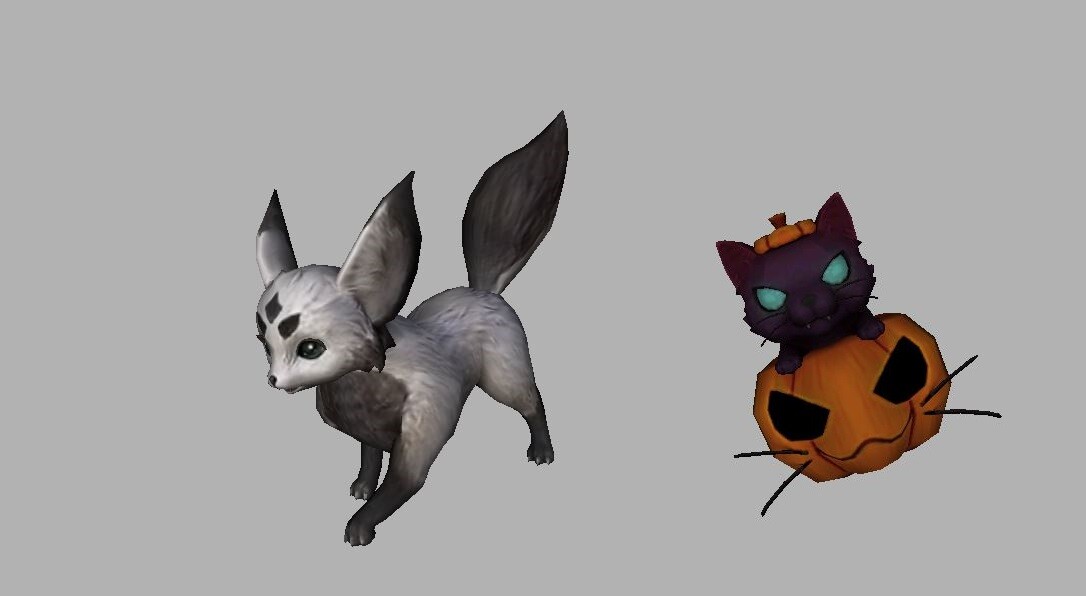
Cadı Kedi - Tilki Pet: Metin2 3D Modelleme ile Oyunculara Yeni Bir Deneyim
Metin2, uzun yıllardır aktif olan ve pek çok oyuncunun nostaljik bağ kurduğu bir MMORPG oyunudur. Ancak zamanla oyuncuların beklentileri artmış ve oyunların görsel kalitesi daha da önem kazanmıştır. Bu doğrultuda Metin2 geliştiricileri ve topluluk üyeleri, oyun içindeki modellemeleri güncellemek, daha özgün içerikler üretmek ve oyun deneyimini zenginleştirmek amacıyla Metin2 3D model, NPC model, monster model, hatta pet modelleri üzerinde çalışmalar yapmaya başlamışlardır. Bu yazıda özellikle Cadı Kedi ve Tilki Pet gibi popüler modellenmiş pet karakterlerine odaklanarak, Metin2 3D modelleme dünyasında neler yapılabileceğini ele alacağız.
Cadı Kedi Pet Nedir?
Cadı Kedi, karanlık temalı, büyücü atmosferiyle dikkat çeken Metin2 özel pet modellerinden biridir. Genellikle siyah renkte, parlak gözlerle ve cadı temalı detaylarla donatılmıştır. Bu pet modeli, kullanıcıların oyun içi deneyimini kişiselleştirmesi açısından oldukça popülerdir. Cadı Kedi, sadece estetik açıdan değil, aynı zamanda animasyonları ve hareketleriyle de dikkat çeker. Metin2 animation ve bone sistemleri sayesinde bu tür modeller daha akıcı ve gerçekçi hale getirilebilir.
Tilki Pet: Doğa Temalı Görsel Zenginlik
Diğer yandan Tilki Pet, doğa temalı, zarif ve çevik görünümlü bir pet modelidir. Renk paleti genellikle turuncu, krem ve siyah tonlarında olup, Metin2'in doğa ve mitoloji temalı unsurlarıyla harmanlanmıştır. Tilki pet, Metin2 character model düzenlemeleriyle birlikte oyun içi karakterlerin yanına sığacak şekilde tasarlanmıştır. Bu tür modellerin oluşturulabilmesi için 3ds Max veya Blender gibi yazılımlar kullanılır. Metin2 gr2 ve granny3d formatları, bu modellemelerin doğru çalışması için kritik öneme sahiptir.
Metin2 3D Modelleme Süreci Nasıl İşler?
Metin2 özel pet modelleri oluşturmak için öncelikle mevcut model dosyalarının anlaşılması gerekir. Metin2 model edit süreci, modelin dış görünümüne dokunulmadan sadece UV haritalamaları, dokular ve detaylar üzerinde değişiklik yapılmasını sağlar. Bu işlem sırasında Metin2 texture ve skin dosyaları düzenlenmelidir. Daha sonra Metin2 rigging işlemiyle modelin kemik yapısı ayarlanır ki pet doğru şekilde hareket edebilsin. Bu süreçte Metin2 bone[/COORD] ve mesh yapıları dikkatle incelenmelidir.
Pet Modelleri İçin Uygun Araçlar
Metin2 3D modelleme projelerinde en çok tercih edilen araçlardan bazıları şunlardır:
- 3ds Max: Yüksek düzeyde modelleme imkanı sunar.
- Blender: Ücretsizdir ve güçlü animasyon araçlarına sahiptir.
- Metin2Dev araçları: Özel olarak Metin2'e uygun model oluşturma imkanı sağlar.
- Gr2 Export/Import eklentileri: Model formatlarının doğru aktarımını sağlar.
Oyun İçinde Pet Model Değiştirme
Oyuncuların kendi petlerini özelleştirmesi için Metin2 model replace işlemleri yapılır. Bu işlem, doğru paketleme (Metin2 pack model) ve sunucu uyumlu hale getirme ile mümkündür. EterPack gibi sistemlerle modeller kolayca oyun içine entegre edilebilir. Martysama gibi geliştirici profilleri, bu konuda örnek alınabilecek kaynaklardır.
Sonuç
Metin2'de Cadı Kedi ve Tilki Pet gibi özel pet modelleri oluşturmak, hem teknik bilgi gerektirir hem de sanatsal yaratıcılığı bir araya getirir. Metin2 3D modelleme süreci, sadece oyunun görsel zenginliğini artırmakla kalmaz, aynı zamanda oyuncuların karakterlerine ve oyun dünyasına daha fazla bağlanmasını sağlar. Bu alandaki gelişmeler, Metin2 topluluğu için yeni kapılar açmaktadır.
Witch Cat - Fox Pet: A New Experience for Players with Metin2 3D Modeling
Metin2 is a long-standing MMORPG that many players have nostalgic ties to. However, over time, player expectations have increased, and visual quality has become more important in games. In this direction, Metin2 developers and community members have started working on updating models within the game, creating more original content, and enriching the gaming experience by focusing on Metin2 3D model, NPC model, monster model, and even pet models. In this article, we will specifically focus on popular modded pet characters such as Witch Cat and Fox Pet, discussing what can be achieved in the world of Metin2 3D modeling.
What is Witch Cat Pet?
Witch Cat is one of the dark-themed, magic-atmosphere-emphasizing special pet models in Metin2. It typically features black tones, glowing eyes, and witch-themed details. This pet model is very popular among users for personalizing their in-game experience. The Witch Cat not only stands out visually but also attracts attention through its animations and movements. Thanks to Metin2 animation and bone systems, these types of models can be made more fluid and realistic.
Fox Pet: Nature-Themed Visual Richness
On the other hand, Fox Pet is a nature-themed, elegant, and agile-looking pet model. Its color palette typically includes orange, cream, and black tones, harmonized with the nature and mythology-themed elements of Metin2. The Fox Pet is designed to fit alongside Metin2 character models. Such models are created using software like 3ds Max or Blender. Metin2 gr2 and granny3d formats are critical for ensuring these models function correctly.
How Does the Metin2 3D Modeling Process Work?
To create special pet models for Metin2, first, the existing model files must be understood. The Metin2 model edit process allows modifications only to the external appearance, including UV mapping, textures, and details. During this process, Metin2 texture and skin files are edited. Then, Metin2 rigging adjusts the skeletal structure of the model so that the pet moves correctly. During this stage, Metin2 bone and mesh structures must be carefully examined.
Tools Suitable for Pet Models
Some of the most preferred tools in Metin2 3D modeling projects include:
- 3ds Max: Offers high-level modeling capabilities.
- Blender: Free and has powerful animation tools.
- Metin2Dev tools: Specifically designed for Metin2-compatible models.
- Gr2 Export/Import plugins: Ensure correct transfer of model formats.
Replacing Pet Models In-Game
Players can customize their pets via Metin2 model replace operations. This requires proper packaging (Metin2 pack model) and making the model compatible with the server. Systems like EterPack allow models to be easily integrated into the game. Developer profiles like Martysama serve as reference points in this area.
Conclusion
Creating special pet models such as Witch Cat and Fox Pet in Metin2 requires both technical knowledge and artistic creativity. The Metin2 3D modeling process not only enhances the visual richness of the game but also helps players connect more deeply with their characters and the game world. Developments in this field open new doors for the Metin2 community.
