

Sistem Bana Ait değildir...
Kanıt:
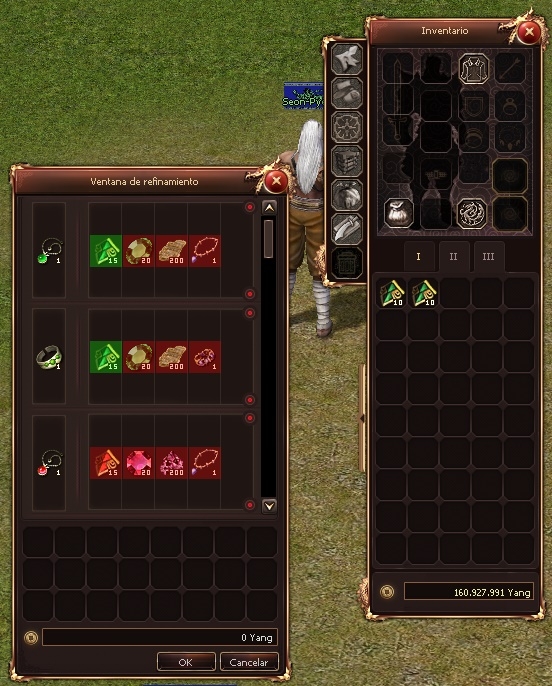
Cube Slot Color C++ & Py
Metin2 özel sunucularında oyun içi deneyimi artırmak için geliştirilen sistemlerden birisi olan Cube Slot Color, oyuncuların eşyalarını daha estetik ve organize bir şekilde görüntülemelerini sağlar. Bu sistem, hem C++ hem de Python tarafında yapılandırılabilmektedir. Bu yazıda Cube Slot Color özelliğini nasıl kurabileceğinizi ve hangi dosyalarla çalışmanız gerektiğini detaylıca inceleyeceğiz.
Cube Slot Color Nedir?
Cube Slot Color, Metin2 özel sunucu geliştiricilerinin oyun içinde item slotlarının renklerini özelleştirmesini sağlayan gelişmiş bir özelliktir. Oyuncular, item slotlarına tıkladıklarında belirlediğiniz renk paletiyle renk seçebilir ve item slotlarını kişiselleştirebilirler. Bu sayede oyun içi deneyim görsel açıdan zenginleşir ve kullanıcı dostu bir arayüz sağlanır.
C++ Tarafında Kurulum
Öncelikle Cube Slot Color sistemi için C++ tarafında bazı değişiklikler yapmanız gerekir. Bunlar genellikle game core dosyalarında yer alır. Aşağıdaki adımları takip ederek sistemi C++ tarafında aktif hale getirebilirsiniz:
- game/src/char_item.cpp dosyasında item slotları ile ilgili fonksiyonları düzenlemeniz gerekir.
- packet.h dosyasına yeni paket tanımlamaları eklenmelidir.
- ClientManager.cpp dosyasında gerekli veri transferlerini tanımlayın.
Python Tarafında Uygulama
Python tarafında Cube Slot Color sistemi genellikle uiscript ve py root dosyalarında çalıştırılır. UI ile kullanıcı etkileşimini sağlamak için GUI bileşenleri kullanılmalıdır. Bu bileşenler genellikle py gui kütüphaneleri ile oluşturulur.
Aşağıdaki adımlarla Python tarafında sistemi entegre edebilirsiniz:
- root/uiCubeSlotColor.py dosyası oluşturun ve UI bileşenlerini tanımlayın.
- Renk seçici arayüzü oluşturmak için python gui kullanabilirsiniz.
- uiscript üzerinden buton ve slotları tanımlayın.
Database Entegrasyonu
Sistemde kullanılan renk verileri genellikle db core üzerinden saklanır. Cube Slot Color sistemi için özel bir tablo oluşturarak her karakterin slot renk tercihlerini veritabanında tutabilirsiniz. Örnek olarak:
CREATE TABLE cube_slot_colors (
account_id INT,
slot_index INT,
color_value VARCHAR(7)
);
Py Root ve Pack Dosyaları
Oluşturduğunuz Python dosyalarını doğru şekilde py root dizinine yerleştirmeniz ve sunucuya aktarmak için özel bir pack dosyası oluşturmanız gerekir. Pack dosyası içinde hem Python betikleri hem de UI scriptleri yer almalıdır. Bu sayede client tarafında herhangi bir hata oluşmadan sistemi çalıştırabilirsiniz.
Sonuç
Cube Slot Color sistemi, Metin2 özel sunucularında kullanıcı deneyimini artıran estetik ve fonksiyonel bir özelliktir. Hem C++ hem de Python tarafında geliştirilmesi gerektiği için geliştiricilerin hem client hem de server tarafında kodlama yapabilmesi gerekir. Bu yazıda anlatılan adımları takip ederek kendi sunucunuzda Cube Slot Color sistemini başarıyla aktive edebilirsiniz.
Cube Slot Color C++ & Py
One of the systems developed to enhance the in-game experience on Metin2 private servers is Cube Slot Color, which allows players to view their items in a more aesthetic and organized manner. This system can be configured on both C++ and Python sides. In this article, we will examine how you can install the Cube Slot Color feature and which files you need to work with in detail.
What is Cube Slot Color?
Cube Slot Color is an advanced feature that enables Metin2 private server developers to customize the colors of item slots within the game. Players can click on item slots and choose from a color palette you define, personalizing their item slots. This enriches the in-game experience visually and provides a user-friendly interface.
Installation on the C++ Side
Firstly, some modifications are required on the C++ side for the Cube Slot Color system. These typically reside in game core files. Follow the steps below to activate the system on the C++ side:
- You need to modify functions related to item slots in game/src/char_item.cpp.
- Add new packet definitions to the packet.h file.
- Define necessary data transfers in ClientManager.cpp.
Implementation on the Python Side
The Cube Slot Color system on the Python side is generally implemented through uiscript and py root files. To provide user interaction via the UI, GUI components must be used. These components are usually created with py gui libraries.
Follow these steps to integrate the system on the Python side:
- Create a root/uiCubeSlotColor.py file and define UI components.
- Use python gui to create a color picker interface.
- Define buttons and slots via uiscript.
Database Integration
Color data used in the system is typically stored via the db core. You can create a custom table for the Cube Slot Color system to store each character's slot color preferences in the database. For example:
CREATE TABLE cube_slot_colors (
account_id INT,
slot_index INT,
color_value VARCHAR(7)
);
Py Root and Pack Files
You need to place your Python files correctly into the py root directory and create a custom pack file to deploy them to the server. The pack file should contain both Python scripts and UI scripts. This ensures that the system runs without errors on the client side.
Conclusion
The Cube Slot Color system is an aesthetic and functional feature that enhances user experience on Metin2 private servers. Since it requires development on both C++ and Python sides, developers need to be able to code on both the client and server sides. By following the steps outlined in this article, you can successfully activate the Cube Slot Color system on your own server.
Ziyaretçiler için gizlenmiş link,görmek için üye olmalısınız!
Giriş yap veya üye ol.
Kanıt:
Cube Slot Color C++ & Py
Metin2 özel sunucularında oyun içi deneyimi artırmak için geliştirilen sistemlerden birisi olan Cube Slot Color, oyuncuların eşyalarını daha estetik ve organize bir şekilde görüntülemelerini sağlar. Bu sistem, hem C++ hem de Python tarafında yapılandırılabilmektedir. Bu yazıda Cube Slot Color özelliğini nasıl kurabileceğinizi ve hangi dosyalarla çalışmanız gerektiğini detaylıca inceleyeceğiz.
Cube Slot Color Nedir?
Cube Slot Color, Metin2 özel sunucu geliştiricilerinin oyun içinde item slotlarının renklerini özelleştirmesini sağlayan gelişmiş bir özelliktir. Oyuncular, item slotlarına tıkladıklarında belirlediğiniz renk paletiyle renk seçebilir ve item slotlarını kişiselleştirebilirler. Bu sayede oyun içi deneyim görsel açıdan zenginleşir ve kullanıcı dostu bir arayüz sağlanır.
C++ Tarafında Kurulum
Öncelikle Cube Slot Color sistemi için C++ tarafında bazı değişiklikler yapmanız gerekir. Bunlar genellikle game core dosyalarında yer alır. Aşağıdaki adımları takip ederek sistemi C++ tarafında aktif hale getirebilirsiniz:
- game/src/char_item.cpp dosyasında item slotları ile ilgili fonksiyonları düzenlemeniz gerekir.
- packet.h dosyasına yeni paket tanımlamaları eklenmelidir.
- ClientManager.cpp dosyasında gerekli veri transferlerini tanımlayın.
Python Tarafında Uygulama
Python tarafında Cube Slot Color sistemi genellikle uiscript ve py root dosyalarında çalıştırılır. UI ile kullanıcı etkileşimini sağlamak için GUI bileşenleri kullanılmalıdır. Bu bileşenler genellikle py gui kütüphaneleri ile oluşturulur.
Aşağıdaki adımlarla Python tarafında sistemi entegre edebilirsiniz:
- root/uiCubeSlotColor.py dosyası oluşturun ve UI bileşenlerini tanımlayın.
- Renk seçici arayüzü oluşturmak için python gui kullanabilirsiniz.
- uiscript üzerinden buton ve slotları tanımlayın.
Database Entegrasyonu
Sistemde kullanılan renk verileri genellikle db core üzerinden saklanır. Cube Slot Color sistemi için özel bir tablo oluşturarak her karakterin slot renk tercihlerini veritabanında tutabilirsiniz. Örnek olarak:
CREATE TABLE cube_slot_colors (
account_id INT,
slot_index INT,
color_value VARCHAR(7)
);
Py Root ve Pack Dosyaları
Oluşturduğunuz Python dosyalarını doğru şekilde py root dizinine yerleştirmeniz ve sunucuya aktarmak için özel bir pack dosyası oluşturmanız gerekir. Pack dosyası içinde hem Python betikleri hem de UI scriptleri yer almalıdır. Bu sayede client tarafında herhangi bir hata oluşmadan sistemi çalıştırabilirsiniz.
Sonuç
Cube Slot Color sistemi, Metin2 özel sunucularında kullanıcı deneyimini artıran estetik ve fonksiyonel bir özelliktir. Hem C++ hem de Python tarafında geliştirilmesi gerektiği için geliştiricilerin hem client hem de server tarafında kodlama yapabilmesi gerekir. Bu yazıda anlatılan adımları takip ederek kendi sunucunuzda Cube Slot Color sistemini başarıyla aktive edebilirsiniz.
Cube Slot Color C++ & Py
One of the systems developed to enhance the in-game experience on Metin2 private servers is Cube Slot Color, which allows players to view their items in a more aesthetic and organized manner. This system can be configured on both C++ and Python sides. In this article, we will examine how you can install the Cube Slot Color feature and which files you need to work with in detail.
What is Cube Slot Color?
Cube Slot Color is an advanced feature that enables Metin2 private server developers to customize the colors of item slots within the game. Players can click on item slots and choose from a color palette you define, personalizing their item slots. This enriches the in-game experience visually and provides a user-friendly interface.
Installation on the C++ Side
Firstly, some modifications are required on the C++ side for the Cube Slot Color system. These typically reside in game core files. Follow the steps below to activate the system on the C++ side:
- You need to modify functions related to item slots in game/src/char_item.cpp.
- Add new packet definitions to the packet.h file.
- Define necessary data transfers in ClientManager.cpp.
Implementation on the Python Side
The Cube Slot Color system on the Python side is generally implemented through uiscript and py root files. To provide user interaction via the UI, GUI components must be used. These components are usually created with py gui libraries.
Follow these steps to integrate the system on the Python side:
- Create a root/uiCubeSlotColor.py file and define UI components.
- Use python gui to create a color picker interface.
- Define buttons and slots via uiscript.
Database Integration
Color data used in the system is typically stored via the db core. You can create a custom table for the Cube Slot Color system to store each character's slot color preferences in the database. For example:
CREATE TABLE cube_slot_colors (
account_id INT,
slot_index INT,
color_value VARCHAR(7)
);
Py Root and Pack Files
You need to place your Python files correctly into the py root directory and create a custom pack file to deploy them to the server. The pack file should contain both Python scripts and UI scripts. This ensures that the system runs without errors on the client side.
Conclusion
The Cube Slot Color system is an aesthetic and functional feature that enhances user experience on Metin2 private servers. Since it requires development on both C++ and Python sides, developers need to be able to code on both the client and server sides. By following the steps outlined in this article, you can successfully activate the Cube Slot Color system on your own server.

