

Forumda Paylaşıldımı Görmedim Eğer Paylaşıldıysa Raporlayınız.
İyi Kullanımlar
İyi Forumlar...
İyi Kullanımlar
İyi Forumlar...
Ziyaretçiler için gizlenmiş link,görmek için üye olmalısınız!
Giriş yap veya üye ol.
Ziyaretçiler için gizlenmiş link,görmek için üye olmalısınız!
Giriş yap veya üye ol.
Metin2 Lobby
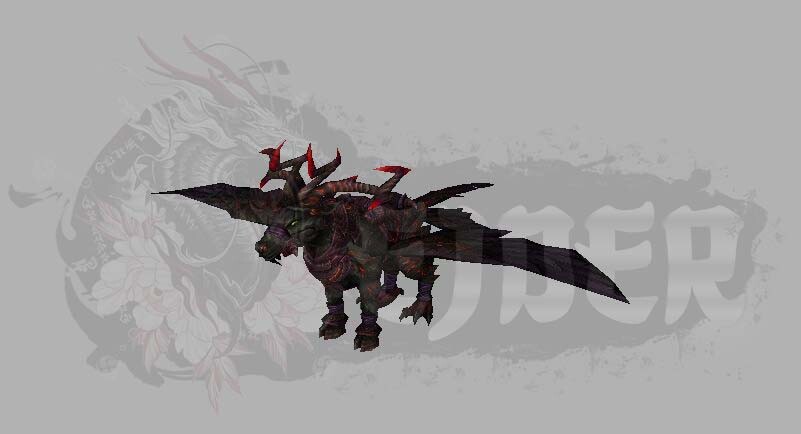
EJDER-Binek [21] Modeli ile Metin2 Oyununda Görsel Bir Dönüm Noktası
EJDER-Binek [21], Metin2 oyununda oyuncuların uzun süredir hayalini kurduğu, hem estetik hem de işlevsel olarak dikkat çeken özel bir binek modelidir. Bu model, Metin2 3D modelleme dünyasında önemli bir yere sahiptir. Metin2 Lobby olarak, bu modelin teknik detaylarını, nasıl kullanıldığını ve Metin2 sunucularında nasıl entegre edileceğini sizler için derledik.
EJDER-Binek [21] Nedir?
EJDER-Binek [21], Metin2 oyununda bir binek olarak tasarlanmış, görsel açıdan oldukça etkileyici bir NPC modelidir. Oyuncuların karakterlerini taşırken hem hızlı hem de dikkat çekici bir şekilde hareket etmesini sağlar. Bu model, Metin2 monster model kategorisinde yer alsa da, binek olarak kullanılması nedeniyle özelleştirilmiş animasyon ve iskelet yapısı (bone) ile gelir.
Metin2 3D Modelleme ile EJDER-Binek [21]
Bu model, 3ds Max veya Blender gibi yazılımlarla hazırlanmış, GR2 formatında dışa aktarılmıştır. GR2 formatı, Metin2 oyun motoru tarafından desteklenen özel bir 3D model formatıdır. Bu format sayesinde modelin mesh, texture, animation gibi tüm bileşenleri eksiksiz bir şekilde oyun içine entegre edilebilir.
Modelin Özellikleri
- UV Haritalama: Model, doğru renk ve doku dağılımı için yüksek kaliteli UV haritalamaya sahiptir.
- Doku ve Renk: Texture dosyaları, gerçekçi görünümlü olacak şekilde optimize edilmiştir.
- Animasyon Desteği: Rigging işlemi yapılmış ve tüm bone sistemleriyle uyumlu çalışır.
- Oyun Uyumlu Format: GR2 formatında dışa aktarılmıştır, bu sayede doğrudan Metin2 oyun dosyalarına eklenebilir.
EJDER-Binek [21] Nasıl Sunucuya Eklenir?
Bu modeli kendi Metin2 sunucunuza eklemek için aşağıdaki adımları izleyebilirsiniz:
1. Model Dosyalarını İndirin: Metin2 Lobby'den EJDER-Binek [21] modeli için gerekli tüm GR2 ve texture dosyalarını indirin.
2. Sunucu Dosyalarını Hazırlayın: Client ve server dosyalarında gerekli değişiklikleri yaparak modeli sisteme tanımlayın.
3. Test Edin: Oyuncu olarak modele erişim sağlayıp sağlamadığınızı kontrol edin.
Metin2 Model Edit Araçları
EJDER-Binek [21] gibi modeller üzerinde değişiklik yapmak isterseniz, Metin2 model edit araçlarını kullanabilirsiniz. Blender, 3ds Max ve özel GR2 import/export eklentileri ile modelin görünümünü, iskelet yapısını ve animasyonlarını özelleştirebilirsiniz.
EJDER-Binek [21] ile Sunucu Yüzünüze Özel Hale Getirin
Metin2 sunucularınızda görsel fark yaratmak istiyorsanız EJDER-Binek [21] modeli ideal bir tercihtir. Hem oyuncuların ilgisini çekecek hem de sunucu markalaşması açısından güçlü bir görsel kimlik oluşturacaktır. Metin2 Lobby, bu tür modellerin indirilebildiği ve detaylı teknik bilgilerin paylaşıldığı en iyi kaynaktır.
Sonuç
EJDER-Binek [21], Metin2 oyununda hem estetik hem de teknik açıdan güçlü bir modeldir. Metin2 3D model dünyasında öncü örneklerden biridir. Sunucularınızda kullanmak için doğru yerleştirmeler ve optimize edilmiş texture dosyaları ile mükemmel bir deneyim sunabilirsiniz.
Metin2 Lobby
Dragon-Mount [21]: A Visual Milestone in Metin2
Dragon-Mount [21] is one of the most visually impressive and functionally appealing mount models that players in Metin2 have longed for. This model holds a significant place in the world of Metin2 3D modeling. At Metin2 Lobby, we have compiled the technical details, usage instructions, and integration methods for this model into your servers.
What is Dragon-Mount [21]?
Dragon-Mount [21] is a visually stunning NPC model designed as a mount in Metin2. While it may fall under the category of Metin2 monster models, its unique animations and skeletal structure (bones) are tailored specifically for use as a mount, allowing player characters to move around the game world with both speed and visual appeal.
Metin2 3D Modeling and Dragon-Mount [21]
This model was created using software such as 3ds Max or Blender, and exported in GR2 format. The GR2 format is a special 3D model format supported by the Metin2 game engine. Thanks to this format, all components of the model—such as mesh, texture, and animation—can be seamlessly integrated into the game.
Model Features
- UV Mapping: The model includes high-quality UV mapping for accurate color and texture distribution.
- Textures and Colors: Texture files are optimized to provide realistic appearances.
- Animation Support: Proper rigging has been applied and is fully compatible with all bone systems.
- Game-Compatible Format: Exported in GR2 format, enabling direct integration into Metin2 game files.
How to Add Dragon-Mount [21] to Your Server?
To add this model to your own Metin2 server, follow these steps:
1. Download the Model Files: Download all required GR2 and texture files for Dragon-Mount [21] from Metin2 Lobby.
2. Prepare Server Files: Make necessary modifications in client and server files to define the model within the system.
3. Test It: Verify whether players can access the mount as intended.
Metin2 Model Editing Tools
If you wish to make alterations to models like Dragon-Mount [21], you can use Metin2 model editing tools. With Blender, 3ds Max, and specialized GR2 import/export plugins, you can customize the model's appearance, skeleton structure, and animations.
Customize Your Server with Dragon-Mount [21]
If you want to create visual distinction on your Metin2 servers, Dragon-Mount [21] is an ideal choice. It will not only attract player interest but also contribute to strong branding for your server. Metin2 Lobby is the best resource where such models can be downloaded and detailed technical information shared.
Conclusion
Dragon-Mount [21] is a model that stands out both aesthetically and technically in Metin2. It is one of the leading examples in the world of Metin2 3D models. With correct placement and optimized texture files, you can deliver a perfect experience on your servers.
