

Forumda Paylaşıldımı Görmedim Eğer Paylaşıldıysa Raporlayınız.
İyi Kullanımlar
İyi Forumlar...
İyi Kullanımlar
İyi Forumlar...
Ziyaretçiler için gizlenmiş link,görmek için üye olmalısınız!
Giriş yap veya üye ol.
Ziyaretçiler için gizlenmiş link,görmek için üye olmalısınız!
Giriş yap veya üye ol.
EJDER-Binek [9]: Metin2 Oyununda 3D Modelleme ve Yeni Binek Sistemleri
Metin2 oyunu, özellikle 3D modelleme konusunda büyük gelişmeler göstermeye devam ediyor. Bu bağlamda EJDER-Binek [9] gibi özel binek modelleri, oyuncuların deneyimini zenginleştiriyor. Bu makalede, EJDER-Binek [9]'un detaylarına, nasıl özelleştirileceğine ve Metin2 3D modelleme dünyasında neden önemli olduğuna değineceğiz.
EJDER-Binek [9] Nedir?
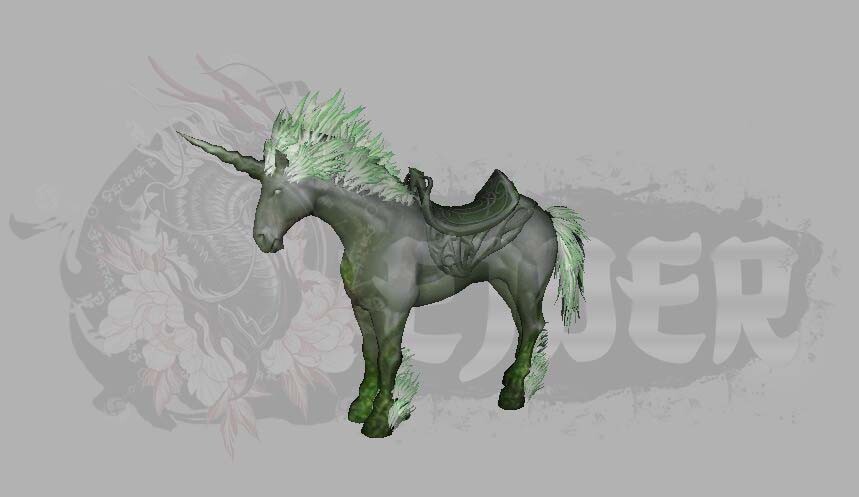
EJDER-Binek [9], Metin2 oyununda sunulan özel bir binek modelidir. Oyuncuların karakterlerini taşıdığı bu binek, hem görsel açıdan dikkat çekici hem de yüksek seviye bir güç simgesidir. EJDER-Binek [9] ile karakterlerinizin görünümü daha etkileyici hale gelirken, aynı zamanda oyun içindeki hareket kabiliyetiniz de artar.
Metin2 3D Modelleme ve EJDER-Binek [9]
Metin2 3D modelleme, oyun içinde kullanılan karakter, npc, canavar, eşya, harita ve binek modellerinin yeniden tasarlanmasını sağlar. EJDER-Binek [9] modeli, bu alandaki en dikkat çeken projelerden biridir. Blender veya 3ds Max gibi yazılımlarla hazırlanan bu model, GR2 formatında oyun içine aktarılır.
Model Edit ve Özel Binek Tasarımı
Metin2 model edit işlemleri, mevcut modellerin değiştirilmesini sağlar. EJDER-Binek [9] modeli üzerinde değişiklik yaparak, kendi özgün bineğinizi oluşturabilirsiniz. Bu süreçte UV mapping, texture ve rigging gibi teknik adımlar önemlidir. Blender Metin2 araçları sayesinde bu işlemler kolayca yapılabilir.
Metin2 Granny ve GR2 Formatları
Metin2 oyun motoru, eski nesil Granny dosyalarını desteklemektedir. Ancak yeni sistemlerde GR2 formatı tercih edilmektedir. EJDER-Binek [9] modeli, GR2 formatında uyumlu olarak geliştirildiğinden, hem eski hem de yeni sistemlerde sorunsuz çalışır.
Metin2 Animation ve Binek Hareketleri
EJDER-Binek [9] ile birlikte gelen animasyonlar, bineğin daha gerçekçi hareket etmesini sağlar. Bone yapısı ve mesh düzeni sayesinde binek, karakterle uyumlu şekilde hareket eder. Bu sayede oyun içinde daha akıcı ve estetik bir deneyim yaşarsınız.
Özel Efekt ve Görsel Modlar
EJDER-Binek [9], yalnızca model değil aynı zamanda özel efekt ve görsel modlarla da zenginleştirilebilir. Metin2 visual mod ve graphic mod sistemleri ile bineğinize özel parlama, ışık efektleri ve animasyonlar eklenebilir.
Metin2 Lobby ve Özelleştirilmiş Modeller
Metin2Lobby platformu, bu tür özelleştirilmiş modellerin paylaşımına olanak tanır. EJDER-Binek [9] gibi modeller, kullanıcılar tarafından kolayca indirilip oyun içine entegre edilebilir. Metin2dev model ve martysama model gibi profesyonel yapımlar da bu platformda yer bulur.
Sonuç
EJDER-Binek [9], Metin2 oyununda 3D modelleme sanatının ne kadar geliştiğinin kanıtıdır. Hem estetik hem de fonksiyonel yönleriyle oyuncuların favori bineklerinden biri haline geldi. Bu modelin özelleştirilmesi ve oyun içine entegrasyonu, Metin2 geliştirmecileri için değerli bir öğrenme ve geliştirme alanıdır.
Dragon-Mount [9]: 3D Modeling and New Mount Systems in Metin2
Metin2 continues to make significant advancements in 3D modeling. In this context, special mount models like Dragon-Mount [9] enhance the player experience. This article will cover the details of Dragon-Mount [9], how it can be customized, and why it is important in the world of Metin2 3D modeling.
What is Dragon-Mount [9]?
Dragon-Mount [9] is a special mount model offered in the Metin2 game. This mount not only visually impressive but also serves as a high-level symbol of power. With Dragon-Mount [9], your character's appearance becomes more striking while also improving mobility within the game.
Metin2 3D Modeling and Dragon-Mount [9]
Metin2 3D modeling allows for redesigning of characters, NPCs, monsters, items, maps, and mounts used in the game. Dragon-Mount [9] is one of the most notable projects in this area. Created with software like Blender or 3ds Max, this model is imported into the game in GR2 format.
Model Editing and Custom Mount Design
Metin2 model editing allows modification of existing models. By altering the Dragon-Mount [9] model, you can create your own unique mount. During this process, technical steps such as UV mapping, texturing, and rigging are essential. Thanks to Blender Metin2 tools, these processes can be completed easily.
Metin2 Granny and GR2 Formats
The Metin2 game engine supports legacy Granny files. However, in newer systems, GR2 format is preferred. Since the Dragon-Mount [9] model is developed to be compatible with GR2 format, it works seamlessly on both old and new systems.
Metin2 Animation and Mount Movements
Animations included with Dragon-Mount [9] allow the mount to move more realistically. With its bone structure and mesh layout, the mount moves smoothly in sync with the character, providing a fluid and aesthetic experience within the game.
Special Effects and Visual Mods
Dragon-Mount [9] can be enriched not only by its model but also through special effects and visual mods. Metin2 visual mod and graphic mod systems allow adding custom glows, light effects, and animations to your mount.
Metin2 Lobby and Customized Models
The Metin2Lobby platform enables sharing of such customized models. Models like Dragon-Mount [9] can be easily downloaded by users and integrated into the game. Professional creations such as Metin2dev model and martysama model can also be found on this platform.
Conclusion
Dragon-Mount [9] is evidence of how far 3D modeling art has come in Metin2. With both aesthetic and functional aspects, it has become one of the favorite mounts among players. Customizing this model and integrating it into the game is a valuable learning and development area for Metin2 developers.
