

Forumda Paylaşıldımı Görmedim Eğer Paylaşıldıysa Raporlayınız.
İyi Kullanımlar
İyi Forumlar...
İyi Kullanımlar
İyi Forumlar...
Ziyaretçiler için gizlenmiş link,görmek için üye olmalısınız!
Giriş yap veya üye ol.
Ziyaretçiler için gizlenmiş link,görmek için üye olmalısınız!
Giriş yap veya üye ol.
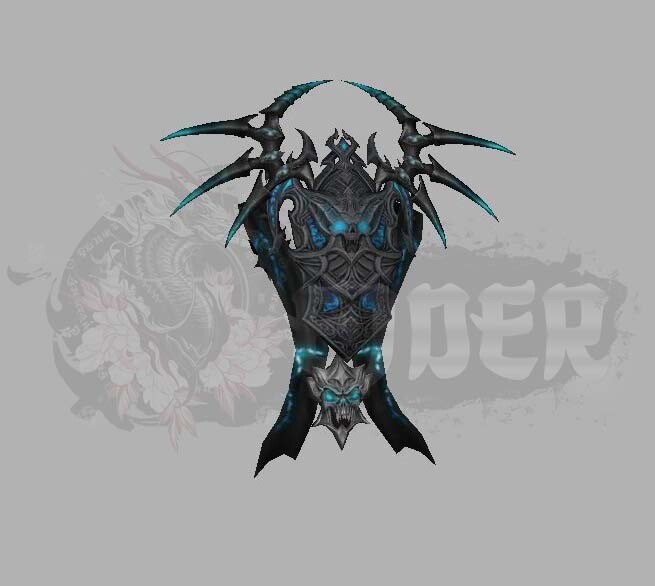
Metin2'de EJDER-Kuşak [5] Modellemesi ve Görsel Geliştirme
Metin2 dünyasında karakter ve NPC modelleri arasında öne çıkan unsurlardan biri olan EJDER-Kuşak [5] serisi, oyuncuların dikkatini çekmeyi başaran nadir görsel efektlerden biridir. Bu model, özellikle 3D modelleme uzmanları tarafından detaylı çalışmalara konu olmuştur. Bu yazıda, EJDER-Kuşak [5] modelinin Metin2 sistemine entegrasyonu, 3D modelleme süreçleri ve geliştirme araçları üzerine odaklanacağız.
EJDER-Kuşak [5] Serisi Nedir?
EJDER-Kuşak [5], Metin2 oyununda karakterin kuşak sistemine entegre edilen yüksek seviyeli bir ekipman parçasıdır. Özellikle görsel açıdan dikkat çeken bu kuşak, karakterin arkasında animasyonlu bir ejderha figürüyle yer alır. Bu sayede hem oyun içinde hem de PvP ortamlarında karakterin dikkat çekici bir görünümü olur. Bu tür modeller genellikle custom model olarak tanımlanır ve geliştiriciler tarafından özel olarak tasarlanır.
Metin2 3D Modelleme Süreci
EJDER-Kuşak [5] gibi modellerin oluşturulması için genellikle Blender ya da 3DS Max gibi 3D modelleme programları kullanılır. Bu programlar sayesinde modelin mesh, bone, animation ve UV mapping gibi detayları kontrol edilebilir. Modelleme sürecinde gr2 ve granny formatları önemlidir. GR2 export ve import işlemleri, modelin doğru şekilde oyun içine aktarılabilmesi için kritik adımlardır.
Ejder Kuşak Modelinin Görsel Özellikleri
EJDER-Kuşak [5], genellikle parlak renkler, ışık efektleri ve animasyonlu detaylarla karakterize edilir. Bu kuşaklar, texture ve skin düzenlemeleriyle daha da zenginleştirilebilir. Ayrıca, kuşağın karakterin omuzlarından sarkan yapısı, rigging ve animation sürecinde dikkatle ele alınmalıdır. Bu sayede kuşak karakterin hareketlerine doğal bir şekilde uyum sağlayabilir.
Metin2 Özel Model Sistemleri
EJDER-Kuşak [5] gibi özel kuşaklar, genellikle custom model olarak sunulur. Bu modellerin doğru şekilde entegre edilmesi için geliştiricilerin Metin2Dev ya da Martysama gibi platformlardan elde ettikleri bilgi ve araçlardan yararlanması gerekir. Bu tür sistemlerde model replace işlemleri, pack model formatları ve eterpack yapıları oldukça yaygındır.
Geliştirme Araçları ve Kaynaklar
EJDER-Kuşak [5] modeli üzerinde çalışmak isteyen 3D sanatçıları için Blender, 3DS Max ve Metin2 3D art kaynakları oldukça faydalıdır. Ayrıca, Metin2 graphic mod ve visual mod geliştirme süreçlerinde texture ve UV map düzenlemeleri de ayrı bir önem taşır. Metin2Lobby üzerinden bu konuda birçok örnek ve kaynak bulabilirsiniz.
Sonuç
EJDER-Kuşak [5] modeli, Metin2 oyununda görsel etkiyi artırmak isteyen oyuncular ve geliştiriciler için önemli bir özelliktir. 3D modelleme, animasyon ve görsel efektlerin birleştiği bu yapı, hem oyun deneyimini zenginleştirir hem de sanatçıların yaratıcılığını sergilemesine olanak tanır. Bu yazıda bahsedilen teknik detaylar, EJDER-Kuşak [5] modellemesi yapmak isteyen herkes için rehber niteliğindedir.
Dragon-Belt [5] Modeling and Visual Enhancement in Metin2
Metin2's notable visual elements include the Dragon-Belt [5] series, which stands out among character and NPC models. This model has drawn attention from 3D modeling experts who have extensively worked on its design. In this article, we will focus on the integration of the Dragon-Belt [5] into the Metin2 system, 3D modeling processes, and development tools used.
What is Dragon-Belt [5]?
Dragon-Belt [5] is a high-tier equipment piece integrated into the belt system of characters in Metin2. Visually impressive, this belt features an animated dragon figure displayed behind the character. As a result, it enhances the character's appearance both within the game and in PvP environments. These types of models are generally defined as custom models and are specially designed by developers.
The 3D Modeling Process for Metin2
Creating models like Dragon-Belt [5] typically involves programs such as Blender or 3DS Max. Thanks to these tools, details such as mesh, bone, animation, and UV mapping can be controlled. During the modeling process, formats like gr2 and granny are important. GR2 export and import operations are critical steps to ensure the model integrates correctly into the game.
Visual Features of the Dragon Belt Model
Dragon-Belt [5] is characterized by bright colors, light effects, and animated details. These belts can be enhanced further with texture and skin adjustments. Additionally, the way the belt hangs from the character’s shoulders must be carefully handled during the rigging and animation phases. This ensures that the belt moves naturally according to the character's movements.
Custom Model Systems in Metin2
Models like Dragon-Belt [5] are usually released as custom models. To properly integrate these models, developers often rely on information and tools from platforms like Metin2Dev or Martysama. In such systems, model replace operations, pack model formats, and eterpack structures are quite common.
Development Tools and Resources
For 3D artists working on the Dragon-Belt [5] model, resources such as Blender, 3DS Max, and Metin2 3D art are highly useful. Moreover, in the development of Metin2 graphic mods and visual mods, texture and UV map adjustments play a significant role. You can find many examples and resources on this topic through Metin2Lobby.
Conclusion
Dragon-Belt [5] is an important feature for players and developers seeking to enhance the visual impact in Metin2. Combining 3D modeling, animations, and visual effects, this structure enriches the gameplay experience while allowing artists to showcase their creativity. The technical details discussed in this article serve as a guide for anyone looking to create Dragon-Belt [5] models.
