

ÖNCELİKLE YAPMANIZ GEREKENLER:
1.SİSTEMİ EKLEMEK:
2.Taskbara Çağırma Butonu Eklemek.:
Not:Questini Okutmayın !
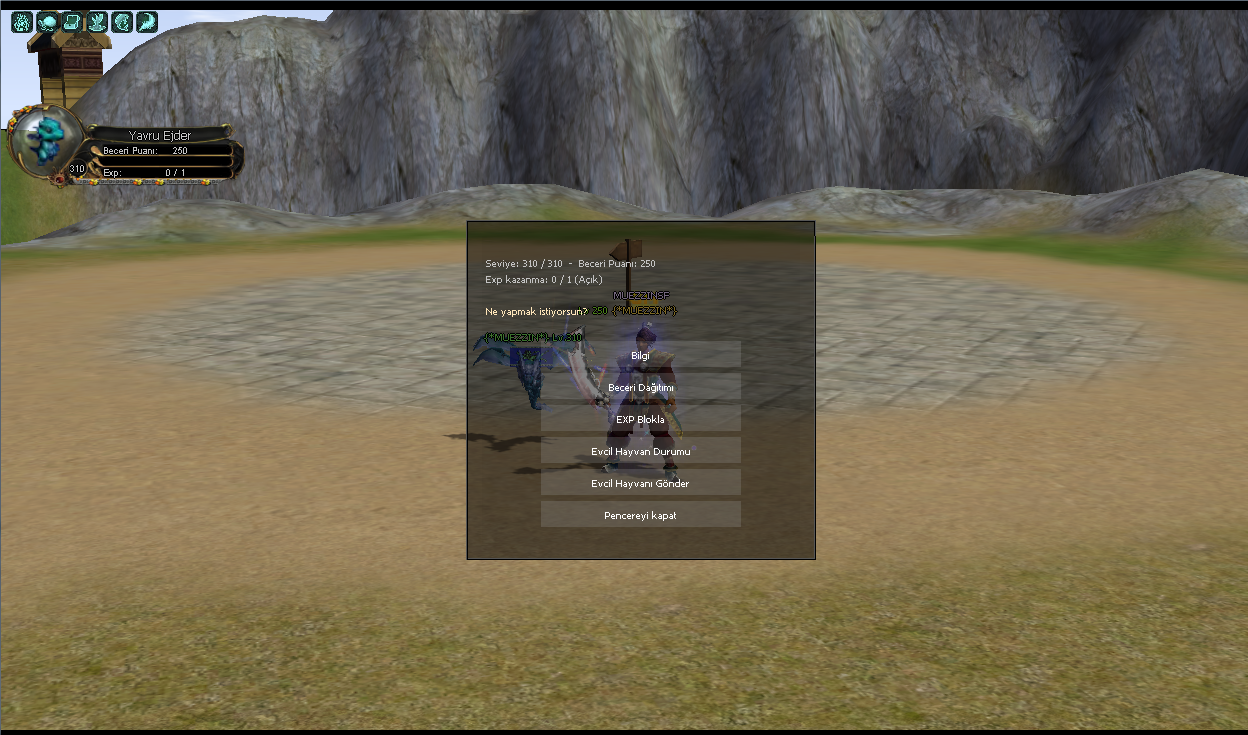
Ve Menü At Çağırma Butonuna Basınca Aktif olur Bukadar Basit.
NOT: BİLMEYENLER İÇİN PAYLAŞILMIŞTIR.BOŞ YORUMA GEREK YOK.
1.SİSTEMİ EKLEMEK:
Ziyaretçiler için gizlenmiş link,görmek için üye olmalısınız!
Giriş yap veya üye ol.
2.Taskbara Çağırma Butonu Eklemek.:
Ziyaretçiler için gizlenmiş link,görmek için üye olmalısınız!
Giriş yap veya üye ol.
Not:Questini Okutmayın !
Ve Menü At Çağırma Butonuna Basınca Aktif olur Bukadar Basit.
NOT: BİLMEYENLER İÇİN PAYLAŞILMIŞTIR.BOŞ YORUMA GEREK YOK.
Evrimli Pet Sisteminde Menü Nasıl Aktif Edilir?
Metin2 özel sunucularında evrimleşebilen pet sistemleri, oyuncuların deneyimini zenginleştiren ve oyun içi etkileşimi artıran önemli özelliktir. Bu sistemler sayesinde oyuncular petlerini seviye atlatıp, evrimsel gelişmeler yaşatabilirler. Ancak bu sistemlerin doğru şekilde aktif edilmesi ve menü üzerinden erişilebilir olması gerekir. Bu makalede, evrimli pet sistemine ait menünün nasıl aktif edileceği detaylı şekilde ele alınacaktır.
Pet Sistemi Nedir ve Ne İşe Yarar?
Pet sistemi, Metin2 oyununda oyuncuların belirli bir seviyeye ulaşan hayvanlarla beraber savaşabildiği, onları eğitebildiği bir özelliktir. Evrimli petlerde ise bu hayvanlar, belirli miktarda deneyim puanı topladıklarında evrim geçirerek hem daha güçlü olur hem de görünüş olarak değişir. Bu süreçte petin menüsüne erişmek, evrim aşamalarını takip etmek ve petin durumunu kontrol etmek oldukça önemlidir.
Menü Aktivasyonu İçin Gereken Dosyalar
Evrimli pet menüsünü aktif etmek için öncelikle bazı dosyalara ihtiyaç vardır. Bunlar genellikle uiscript, py root ve client src klasörlerinde bulunur. Menü için gereken arayüz dosyası genellikle pet_evolution.py gibi bir yapıdadır. Bu dosya, kullanıcı arayüzü üzerinden petin evrim menüsünü açar. Ayrıca C++ source tarafında bu menüyle etkileşime geçebilmek için gerekli fonksiyonlar da tanımlanmalıdır.
Pet Menüsünü Aktif Etme Adımları
1. Öncelikle client tarafında uiscript dizinine gidilir ve pet menüsü için gerekli arayüz dosyası yüklenir. Bu dosya genellikle XML formatındadır ve butonlar, görseller ve metinler içerir.
2. Py Root kısmında, menü ile etkileşim kurulacak Python dosyaları düzenlenmelidir. Burada pet_evolution.py gibi bir dosya, menüden gelen komutları karşılayacak ve sunucuya yönlendirecektir.
3. Sunucu tarafında, yani game server kısmında C++ source üzerinde pet evrim sistemini destekleyen kodlar yazılır veya mevcut sistemle entegre edilir. Bu kodlar, petin evrim geçirmesi için gereken koşulları kontrol eder ve menü üzerinden yapılan işlemleri işler.
Python GUI ve C++ Entegrasyonu
Python GUI (Py UI) ile menü tasarımı yapılırken, bu menüden gelen verilerin C++ tarafında doğru şekilde işlenebilmesi gerekir. Bu nedenle pack dosyaları üzerinden client ile auth ve game sunucusu arasında haberleşme sağlanmalıdır. Pet menüsü üzerinden yapılan evrimleme işlemi, db core üzerinden kayıt altına alınır ve sunucuda tutulan pet verileri güncellenir.
Menü Aktif Olduğunda Neler Olur?
Menü başarıyla aktif edildiğinde, oyuncular petlerinin evrim durumu, mevcut seviyesi ve evrim için gerekli eşyalar gibi bilgilere kolayca erişebilirler. Bu sayede petlerin gelişim süreci daha şeffaf hale gelir ve oyuncuların sistemi daha iyi anlaması sağlanır. Ayrıca bu menü sayesinde petlerin farklı evrim yolları sunulabilir, örneğin saldırı ya da savunma tabanlı evrimler gibi.
Sonuç
Evrimli pet sistemlerinde menü aktivasyonu, hem Metin2 development hem de kullanıcı deneyimi açısından kritik öneme sahiptir. Doğru yapılandırılmış bir menü, oyuncuların petlerini daha aktif yönetmesini sağlarken, geliştiricilerin de sistemi daha verimli kullanmasına olanak tanır. Bu işlem için uiscript, py gui, client src ve server src gibi bileşenler dikkatlice yapılandırılmalıdır.
How to Activate Menu in Evolution Pet System?
In Metin2 private servers, evolution pet systems are important features that enrich the player experience and increase in-game interaction. Thanks to these systems, players can level up their pets and make them evolve. However, it's crucial for these systems to be properly activated and accessible through menus. In this article, we will detail how to activate the menu related to the evolution pet system.
What Is the Pet System and What Does It Do?
The pet system allows players in Metin2 to fight alongside animals they have trained, reaching certain levels. In evolution pets, these animals become stronger and change visually after accumulating a specific amount of experience points. During this process, accessing the pet's menu, tracking evolution stages, and checking its status becomes essential.
Files Required for Menu Activation
To activate the evolution pet menu, certain files are required. These are typically located in the uiscript, py root, and client src folders. The interface file needed for the menu is usually named something like pet_evolution.py. This file opens the evolution menu of the pet via the user interface. Additionally, functions necessary to interact with this menu must be defined on the C++ source side.
Steps to Activate the Pet Menu
1. First, go to the uiscript directory on the client side and upload the required interface file for the pet menu. This file is usually in XML format and contains buttons, images, and texts.
2. In the Py Root section, the Python files that will interact with the menu need to be edited. Here, a file like pet_evolution.py will handle commands from the menu and forward them to the server.
3. On the server side, within the game server, code supporting the pet evolution system must be written or integrated into the existing system using C++ source. These codes check the conditions required for the pet to evolve and process operations made through the menu.
Python GUI and C++ Integration
While designing the menu with Python GUI (Py UI), the data coming from the menu must be correctly processed on the C++ side. Therefore, communication between the client and auth/game servers should be established through pack files. The evolution process initiated through the pet menu is recorded via the db core, and the pet data stored on the server is updated accordingly.
What Happens When the Menu is Activated?
Once the menu is successfully activated, players can easily access information such as their pet's evolution status, current level, and items required for evolution. This makes the pet development process more transparent and helps players better understand the system. Moreover, different evolution paths can be offered through this menu, such as attack-based or defense-based evolutions.
Conclusion
Menu activation in evolution pet systems is critically important for both Metin2 development and user experience. A well-configured menu enables players to manage their pets more actively, while also allowing developers to use the system more efficiently. For this process, components like uiscript, py gui, client src, and server src must be carefully configured.
