

- <li data-xf-list-type="ul">Navicat'a girip "common" veri tabanında "gmhost" tablosuna 127.0.0.1 ekleyin sorununuz düzelecektir.
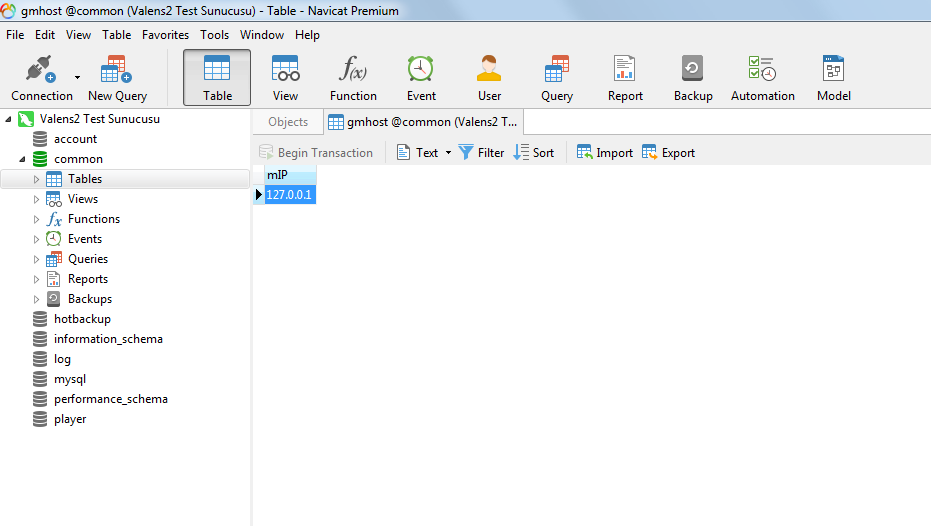
HATA BİLDİRİMİ: [FIX]__GetHostInfo: __GetHostInfo() ==> DirectQuery failed(SELECT mIP FROM gmhost)
Metin2 sunucularında çalışan geliştiriciler ve yöneticiler zaman zaman veritabanı ile ilgili farklı hatalarla karşılaşabilir. Bu hatalar genellikle sistemsel sorunlar, eksik yapılandırmalar veya veritabanı tablolarındaki problemler nedeniyle ortaya çıkar. Bugün inceleyeceğimiz __GetHostInfo: __GetHostInfo() ==> DirectQuery failed(SELECT mIP FROM gmhost) hatası da bu türden bir sorundur. Bu yazıda bu hatanın ne olduğunu, neden oluştuğunu ve nasıl düzeltileceğini detaylıca ele alacağız.
Hatayı Anlamak
Metin2 sunucu yapılandırmasında, GM (Game Master) kullanıcıların IP adreslerinin kontrol edildiği bir mekanizma vardır. Bu mekanizma, güvenlik amacıyla bazı IP adreslerine erişim kısıtlaması getirebilir. gmhost adlı tablo, GM kullanıcılarının IP adreslerini saklayan tablodur. Hata mesajında belirtilen SELECT mIP FROM gmhost sorgusu, bu tablodan IP adreslerini çekmeye çalışmaktadır. Ancak doğrudan sorgulama başarısız olduğunda sistem bu hatayı üretir.
Olası Nedenler
Bu hata aşağıdaki durumlarda oluşabilir:
- gmhost tablosu veritabanında eksik veya silinmiş olabilir.
- Tablo varsa, ancak doğru yapıya sahip olmayabilir (örneğin mIP alanı eksik).
- Veritabanı kullanıcı izinleri yetersiz olabilir.
- Sunucu yapılandırmasında GM host kontrolü aktifse, ancak gerekli tabloya erişim sağlanamıyor olabilir.
Çözüm Adımları
Adım 1: gmhost Tablosunun Kontrolü
Öncelikle gmhost adlı tablonun varlığını kontrol edin. Metin2 veritabanınızda bu tablonun olup olmadığını doğrulamak için şu sorguyu çalıştırın:
SHOW TABLES LIKE 'gmhost';
Eğer tablo yoksa, oluşturmanız gerekir.
Adım 2: gmhost Tablosunun Yapısını Oluşturmak
Tablo yoksa veya yapısı eksikse, aşağıdaki SQL komutunu kullanarak doğru yapıyla oluşturabilirsiniz:
CREATE TABLE IF NOT EXISTS gmhost (
id INT(7) UNSIGNED NOT NULL AUTO_INCREMENT,
mIP VARCHAR(15) NOT NULL DEFAULT '0.0.0.0',
PRIMARY KEY (id),
KEY mIP (mIP)
);
Adım 3: Gerekli Kayıtları Eklemek
GM olarak erişim izni vermek istediğiniz IP adreslerini bu tabloya ekleyin. Örneğin:
INSERT INTO gmhost (mIP) VALUES ('127.0.0.1');
Adım 4: Sunucu Yapılandırması
Sunucu yapılandırma dosyanızda GM host kontrolünün aktif olup olmadığını kontrol edin. Eğer aktifse ve gmhost tablosu eksikse bu hata alınacaktır. Yapılandırmada bu seçeneği kapatmayı veya doğru şekilde yapılandırmayı unutmayın.
Veritabanı Güvenliği ve Optimizasyonu
Metin2 sunucularında veritabanı güvenliği son derece önemlidir. Özellikle GM yetkileri gibi hassas alanlarda doğruluk ve bütünlük sağlanmalıdır. gmhost tablosu gibi yapılar, yalnızca yetkili IP adreslerinden erişim sağlamanızı sağlar. Bu tabloyu düzenli olarak gözden geçirip güncel tutmak, sunucu güvenliği açısından kritik öneme sahiptir. Ayrıca, veritabanı performansını artırmak adına düzenli backup alma ve optimizasyon işlemleri yapmanız önerilir.
Sonuç
__GetHostInfo hatası, genellikle veritabanı yapılandırması ile ilgilidir. Bu hata ile karşılaştığınızda, öncelikle gmhost tablosunun varlığını ve yapısını kontrol etmelisiniz. Eksik veya yanlış yapılandırılmış tablolar, doğrudan sorguların başarısız olmasına neden olur. Doğru yapılandırmalar ve düzenli bakım ile Metin2 sunucularınız daha kararlı ve güvenli bir şekilde çalışacaktır.
ERROR REPORT: [FIX]__GetHostInfo: __GetHostInfo() ==> DirectQuery failed(SELECT mIP FROM gmhost)
Developers and administrators running Metin2 servers may occasionally encounter various database-related errors. These errors are often caused by system issues, incomplete configurations, or problems within the database tables. The error we will examine today, __GetHostInfo: __GetHostInfo() ==> DirectQuery failed(SELECT mIP FROM gmhost), is one such issue. In this article, we will explore what this error is, why it occurs, and how to fix it in detail.
Understanding the Error
Within the Metin2 server configuration, there is a mechanism that checks IP addresses of Game Masters (GMs). This mechanism can impose access restrictions on certain IP addresses for security purposes. The gmhost table stores IP addresses of GM users. The error message indicates that the query SELECT mIP FROM gmhost tried to retrieve IP addresses from this table but failed during direct execution.
Possible Causes
This error may occur under the following conditions:
- The gmhost table might be missing or deleted from the database.
- The table exists but does not have the correct structure (e.g., missing mIP column).
- Database user permissions might be insufficient.
- If GM host checking is enabled in the server configuration, but access to the required table cannot be established.
Solution Steps
Step 1: Check the gmhost Table
Firstly, verify whether the gmhost table exists in your database. You can check its existence with the following query:
SHOW TABLES LIKE 'gmhost';
If the table does not exist, you need to create it.
Step 2: Create the gmhost Table Structure
If the table does not exist or its structure is incomplete, you can create it with the correct schema using the following SQL command:
CREATE TABLE IF NOT EXISTS gmhost (
id INT(7) UNSIGNED NOT NULL AUTO_INCREMENT,
mIP VARCHAR(15) NOT NULL DEFAULT '0.0.0.0',
PRIMARY KEY (id),
KEY mIP (mIP)
);
Step 3: Add Required Entries
Add IP addresses you want to grant GM access to this table. For example:
INSERT INTO gmhost (mIP) VALUES ('127.0.0.1');
Step 4: Server Configuration
Check if GM host checking is enabled in your server configuration file. If it is active and the gmhost table is missing, this error will occur. Make sure to either disable this option or configure it properly.
Database Security and Optimization
Database security is extremely important in Metin2 servers. Especially in sensitive areas like GM privileges, accuracy and integrity must be ensured. Structures like the gmhost table allow you to restrict access only from authorized IP addresses. Regularly reviewing and updating these tables is critical for server security. Additionally, performing regular backups and optimization operations helps improve database performance.
Conclusion
The __GetHostInfo error is usually related to database configuration. When encountering this error, first check the existence and structure of the gmhost table. Missing or incorrectly configured tables cause direct queries to fail. With proper configurations and regular maintenance, your Metin2 servers will operate more stably and securely.