

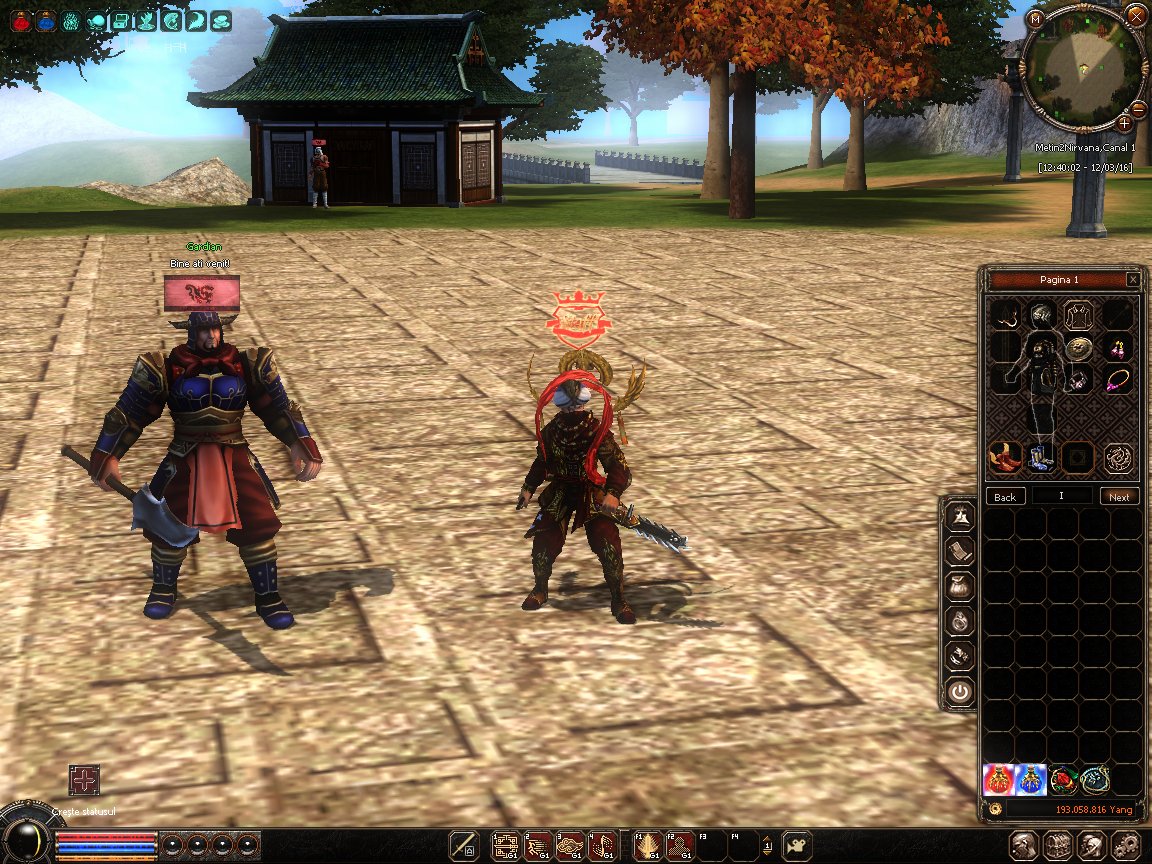
Envanter Anlatımı
Ziyaretçiler için gizlenmiş link,görmek için üye olmalısınız!
Giriş yap veya üye ol.
Questler
Ziyaretçiler için gizlenmiş link,görmek için üye olmalısınız!
Giriş yap veya üye ol.
Frozen Paylaşılan Filesten Gelişmiş Yan Panel Sistemi
Metin2 özel sunucularında kullanıcı deneyimini artırmak için geliştirilen sistemlerden biri olan Gelişmiş Yan Panel Sistemi, Frozen dosya paylaşım sitesinden alınan yapılarla kolayca entegre edilebilir.
Bu sistem, oyuncuların hızlıca erişmesi gereken menüleri, envanteri, özellik sayfasını, görevleri ve diğer pencereleri yan tarafta sabitlenmiş şekilde tutar.
Yan Panel Nedir?
Yan panel, oyuncunun oyun içi arayüzünde sağ ya da sol tarafta bulunan ve belirli menülerin doğrudan erişilebilir olduğu bir UI sistemidir.
Gelişmiş yan panel sistemleri, oyuncuya daha derin bir erişim imkanı sağlar. Örneğin; envanter, beceri penceresi, harita, görev takibi gibi pencereler kolayca açılıp kapatılabilir.
Frozen Dosyası Kullanımı
Frozen, Metin2 özel sunucu geliştiricileri arasında popüler bir dosya paylaşım platformudur.
Burada paylaşılan yan panel sistemleri genellikle UIScript tabanlıdır ve kolayca uygulanabilir.
Bu dosyalar genellikle Py Root dizinine konulur ve gerekli değişiklikler yapıldıktan sonra oyun istemcisinde aktif hale gelir.
Sistem Entegrasyonu
Yan panel sistemini entegre etmek için öncelikle ilgili UIScript dosyasının doğru şekilde tanımlanması gerekir.
Ayrıca, gerekirse Python GUI bileşenlerinde değişiklik yapılmalıdır.
Sistem genellikle client/src/uiInventory.py, uiCharacter.py gibi dosyalarla etkileşim kurar.
Avantajları
Oyuncuların oyun içi menülere daha hızlı ulaşabilmesi, PvP ve PvE aktivitelerinde daha verimli hareket etmelerini sağlar.
Ayrıca, sunucu sahipleri tarafından özelleştirilebilir ve sunucuya özel sistemlerle entegre edilebilir.
Sonuç
Frozen'dan alınan gelişmiş yan panel sistemleri, Metin2 özel sunucularında kullanıcı dostu arayüz geliştirmek için güçlü bir araçtır.
Doğru entegre edildiğinde, oyuncu memnuniyetini ve sunucu sadakatini artırabilir.
Frozen Shared Files Advanced Side Panel System
One of the systems developed to enhance user experience in Metin2 private servers is the Advanced Side Panel System, which can be easily integrated with structures taken from the Frozen file sharing site.
This system keeps menus that players need quick access to—such as inventory, character stats, quests, and other windows—fixed on the side of the screen.
What is a Side Panel?
The side panel is a UI system located on the right or left side of the in-game interface, allowing direct access to specific menus.
Advanced side panel systems provide deeper access for the player. For instance, windows such as inventory, skill window, map, quest tracking can be opened or closed easily.
Using Frozen Files
Frozen is a popular file-sharing platform among Metin2 private server developers.
The side panel systems shared here are usually UIScript-based and easy to implement.
These files are generally placed into the Py Root directory and become active in the game client after necessary modifications.
System Integration
To integrate the side panel system, the relevant UIScript file must first be correctly defined.
If needed, modifications can also be made in Python GUI components.
The system typically interacts with files like client/src/uiInventory.py, uiCharacter.py.
Benefits
Allows players to reach in-game menus faster, enabling more efficient gameplay during PvP and PvE activities.
Additionally, it can be customized by server owners and integrated with server-specific systems.
Conclusion
Advanced side panel systems taken from Frozen are a powerful tool for creating user-friendly interfaces in Metin2 private servers.
When properly integrated, they can increase player satisfaction and server loyalty.
