

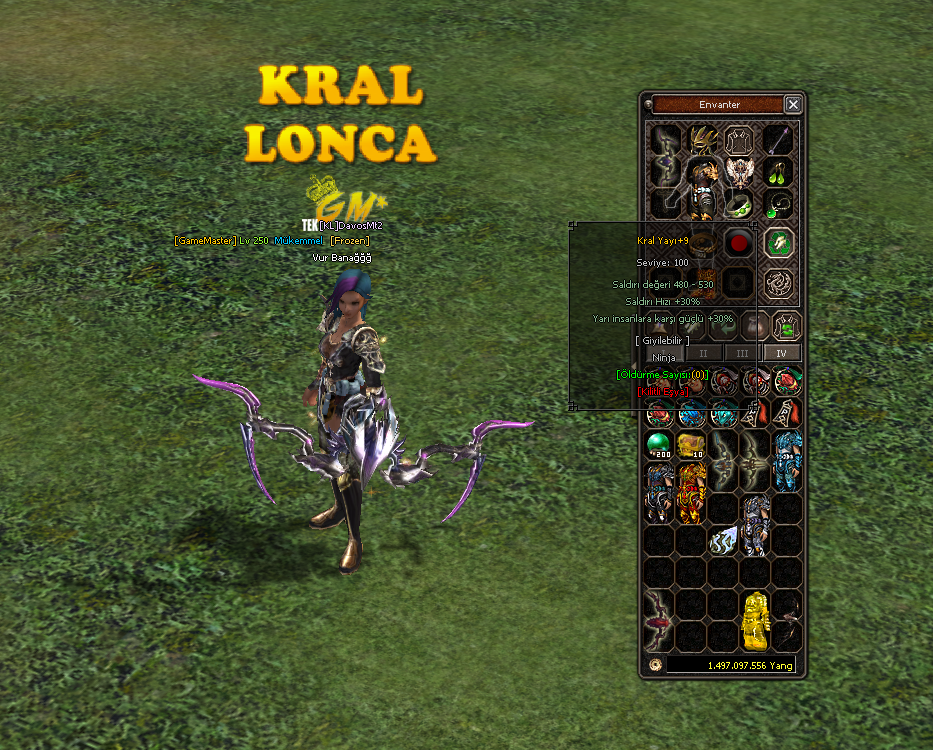
Yansıtma Sorunu Yoktur. Varsa Söyleyin Düzeltiyim.
uiinventory.py
Aratılır:
Kod:
[COLOR=#333333]if attrCount<4:[/COLOR]4 Taş Sistemi Varsa 5 Olarak Değişin.
5 Taş Sistemi Varsa 6 Olarak Değişin.
6 Taş Sistemi Varsa 7 Olarak Değişin.
Ziyaretçiler için gizlenmiş link,görmek için üye olmalısınız!
Giriş yap veya üye ol.
Ziyaretçiler için gizlenmiş link,görmek için üye olmalısınız!
Giriş yap veya üye ol.
İyi Forumlar.
Frozen Silahında Öldürme Sayısı Sistemi Nedir?
Metin2 özel sunucularında oyun deneyimini artırmak için geliştirilen birçok sistem vardır. Bu sistemlerden birisi de silah üzerinde öldürülen rakip sayısını gösteren öldürme sayısı sistemidir. Frozen silahları için geliştirilen bu sistem, oyuncuların PvP mücadelesinde daha fazla motivasyon kazanmasını sağlar.
Öldürme Sayısı Sistemi Nedir?
Bu sistem, oyuncuların silahları üzerindeki öldürme sayısını takip eder. Her başarılı bir düşman öldürmede silahtaki sayaç bir artar. Bu sayaç genellikle oyuncunun ekipmanı üzerinde belirgin bir şekilde gösterilir. Özellikle Frozen silahlarında bu sayaç görsel olarak etkileyici bir şekilde entegre edilir.
Sistem Nasıl Çalışır?
Silah üzerindeki sayaç, oyuncu PvP sırasında bir rakibi öldürdüğünde aktif olarak güncellenir. Bu sayaç, genellikle C++ tabanlı sunucu kaynak kodlarında tanımlanan özel event fonksiyonları ile çalışır. Bu fonksiyonlar, öldürülen karakterin kimliğini kontrol eder ve silahta sayaç güncellenir. Sayaç değeri, silahın görünümüne veya ismine dinamik olarak eklenir.
Sistemin Uygulanması İçin Gerekli Adımlar
1. Sunucu tarafında silah için özel sayaç verisi tanımlanmalıdır.
2. Kill event'ı tetiklendiğinde sayaç değerini güncelleyen fonksiyon yazılmalıdır.
3. Client tarafında sayaç değeri silah üzerinde gösterilmelidir.
4. DB tarafında sayaç verisinin kalıcı olması sağlanmalıdır.
Python GUI ile Silah Ayarları
Eğer sunucu tarafında Python tabanlı sistemler kullanılıyorsa, sayaç ayarları py root klasörlerindeki dosyalarla yapılabilir. Py GUI arayüzü ile sayaç verileri kolayca düzenlenebilir. Ayrıca uiscript ile sayaç bilgisi kullanıcı arayüzünde gösterilebilir.
Sistem Geliştirme ve Test
Sistemin doğru çalışması için öncelikle test sunucusunda denemeler yapılmalıdır. Metin2lobby.com gibi platformlarda geliştirilen sistemler, gerçek sunucularda aktif edilmeden önce kapsamlı test süreçlerinden geçirilmelidir. Bu süreçte auth, game, db gibi tüm katmanlar test edilmelidir.
Yararları Nelerdir?
Bu sistem, oyuncuların PvP oynamaya teşvik eder. Silahın sahibi, öldürme sayısına göre statüsünü artırabilir. Bu da oyun içi prestij ve rekabeti artırır. Aynı zamanda source edit ile özelleştirilebilir sistemlerle, farklı silahlar için de benzer sayaçlar geliştirilebilir.
Sonuç
Frozen silahlarında öldürme sayısı sistemi, hem oyun içi deneyimi zenginleştirir hem de oyuncuların PvP motivasyonunu artırır. Doğru uygulandığında bu sistem, Metin2 özel sunucularında popüler bir özelliktir. Geliştiriciler içinse C++ veya Python tabanlı sistemlerle entegrasyon oldukça kolaydır.
What is the Kill Count System on Frozen Weapons?
There are many systems developed to enhance the gaming experience in Metin2 private servers. One of these systems is the kill count system which displays the number of kills made with a weapon. This system, designed for Frozen weapons, increases player motivation during PvP battles.
What is the Kill Count System?
This system tracks the number of kills made by a player's weapon. Each successful enemy kill increments the counter on the weapon. This counter is usually displayed prominently on the player's equipment. Especially on Frozen weapons, this counter is visually integrated in an impressive way.
How Does the System Work?
The counter on the weapon updates each time the player kills an opponent in PvP. This counter typically works through special event functions defined in the server-side C++ source code. These functions check the identity of the killed character and update the counter on the weapon. The counter value is dynamically added to the weapon's appearance or name.
Steps Required for Implementation
1. Define custom counter data for the weapon on the server side.
2. Write a function that updates the counter value when a kill event is triggered.
3. Display the counter value on the weapon in the client interface.
4. Ensure the counter data persists in the database.
Weapon Settings with Python GUI
If Python-based systems are used on the server side, the counter settings can be configured via files located in the py root folders. With the Py GUI interface, the counter data can be easily edited. Additionally, the counter information can be shown in the user interface via uiscript.
System Development and Testing
To ensure the system works correctly, tests should first be conducted on a test server. Systems developed on platforms like Metin2lobby.com should go through comprehensive testing phases before being activated on live servers. During this process, all layers such as auth, game, and db should be tested.
What Are Its Benefits?
This system encourages players to engage in PvP. The owner of the weapon can increase their status based on the kill count, increasing in-game prestige and competition. Additionally, with customizable systems via source edit, similar counters can be developed for different weapons.
Conclusion
The kill count system on Frozen weapons enriches the in-game experience and boosts player motivation for PvP. When properly implemented, this system becomes a popular feature in Metin2 private servers. For developers, integration with C++ or Python-based systems is quite straightforward.
