

root/OfflineShop.py açılır
içerisindeki
bulunur
değiştirilir :
içerisindeki
bulunur
değiştirilir :
---------------------------------------------------
Fiyat Değiştirme ve gözükmesi fixiydi.
item ekleme kaldırma veyahut başka şeylerdede aktif etmek için
aratıp yukardakiler gibi değişiniz.
---------------------------------------------------
root/OfflineShopBuilder.py
arat
değiştir :
---------------------------------------------------
hd :
Kod:
class OfflineShopChangePriceWindow(ui.ScriptWindow):içerisindeki
Kod:
def Refresh(self):bulunur
değiştirilir :
Ziyaretçiler için gizlenmiş link,görmek için üye olmalısınız!
Giriş yap veya üye ol.
Kod:
class OfflineShopDialog(ui.ScriptWindow):içerisindeki
Kod:
def Refresh(self):bulunur
değiştirilir :
Ziyaretçiler için gizlenmiş link,görmek için üye olmalısınız!
Giriş yap veya üye ol.
---------------------------------------------------
Fiyat Değiştirme ve gözükmesi fixiydi.
item ekleme kaldırma veyahut başka şeylerdede aktif etmek için
Kod:
def Refresh(self):aratıp yukardakiler gibi değişiniz.
---------------------------------------------------
root/OfflineShopBuilder.py
Kod:
def Refresh(self):arat
değiştir :
Ziyaretçiler için gizlenmiş link,görmek için üye olmalısınız!
Giriş yap veya üye ol.
---------------------------------------------------
hd :
Ziyaretçiler için gizlenmiş link,görmek için üye olmalısınız!
Giriş yap veya üye ol.
Uzun Zamandır Paylaşım Yapmıyordum Kıyağım Olsun
iyi forumlar.
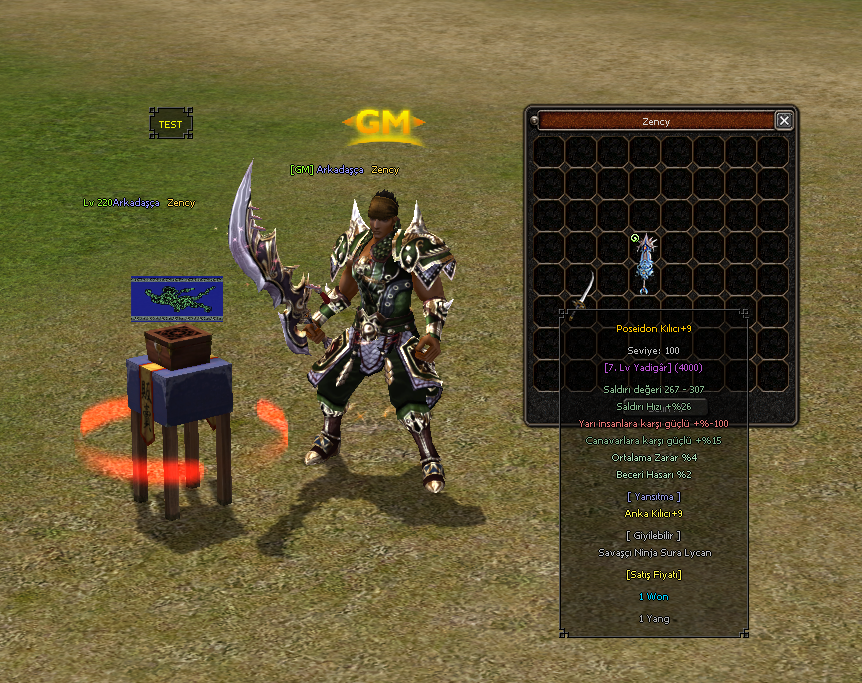
Metin2 Lobby forumundan sunulan bu makalede, Frozen Yansıtma Sistemi ile ilgili yaşanan offline shop gözükme sorununa dair detaylı bir fix çözümü ele alınmaktadır.
Metin2 özel sunucularında PvP sistemlerinin geliştirilmesinde önemli adımlar atılırken, bazen bazı sistemlerin uyumsuzlukları veya eksik yapılandırmalar nedeniyle beklentiler doğrultusunda çalışmadığını görürüz.
Bu durum Frozen Yansıtma Sistemi ile entegre edilen offline shop sistemlerinde de yaşanabiliyor. Bu yazıda, offline shopların yansıtmada görünmemesi sorununu nasıl çözeceğinizi adım adım anlatıyoruz.
Sorun Nedir?
Offline Shop sistemleri, oyuncuların sunucudan çıkmış olsa bile esnaf yapabilmesini sağlar. Ancak Frozen Yansıtma Sistemi kullanıldığında, bu shoplar yansıtmada görünmeyebilir. Bu da kullanıcı deneyimini olumsuz etkiler ve sunucu sahipleri için büyük bir problem teşkil eder.
Fix Uygulaması
Öncelikle, game sunucusu üzerindeki source code dosyalarında değişiklik yapılması gerekir. Özellikle entity.cpp veya benzeri bir dosya üzerinde, shop durumu kontrol eden fonksiyonlar incelenmelidir.
Yansıtma mekanizması, oyuncuların aktif olup olmadığını kontrol ederken, offline shop durumunu da dikkate alacak şekilde yeniden yapılandırılmalıdır.
Örneğin, IsOpenShop() fonksiyonuna özel bir kontrol eklenerek, oyuncu offline iken dahi shopun açık olup olmadığı kontrol edilebilir.
Kod Örneği:
Kod:
if (ch->IsOpenShop() || ch->IsOfflineShop()) { // Yansıtma listesine ekle }Client tarafında da gerekli düzenlemeler yapılmalıdır. Özellikle uiscript dosyalarında, shop simgesinin gösterimi ile ilgili ayarlar güncellenmelidir.
Ayrıca, pack dosyalarında bulunan shop verilerinin doğru şekilde yansıtıldığından emin olunmalıdır.
Python tabanlı root sistemlerinde, shop verileri ile ilgili GUI güncellemeleri de yapılabilir. Bu sayede kullanıcı arayüzü daha stabil ve doğru çalışacaktır.
Test ve Uygulama
Fix uygulandıktan sonra, compile işlemi yapılmadan önce tüm değişiklikler kontrol edilmelidir. Auth ve Game Server yeniden başlatılmalı ve test ortamında offline shop açılıp yansıtmada görünüp görünmediği kontrol edilmelidir.
Metin2 Lobby olarak bu fixi uygulamak isteyen geliştiriciler için örnek source dosyaları, db güncellemeleri ve martysama tarafından sağlanan sistemlerle entegrasyon konusunda destek verilmektedir.
Bu fix sayesinde offline shop sahipleri artık yansıtmada görünerek daha fazla satış yapabilir ve sunucu ekonomisi daha verimli şekilde çalışabilir.
Metin2 Lobby presents in this article a detailed fix for the issue where offline shops do not appear in the Frozen Reflection System.
In Metin2 private servers, while developing PvP systems, we sometimes encounter situations where certain systems do not function as expected due to incompatibilities or misconfigurations.
This case occurs with offline shop systems integrated with the Frozen Reflection System. In this article, we explain step by step how to resolve the issue where offline shops are not visible in the reflection system.
What Is The Problem?
Offline Shop systems allow players to continue trading even when they are logged out of the server. However, when using the Frozen Reflection System, these shops may not appear in the reflection view, which negatively impacts user experience and causes significant issues for server owners.
Applying The Fix
Firstly, modifications must be made to the source code files on the game server, especially within files like entity.cpp, focusing on functions that check the shop status.
The reflection mechanism needs to be restructured to also consider offline shop states when checking whether players are active.
For instance, a custom check can be added to the IsOpenShop() function to determine if the shop is open even when the player is offline.
Sample Code:
Kod:
if (ch->IsOpenShop() || ch->IsOfflineShop()) { // Add to reflection list }Necessary adjustments should also be made on the client side, particularly in uiscript files, updating settings related to the display of the shop icon.
Additionally, ensure that shop data within pack files is correctly reflected.
In Python-based root systems, GUI updates related to shop data can be implemented to achieve more stable and accurate functionality.
Testing And Deployment
After applying the fix, all changes should be checked before performing the compile process. Auth and Game Server must be restarted, and it should be tested in a controlled environment whether offline shops appear in the reflection system.
Metin2 Lobby provides support for developers wishing to implement this fix, including sample source files, db updates, and integration with systems provided by martysama.
With this fix, offline shop owners will now appear in the reflection view, allowing for increased sales and more efficient server economy.
