

İyi Kullanımlar
Kanıt:
Dowland :
Kanıt:
Dowland :
Ziyaretçiler için gizlenmiş link,görmek için üye olmalısınız!
Giriş yap veya üye ol.
Virüs Total :
Ziyaretçiler için gizlenmiş link,görmek için üye olmalısınız!
Giriş yap veya üye ol.
Metin2'de Gelişmiş Beyaz Aslan Modelinin Oluşturulması
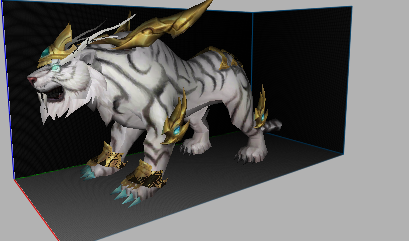
Metin2 oyunu içerisinde sunucularında kullanılmak üzere özelleştirilmiş modeller tasarlamak isteyen geliştiriciler için, gelişmiş 3D modelleme becerileri büyük önem taşır. Bu bağlamda, Gelişmiş Beyaz Aslan modeli gibi karakter, hayvan ya da NPC modelleri, oyun deneyimini ciddi anlamda artırabilir. Bu yazıda, Metin2Lobby üzerinden sunulan bilgilere dayanarak, Metin2 için özel olarak tasarlanmış bir Beyaz Aslan modelinin detaylarına değineceğiz.
Metin2 3D Modelleme ve Beyaz Aslan Projesi
Metin2 3D modelleme, genellikle 3ds Max veya Blender gibi yazılımlarla yapılır. Beyaz Aslan gibi gerçekçi hayvan modelleri oluştururken, mesh, rigging, bone yapıları, animation süreçleri ve UV mapping işlemleri dikkatle yapılmalıdır. Bu model, gr2 veya granny formatında dışa aktarılmalı ve Metin2 sistemine uyumlu hale getirilmelidir.
Beyaz Aslan Modeli İçin Gerekli Adımlar
Öncelikle, 3D modelleme sürecinde Blender veya 3ds Max kullanılır. Aslanın anatomisi doğru şekilde oluşturulmalı ve detaylandırılmalıdır. Bu aşamada texture ve skin dosyaları, aslanın kürk dokusunu daha gerçekçi hale getirmek için özenle hazırlanmalıdır. Ardından, UV Map işlemiyle doku koordinatları ayarlanır.
Model Aktarma ve Format Uyumu
Metin2 sistemine uyumlu bir model oluşturabilmek için, modelin GR2 formatında dışa aktarılması gerekir. Bu işlem sırasında granny3d araçları kullanılabilir. Import ve export işlemleri sırasında Metin2Dev veya Martysama gibi araçlar destek sağlayabilir. Gr2 import ve export işlemlerinde hata yaşamamak için, modelin topolojisi ve bone yapısı dikkatle kontrol edilmelidir.
Oyun İçinde Kullanım ve Görsel Mod
Hazırlanan Beyaz Aslan modeli, NPC veya monster olarak Metin2 sunucusuna entegre edilebilir. Bu model, aynı zamanda visual mod veya graphic mod kapsamında da değerlendirilebilir. Sunuculara ekstra görsel zenginlik katacak bu tür modeller, custom model adıyla da bilinir. Effect model, building model, dungeon model gibi diğer yapılarla da uyumlu çalışmalıdır.
Metin2 Model Replace ve Paketleme
Oyun içinde mevcut modelin yerine bu yeni Beyaz Aslan modelinin konulabilmesi için, model replace işlemi gerekebilir. Bu işlem sırasında eterpack veya eter gibi paketleme araçları kullanılabilir. Pack model süreçleri sırasında, modelin boyutu ve performans etkisi de göz önünde bulundurulmalıdır.
Sonuç
Metin2 için geliştirilen gelişmiş 3D modeller, özellikle Beyaz Aslan gibi karakteristik yapılar sayesinde oyunun görsel zenginliği ciddi anlamda artar. Metin2 3D model, animation, texture, mesh, rigging gibi teknik detaylar, bu projelerin başarısını doğrudan etkiler. Metin2Lobby üzerinden paylaşılan kaynaklarla, bu tür modellerin geliştirilmesi kolaylaşmaktadır.
Creating Advanced White Lion Model in Metin2
Developers aiming to create customized models for Metin2 servers often require advanced 3D modeling skills. In this context, models such as an Advanced White Lion for characters, animals, or NPCs can significantly enhance the gaming experience. In this article, based on information provided via Metin2Lobby, we will discuss the details of a specially designed White Lion model for Metin2.
Metin2 3D Modeling and the White Lion Project
Metin2 3D modeling is usually done with software like 3ds Max or Blender. When creating realistic animal models like a White Lion, elements such as mesh, rigging, bone structures, animation processes, and UV mapping must be handled carefully. The model should be exported in gr2 or granny formats to ensure compatibility with Metin2 systems.
Steps Required for Creating the White Lion Model
Initially, 3D modeling is performed using Blender or 3ds Max. The lion’s anatomy must be accurately constructed and detailed. At this stage, texture and skin files should be prepared carefully to give the lion's fur a more realistic appearance. Then, UV Map procedures are used to adjust texture coordinates.
Model Export and Format Compatibility
To ensure the model is compatible with Metin2, it must be exported in GR2 format. During this process, granny3d tools may be used. Tools like Metin2Dev or Martysama can provide support during import and export operations. To avoid errors during Gr2 import and export, the model’s topology and bone structure must be checked carefully.
In-Game Usage and Visual Mods
The created White Lion model can be integrated into Metin2 servers as an NPC or monster. This model can also be evaluated within the scope of visual mod or graphic mod. Such models that add extra visual richness to servers are also known as custom model. They should remain compatible with other structures like effect model, building model, and dungeon model.
Metin2 Model Replace and Packaging
To place the new White Lion model instead of the existing one in the game, a model replace operation might be required. During this process, packaging tools like eterpack or eter can be used. During pack model processes, the model’s size and performance impact should also be considered.
Conclusion
Advanced 3D models developed for Metin2, especially characteristic designs like the White Lion, significantly enhance the visual richness of the game. Technical aspects like Metin2 3D model, animation, texture, mesh, and rigging directly affect the success of such projects. Resources shared through Metin2Lobby make the development of such models easier.

