

Umarım Paylaşılmamıştır.
Kanguru binek modeli
İyi Kullanımlar.
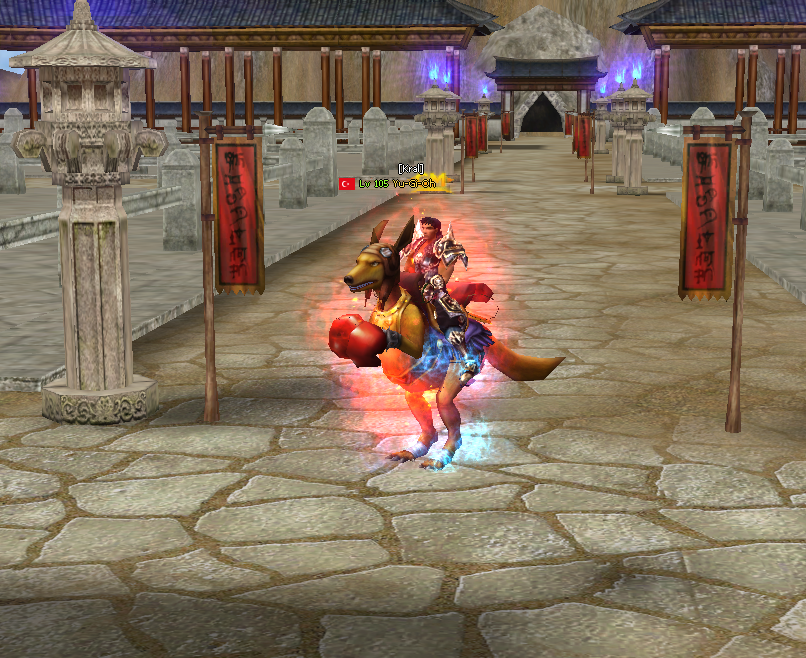
Kanguru binek modeli
İyi Kullanımlar.
Ziyaretçiler için gizlenmiş link,görmek için üye olmalısınız!
Giriş yap veya üye ol.
Ziyaretçiler için gizlenmiş link,görmek için üye olmalısınız!
Giriş yap veya üye ol.
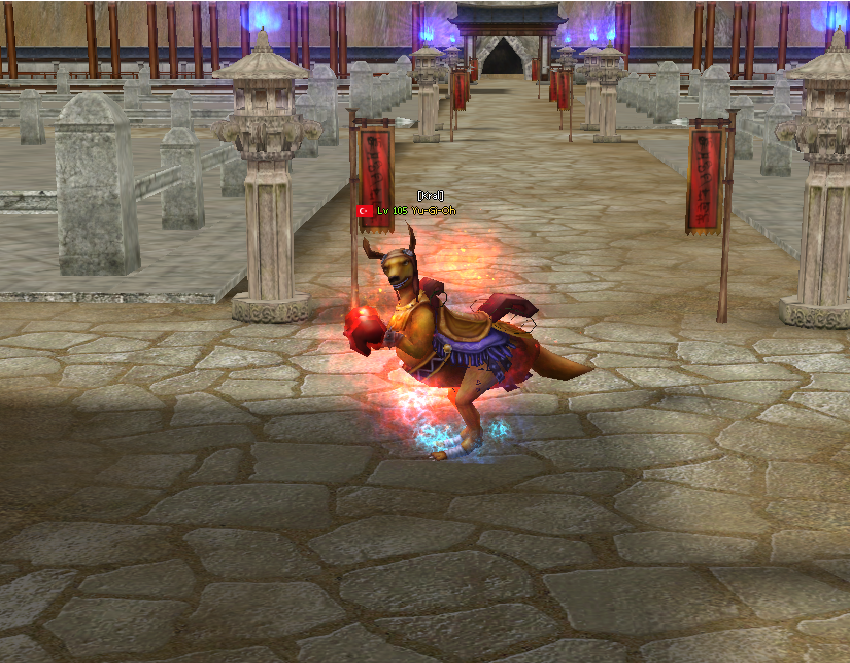
JinxTheLux Kanguru Binek: Metin2 Oyununda Görsel Zenginlik Arttıran Özel NPC Modeli
Metin2 sunucularında görsellik ve kullanıcı deneyimini artırmak isteyen geliştiriciler için özel NPC ve binek modelleri büyük önem taşır. Bu bağlamda JinxTheLux Kanguru Binek, Metin2 dünyasına farklı bir hava katmayı hedefleyen benzersiz bir 3D modeldir. Bu yazıda, bu özel binek modelinin özellikleri, kurulumu ve Metin2 sunucusuna nasıl entegre edileceği hakkında detaylı bilgi vereceğiz.
JinxTheLux Kanguru Binek Nedir?
JinxTheLux Kanguru Binek, Metin2 oyununda kullanılmak üzere özel olarak tasarlanmış, yüksek kaliteli bir 3D model'dir. Bu binek, oyun içi grafiksel zenginliği artırmak ve oyunculara daha keyifli bir deneyim sunmak amacıyla geliştirilmiştir. Blender ve 3DS Max gibi yazılımlarla hazırlanmış olan model, .gr2 formatında gelmekte olup, Metin2’nin desteklediği yapıya uyumludur.
Neden JinxTheLux Kanguru Binek Kullanmalısınız?
Metin2 sunucularında standart binekler yerine özel modeller kullanmak, sunucunuzun dikkat çekici olmasının yanı sıra oyuncu sadakatinin artırılmasına da yardımcı olur. JinxTheLux Kanguru Binek bu amaca oldukça uygundur çünkü:
- Yüksek detaylı 3D model yapısı ile görsel şıklık sağlar.
- UV mapping ve texture uyumu sayesinde oyun içi performansı düşmez.
- Rigging ve animation uyumu sayesinde hareketleri doğal ve akıcıdır.
- Kurulum kolaylığı ile Metin2 geliştiricilerine zaman kazandırır.
Model Özellikleri
- Format: .gr2 (Metin2 uyumlu)
- UV Haritalama: Tamamlanmış
- Doku (Texture) Dosyası: Dahil
- Animasyon Uyumlu: Evet
- 3D Yazılım Uyumu: Blender, 3DS Max
Kurulum Adımları
1. JinxTheLux Kanguru Binek model dosyalarını indirin.
2. .gr2 ve texture dosyalarını Metin2 sunucunuzun ilgili klasörlerine yerleştirin.
3. NPC sistemine uygun şekilde modeli tanımlayın.
4. Gerekli animasyon ve bone ayarlarını yapın.
5. Sunucuyu yeniden başlatın ve modelin çalıştığını kontrol edin.
Metin2 3D Modelleme ile İlgili Tavsiyeler
Eğer Metin2 için kendi özel modellerinizi oluşturmak istiyorsanız şu adımları takip etmeniz önerilir:
- Blender veya 3DS Max gibi yazılımlarda modelleme becerisi edinin.
- .gr2 formatına dönüştürmek için uygun export eklentileri kullanın.
- UV haritalamayı doğru yaparak dokuların bozulmasını önleyin.
- Animation ve rigging işlemlerini eksiksiz yapın.
Sonuç
JinxTheLux Kanguru Binek, Metin2 sunucularında görsel kaliteyi yükseltmek isteyen geliştiriciler için harika bir özelliktir. Bu tür özel modeller, hem oyuncular hem de geliştiriciler açısından değerlidir. Metin2 3D modelleme konusunda bilgi sahibi olmak ve bu alanda çalışmalar yapmak isteyenler için Metin2Lobby sitemizde birçok kaynak ve rehber bulabilirsiniz.
JinxTheLux Kangaroo Mount: An Exclusive NPC Model Enhancing Visual Appeal in Metin2
Metin2 servers aim to provide enhanced visuals and user experience through special NPC and mount models. In this context, JinxTheLux Kangaroo Mount is a unique 3D model designed to bring a different atmosphere into the Metin2 world. This article will provide detailed information about the features of this special mount model, its installation, and how to integrate it into your Metin2 server.
What is the JinxTheLux Kangaroo Mount?
JinxTheLux Kangaroo Mount is a high-quality 3D model specifically created for use within the Metin2 game. It aims to enhance in-game graphics and offer players a more enjoyable gaming experience. Developed using software such as Blender and 3DS Max, the model comes in the .gr2 format, which is compatible with the structure supported by Metin2.
Why Should You Use the JinxTheLux Kangaroo Mount?
Using special mounts instead of standard ones in Metin2 servers helps attract attention to your server and increase player loyalty. The JinxTheLux Kangaroo Mount is ideal for this purpose because:
- Its highly detailed 3D model provides visual elegance.
- Thanks to proper UV mapping and texture compatibility, in-game performance is not affected.
- Its rigging and animation compatibility ensures natural and fluid movements.
- Its easy installation saves time for Metin2 developers.
Model Features
- Format: .gr2 (Metin2 Compatible)
- UV Mapping: Completed
- Texture File: Included
- Animation Compatible: Yes
- 3D Software Compatibility: Blender, 3DS Max
Installation Steps
1. Download the JinxTheLux Kangaroo Mount model files.
2. Place the .gr2 and texture files into the appropriate folders on your Metin2 server.
3. Define the model in the NPC system accordingly.
4. Perform necessary animation and bone adjustments.
5. Restart the server and check if the model is running correctly.
Tips Regarding Metin2 3D Modeling
If you want to create your own custom models for Metin2, we recommend following these steps:
- Acquire modeling skills using software like Blender or 3DS Max.
- Use appropriate export plugins to convert to the .gr2 format.
- Prevent texture distortion by properly applying UV mapping.
- Complete animation and rigging processes thoroughly.
Conclusion
JinxTheLux Kangaroo Mount is an excellent feature for developers seeking to elevate visual quality on Metin2 servers. Such custom models are valuable for both players and developers. For those looking to gain knowledge and work in the area of Metin2 3D modeling, many resources and guides can be found at Metin2Lobby.
