

VİDEO ;
Merhaba Arkadaşlar Duydumki 1 2 Kod Satırlı Sistemi Parayla Satmaktalar.
Şimdi Anlatıma Geçelim
NOT : KODLAMASI BANA AİTTİR.
CLİENT SOURCE > Locale_inc.h AÇılır Eklenir ;
Client Source > UserInterFace > PythonApplicationModule.cpp Eklenir ;
Merhaba Arkadaşlar Duydumki 1 2 Kod Satırlı Sistemi Parayla Satmaktalar.
Şimdi Anlatıma Geçelim
NOT : KODLAMASI BANA AİTTİR.
CLİENT SOURCE > Locale_inc.h AÇılır Eklenir ;
Kod:
#define AHMET_K_ENVANTERI_ILE_ACILMAClient Source > UserInterFace > PythonApplicationModule.cpp Eklenir ;
Kod:
#ifdef AHMET_K_ENVANTERI_ILE_ACILMA PyModule_AddIntConstant(poModule, "AHMET_K_ENVANTERI_ILE_ACILMA", 1); #else PyModule_AddIntConstant(poModule, "AHMET_K_ENVANTERI_ILE_ACILMA", 0); #endifinterfacemodule.py açılır > def ToggleInventoryWindow(self): aratılır değiştir ;
Kod:
def ToggleInventoryWindow(self): if app.WJ_SECURITY_SYSTEM and player.IsSecurityActivate(): return if FALSE == player.IsObserverMode(): if FALSE == self.wndInventory.IsShow(): self.wndInventory.Show() self.wndInventory.SetTop() if 1 == constInfo.EnvanterAcilsinmi: if not self.wndExtendedInventory.IsShow(): self.wndExtendedInventory.Show() if not self.wndExpandedMoneyTaskbar.IsShow(): self.wndExpandedMoneyTaskbar.Show() else: self.wndInventory.OverOutItem() self.wndInventory.Close() if 1 == constInfo.EnvanterAcilsinmi: if self.wndExtendedInventory.IsShow(): self.wndExtendedInventory.Close() if self.wndExpandedMoneyTaskbar.IsShow(): self.wndExpandedMoneyTaskbar.Hide()constinfo.py açılır eklenir ;
Kod:
EnvanterAcilsinmi = 0uiinventor veya k envanter pysi açılır. aratılır.
Kod:
if app.WJ_SPLIT_INVENTORY_SYSTEM: class ExtendedInventoryWindow(ui.ScriptWindow):Altındaki def __init__(self): altına eklenir ;
Kod:
if app.AHMET_K_ENVANTERI_ILE_ACILMA: self.__Initialize()------------ARATILIR ---------
def __del__(self):
-------------EKLENİR-----------
Kod:
if app.AHMET_K_ENVANTERI_ILE_ACILMA: def __Initialize(self): self.envanterileacilsin = []----------------- ARATILIR -------------
----------------- ARATILIR -------------
wndItem = self.GetChild("ItemSlot")
----------------- Üstüne EKlenir-------------
Kod:
if app.AHMET_K_ENVANTERI_ILE_ACILMA: GetObject = self.GetChildFotoğraf ;
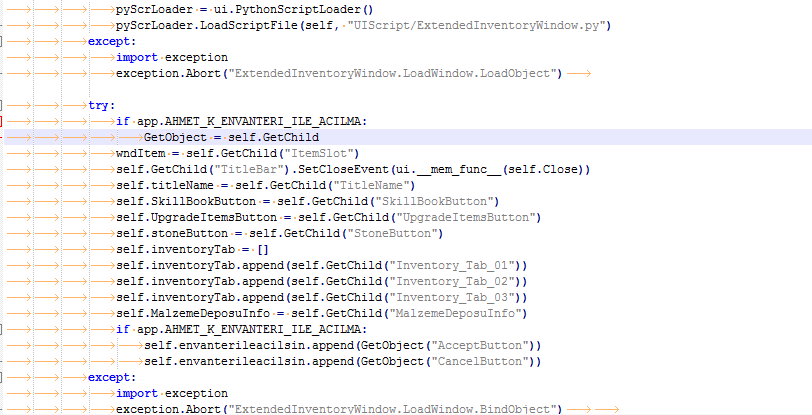
----------------- ARATILIR -------------
self.MalzemeDeposuInfo = self.GetChild("MalzemeDeposuInfo") aratılır
----------------- EKLENİR-------------
Kod:
if app.AHMET_K_ENVANTERI_ILE_ACILMA: self.envanterileacilsin.append(GetObject("AcceptButton")) self.envanterileacilsin.append(GetObject("CancelButton"))----------------- ARATILIR -------------
Kod:
if app.AHMET_K_ENVANTERI_ILE_ACILMA: self.envanterileacilsin[0].SAFE_SetEvent(self.__OnClickEnableEnvanterOn) self.envanterileacilsin[1].SAFE_SetEvent(self.__OnClickDisableEnvanterOf) self.envanterileacilsin[1].Down()----------------- EKLENİR-------------
Kod:
self.envanterileacilsin[0].SAFE_SetEvent(self.__OnClickEnableEnvanterOn) self.envanterileacilsin[1].SAFE_SetEvent(self.__OnClickDisableEnvanterOf) self.envanterileacilsin[1].Down()Kod Satırının En Altına Eklenir..
-----------AÇILIR --------
uiscript > extendedinventorywindow.py
import kısmının altına eklenir ;
BUTTON_ROOT = "d:/ymir work/ui/public/"
en altına eklenir ;
******************************** KANITLAR *************************************
K Envanteri ve Envanter İle Açılma Özelliği Nedir?
Metin2 özel sunucularında oyun deneyimini zenginleştirmek için geliştirilen birçok sistem vardır. Bunlardan birisi de 'K Envanteri' olarak bilinen ve oyuncuların envanterlerinde özel bir alan sunan özelliktir. Bu sistem, özellikle Metin2 PvP sistemleri üzerinde çalışan geliştiriciler tarafından sıkça tercih edilmektedir. K Envanteri, oyuncuların belirli eşyaları daha hızlı ve organize bir şekilde kullanmalarını sağlar. Ayrıca bazı özel eşyaların doğrudan envanterden açılması gibi avantajlı özellikler de barındırır.
K Envanteri Nasıl Çalışır?
K Envanteri, genellikle C++ sistem tabanlı Metin2 server src dosyalarında geliştirilerek entegre edilir. Bu sistem sayesinde oyuncuların envanterinde belirli slotlar ayrılmış olur. Bu slotlara özel eşyalar konulabilir ve oyuncu ihtiyaç duyduğunda hızlıca erişebilir. Örneğin, bir savaş sırasında hp potion ya da mana potion gibi eşyalar K Envanteri'nde saklanarak anında kullanılabilir. Aynı zamanda, bazı özel paketler ya da sandıklar doğrudan envanterden açılıp içeriğinin aktarılması sağlanabilir. Bu işlem genellikle Python GUI ile desteklenen arayüzler üzerinden kolayca yapılır.
Envanter İle Açılma Sistemi
Envanter ile açılma özelliği, oyuncuların belirli sandık veya kutuları doğrudan envanterlerinden açabilmesini sağlar. Bu sistem, Metin2 lobby gibi sitelerde sunulan özel sunucularda popülerdir. Oyuncu, bir kutuyu envanterine attığında kutunun içeriğini açarken ekstra bir pencere açılmaz. Tüm işlemler arka planda otomatik olarak gerçekleşir. Bu, kullanıcı deneyimini ciddi anlamda artırır. Bu sistem genellikle uiscript ve py root dosyalarında yapılandırılır. Martysama gibi geliştirici sistemleri bu işlemleri kolaylaştırmaktadır.
Neden Kullanılmalıdır?
K Envanteri ve envanter ile açma sistemi, oyuncuların oyun içinde daha hızlı hareket etmesini sağlar. Özellikle PvP esnasında zaman kritik olduğu için bu tür sistemler büyük önem taşır. Ayrıca, game core üzerinde yapılan bu geliştirmeler, sunucunun performansını artırmakta ve oyuncu sadakatini yükseltmektedir. Bu sistemlerin doğru kurulumu için Metin2 development bilgisi gereklidir. Geliştiriciler, source edit yaparak bu sistemleri kendi sunucularına entegre edebilirler.
Teknik Uygulama ve Kaynak Kodlar
K Envanteri ve envanter ile açma sistemi genellikle C++ kaynak kod kullanılarak geliştirilir. Game server programming bilgisi gerektiren bu sistemler, auth ve db core yapıları ile de entegre çalışır. Geliştiriciler, Metin2 compile işlemleri sırasında bu özellikleri derlemeye dahil etmelidir. Client src tarafında da uyumlu değişiklikler yapılması gerekir. Py GUI ile hazırlanan arayüzler sayesinde bu sistemler kullanıcı dostu hale getirilebilir. Metin2 lobby gibi platformlarda paylaşılan pack dosyalarında bu tür sistemler örnek alınabilir. Bu sistemler, Metin2 pvp game source geliştirme sürecinde önemli rol oynar.
What is K Inventory and Open From Inventory Feature?
There are many systems developed to enhance the gaming experience in Metin2 private servers. One of these is known as 'K Inventory', which provides players with a special area in their inventory. This system is frequently preferred by developers working on Metin2 PvP systems. The K Inventory allows players to use certain items more quickly and in an organized manner. Additionally, it offers advantageous features such as direct opening of special items from the inventory.
How Does K Inventory Work?
The K Inventory is generally integrated into Metin2 server src files based on C++ system. With this system, specific slots are allocated in the player's inventory. Special items can be placed in these slots, allowing quick access whenever needed. For instance, during combat, items like HP potions or mana potions can be stored in the K Inventory for instant usage. Moreover, certain special packages or chests can be opened directly from the inventory and their contents transferred. This process is usually facilitated through interfaces supported by Python GUI.
Open From Inventory System
The open from inventory feature allows players to open certain boxes or chests directly from their inventory. This system is popular in private servers offered by sites like Metin2 lobby. When a player puts a box into their inventory, its content can be opened without launching an extra window. All processes occur automatically in the background. This significantly enhances user experience. This system is typically configured in uiscript and py root files. Developer systems like Martysama facilitate these operations.
Why Should It Be Used?
K Inventory and the open-from-inventory system allow players to act faster within the game. Especially during PvP, where timing is critical, such systems are highly important. Furthermore, these improvements made on the game core increase server performance and boost player loyalty. Proper setup of these systems requires knowledge of Metin2 development. Developers can integrate these systems into their own servers by performing source edit.
Technical Implementation and Source Codes
K Inventory and open-from-inventory systems are generally developed using C++ source code. These systems require knowledge of game server programming and also work integrated with auth and db core structures. During Metin2 compile processes, developers should include these features in the build. Compatible changes must also be made on the client src side. With the help of Py GUI-based interfaces, these systems can become more user-friendly. Such systems play an important role in Metin2 pvp game source development processes.
Kod:
if app.AHMET_K_ENVANTERI_ILE_ACILMA: def __OnClickEnableEnvanterOn(self): self.envanterileacilsin[0].Down() self.envanterileacilsin[1].SetUp() constInfo.EnvanterAcilsinmi = 1 chat.AppendChat(chat.CHAT_TYPE_INFO, "|cFF00FF00|H|h[Sistem] : " + "|cFFFFCC00|H|h " + "Envanter ile acilma aktif.") chat.AppendChat(chat.CHAT_TYPE_INFO, "|cFF00FF00|H|h[Sistem] : " + "|cFFFFCC00|H|h " + "Oyun Takımı iyi oyunlar diler.") def __OnClickDisableEnvanterOf(self): self.envanterileacilsin[0].SetUp() self.envanterileacilsin[1].Down() constInfo.EnvanterAcilsinmi = 0 chat.AppendChat(chat.CHAT_TYPE_INFO, "|cFF00FF00|H|h[Sistem] : " + "|cFFFFCC00|H|h " + "Envanter ile acilma pasif.") chat.AppendChat(chat.CHAT_TYPE_INFO, "|cFF00FF00|H|h[Sistem] : " + "|cFFFFCC00|H|h " + "Oyun Takımı iyi oyunlar diler.")-----------AÇILIR --------
uiscript > extendedinventorywindow.py
import kısmının altına eklenir ;
BUTTON_ROOT = "d:/ymir work/ui/public/"
en altına eklenir ;
Kod:
{ "name" : "AcceptButton", "type" : "radio_button", "x" : 20, "y" : 410, "tooltip_text" : "Envanter ile Acilsin?", "default_image" : BUTTON_ROOT + "AcceptButton00.sub", "over_image" : BUTTON_ROOT + "AcceptButton01.sub", "down_image" : BUTTON_ROOT + "AcceptButton02.sub", }, { "name" : "CancelButton", "type" : "radio_button", "x" : 97, "y" : 410, "tooltip_text" : "Envanter ile Acilmasin?", "default_image" : BUTTON_ROOT + "CancleButton00.sub", "over_image" : BUTTON_ROOT + "CancleButton01.sub", "down_image" : BUTTON_ROOT + "CancleButton02.sub", },******************************** KANITLAR *************************************
K Envanteri ve Envanter İle Açılma Özelliği Nedir?
Metin2 özel sunucularında oyun deneyimini zenginleştirmek için geliştirilen birçok sistem vardır. Bunlardan birisi de 'K Envanteri' olarak bilinen ve oyuncuların envanterlerinde özel bir alan sunan özelliktir. Bu sistem, özellikle Metin2 PvP sistemleri üzerinde çalışan geliştiriciler tarafından sıkça tercih edilmektedir. K Envanteri, oyuncuların belirli eşyaları daha hızlı ve organize bir şekilde kullanmalarını sağlar. Ayrıca bazı özel eşyaların doğrudan envanterden açılması gibi avantajlı özellikler de barındırır.
K Envanteri Nasıl Çalışır?
K Envanteri, genellikle C++ sistem tabanlı Metin2 server src dosyalarında geliştirilerek entegre edilir. Bu sistem sayesinde oyuncuların envanterinde belirli slotlar ayrılmış olur. Bu slotlara özel eşyalar konulabilir ve oyuncu ihtiyaç duyduğunda hızlıca erişebilir. Örneğin, bir savaş sırasında hp potion ya da mana potion gibi eşyalar K Envanteri'nde saklanarak anında kullanılabilir. Aynı zamanda, bazı özel paketler ya da sandıklar doğrudan envanterden açılıp içeriğinin aktarılması sağlanabilir. Bu işlem genellikle Python GUI ile desteklenen arayüzler üzerinden kolayca yapılır.
Envanter İle Açılma Sistemi
Envanter ile açılma özelliği, oyuncuların belirli sandık veya kutuları doğrudan envanterlerinden açabilmesini sağlar. Bu sistem, Metin2 lobby gibi sitelerde sunulan özel sunucularda popülerdir. Oyuncu, bir kutuyu envanterine attığında kutunun içeriğini açarken ekstra bir pencere açılmaz. Tüm işlemler arka planda otomatik olarak gerçekleşir. Bu, kullanıcı deneyimini ciddi anlamda artırır. Bu sistem genellikle uiscript ve py root dosyalarında yapılandırılır. Martysama gibi geliştirici sistemleri bu işlemleri kolaylaştırmaktadır.
Neden Kullanılmalıdır?
K Envanteri ve envanter ile açma sistemi, oyuncuların oyun içinde daha hızlı hareket etmesini sağlar. Özellikle PvP esnasında zaman kritik olduğu için bu tür sistemler büyük önem taşır. Ayrıca, game core üzerinde yapılan bu geliştirmeler, sunucunun performansını artırmakta ve oyuncu sadakatini yükseltmektedir. Bu sistemlerin doğru kurulumu için Metin2 development bilgisi gereklidir. Geliştiriciler, source edit yaparak bu sistemleri kendi sunucularına entegre edebilirler.
Teknik Uygulama ve Kaynak Kodlar
K Envanteri ve envanter ile açma sistemi genellikle C++ kaynak kod kullanılarak geliştirilir. Game server programming bilgisi gerektiren bu sistemler, auth ve db core yapıları ile de entegre çalışır. Geliştiriciler, Metin2 compile işlemleri sırasında bu özellikleri derlemeye dahil etmelidir. Client src tarafında da uyumlu değişiklikler yapılması gerekir. Py GUI ile hazırlanan arayüzler sayesinde bu sistemler kullanıcı dostu hale getirilebilir. Metin2 lobby gibi platformlarda paylaşılan pack dosyalarında bu tür sistemler örnek alınabilir. Bu sistemler, Metin2 pvp game source geliştirme sürecinde önemli rol oynar.
What is K Inventory and Open From Inventory Feature?
There are many systems developed to enhance the gaming experience in Metin2 private servers. One of these is known as 'K Inventory', which provides players with a special area in their inventory. This system is frequently preferred by developers working on Metin2 PvP systems. The K Inventory allows players to use certain items more quickly and in an organized manner. Additionally, it offers advantageous features such as direct opening of special items from the inventory.
How Does K Inventory Work?
The K Inventory is generally integrated into Metin2 server src files based on C++ system. With this system, specific slots are allocated in the player's inventory. Special items can be placed in these slots, allowing quick access whenever needed. For instance, during combat, items like HP potions or mana potions can be stored in the K Inventory for instant usage. Moreover, certain special packages or chests can be opened directly from the inventory and their contents transferred. This process is usually facilitated through interfaces supported by Python GUI.
Open From Inventory System
The open from inventory feature allows players to open certain boxes or chests directly from their inventory. This system is popular in private servers offered by sites like Metin2 lobby. When a player puts a box into their inventory, its content can be opened without launching an extra window. All processes occur automatically in the background. This significantly enhances user experience. This system is typically configured in uiscript and py root files. Developer systems like Martysama facilitate these operations.
Why Should It Be Used?
K Inventory and the open-from-inventory system allow players to act faster within the game. Especially during PvP, where timing is critical, such systems are highly important. Furthermore, these improvements made on the game core increase server performance and boost player loyalty. Proper setup of these systems requires knowledge of Metin2 development. Developers can integrate these systems into their own servers by performing source edit.
Technical Implementation and Source Codes
K Inventory and open-from-inventory systems are generally developed using C++ source code. These systems require knowledge of game server programming and also work integrated with auth and db core structures. During Metin2 compile processes, developers should include these features in the build. Compatible changes must also be made on the client src side. With the help of Py GUI-based interfaces, these systems can become more user-friendly. Such systems play an important role in Metin2 pvp game source development processes.
