

Selamun Aleyküm.
açıklamaya gerek yok açıklama isteyene de diyecek bir şey yok .)
CTRL+G YAPINCA MOUNT GİBİ YENİ EKLENEN İTEMİ GİYER ONUN ÇÖZÜMÜNÜ VERMEYECEĞİM ÇOK ZEKİ 1LVL HESAP AÇIP KONUYA ÇAMUR ATIP SKYP DEN SÖVEN İCRAATSIZ PROLAR ARTIK ÇÖZER .D
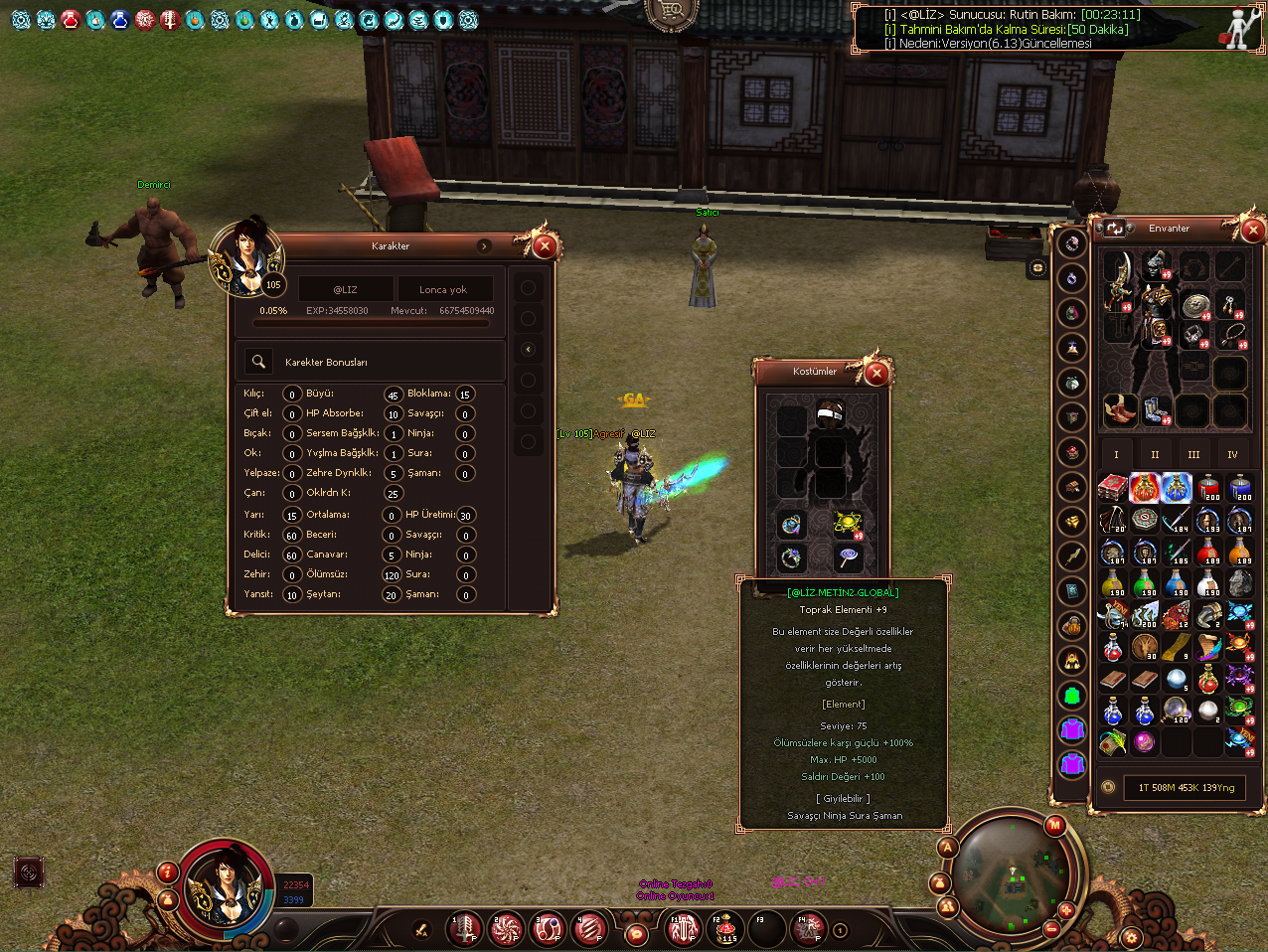
açıklamaya gerek yok açıklama isteyene de diyecek bir şey yok .)
CTRL+G YAPINCA MOUNT GİBİ YENİ EKLENEN İTEMİ GİYER ONUN ÇÖZÜMÜNÜ VERMEYECEĞİM ÇOK ZEKİ 1LVL HESAP AÇIP KONUYA ÇAMUR ATIP SKYP DEN SÖVEN İCRAATSIZ PROLAR ARTIK ÇÖZER .D
Kod:
service&locale_inc---------EKLE #define ALIZ_YUZUK_SYSTEM //////////////////////////////////////////////////////////////////////////////////////////////////////////////////////////////// ##item.cpp ##ARAT int CItem::FindEquipCell(LPCHARACTER ch, int iCandidateCell) ##İÇİNDE BUL else if (GetType() == ITEM_COSTUME) { if (GetSubType() == COSTUME_BODY) return WEAR_COSTUME_BODY; else if (GetSubType() == COSTUME_HAIR) return WEAR_COSTUME_HAIR; ##ALTINA EKLENİR #ifdef ALIZ_YUZUK_SYSTEM else if (GetSubType() == COSTUME_YUZUK) return WEAR_YUZUK; #endif ##ARAT bool CItem::IsRideItem() ##EKLE #ifdef ALIZ_YUZUK_SYSTEM if (ITEM_COSTUME == GetType() && COSTUME_YUZUK == GetSubType()) return true; #endif //////////////////////////////////////////////////////////////////////////////////////////////////////////////////////////////// ##char_item.cpp ##ARAT void CHARACTER::BuffOnAttr_ValueChange(BYTE bType, BYTE bOldValue, BYTE bNewValue) ##İÇERİSİNDE BUL case POINT_COSTUME_ATTR_BONUS: { static BYTE abSlot[*] = {WEAR_COSTUME_BODY, WEAR_COSTUME_HAIR, ##ALTINA EKLE #ifdef ALIZ_YUZUK_SYSTEM WEAR_YUZUK, #endif //////////////////////////////////////////////////////////////////////////////////////////////////////////////////////////////// ##COMMON/iltem_length.h ##ARAT enum ECostumeSubTypes ##EKLE COSTUME_NUM_TYPES, ÜZERİNE #ifdef ALIZ_YUZUK_SYSTEM COSTUME_YUZUK, #endif //////////////////////////////////////////////////////////////////////////////////////////////////////////////////////////////// ##COMMON/length.h ##ARAT enum EWearPositions ##BUNUN ÜZERİNE WEAR_MAX = 32 EKLE #ifdef ALIZ_YUZUK_SYSTEM WEAR_YUZUK, #endif //////////////////////////////////////////////////////////////////////////////////////////////////////////////////////////////// ##DB/SRC/ProtoReader.cpp ##ARAT BUL static string arSub28[*] = {"COSTUME_BODY", "COSTUME_HAIR", ##EKLE #ifdef ALIZ_YUZUK_SYSTEM "COSTUME_YUZUK", #endif ##ARAT int get_Item_WearFlag_Value(string inputString) { string arWearrFlag[*] = {"WEAR_BODY", "WEAR_HEAD", "WEAR_FOOTS", "WEAR_WRIST", "WEAR_WEAPON", "WEAR_NECK", "WEAR_EAR", "WEAR_SHIELD", "WEAR_UNIQUE", "WEAR_ARROW", "WEAR_HAIR", "WEAR_ABILITY", ##EKLE #ifdef ALIZ_YUZUK_SYSTEM "WEAR_YUZUK", #endif //////////////////////////////////////////////////////////////////////////////////////////////////////////////////////////////// ##ClientSRC/GameType.h #ifdef ENABLE_COSTUME_SYSTEM const DWORD c_Costume_Slot_Start = c_Equipment_Start + 19; // [ÁÖÀÇ] ¼ıÀÚ(19) ÇϵåÄÚµù ÁÖÀÇ. ÇöÀç ¼¹ö¿¡¼ ÄÚ½ºÃõ ½½·ÔÀº 19ºÎÅÍÀÓ. ¼¹ö common/length.h ÆÄÀÏÀÇ EWearPositions ¿°ÅÇü Âü°í. ##EKLE------------------------------------------------------------------------------------------------- #ifdef ALIZ_YUZUK_SYSTEM const DWORD c_Equipment_Yuzuk = c_Costume_Slot_Start + 6; #endif const DWORD c_Costume_Slot_Count = 6;//burası yukarıdaki büyük sayıdan 1 büyük olacak !!!!!!!!!!!!!!!!!!!!!!!!!! const DWORD c_Costume_Slot_End = c_Costume_Slot_Start + c_Costume_Slot_Count; #endif //////////////////////////////////////////////////////////////////////////////////////////////////////////////////////////////// PythonItemModule.cpp ##ARAT PyModule_AddIntConstant(poModule, "COSTUME_SLOT_END", c_Costume_Slot_End); #endif ##ÜZERİNE EKLE #ifdef ALIZ_YUZUK_SYSTEM PyModule_AddIntConstant(poModule, "COSTUME_SLOT_YUZUK", c_Equipment_Yuzuk); #endif ##ÜST TARAFTA BUL PyModule_AddIntConstant(poModule, "COSTUME_TYPE_HAIR", CItemData::COSTUME_HAIR); ##ALTINA EKLE #ifdef ALIZ_YUZUK_SYSTEM PyModule_AddIntConstant(poModule, "COSTUME_TYPE_YUZUK", CItemData::COSTUME_YUZUK); #endif //////////////////////////////////////////////////////////////////////////////////////////////////////////////////////////////// ##GameLib/ItemData.h ##ARAT enum ECostumeSubTypes ##EKLE #ifdef ALIZ_YUZUK_SYSTEM COSTUME_YUZUK, #endif /////////////////////////////////////////CLİENT SRC İLE İŞİMİZ BİTTİ AÇINIZ DUMPPROTOYU //////////////////////////////////////// ##ItemCSVReader.cpp ##ARAT int get_Item_SubType_Value(int type_value, string inputString) ##İÇİNDE BUL static string arSub28[*] = {"COSTUME_BODY", "COSTUME_HAIR", ##EKLE #ifdef ALIZ_YUZUK_SYSTEM "COSTUME_YUZUK", #endif /////////////////////////////////////////////////////////////////////////////////////////////////////////////////////////////// //ROOT/uitooltip.py ##arat altına ekle isCostumeBody = 0 isCostumeYuzuk = 0 ##arat altına ekle isCostumeBody = item.COSTUME_TYPE_BODY == itemSubType isCostumeYuzuk = item.COSTUME_TYPE_YUZUK == itemSubType /////////////////////////////////////////////////////////////////////////////////////////////////////////////////////////////// ##uiscprt/costumewindow.py {"index":COSTUME_START_INDEX+4, "x":67, "y":115, "width":32, "height":32},Kostüm Envanterine Yeni Slot Açma Rehberi
Metin2 özel sunucularında kostüm envanteri, oyuncuların karakterlerini özelleştirmelerine olanak tanır. Ancak varsayılan sistemde sınırlı sayıda slot bulunur. Bu rehberde, C++ ve Python tabanlı sistemler üzerinde çalışarak kostüm envanterine yeni slot ekleme sürecini adım adım ele alacağız.
Kostüm Sistemi Nedir?
Metin2'de kostüm sistemi, oyuncuların kafalarında, gövdelerinde veya diğer ekipman slotlarında bulunan normal item'ların yerine kostüm item'larını giymelerini sağlar. Bu sayede karakterin görünümü değişir ama istatistikler aynı kalır. Bu sistem, PvP sunucularında estetik açıdan büyük önem taşır.
Varsayılan Slot Yapısı
Varsayılan olarak Metin2 kostüm sisteminde sadece belirli slotlar (örneğin kostüm zırh) aktiftir. Bu slotlar genellikle game/src/char_item.cpp gibi dosyalarda tanımlanmıştır. Ancak bazı sunucularda bu yeterli olmayabilir. Örneğin bir sunucu sahibi, kostüm silah, kostüm küpe, kostüm yüzük gibi yeni slotlar eklemek isteyebilir.
Yeni Slot Ekleme Adımları
1. Client Tarafında Slot Tanımı
Öncelikle client tarafında UI tanımlarını yapmalıyız. uiscript/costumewindow.py dosyasında yeni slot için buton ve konum tanımları yapılmalıdır. Burada dikkat edilmesi gereken husus, slot ID'lerin çakışmamasıdır. Örneğin, yeni bir kostüm silah slotu için ID olarak 20 gibi bir değer atanabilir.
2. Root ve Locale Dosyalarında Değişiklikler
root/locale_slottype.py ve locale/xx/slottype.txt gibi dosyalarda yeni slot için sabitler tanımlanmalıdır. Örneğin:
SLOT_TYPE_COSTUME_WEAPON = 20
Bu değer, hem client hem de server tarafında aynı şekilde kullanılmalıdır.
3. Server Tarafında Slot Kontrolü
Game server'da kostüm item'ların hangi slotlara takılabileceği kontrol edilmelidir. Bu kontroller game/src/item.cpp ve game/src/char.cpp dosyalarında yapılır. Örneğin, bir item'in kostüm silah slotuna takılıp takılamayacağı burada kontrol edilir.
4. Pack ve DB Güncellemesi
Yeni kostüm item'lar için item_proto tablosunda gerekli alanlar tanımlanmalıdır. Örneğin:
vnum, name, type, subtype, slot_type
Burada slot_type alanı, yeni oluşturduğunuz slot ID'sine göre ayarlanmalıdır.
Python GUI ile Slot Kontrolü
Python GUI kullanarak kullanıcı arayüzünde slot'un doğru çalışıp çalışmadığını test edebilirsiniz. PyRoot üzerinde bir test arayüzü oluşturarak slotun görünümünü ve işlevselliğini kontrol edebilirsiniz.
C++ Kaynak Kodlarında Değişiklik
Sunucu tarafında yeni slot tanımı için server_source/game/src/constants.h dosyasında sabitler tanımlamalısınız. Ayrıca packet.h dosyasında yeni slot ile ilgili paket yapıları da tanımlanmalıdır.
Hata Ayıklama ve Test
Tüm değişikliklerden sonra sistemi derleyip test etmek önemlidir. Client ve server arasında uyumsuzluk varsa karakter envanterinde slot görünmeyebilir ya da item takılamayabilir. Bu durumda log dosyalarını kontrol etmek gerekir.
Sonuç
Kostüm envanterine yeni slot açmak, Metin2 özel sunucularında kullanıcı deneyimini artıran önemli bir özelliktir. Bu işlem sırasında dikkat edilmesi gereken en önemli konu, client ve server uyumudur. Uygun C++ ve Python bilgisiyle bu işlem kolayca yapılabilir.
Kaynaklar
Metin2Lobby - Metin2 Development Resources
Adding a New Slot to Costume Inventory Guide
In Metin2 private servers, the costume inventory allows players to customize their characters. However, the default system only provides a limited number of slots. In this guide, we'll walk through the process of adding new costume inventory slots step by step, using C++ and Python-based systems.
What is the Costume System?
The costume system in Metin2 allows players to wear costume items instead of regular items on their heads, bodies, or other equipment slots. This changes the character's appearance while keeping stats unchanged. This system is particularly important for aesthetic purposes in PvP servers.
Default Slot Structure
By default, the Metin2 costume system has only certain slots active (e.g., costume armor). These are usually defined in files like game/src/char_item.cpp. However, some servers may require more. For instance, a server owner might want to add new slots such as costume weapons, costume earrings, or costume rings.
Steps to Add New Slots
1. Defining the Slot on the Client Side
Firstly, UI definitions must be made on the client side. In the file uiscript/costumewindow.py, button and location definitions for the new slot must be added. It's important to ensure that slot IDs do not conflict. For example, you can assign an ID like 20 for a new costume weapon slot.
2. Changes in Root and Locale Files
Constants for the new slot must be defined in files like root/locale_slottype.py and locale/xx/slottype.txt. For example:
SLOT_TYPE_COSTUME_WEAPON = 20
This value must be used consistently on both the client and server sides.
3. Slot Control on the Server Side
On the game server, checks must be made regarding which slots costume items can be equipped into. These checks are done in files like game/src/item.cpp and game/src/char.cpp. For example, whether an item can be equipped into the costume weapon slot is checked here.
4. Pack and Database Updates
For new costume items, required fields must be defined in the item_proto table. For example:
vnum, name, type, subtype, slot_type
Here, the slot_type field should be set according to your newly created slot ID.
Slot Control with Python GUI
Using Python GUI, you can test whether the slot functions correctly in the user interface. You can create a test UI on PyRoot to check the visual and functional aspects of the slot.
Changes in C++ Source Code
To define a new slot on the server side, constants must be defined in the file server_source/game/src/constants.h. Additionally, packet structures related to the new slot must also be defined in the packet.h file.
Debugging and Testing
After all modifications, compiling and testing the system is crucial. If there's a mismatch between the client and server, the slot might not appear in the character inventory or items might fail to equip. In such cases, checking log files is necessary.
Conclusion
Adding new slots to the costume inventory enhances user experience in Metin2 private servers. The most important aspect during this process is compatibility between the client and server. With proper knowledge of C++ and Python, this task can be easily accomplished.
Resources
Metin2Lobby - Metin2 Development Resources
