

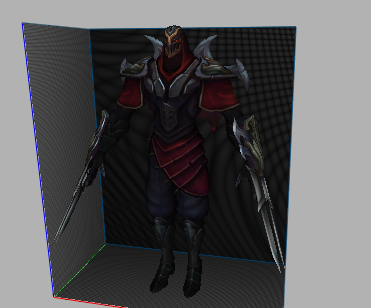
Herkese Hayırlı Kullanımlar Güzel Bi Npc Benziyor
Güle Güle Kullanın
Bana Ait Degildir.
Ziyaretçiler için gizlenmiş link,görmek için üye olmalısınız!
Giriş yap veya üye ol.
Ziyaretçiler için gizlenmiş link,görmek için üye olmalısınız!
Giriş yap veya üye ol.
League of Legends - Zed Npc: Metin2 Oyunu İçin 3D Modelleme ve Karakter Tasarımı
Metin2 oyununda NPC modelleme ve 3D karakter tasarımı yaparken, farklı oyunlardan esinlenmek oldukça yaygın bir yöntemdir. Bu yazıda, League of Legends oyunundan tanınmış bir karakter olan Zed'in Metin2 ortamında nasıl bir NPC veya monster modeli olarak tasarlanabileceği üzerinde duracağız. Bu süreçte 3ds Max, Blender, GR2 formatı ve Metin2 özelinde teknik adımlar ele alınacaktır.
Zed Karakteri Hakkında Genel Bilgi
Zed, League of Legends oyununun en popüler karakterlerinden biridir. Ninja temalı bir savaşçıdır ve gölgeleri kontrol edebilme yeteneğine sahiptir. Bu karakterin estetiği, detaylı kıyafeti, silahları ve gölge efektleri, onu Metin2 gibi MMORPG oyunlarında özel bir NPC veya monster modeli olarak kullanmak için ideal kılar.
Metin2 İçin Zed NPC Model Tasarımı
Metin2 oyununda NPC ya da monster olarak kullanılacak bir modelin doğru formatta hazırlanması gerekir. Bu bağlamda GR2 formatı büyük önem taşır. GR2, Metin2'nin kullandığı 3D model formatıdır. Bu nedenle, Blender veya 3ds Max üzerinde tasarlanan Zed modeli, doğru UV mapping, texture ve bone sistemleriyle GR2 formatına dönüştürülmelidir.
Modelleme Süreci
Öncelikle Zed karakterinin Blender ya da 3ds Max ortamında yüksek detaylı bir şekilde modellenmesi gerekir. Gövdesi, kıyafeti, silahları ve gölge efektlerini temsil edecek parçalar ayrı ayrı modellenmelidir. Daha sonra rigging işlemiyle kemik sistemi eklenir. Bu sistem, Metin2 oyununda karakterin hareket edebilmesi için kritik öneme sahiptir. Animation dosyaları da bu yapıya uygun olarak dışa aktarılır.
Texture ve UV Mapping
Zed karakteri siyah, gri ve metal tonlarında detaylı bir görünüme sahiptir. Bu nedenle, Metin2 için hazırlanacak texture dosyaları yüksek çözünürlükte olmalı ve UV mapping işlemleri dikkatlice yapılmalıdır. Metin2 için skin ve effect model olarak kullanılacak bu tasarımda renk ve parlaklık dengesi çok önemlidir.
GR2 Formatına Aktarma
Blender veya 3ds Max üzerinden tamamlanan model, Metin2 formatına uygun şekilde GR2 olarak dışa aktarılır. Bu işlem sırasında mesh, animation ve object verileri korunmalıdır. GR2 import ve export işlemleri sırasında Metin2 geliştirici araçları ya da MartySama gibi yardımcı programlar kullanılabilir.
Metin2 İçeriğine Entegrasyon
Zed modeli Metin2 sunucularında bir NPC olarak yerleştirildiğinde, hem görsel hem de mekanik açıdan oyun deneyimini zenginleştirebilir. Bu model, custom model olarak tanımlanıp map object veya dungeon model olarak da kullanılabilir. EterPack veya benzeri sistemlerle modelin pack içine entegrasyonu sağlanabilir.
Sonuç
League of Legends karakterlerinden esinlenerek Metin2 için özel bir NPC modeli oluşturmak, hem yaratıcılığı hem de teknik bilgiyi gerektiren bir iştir. Zed gibi estetik ve teknik olarak zengin bir karakterin Metin2 dünyasına entegrasyonu, oyunun görsel kalitesini artırmak için harika bir örnektir.
League of Legends - Zed NPC: 3D Modeling and Character Design for Metin2
Metin2 game, while creating NPC models and 3D character designs, drawing inspiration from different games is quite common. In this article, we will focus on how the famous character Zed from League of Legends can be designed as an NPC or monster model within the Metin2 environment. During this process, technical steps involving 3ds Max, Blender, GR2 format, and Metin2-specific procedures will be addressed.
General Information About Zed Character
Zed is one of the most popular characters in League of Legends. He is a ninja-themed warrior who has the ability to control shadows. His aesthetics, detailed outfit, weapons, and shadow effects make him an ideal candidate to be used as a special NPC or monster model in MMORPG games like Metin2.
Designing Zed NPC Model for Metin2
A model intended to be used as an NPC or monster in Metin2 must be prepared in the correct format. In this context, the GR2 format is highly important. GR2 is the 3D model format used by Metin2. Therefore, the Zed model designed in Blender or 3ds Max must be converted into GR2 format with proper UV mapping, textures, and bone systems.
Modeling Process
Firstly, the Zed character should be modeled in high detail within Blender or 3ds Max. His body, outfit, weapons, and parts representing shadow effects should be modeled separately. Afterwards, a bone system is added via rigging. This system is critical for enabling the character to move within the Metin2 game. Animation files are then exported accordingly.
Textures and UV Mapping
Zed has a visually detailed appearance with black, gray, and metallic tones. Therefore, texture files for Metin2 should be of high resolution, and UV mapping processes must be handled carefully. For use as skin or effect model in Metin2, the balance of color and brightness is very important.
Exporting to GR2 Format
The completed model from Blender or 3ds Max is exported to GR2 format, which is compatible with Metin2. During this process, mesh, animation, and object data must be preserved. Tools such as Metin2 developer tools or utilities like MartySama can be used during GR2 import and export operations.
Integration Into Metin2 Content
When placed in Metin2 servers as an NPC, the Zed model can enrich the gaming experience both visually and mechanically. This model can also be used as a custom model or integrated as a map object or dungeon model. Integration into pack systems can be achieved through EterPack or similar systems.
Conclusion
Creating a special NPC model for Metin2 inspired by characters from League of Legends is an activity that requires both creativity and technical knowledge. Integrating a visually and technically rich character like Zed into the world of Metin2 is a great example of enhancing the visual quality of the game.
