

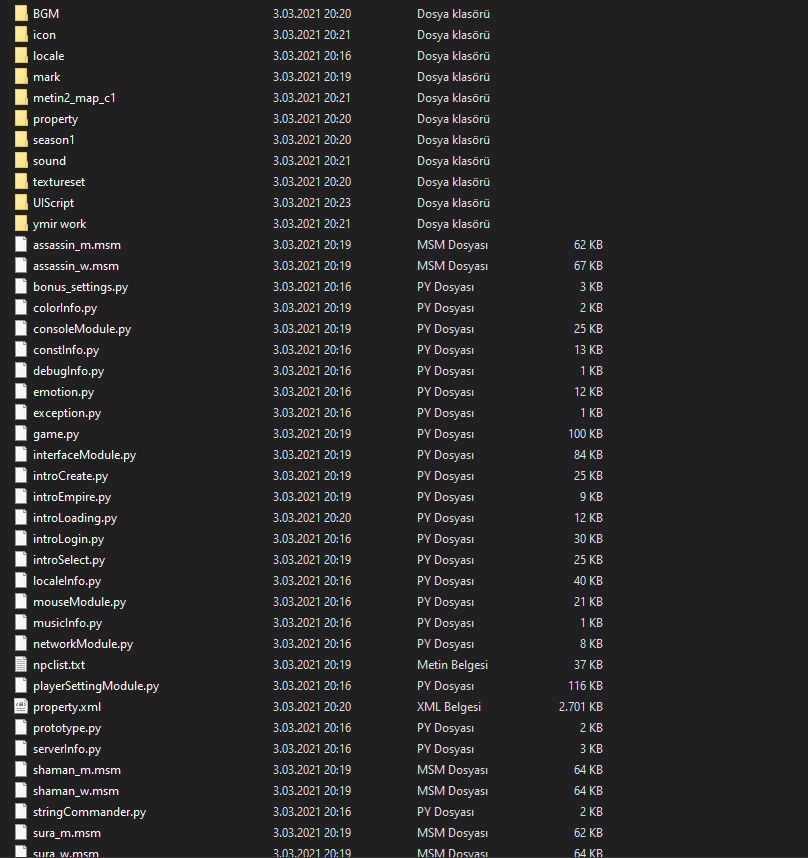
Merhaba Arkadaşlar, Mini Pack'ın Unpack halidir. İyi kullanımlar dilerim.
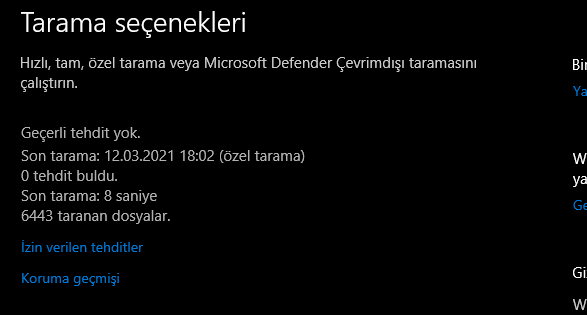
TARAMA
Ziyaretçiler için gizlenmiş link,görmek için üye olmalısınız!
Giriş yap veya üye ol.
Legends2 Legacy - Unpack Mini Pack
Metin2 oyuncuları arasında popülerlik kazanan Legends2 Legacy projesi, özellikle özel client ve pack dosyaları ile tanınır. Bu rehberde size Legends2 Legacy - Unpack Mini Pack hakkında detaylı bilgi sunarak, bu paketi nasıl açacağınızı ve kullanacağınızı adım adım anlatacağız.
Bu paket, Metin2 oyununun temel dosyalarını içeren ve özelleştirilmiş bir mini pack yapısına sahiptir. Amacı, oyuncuların hızlıca kurulum yapabilmesi ve oyuna başlayabilmesidir. Özellikle PvP odaklı içerikler sunan bu paket, düşük sistem gereksinimleriyle herkes tarafından kullanılabilmesi için tasarlanmıştır.
Neden Legends2 Legacy Unpack Mini Pack?[/BR][/BR]• Hızlı Kurulum: Tam client indirmeden, sadece paketi açarak oyuna başlayabilirsiniz.
• Optimize Edilmiş Dosyalar: Gereksiz dosyalar çıkarılarak performans artırılmıştır.
• PvP Odaklı Yapı: Arena ve savaş sistemleri ön planda tutulmuştur.
• Güncel Patch Uyumluluğu: En son yamalarla tamamen uyumludur.
Paketi Nasıl Açarsınız?[/BR][/BR]Unpack işlemi, paket içindeki sıkıştırılmış dosyaları orijinal yapılarına döndürme sürecidir. Bunun için aşağıdaki adımları izleyin:
1. Metin2Lobby sitesinden Legends2 Legacy - Unpack Mini Pack dosyasını indirin.
2. WinRAR veya 7-Zip gibi bir arşiv yazılımı kullanarak dosyayı çıkarın.
3. Çıkarılan klasörü istediğiniz dizine taşıyın (örneğin: C:\Metin2\Legacy).
4. Klasör içinde yer alan launcher.exe dosyasını çalıştırarak oyunu başlatın.
İçerik ve Özellikler[/BR][/BR]Bu mini pack aşağıdaki bileşenleri içerir:
• Temel oyun motoru dosyaları (client.exe, dll dosyaları)
• Özelleştirilmiş texture ve effect dosyaları
• Güncel patch dosyaları (v1.6.8 uyumlu)
• PvP optimizasyonlu network ayarları
• Hata düzeltmeleri ve performans iyileştirmeleri
Sıkça Karşılaşılan Sorunlar ve Çözümleri[/BR][/BR]• 'Client.exe çalışmıyor' hatası: DirectX ve Visual C++ yeniden dağıtılabilir paketlerinin yüklü olduğundan emin olun.
• 'Texture yüklenmiyor': Grafik sürücülerinizi güncelleyin veya low texture modunu aktif edin.
• 'Bağlantı hatası': Firewall ayarlarınızda client.exe'yi izin verilen uygulamalar listesine ekleyin.
Nasıl Güncel Tutabilirsiniz?[/BR][/BR]Legends2 Legacy paketi düzenli olarak güncellenmektedir. Güncellemeleri takip etmek için Metin2Lobby sitesini sık sık ziyaret edin. Ayrıca paket içinde yer alan auto-patch sistemi sayesinde otomatik güncelleme özelliğinden faydalanabilirsiniz.
Sonuç[/BR][/BR]Legends2 Legacy - Unpack Mini Pack, Metin2 tutkunları için hızlı, stabil ve özelleştirilebilir bir başlangıç noktası sunar. Özellikle PvP içeriklerine odaklanan oyuncular için ideal bir seçenektir. Paketi dikkatli bir şekilde açtıktan sonra, keyifle oynayabileceğiniz bir dünyanın kapılarını aralayabilirsiniz.
Unutmayın: Her zaman güvenilir kaynaklardan indirdiğinizden emin olun. Metin2Lobby olarak sizlere en güncel ve güvenli içerikleri sunmaya devam ediyoruz.
Bu paket, Metin2 oyununun temel dosyalarını içeren ve özelleştirilmiş bir mini pack yapısına sahiptir. Amacı, oyuncuların hızlıca kurulum yapabilmesi ve oyuna başlayabilmesidir. Özellikle PvP odaklı içerikler sunan bu paket, düşük sistem gereksinimleriyle herkes tarafından kullanılabilmesi için tasarlanmıştır.
Neden Legends2 Legacy Unpack Mini Pack?[/BR][/BR]• Hızlı Kurulum: Tam client indirmeden, sadece paketi açarak oyuna başlayabilirsiniz.
• Optimize Edilmiş Dosyalar: Gereksiz dosyalar çıkarılarak performans artırılmıştır.
• PvP Odaklı Yapı: Arena ve savaş sistemleri ön planda tutulmuştur.
• Güncel Patch Uyumluluğu: En son yamalarla tamamen uyumludur.
Paketi Nasıl Açarsınız?[/BR][/BR]Unpack işlemi, paket içindeki sıkıştırılmış dosyaları orijinal yapılarına döndürme sürecidir. Bunun için aşağıdaki adımları izleyin:
1. Metin2Lobby sitesinden Legends2 Legacy - Unpack Mini Pack dosyasını indirin.
2. WinRAR veya 7-Zip gibi bir arşiv yazılımı kullanarak dosyayı çıkarın.
3. Çıkarılan klasörü istediğiniz dizine taşıyın (örneğin: C:\Metin2\Legacy).
4. Klasör içinde yer alan launcher.exe dosyasını çalıştırarak oyunu başlatın.
İçerik ve Özellikler[/BR][/BR]Bu mini pack aşağıdaki bileşenleri içerir:
• Temel oyun motoru dosyaları (client.exe, dll dosyaları)
• Özelleştirilmiş texture ve effect dosyaları
• Güncel patch dosyaları (v1.6.8 uyumlu)
• PvP optimizasyonlu network ayarları
• Hata düzeltmeleri ve performans iyileştirmeleri
Sıkça Karşılaşılan Sorunlar ve Çözümleri[/BR][/BR]• 'Client.exe çalışmıyor' hatası: DirectX ve Visual C++ yeniden dağıtılabilir paketlerinin yüklü olduğundan emin olun.
• 'Texture yüklenmiyor': Grafik sürücülerinizi güncelleyin veya low texture modunu aktif edin.
• 'Bağlantı hatası': Firewall ayarlarınızda client.exe'yi izin verilen uygulamalar listesine ekleyin.
Nasıl Güncel Tutabilirsiniz?[/BR][/BR]Legends2 Legacy paketi düzenli olarak güncellenmektedir. Güncellemeleri takip etmek için Metin2Lobby sitesini sık sık ziyaret edin. Ayrıca paket içinde yer alan auto-patch sistemi sayesinde otomatik güncelleme özelliğinden faydalanabilirsiniz.
Sonuç[/BR][/BR]Legends2 Legacy - Unpack Mini Pack, Metin2 tutkunları için hızlı, stabil ve özelleştirilebilir bir başlangıç noktası sunar. Özellikle PvP içeriklerine odaklanan oyuncular için ideal bir seçenektir. Paketi dikkatli bir şekilde açtıktan sonra, keyifle oynayabileceğiniz bir dünyanın kapılarını aralayabilirsiniz.
Unutmayın: Her zaman güvenilir kaynaklardan indirdiğinizden emin olun. Metin2Lobby olarak sizlere en güncel ve güvenli içerikleri sunmaya devam ediyoruz.
Legends2 Legacy - Unpack Mini Pack
The Legends2 Legacy project, which has gained popularity among Metin2 players, is especially known for its custom client and pack files. In this guide, we will provide you with detailed information about the Legends2 Legacy - Unpack Mini Pack and explain step-by-step how to extract and use this package.
This package features a mini pack structure that contains the core files of the Metin2 game and is customized. Its purpose is to allow players to quickly set up and start playing. Specifically designed with PvP-focused content, this pack is tailored for accessibility by anyone due to its low system requirements.
Why Choose Legends2 Legacy Unpack Mini Pack?[/BR][/BR]• Fast Installation: Start playing immediately by extracting the pack—no need to download a full client.
• Optimized Files: Unnecessary files have been removed to enhance performance.
• PvP-Oriented Structure: Arena and combat systems are prioritized.
• Current Patch Compatibility: Fully compatible with the latest updates.
How to Extract the Pack[/BR][/BR]The unpacking process restores compressed files within the package to their original structure. Follow these steps:
1. Download the Legends2 Legacy - Unpack Mini Pack file from the Metin2Lobby website.
2. Use archiving software like WinRAR or 7-Zip to extract the file.
3. Move the extracted folder to your desired directory (e.g., C:\Metin2\Legacy).
4. Run the launcher.exe file inside the folder to start the game.
Contents and Features[/BR][/BR]This mini pack includes the following components:
• Core game engine files (client.exe, DLL files)
• Customized texture and effect files
• Updated patch files (compatible with v1.6.8)
• PvP-optimized network settings
• Bug fixes and performance improvements
Common Issues and Solutions[/BR][/BR]• 'Client.exe not working' error: Ensure DirectX and Visual C++ Redistributable packages are installed.
• 'Textures not loading': Update your graphics drivers or enable the low texture mode.
• 'Connection error': Add client.exe to the allowed applications list in your firewall settings.
How to Keep It Updated[/BR][/BR]The Legends2 Legacy pack is regularly updated. To stay current, frequently visit the Metin2Lobby website. Additionally, you can benefit from the built-in auto-patch system for automatic updates.
Conclusion[/BR][/BR]The Legends2 Legacy - Unpack Mini Pack offers a fast, stable, and customizable starting point for Metin2 enthusiasts. It is an ideal choice, particularly for players focused on PvP content. After carefully extracting the pack, you can unlock the doors to a world ready for enjoyable gameplay.
Remember: Always ensure you download from trusted sources. At Metin2Lobby, we continue to provide you with the most up-to-date and secure content.
This package features a mini pack structure that contains the core files of the Metin2 game and is customized. Its purpose is to allow players to quickly set up and start playing. Specifically designed with PvP-focused content, this pack is tailored for accessibility by anyone due to its low system requirements.
Why Choose Legends2 Legacy Unpack Mini Pack?[/BR][/BR]• Fast Installation: Start playing immediately by extracting the pack—no need to download a full client.
• Optimized Files: Unnecessary files have been removed to enhance performance.
• PvP-Oriented Structure: Arena and combat systems are prioritized.
• Current Patch Compatibility: Fully compatible with the latest updates.
How to Extract the Pack[/BR][/BR]The unpacking process restores compressed files within the package to their original structure. Follow these steps:
1. Download the Legends2 Legacy - Unpack Mini Pack file from the Metin2Lobby website.
2. Use archiving software like WinRAR or 7-Zip to extract the file.
3. Move the extracted folder to your desired directory (e.g., C:\Metin2\Legacy).
4. Run the launcher.exe file inside the folder to start the game.
Contents and Features[/BR][/BR]This mini pack includes the following components:
• Core game engine files (client.exe, DLL files)
• Customized texture and effect files
• Updated patch files (compatible with v1.6.8)
• PvP-optimized network settings
• Bug fixes and performance improvements
Common Issues and Solutions[/BR][/BR]• 'Client.exe not working' error: Ensure DirectX and Visual C++ Redistributable packages are installed.
• 'Textures not loading': Update your graphics drivers or enable the low texture mode.
• 'Connection error': Add client.exe to the allowed applications list in your firewall settings.
How to Keep It Updated[/BR][/BR]The Legends2 Legacy pack is regularly updated. To stay current, frequently visit the Metin2Lobby website. Additionally, you can benefit from the built-in auto-patch system for automatic updates.
Conclusion[/BR][/BR]The Legends2 Legacy - Unpack Mini Pack offers a fast, stable, and customizable starting point for Metin2 enthusiasts. It is an ideal choice, particularly for players focused on PvP content. After carefully extracting the pack, you can unlock the doors to a world ready for enjoyable gameplay.
Remember: Always ensure you download from trusted sources. At Metin2Lobby, we continue to provide you with the most up-to-date and secure content.
