


Maviruh forumda F4 , F5 selam ver selam al şeklinde paylaşmış
bende butona bağladım
küçük ama güzel kullanışlı bir ufak sistem
T tuşuna entegre Edilmiştir
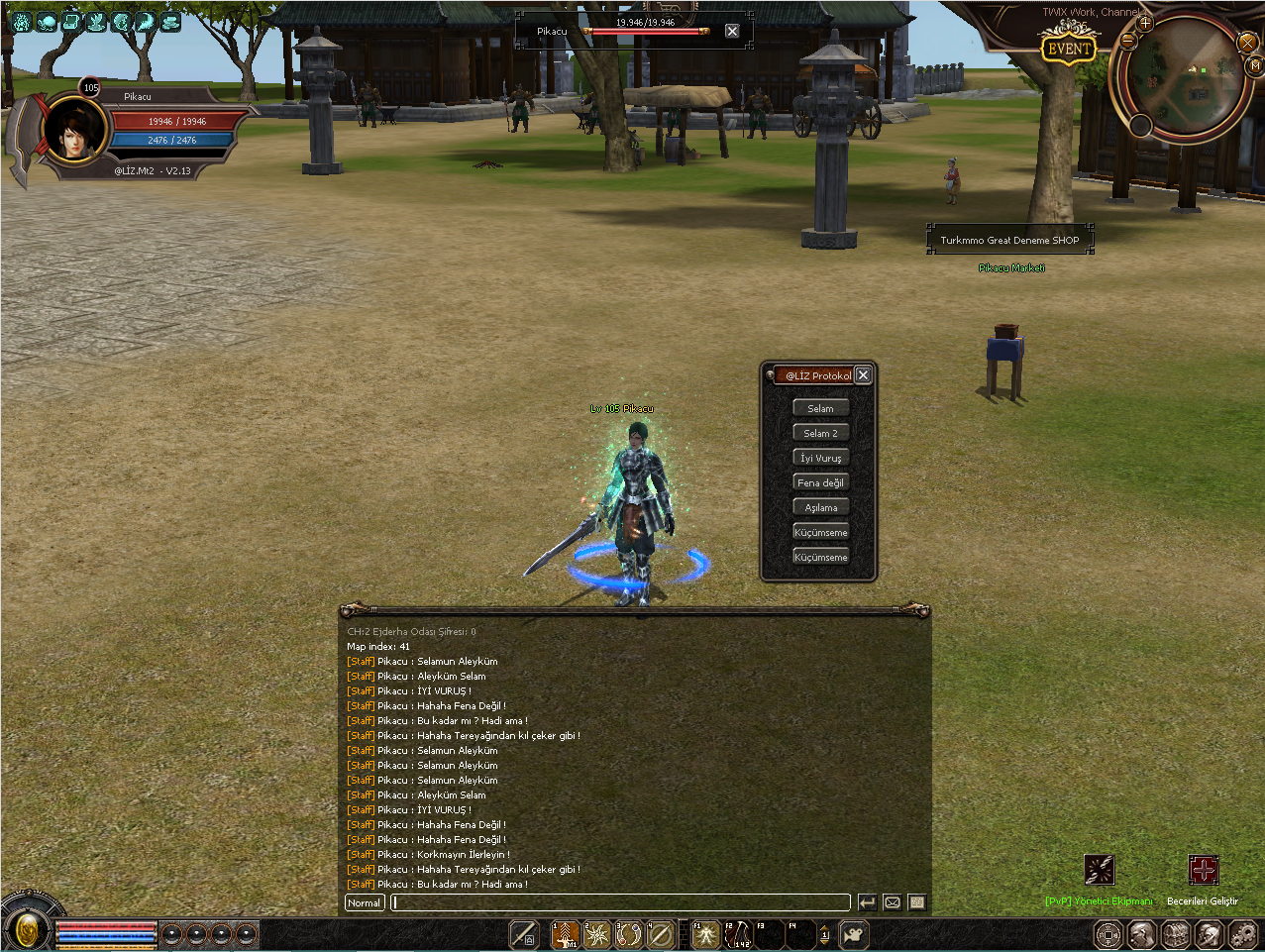
Kanıt

@LİZ [T] KISAYOL SOHBET PENCERESİ
Metin2 özel sunucu geliştirmesi, PvP sistemleri, C++ tabanlı sistemler ve Python GUI entegrasyonları gibi konularla uğraşan geliştiriciler için önemli araçlardan biridir @LİZ [T] komutu. Bu komut sayesinde geliştiriciler hızlıca bir sohbet penceresi açabilir ve sunucu üzerinde test yapabilirler. Bu yazıda, @LİZ [T] komutunun ne olduğu, nasıl çalıştığı ve Metin2 geliştirme sürecinde nasıl kullanılabileceği hakkında detaylı bilgiler sunacağız.
@LİZ [T] Komutunun Tanımı
@LİZ komutu, Metin2 özel sunucularında yetkililere sunulan özel komutlardan biridir. Özellikle test süreçlerinde veya acil durumlarda hızlı iletişim kurulmasını sağlar. [T] parametresiyle birlikte kullanıldığında, bu komut kullanıcıya özel bir sohbet penceresi açar. Bu pencere sayesinde yetkili, diğer oyuncuların göremediği özel mesajları görüntüleyebilir ve yönetebilir.
Nasıl Çalışır?
Yetkili karakterinizde bu komutu kullandığınızda, sistem size özel bir pencere oluşturur. Bu pencere genellikle sağ alt köşede belirir ve tüm oyun içi sohbet akışını takip etmenizi sağlar. Aynı zamanda, özel mesajlar ya da sistem tarafından gönderilen uyarılar burada görüntülenebilir. Bu, geliştirme ve test süreçlerinde büyük kolaylık sağlar.
Metin2 Geliştirme Sürecinde Kullanımı
Metin2 özel sunucularında C++ veya Python tabanlı sistemler geliştirirken, test aşamasında bazı mesajların hızlıca görüntülenmesi gerekebilir. @LİZ [T] komutu, bu tür durumlarda ideal bir çözüm sunar. Geliştiriciler, oyun içindeyken hata mesajlarını ya da sistem uyarılarını özel bir pencerede takip edebilirler. Bu da hata ayıklama sürecini hızlandırır.
Python GUI Entegrasyonları ve Uiscript ile İlişkisi
Python GUI arayüzlerinde, özellikle uiscript dosyalarıyla entegre çalışan sistemlerde, @LİZ [T] gibi komutlar doğrudan arayüzden tetiklenebilir. Örneğin, geliştirici paneli üzerinden bir butona basıldığında bu komut çalıştırılabilir. Böylece hem arayüz hem de sistem seviyesinde etkileşim sağlanmış olur.
Güvenlik ve Yetkilendirme
Bu komutun kullanımı, sadece yetkili karakterler için tasarlanmıştır. Sunucu yapılandırmasında yetki seviyesi kontrolü yapılmadığı sürece güvenlik açıklarına neden olabilir. Bu yüzden, bu komutun doğru yetkilendirme ile korunması önemlidir.
Özet
@LİZ [T] komutu, Metin2 özel sunucu geliştiricileri için oldukça kullanışlı bir özelliktir. Geliştirme, test ve hata ayıklama süreçlerinde büyük kolaylıklar sağlar. Ancak güvenli kullanım için doğru yetkilendirme ve kontrollerin yapılması gerekir.
@LIZ [T] Shortcut Chat Window
The @LIZ [T] command is one of the essential tools for developers working on Metin2 private servers, PvP systems, C++ based systems, and Python GUI integrations. This command allows developers to quickly open a chat window and perform tests on the server. In this article, we will provide detailed information about what the @LIZ [T] command is, how it works, and how it can be used during Metin2 development processes.
Definition of the @LIZ [T] Command
The @LIZ command is one of the special commands provided to administrators on Metin2 private servers. It allows quick communication especially during testing phases or emergency situations. When used together with the [T] parameter, this command opens a special chat window for the user. Through this window, administrators can view and manage private messages that other players cannot see.
How Does It Work?
When you use this command on your admin character, the system creates a special window for you. This window usually appears in the lower right corner and allows you to follow all in-game chat activity. Additionally, private messages or warnings sent by the system can be displayed here. This provides great convenience during development and testing phases.
Usage During Metin2 Development Process
While developing C++ or Python-based systems on Metin2 private servers, it may be necessary to quickly view certain messages during testing. The @LIZ [T] command offers an ideal solution in such cases. Developers can monitor error messages or system alerts within a special window while still in the game, accelerating the debugging process.
Relation with Python GUI Integrations and Uiscript
In Python GUI interfaces, especially those integrated with uiscript files, commands like @LIZ [T] can be triggered directly from the interface. For example, pressing a button on the developer panel could execute this command. This way, both UI and system-level interactions are achieved.
Security and Authorization
The usage of this command is designed only for authorized characters. Without proper authorization checks in the server configuration, security vulnerabilities might occur. Therefore, it's important to ensure that this command is protected with correct authorization settings.
Summary
The @LIZ [T] command is a very useful feature for Metin2 private server developers. It provides significant conveniences during development, testing, and debugging processes. However, secure usage requires proper authorization and checks.
bende butona bağladım
küçük ama güzel kullanışlı bir ufak sistem
T tuşuna entegre Edilmiştir
Ziyaretçiler için gizlenmiş link,görmek için üye olmalısınız!
Giriş yap veya üye ol.
Ziyaretçiler için gizlenmiş link,görmek için üye olmalısınız!
Giriş yap veya üye ol.
Kanıt
Ziyaretçiler için gizlenmiş link,görmek için üye olmalısınız!
Giriş yap veya üye ol.
@LİZ [T] KISAYOL SOHBET PENCERESİ
Metin2 özel sunucu geliştirmesi, PvP sistemleri, C++ tabanlı sistemler ve Python GUI entegrasyonları gibi konularla uğraşan geliştiriciler için önemli araçlardan biridir @LİZ [T] komutu. Bu komut sayesinde geliştiriciler hızlıca bir sohbet penceresi açabilir ve sunucu üzerinde test yapabilirler. Bu yazıda, @LİZ [T] komutunun ne olduğu, nasıl çalıştığı ve Metin2 geliştirme sürecinde nasıl kullanılabileceği hakkında detaylı bilgiler sunacağız.
@LİZ [T] Komutunun Tanımı
@LİZ komutu, Metin2 özel sunucularında yetkililere sunulan özel komutlardan biridir. Özellikle test süreçlerinde veya acil durumlarda hızlı iletişim kurulmasını sağlar. [T] parametresiyle birlikte kullanıldığında, bu komut kullanıcıya özel bir sohbet penceresi açar. Bu pencere sayesinde yetkili, diğer oyuncuların göremediği özel mesajları görüntüleyebilir ve yönetebilir.
Nasıl Çalışır?
Yetkili karakterinizde bu komutu kullandığınızda, sistem size özel bir pencere oluşturur. Bu pencere genellikle sağ alt köşede belirir ve tüm oyun içi sohbet akışını takip etmenizi sağlar. Aynı zamanda, özel mesajlar ya da sistem tarafından gönderilen uyarılar burada görüntülenebilir. Bu, geliştirme ve test süreçlerinde büyük kolaylık sağlar.
Metin2 Geliştirme Sürecinde Kullanımı
Metin2 özel sunucularında C++ veya Python tabanlı sistemler geliştirirken, test aşamasında bazı mesajların hızlıca görüntülenmesi gerekebilir. @LİZ [T] komutu, bu tür durumlarda ideal bir çözüm sunar. Geliştiriciler, oyun içindeyken hata mesajlarını ya da sistem uyarılarını özel bir pencerede takip edebilirler. Bu da hata ayıklama sürecini hızlandırır.
Python GUI Entegrasyonları ve Uiscript ile İlişkisi
Python GUI arayüzlerinde, özellikle uiscript dosyalarıyla entegre çalışan sistemlerde, @LİZ [T] gibi komutlar doğrudan arayüzden tetiklenebilir. Örneğin, geliştirici paneli üzerinden bir butona basıldığında bu komut çalıştırılabilir. Böylece hem arayüz hem de sistem seviyesinde etkileşim sağlanmış olur.
Güvenlik ve Yetkilendirme
Bu komutun kullanımı, sadece yetkili karakterler için tasarlanmıştır. Sunucu yapılandırmasında yetki seviyesi kontrolü yapılmadığı sürece güvenlik açıklarına neden olabilir. Bu yüzden, bu komutun doğru yetkilendirme ile korunması önemlidir.
Özet
@LİZ [T] komutu, Metin2 özel sunucu geliştiricileri için oldukça kullanışlı bir özelliktir. Geliştirme, test ve hata ayıklama süreçlerinde büyük kolaylıklar sağlar. Ancak güvenli kullanım için doğru yetkilendirme ve kontrollerin yapılması gerekir.
@LIZ [T] Shortcut Chat Window
The @LIZ [T] command is one of the essential tools for developers working on Metin2 private servers, PvP systems, C++ based systems, and Python GUI integrations. This command allows developers to quickly open a chat window and perform tests on the server. In this article, we will provide detailed information about what the @LIZ [T] command is, how it works, and how it can be used during Metin2 development processes.
Definition of the @LIZ [T] Command
The @LIZ command is one of the special commands provided to administrators on Metin2 private servers. It allows quick communication especially during testing phases or emergency situations. When used together with the [T] parameter, this command opens a special chat window for the user. Through this window, administrators can view and manage private messages that other players cannot see.
How Does It Work?
When you use this command on your admin character, the system creates a special window for you. This window usually appears in the lower right corner and allows you to follow all in-game chat activity. Additionally, private messages or warnings sent by the system can be displayed here. This provides great convenience during development and testing phases.
Usage During Metin2 Development Process
While developing C++ or Python-based systems on Metin2 private servers, it may be necessary to quickly view certain messages during testing. The @LIZ [T] command offers an ideal solution in such cases. Developers can monitor error messages or system alerts within a special window while still in the game, accelerating the debugging process.
Relation with Python GUI Integrations and Uiscript
In Python GUI interfaces, especially those integrated with uiscript files, commands like @LIZ [T] can be triggered directly from the interface. For example, pressing a button on the developer panel could execute this command. This way, both UI and system-level interactions are achieved.
Security and Authorization
The usage of this command is designed only for authorized characters. Without proper authorization checks in the server configuration, security vulnerabilities might occur. Therefore, it's important to ensure that this command is protected with correct authorization settings.
Summary
The @LIZ [T] command is a very useful feature for Metin2 private server developers. It provides significant conveniences during development, testing, and debugging processes. However, secure usage requires proper authorization and checks.
